1. Introduktion
This manual provides detailed instructions for the safe and efficient operation of your Auna Sarah Ann multi-functional audio system. Please read this manual thoroughly before using the device and retain it for future reference.
The Auna Sarah Ann is a versatile audio system featuring a 3-speed turntable, CD player, cassette player, DAB+ and FM radio, Bluetooth connectivity, USB and SD card playback, AUX input, and headphone output. It also includes integrated stereo speakers and a remote control for convenient operation.
2. Sikkerhedsinstruktioner
- Læs alle instruktioner omhyggeligt før brug.
- Hold enheden væk fra varmekilder, direkte sollys, fugtighed, vand og andre væsker.
- Betjen ikke enheden, hvis den har været udsat for vand, fugt eller andre væsker for at forhindre elektrisk stød, eksplosion og/eller skade på dig selv og beskadigelse af enheden.
- Brug ikke enheden, hvis den er blevet tabt eller beskadiget på nogen måde.
- Reparationer af elektrisk udstyr bør kun udføres af en kvalificeret elektriker. Ukorrekte reparationer kan sætte brugeren i alvorlig fare.
- Brug ikke enheden med våde hænder.
- Indsæt ikke genstande i nogen åbninger.
- Hold enheden fri for støv, fnug, hår osv.
- Brug ikke denne enhed til andet end den tilsigtede brug.
- Opbevar enheden utilgængeligt for børn.
3. Pakkens indhold
- Auna Sarah Ann Multi-functional Audio System
- Fjernbetjening
- 45 omdr./min. Adapter
- Brugervejledning (dette dokument)
4. Produktet er slutview
The Auna Sarah Ann combines classic audio playback with modern connectivity options.

Billede 4.1: Forside view of the Auna Sarah Ann audio system, displaying the turntable, control panel, CD tray, and integrated speakers. A remote control and a smartphone connected via Bluetooth are also shown.
4.1 Nøglefunktioner
- 3-hastigheds pladespiller: Supports 33 1/3, 45, and 78 RPM records. Includes a 45 RPM adapter.
- Integrerede stereohøjttalere: Provides clear audio output.
- Bluetooth-forbindelse: Wirelessly stream audio from compatible devices.
- CD-afspiller: For playback of audio CDs.
- Kassetteafspiller: For playback of audio cassettes.
- DAB+ og FM-radio: Digital and analog radio reception.
- USB- og SD-kortpladser: Til MP3-afspilning og -optagelse.
- AUX-indgang: Connect external audio sources via 3.5mm jack.
- Hovedtelefonudgang: For private listening via 3.5mm jack.
- RCA Line Out: Tilslut til ekstern ampløftere eller elektriske højttalere.
- Fjernbetjening: Bekvem betjening på afstand.
- Automatisk stop funktion: Protects vinyl records by stopping the turntable when a record finishes.
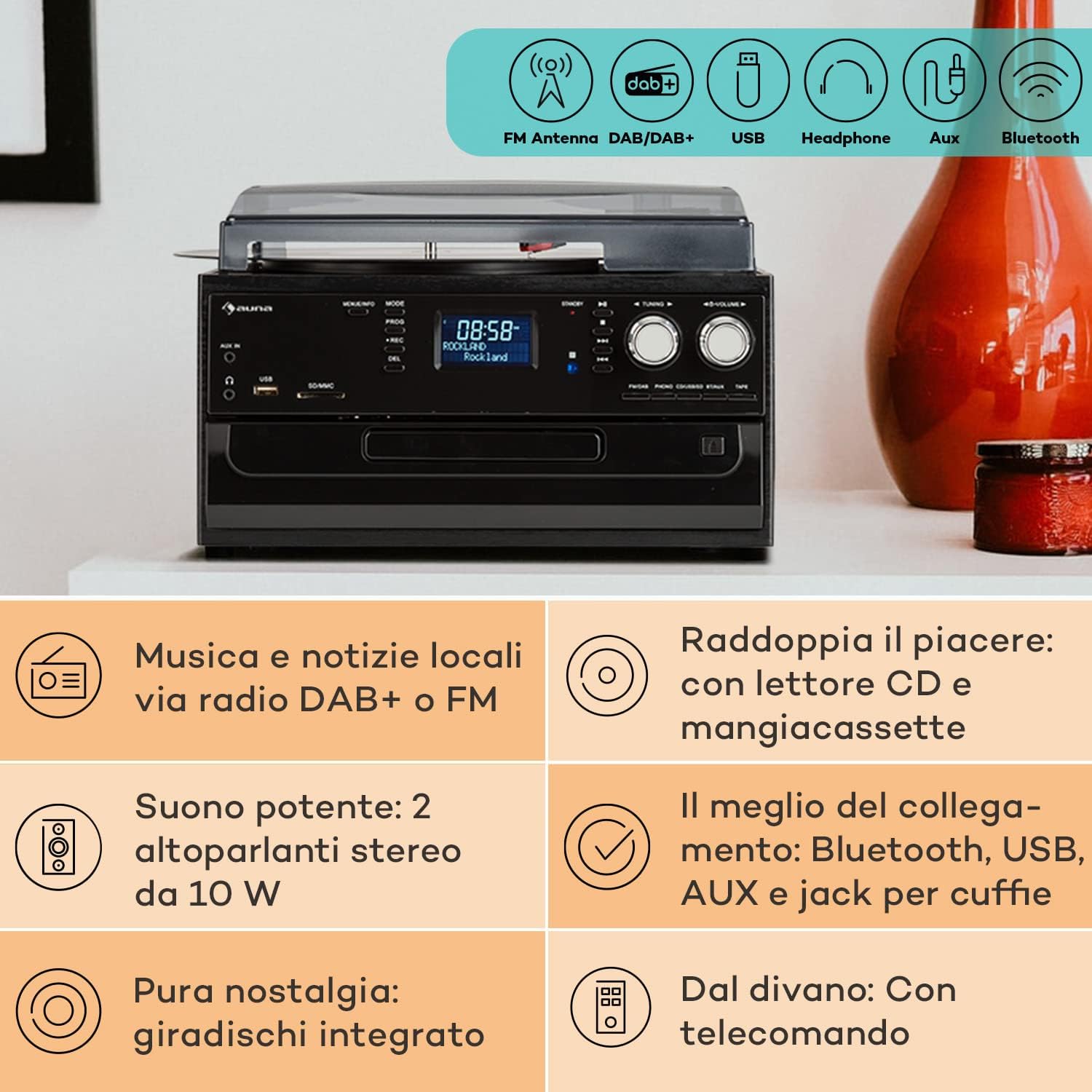
Image 4.2: Visual representation of the various connectivity options available on the Auna Sarah Ann, including FM/DAB+ radio, USB, headphone jack, AUX input, and Bluetooth.
5. Opsætning
5.1 Udpakning og placering
- Tag forsigtigt enheden ud af emballagen.
- Place the unit on a stable, level surface, away from direct sunlight, heat sources, and excessive dust or moisture.
- Sørg for tilstrækkelig ventilation omkring enheden.
5.2 Strømtilslutning
Connect the power cable to the AC inlet on the back of the unit and then to a standard 230V, 50Hz wall outlet.
5.3 Installation af batteri i fjernbetjening
The remote control requires 2 x AAA batteries (not included). Open the battery compartment on the back of the remote control, insert the batteries according to the polarity indicators, and close the compartment.
5.4 Antenneforbindelse
The unit features an integrated FM antenna. For optimal DAB+ and FM radio reception, ensure the unit is placed in an area with good signal strength. Adjust the unit's position if reception is poor.
5.5 Tilslutning af eksterne enheder (valgfrit)
- Hovedtelefoner: Plug 3.5mm headphones into the headphone jack on the front panel.
- External Audio Source (AUX IN): Connect an external audio device (e.g., MP3 player, smartphone) to the AUX IN jack on the front panel using a 3.5mm audio cable.
- Ekstern Amplifier/Speakers (RCA LINE OUT): Connect the RCA LINE OUT jacks on the rear of the unit to the audio input of an external ampeller aktive højttalere ved hjælp af et RCA-kabel.
6. Betjeningsvejledning
6.1 Grundlæggende betjening
- Tryk på MAGT knappen for at tænde eller slukke enheden.
- Brug MODE button on the unit or remote control to select the desired function (PHONO, CD, TAPE, USB, SD, AUX, FM, DAB, Bluetooth).
- Juster lydstyrken ved hjælp af BIND knob on the unit or the VOL +/- knapperne på fjernbetjeningen.
6.2 Turntable Operation (PHONO)

Billede 6.1: Detaljeret view of the turntable section, showing the platter, tonearm, and a vinyl record in place, highlighting the classic playback functionality.
- Løft støvdækslet.
- Placer en vinylplade på pladetallerkenen.
- Select the appropriate speed (33, 45, or 78 RPM) using the speed selector switch. Use the 45 RPM adapter for singles if needed.
- Slip tonearmslåsen.
- Gently lift the tonearm and position the stylus over the desired track of the record.
- Lower the tonearm slowly onto the record. Playback will begin.
- The automatic stop function will stop the turntable when the record finishes. To disable/enable this, refer to the specific switch on the unit (if present, usually labeled "AUTO STOP").
- At the end of playback, gently lift the tonearm, return it to its rest, and engage the tonearm lock.
6.3 CD Player Operation (CD)
- Tryk på MODE knappen for at vælge CD -tilstand.
- Tryk på ÅBN/LUK knappen for at åbne CD-skuffen.
- Placer en cd i bakken med etiketten opad.
- Tryk på ÅBN/LUK button again to close the tray. The unit will read the CD.
- Trykke AFSPIL/PAUSE for at starte eller sætte afspilningen på pause.
- Bruge SKIP FORWARD/BACKWARD knapper til at navigere i spor.
- Trykke STOP for at afslutte afspilningen.
6.4 Cassette Player Operation (TAPE)
- Tryk på MODE button to select TAPE mode.
- Insert a cassette tape into the side cassette slot.
- Use the cassette control buttons (PLAY, STOP/EJECT, FWD, REW) to operate the cassette player.
6.5 Radio Operation (DAB+/FM)
- Tryk på MODE knappen for at vælge FM- eller DAB-tilstand.
- I FM-tilstand skal du trykke på og holde nede TUNING +/- buttons for automatic station search, or press briefly for manual tuning.
- In DAB mode, the unit will automatically scan for available stations. Use the TUNING +/- buttons to navigate through the station list.
- To save a station, refer to the manual's specific instructions for preset functions (usually involving a "PROG" or "MEMORY" button).
6.6 Bluetooth-betjening

Image 6.2: Demonstrates wireless music streaming via Bluetooth from a smartphone to the audio system, and the use of a USB drive for digital media playback.
- Tryk på MODE button to select Bluetooth mode. The display will show "BT" or "Bluetooth" and the unit will enter pairing mode, indicated by a flashing Bluetooth icon.
- Aktiver Bluetooth på din Bluetooth-aktiverede enhed (smartphone, tablet osv.) og søg efter tilgængelige enheder.
- Select "Auna Sarah Ann" (or similar name) from the list of devices.
- Once paired, the Bluetooth icon will stop flashing, and you can play music from your device through the Auna Sarah Ann.
6.7 USB/SD Card Operation
- Insert a USB flash drive into the USB port or an SD card into the SD/MMC slot.
- Tryk på MODE button to select USB or SD mode. The unit will automatically detect and begin playing MP3 files.
- Bruge SKIP FORWARD/BACKWARD knapper til at navigere i spor.
- Brug FOLDER button on the remote to navigate through folders (if applicable).
- MP3 Recording: The unit supports recording from other sources (e.g., vinyl, CD, radio) to USB/SD. Press the REC button to start recording. Manual title division is available during recording. Refer to the full manual for detailed recording instructions.
6.8 Betjening af AUX-indgang
- Connect your external audio device to the AUX IN jack using a 3.5mm audio cable.
- Tryk på MODE -knappen for at vælge AUX-tilstand.
- Control playback from your external device. The volume can be adjusted on the Auna Sarah Ann unit.
7. Vedligeholdelse
7.1 Rengøring af enheden
- Tag altid stikket ud af stikkontakten før rengøring.
- Brug en blød, tør klud til at tørre de udvendige overflader af.
- Brug ikke slibende rengøringsmidler, voks eller opløsningsmidler, da de kan beskadige finishen.
- Brug en blød klud og et mildt, ikke-slibende rengøringsmiddel til støvdækslet, hvis det er nødvendigt.
7.2 Pleje af pladespillerpen
- The stylus (needle) is a delicate component. Handle it with extreme care.
- Rengør pennen med jævne mellemrum med en blød børste, og børst forsigtigt bagfra og forfra.
- A worn stylus can damage records and degrade sound quality. Replace the stylus when signs of wear are apparent (e.g., distorted sound, skipping).
7.3 Optagelsespleje
- Keep records clean and free of dust. Use a record brush before each play.
- Opbevar plader lodret i deres ærmer, væk fra varme og direkte sollys.
8. Fejlfinding
If you experience problems with your Auna Sarah Ann, please consult the following table before seeking professional service.
| Problem | Mulig årsag | Løsning |
|---|---|---|
| Ingen strøm | Strømkabel ikke tilsluttet; Strømudtag ikke aktivt. | Sørg for, at strømkablet er korrekt tilsluttet; prøv en anden stikkontakt. |
| Ingen lyd | Lydstyrken er for lav; Forkert tilstand valgt; Hovedtelefoner er tilsluttet. | Øg lydstyrken; Vælg den korrekte inputtilstand; Frakobl hovedtelefonerne, hvis du bruger højttalere. |
| Pladespiller drejer ikke | Unit not in PHONO mode; Auto-stop engaged and no record playing. | Select PHONO mode; Place a record and lower the tonearm. |
| Dårlig radiomodtagelse | Weak signal; Antenna position. | Adjust unit position for better signal; Perform a new auto-scan for DAB+ stations. |
| Bluetooth-parringsfejl | Device too far; Bluetooth not enabled on external device; Unit not in pairing mode. | Ensure devices are within range; Enable Bluetooth on your device; Select Bluetooth mode on the Auna Sarah Ann. |
| Fjernbetjening virker ikke | Batterierne er opbrugt eller er isat forkert; Blokering mellem fjernbetjening og enhed. | Replace batteries; Check battery polarity; Remove any obstructions. |
Hvis problemet fortsætter efter at have prøvet disse løsninger, bedes du kontakte kundesupport.
9. Specifikationer
| Feature | Detalje |
|---|---|
| Mærke | AUNA |
| Modelnavn | Sarah Ann |
| Produktmål (L x B x H) | 30 x 32.5 x 21.5 cm |
| Vægt | 4.55 kg |
| Strømforsyning | 230V, 50Hz |
| Pladespiller hastigheder | 33 1/3, 45, 78 omdr./min |
| Motortype | Direkte kørsel |
| Radio Tuner | DAB+, FM |
| Bluetooth support | Ja |
| Forbindelse | USB Input, SD Input, AUX Input (3.5mm), Headphone Output (3.5mm), RCA Line Out |
| Lydudgangstilstand | Stereoanlæg |
| Batterier til fjernbetjening | 2 x AAA (medfølger ikke) |

Image 9.1: Visual representation of the unit's dimensions (length, width, height) and a summary of its various input/output connections.
10. Garanti og support
10.1 Garantioplysninger
Your Auna Sarah Ann audio system comes with a manufacturer's warranty. Please refer to the warranty card or documentation included with your purchase for specific terms, conditions, and duration of the warranty. Keep your proof of purchase for warranty claims.
10.2 Kundesupport
For technical assistance, troubleshooting beyond this manual, or warranty inquiries, please contact Auna customer support. Contact details can typically be found on the Auna webwebstedet eller på produktemballagen.


