1. Sikkerhedsinstruktioner
Please read these instructions carefully before using your Behringer HC 2000 Studio Monitoring Headphones. Keep this manual for future reference.
- Høreværn: Prolonged exposure to high volume levels can cause permanent hearing damage. Always set the volume to a comfortable level before putting on the headphones.
- Rensning: Brug en blød, tør klud til rengøring. Brug ikke flydende rengøringsmidler eller aerosoler.
- Vandeksponering: These headphones are not water resistant. Avoid exposure to water or moisture.
- Demontering: Forsøg ikke at skille hovedtelefonerne ad eller ændre dem. Dette vil ugyldiggøre garantien og kan forårsage skade.
- Opbevaring: Opbevar hovedtelefonerne på et køligt, tørt sted, når de ikke er i brug.
2. Produktet er slutview
The Behringer HC 2000 Studio Monitoring Headphones are designed for critical listening and monitoring applications. They feature a closed-back design for excellent sound isolation and 40 mm dynamic drivers for a wide frequency response.
2.1 Nøglefunktioner
- Compact studio monitoring headphones.
- 40 mm dynamic drivers provide wide frequency response (20 Hz - 20 kHz) delivering full bass and detailed highs.
- Exceptional sound quality combined with portability.
- Designet med lukket bagside sikrer ensartet lyttemiljø med enestående lydisolering.
- Compact foldable design with comfortable padded ear cups and adjustable headband.
2.2 Pakkens indhold
The Behringer HC 2000 package includes:
- Behringer HC 2000 Studio Monitoring Headphones
- 3.5mm audio cable (permanently attached or included, as it's wired)
- 6.3mm (1/4") adapter (commonly included with studio headphones)
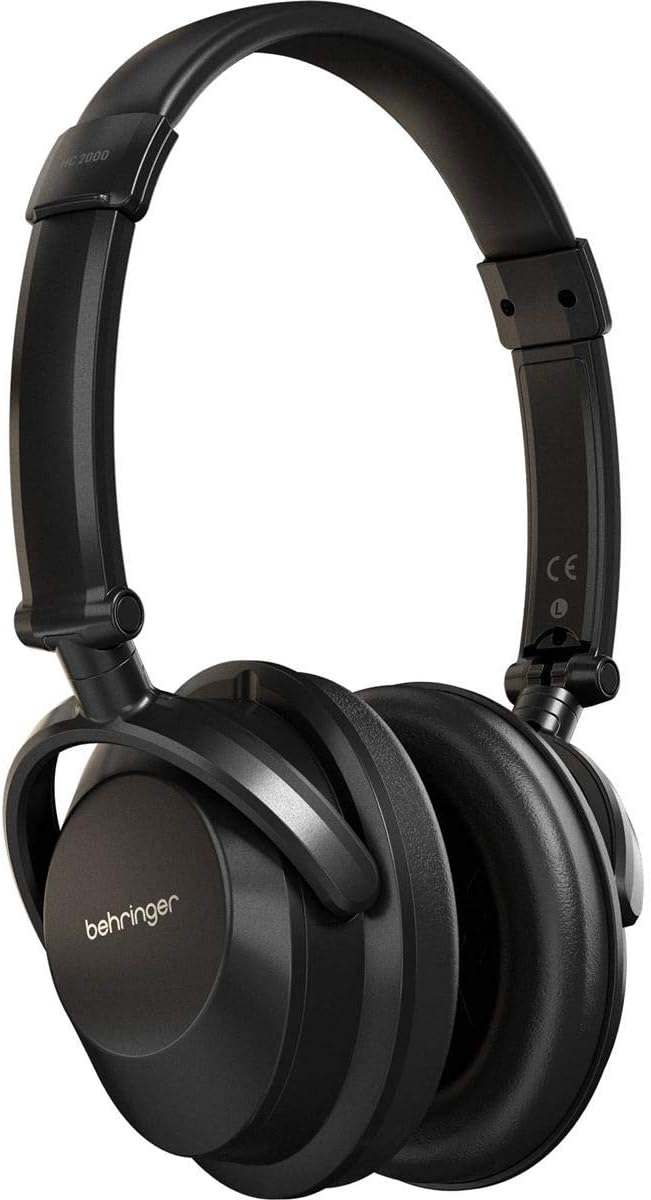
Figur 2.2.1: Forside view of the Behringer HC 2000 Studio Monitoring Headphones. The headphones are black with the Behringer logo on the earcups and an adjustable headband.

Figur 2.2.2: Side view of the Behringer HC 2000 headphones, highlighting the comfortable, padded over-ear earcups.
3. Opsætning
3.1 Unfolding the Headphones
The HC 2000 headphones feature a compact foldable design for portability. To unfold them for use:
- Gently extend the headband until it reaches a comfortable length.
- Rotate the earcups outwards until they are in the standard listening position.

Figur 3.1.1: Øverst view of the Behringer HC 2000 headphones in a folded position, demonstrating their compact design for storage or transport.
3.2 Tilslutning til en lydkilde
The HC 2000 headphones connect via a standard 3.5mm audio jack.
- Locate the audio input jack on your device (e.g., audio interface, mixer, computer, smartphone).
- Insert the 3.5mm connector of the headphone cable firmly into the device's audio output jack.
- If your device requires a 6.3mm (1/4") connection, attach the appropriate adapter (if included) to the 3.5mm plug before inserting.

Figur 3.2.1: Vinklet view of the Behringer HC 2000 headphones, highlighting the comfortable padded earcups and the connection point for the audio cable.
4. Betjening
4.1 Sådan tager du hovedtelefonerne på
- Juster pandebåndet, så det passer behageligt over dit hoved. Pandebåndet kan justeres, så det passer til forskellige hovedstørrelser.
- Ensure the earcups fully enclose your ears for optimal sound isolation and audio performance. The "L" and "R" markings inside the earcups indicate the left and right channels, respectively.
4.2 Justering af lydstyrke
Volume control is managed directly from your connected audio source. The HC 2000 headphones do not feature inline volume controls.
- Before playing audio, set the volume on your audio source to its lowest setting.
- Begin playing audio and gradually increase the volume on your audio source to a comfortable listening level.
- Avoid excessively high volume levels to prevent hearing damage.
5. Vedligeholdelse
5.1 Rengøring
- Use a soft, dry, lint-free cloth to wipe down the exterior of the headphones.
- Tør forsigtigt ørekopperne af med en let dip.amp cloth if necessary, then immediately dry with a soft, dry cloth. Do not saturate.
- Do not use harsh chemicals, abrasive cleaners, or solvents as they may damage the finish or materials.
5.2 Opbevaring
When not in use, fold the headphones into their compact form and store them in a protective case or bag (not included) to prevent dust accumulation and physical damage.

Figur 5.2.1: Vinklet view of the Behringer HC 2000 headphones in their folded configuration, ready for compact storage or transport.
6. Fejlfinding
If you encounter issues with your Behringer HC 2000 headphones, please refer to the following common problems and solutions:
| Problem | Mulig årsag | Løsning |
|---|---|---|
| Ingen lyd |
|
|
| Forvrænget lyd |
|
|
| Kun lyd i én ørekop |
|
|
7. Specifikationer
Technical specifications for the Behringer HC 2000 Studio Monitoring Headphones:
| Feature | Detalje |
|---|---|
| Modelnavn | HC 2000 |
| Ørestykke form | Over Ear |
| Forbindelsesteknologi | Kablet |
| Hovedtelefonstik | 3.5 mm Jack |
| Audio driver type | Dynamisk Driver |
| Audio driver størrelse | 40 millimeter |
| Frekvensrespons | 20 Hz - 20,000 Hz |
| Støjkontrol | Lydisolering (lukket design) |
| Speciel funktion | Sammenfoldelig |
| Materiale | Plast |
| Varens vægt | 0.42 pund (ca. 6.7 ounces) |
| Produktdimensioner | 5.71 x 3.15 x 7.68 tommer |
| Fabrikant | Music Tribe US |
| Inkluderede komponenter | Studio overvågning hovedtelefoner |
| Vandmodstandsniveau | Ikke vandafvisende |
| Kompatible enheder | Music Production Equipment, Laptops, Desktops, Tablets, Telephones, Smart Speakers, Televisions, Car Audio Systems, Cellphones |
8. Garanti og support
8.1 Garantioplysninger
Behringer products are covered by a limited warranty. For detailed warranty terms and conditions, please refer to the official Behringer webwebstedet eller garantikortet, der fulgte med dit produkt. Gem din købsbevis til garantikrav.
8.2 Kundesupport
For technical support, service, or spare parts, please contact Behringer customer support. You can find contact information and frequently asked questions on the official Behringer webwebsted:
When contacting support, please have your product model (HC 2000) and serial number (if applicable) ready.


