1. Introduktion
The eKids Frozen 2 Bluetooth Karaoke Machine with Light Show is designed to provide an interactive music experience. This portable device allows users to stream audio wirelessly via Bluetooth, sing along with the included wired microphone, and expand content through a USB port. It features a multi-colored LED light show and built-in memory for storing music.
2. Hvad er der i æsken
- Bluetooth MP3 Karaoke Machine
- Kablet mikrofon
- USB opladningskabel
3. Produktfunktioner
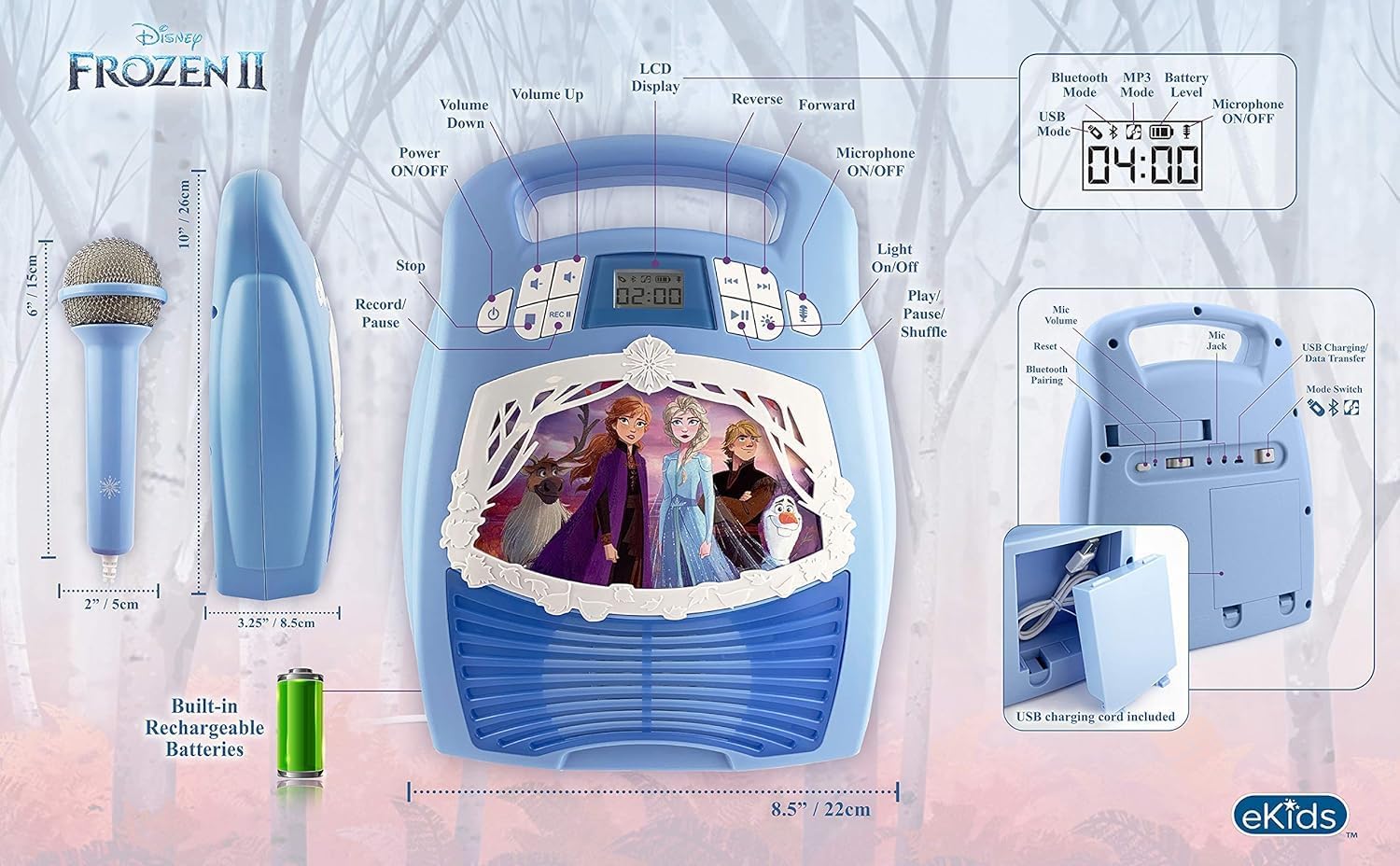
- Bluetooth-forbindelse: Connect to any compatible Bluetooth device to stream audio wirelessly.
- Kablet mikrofon: Includes one real working wired microphone for singing along. An additional mic jack is available for a second microphone (sold separately).
- USB Audio Player: Features a USB port to play MP3 files from a USB flash drive (not included).
- Optagefunktion: Record performances while singing along to streaming music. Requires a USB flash drive (not included).
- Multi-colored LED Light Show: Integrated light show to enhance the performance experience.
- Indbygget hukommelse: Store hours of music directly on the device.
- Genopladeligt batteri: Portable design with a built-in rechargeable battery for on-the-go use.

Figur 1: Overview of the Karaoke Machine's Controls and Features.

Figure 2: Bluetooth Compatibility with various devices.
4. Opsætning
4.1 Strømforsyning til enheden
The karaoke machine operates on a built-in rechargeable battery. Ensure the unit is fully charged before first use for optimal performance.
- Connect the supplied USB charging cable to the USB charging port on the back of the unit.
- Connect the other end of the USB cable to a standard USB power adapter (not included) or a powered USB port.
- The charging indicator will illuminate. Allow sufficient time for a full charge.
4.2 Tilslutning af mikrofonen
The wired microphone connects to the microphone jack on the unit.
- Locate the microphone jack on the side or back of the karaoke machine.
- Insert the microphone plug firmly into the jack.

Figure 3: Karaoke Machine with Microphone Connected.
5. Betjeningsvejledning
5.1 Tænd/sluk
Tryk og hold på Magt button located on the control panel to turn the unit on or off.
5.2 Bluetooth -parring
- Turn on the karaoke machine. The Bluetooth indicator on the display will flash, indicating it is in pairing mode.
- Gå til Bluetooth-indstillingerne på din Bluetooth-aktiverede enhed (smartphone, tablet osv.) og aktiver Bluetooth.
- Select "eKids Frozen 2 Karaoke" (or similar name) from the list of available devices.
- Når den er parret, holder Bluetooth-indikatoren op med at blinke og forbliver konstant. Du kan nu streame lyd fra din enhed.
5.3 Playing Music via USB
- Indsæt et USB-flashdrev, der indeholder MP3 files i USB-porten på enheden.
- The unit should automatically switch to USB mode and begin playing music. If not, press the Mode knappen for at vælge USB-tilstand.
- Brug Afspil/pause, Næste spor, og Forrige spor knapper til at styre afspilning.
5.4 Brug af mikrofon
- Ensure the microphone is securely plugged into the mic jack.
- Tryk på Mikrofon TIL / FRA button to activate the microphone.
- Adjust the microphone volume using the dedicated volume controls if available, or the main volume controls.
5.5 lysshow
Tryk på Lys ON/OFF button to activate or deactivate the multi-colored LED light show.
5.6 Recording Performances
To record your singing, a USB flash drive (not included) must be inserted into the USB port.
- Ensure a USB flash drive is inserted.
- Start playing your desired music (via Bluetooth or USB).
- Tryk på REC knappen for at starte optagelsen.
- Sing into the microphone.
- Tryk på REC button again to stop recording. Your performance will be saved to the USB flash drive.
6. Vedligeholdelse
- Rengør enheden med en blød, tør klud. Brug ikke slibende rengøringsmidler eller opløsningsmidler.
- Hold enheden væk fra direkte sollys, varmekilder og fugt.
- Store the microphone in its designated compartment on the back of the unit when not in use to prevent loss or damage.
Figur 4: Bagside view with microphone storage compartment.
7. Fejlfinding
- Ingen strøm: Ensure the unit is charged. Connect the USB charging cable and allow it to charge.
- Ingen lyd: Check the volume levels on both the karaoke machine and your connected Bluetooth device. Ensure the microphone is turned on if using it.
- Bluetooth forbinder ikke: Make sure Bluetooth is enabled on your device and the karaoke machine is in pairing mode. Try restarting both devices. Ensure no other devices are currently connected to the karaoke machine.
- Mikrofonen virker ikke: Verify the microphone is securely plugged into the correct jack and the microphone ON/OFF button is activated.
- Optagelsesproblemer: Ensure a compatible USB flash drive is inserted and has sufficient free space.
8. Specifikationer
| Feature | Detalje |
|---|---|
| Produktdimensioner | 8 x 3 x 10 tommer |
| Varens vægt | 2.64 pund |
| Modelnummer | FR-553v9M |
| Anbefalet alder | 3-35 måneder |
| Batterier | 3 AA batteries required (included) - Note: Product description also mentions built-in rechargeable battery. Please refer to packaging for exact battery type. |
| Speciel funktion | Bærbar, genopladelig |
| Farve | Older Version |
| Fabrikant | KIDdesigns |
9. Sikkerhedsoplysninger
Please read and follow all safety instructions provided with the product packaging. This product is intended for use by children aged 3 and up, under adult supervision.
10. Garanti og support
Dette produkt leveres med en Et års begrænset garanti. For warranty claims or technical support, please refer to the contact information provided in your product packaging or visit the eKids official webwebsted.
11. Produktvideo
Video 1: An official product video from KIDdesigns, Inc. showcasing the eKids Frozen 2 Bluetooth Karaoke Machine with Light Show, highlighting its features and design.


