Indledning
Thank you for choosing the ICQN 42L Mini Electric Oven. This appliance is designed for versatile cooking, offering various functions to meet your culinary needs. Please read this manual carefully before operating the oven to ensure safe and efficient use. Keep this manual for future reference.
Vigtige sikkerhedsinstruktioner
Ved brug af elektriske apparater skal grundlæggende sikkerhedsforanstaltninger altid følges, herunder følgende:
- Læs alle instruktioner før brug.
- Rør ikke ved varme overflader. Brug håndtag eller knopper.
- For at beskytte mod elektrisk stød må ledningen, stik eller apparatet ikke nedsænkes i vand eller anden væske.
- Tæt opsyn er nødvendigt, når et apparat bruges af eller i nærheden af børn.
- Træk stikket ud af stikkontakten, når det ikke er i brug, og før rengøring. Lad det køle af, før du sætter dele på eller af.
- Betjen ikke noget apparat med en beskadiget ledning eller stik, eller efter at apparatet ikke fungerer korrekt eller er blevet beskadiget på nogen måde.
- Brug af tilbehør, der ikke er anbefalet af apparatets producent, kan forårsage farer.
- Må ikke bruges udendørs.
- Lad ikke ledningen hænge ud over kanten af bordet eller bordpladen eller røre ved varme overflader.
- Må ikke placeres på eller i nærheden af en varm gas- eller elektrisk brænder eller i en opvarmet ovn.
- Der skal udvises ekstrem forsigtighed ved flytning af et apparat, der indeholder varm olie eller andre varme væsker.
- Sæt altid stikket i apparatet først, og sæt derefter ledningen i stikkontakten. For at afbryde forbindelsen skal du slukke for en vilkårlig knap og derefter tage stikket ud af stikkontakten.
- Brug ikke apparatet til andet end tilsigtet brug.
- For store fødevarer eller metalredskaber må ikke sættes i en brødristerovn, da de kan skabe brand eller risiko for elektrisk stød.
- Der kan opstå brand, hvis ovnen er dækket eller rører brændbart materiale, herunder gardiner, gardiner, vægge og lignende, når den er i drift.
- Do not place any of the following materials in the oven: paper, cardboard, plastic, and other similar materials.
- Do not store any materials other than manufacturer's recommended accessories in this oven when not in use.
- Dæk ikke krummebakken eller nogen del af ovnen med metalfolie. Dette vil forårsage overophedning af ovnen.
Produkt overview
The ICQN 42L Mini Electric Oven features a compact design with a spacious interior, offering various cooking functions and easy-to-use controls.

Figur 1: Front view of the ICQN 42L Mini Electric Oven, showing the main body, glass door, and control knobs on the right side.
Nøglekomponenter:
- Temperaturkontrolknap: Justerer ovntemperaturen fra 40°C til 230°C.
- Funktionsvælgerknap: Selects desired cooking mode (e.g., convection, top/bottom heat).
- Timerknap: Sets cooking duration up to 90 minutes or continuous operation.
- Glasdør: Double-glazed for improved insulation and visibility.
- Indvendigt lys: Lyser ovnrummet op under drift.
- Konvektionsblæser: Cirkulerer varm luft for jævn madlavning.
- Rack niveauer: Three adjustable levels for the baking tray and wire rack.
- Emaljeret interiør: Designet til nem rengøring.

Figur 2: The oven displaying its 42-liter capacity, interior light, convection fan, double glazing, easy cleaning feature, and suitability for baking bread.

Figur 3: Close-up of the oven interior, highlighting the "Umluft" (convection) fan for even heat distribution.
Opsætning
- Udpakning: Tag forsigtigt ovnen og alt tilbehør ud af emballagen. Gem emballagen til senere transport, hvis det er nødvendigt.
- Placering: Place the oven on a stable, heat-resistant surface. Ensure adequate clearance (at least 10 cm) on all sides and above the oven for proper ventilation. Vigtig: Measure the intended placement area before installation to ensure proper fit and ventilation.
- Indledende rengøring: Tør indersiden og tilbehøret af med en klud før første brug.amp cloth. Run the oven empty for approximately 15 minutes at maximum temperature (230°C) with the convection function to burn off any manufacturing residues and odors. Ensure the room is well-ventilated during this process.
- Strømtilslutning: Plug the oven into a grounded electrical outlet. Ensure the voltage matches the specifications (230V).
Betjeningsvejledning
Familiarize yourself with the control knobs before operation.
Kontrolpanel:
- Top Knob (Temperature): Turn to set the desired cooking temperature from 40°C to 230°C.
- Middle Knob (Function): Turn to select one of the five cooking functions:
- Convection (Chaleur tournante)
- Convection with Bottom Heat (Chaleur tournante avec chaleur inférieure)
- Top Heat (Chaleur haute)
- Bottom Heat (Chaleur inférieure)
- Top/Bottom Heat (Chaleur voûte/inférieure)
- Defrost Function (Fonction de décongélation)
- Nederste knap (timer): Turn clockwise to set the cooking time up to 90 minutes. The oven will automatically switch off when the timer reaches zero. For continuous operation, turn the timer knob counter-clockwise to the "Manual" position. Forsigtighed: Do not force the timer knob counter-clockwise from a timed setting, as this may damage the mechanism.
Generel drift:
- Place food on the baking tray or wire rack. Select the appropriate rack level (1, 2, or 3) for optimal cooking.
- Luk ovndøren forsvarligt.
- Set the desired temperature using the top knob.
- Select the appropriate cooking function using the middle knob.
- Set the cooking time using the bottom timer knob. The oven will begin heating.
- The oven light will illuminate during operation.
- When the set time expires, the oven will switch off automatically, and a bell will sound. If using continuous operation, manually turn the timer knob to the "Off" position.
- Carefully remove cooked food using oven mitts and the provided handle for the baking tray/wire rack.

Figur 4: Interior of the oven illustrating the three available rack levels for flexible cooking and optimal heat distribution.
Vedligeholdelse og rengøring
Regelmæssig rengøring sikrer optimal ydeevne og forlænger din ovns levetid.
- Før rengøring: Tag altid stikket ud af stikkontakten, og lad ovnen køle helt af, inden den rengøres.
- Udvendig rengøring: Tør de udvendige overflader af med en blød, damp klud. Brug ikke slibende rengøringsmidler eller skuresvampe, da de kan beskadige overfladen.
- Interior Cleaning (Enameled Interior): The oven features an enameled interior for easy cleaning.
- For light soil, wipe the interior with a damp klud og mildt rengøringsmiddel.
- For stubborn stains, the oven offers a self-cleaning function: Add two glasses of water to the baking tray and place it in the oven. Run the oven at a moderate temperature for approximately 30 minutes. The steam will loosen food residues, making them easier to wipe away once the oven has cooled.
- Glass Door Cleaning: The double-glazed door can be disassembled for thorough cleaning. Refer to Figure 5 for guidance. Carefully remove the inner glass panel for cleaning, then reassemble securely.
- Tilbehør: Wash the baking tray, wire rack, and handle with warm, soapy water. Rinse thoroughly and dry completely before storing.

Figur 5: Illustration demonstrating the process of disassembling the double-glazed oven door for easier cleaning of both inner and outer glass panels, highlighting the enameled interior.
Fejlfinding
If you encounter issues with your oven, please consult the following table before contacting customer support.
| Problem | Mulig årsag | Løsning |
|---|---|---|
| Ovnen tænder ikke. | Ikke tilsluttet; strømmen er slukkettage; timeren er ikke indstillet. | Ensure the oven is securely plugged into a working outlet. Check circuit breaker. Set the timer knob to a desired time or to the "Manual" position. |
| Maden tilberedes ikke jævnt. | Incorrect rack level; oven overloaded; convection fan issue. | Adjust rack level. Avoid overloading the oven. Ensure the convection fan is selected for even cooking. |
| Røg eller lugt under første brug. | Afbrænding af produktionsrester. | This is normal during initial use. Ensure good ventilation. The odor should dissipate after the first few uses. |
| Timeren fungerer ikke korrekt. | Timer knob not set properly. | Ensure the timer knob is turned clockwise past the 10-minute mark before setting the desired time. Do not turn counter-clockwise from a timed setting. |
Specifikationer
| Feature | Detalje |
|---|---|
| Mærke | ICQN |
| Modelnummer | IQ M4251R03N 1IA |
| Kapacitet | 42 liter |
| Magt | 1300 watt |
| Voltage | 230 volt |
| Temperaturområde | 40°C - 230°C |
| Dimensioner (L x B x H) | 45.9 x 53.2 x 35.2 cm |
| Vægt | 13 kilo |
| Materiale | Enameled Interior |
| Særlige funktioner | 3 rack levels, Timer, Turbo fan with convection, Pizza plate compatibility |
| Inkluderede komponenter | 1 baking tray, 1 wire rack, 1 handle clamp |

Figur 6: Included accessories: a baking tray, a wire rack, and a handle clamp for safe removal of hot items.
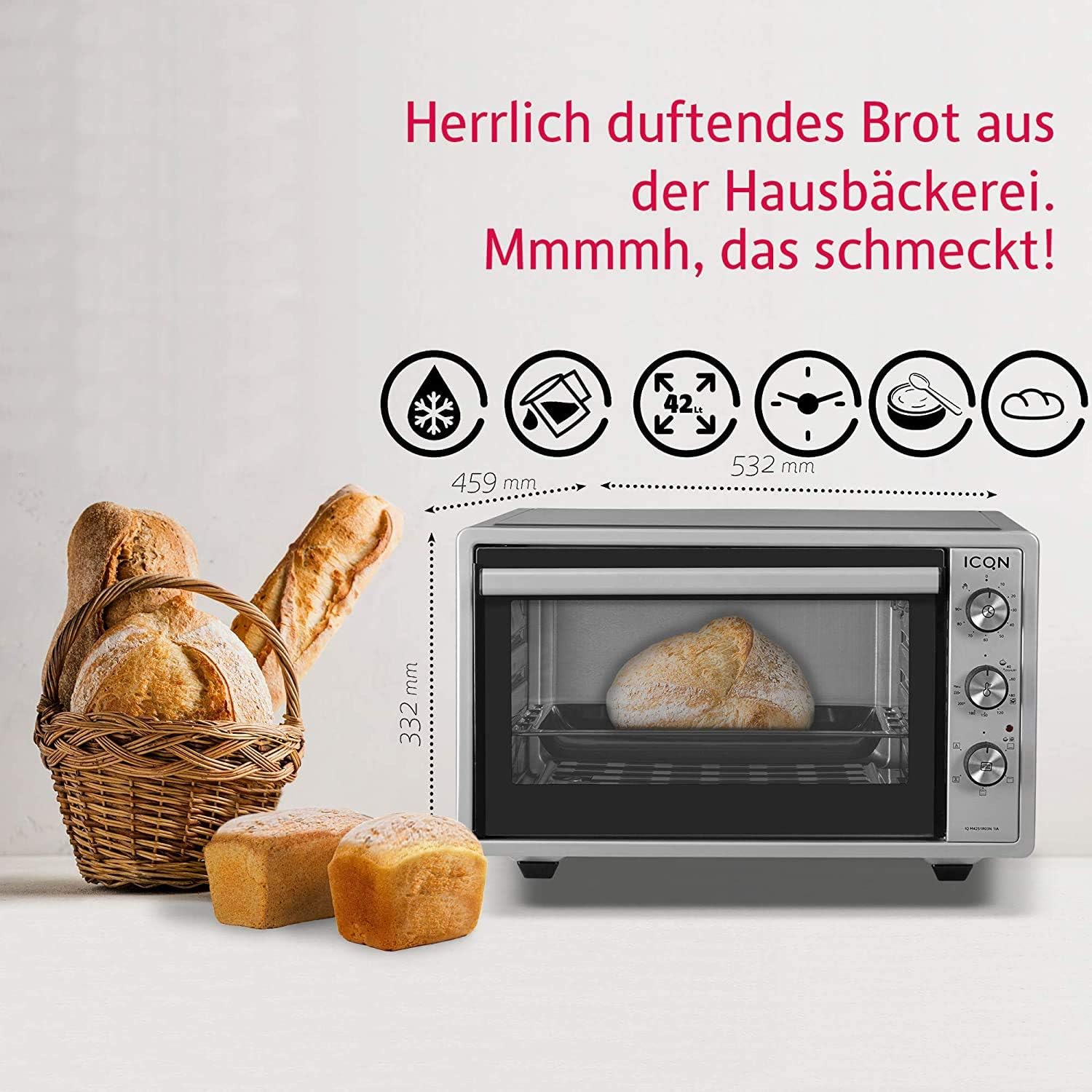
Figur 7: The oven shown with bread, illustrating its external dimensions (width 532mm, depth 459mm, height 332mm).
Garanti og support
This ICQN Mini Electric Oven comes with a 2 års garanti fra købsdatoen. Gem venligst din købsbevis i tilfælde af garantikrav.
For technical support, service, or warranty inquiries, please contact your retailer or the manufacturer's customer service department. Contact information may be found on the product packaging or the manufacturer's official webwebsted.


