1. Introduktion
The Retevis RT22S is an upgraded version of the RT22 walkie-talkie, designed for clear and reliable communication. This compact two-way radio features a clear signal prompt, channel display, and supports hands-free operation with its VOX function. It is suitable for various applications, from family outings to community events and business use.
Key enhancements in the RT22S include improved signal prompting, a dedicated channel display for quick identification, and enhanced features for secure and efficient communication.
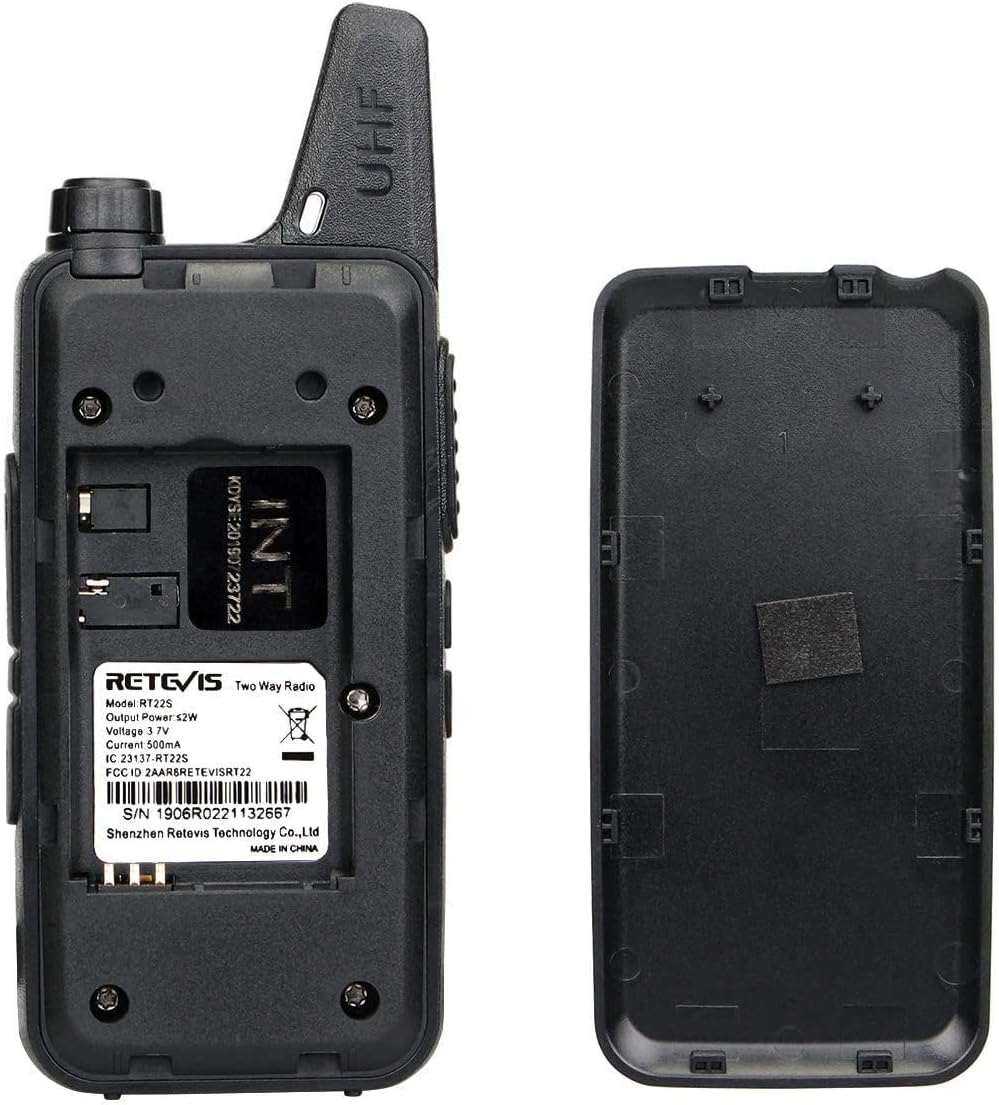
Image: Comparison of the Retevis RT22S (left) and RT22 (right) walkie-talkies, highlighting the RT22S's 22-channel capability versus the RT22's 16 channels.
2. Pakkens indhold
Before using your Retevis RT22S walkie-talkies, please ensure all items are present in the package:
- 2 x Retevis RT22S Walkie-Talkies
- 2 x 1000mAh litium-ion-batterier
- 1 x Dual USB Charging Dock
- 2 x USB ladekabler
- 2 x bælteclips
- 1 x Brugermanual (dette dokument)

Image: The complete package contents for the Retevis RT22S, including two radios, batteries, charger, USB cables, and the user manual.
3. Produktet er slutview
Familiarize yourself with the various components and controls of your Retevis RT22S walkie-talkie.

Image: Detailed front and side views of the Retevis RT22S walkie-talkie, indicating the Power/Volume knob, PTT button, Channel Up/Down buttons, Earpiece Jack, USB Jack, Channel Display, and Round Indicator.
- Antenne: Fixed for optimal signal reception and transmission.
- Strøm-/lydstyrkeknap: Drej for at tænde/slukke radioen og justere lydstyrken.
- PTT (Push-to-Talk) knap: Tryk og hold nede for at sende din stemme. Slip for at lytte.
- Kanal op/ned-knapper: Use to select desired communication channels.
- Ørestykkestik: Standard 2-pin Kenwood compatible jack for audio accessories.
- USB-stik: Mini USB port for charging the radio.
- Kanalvisning: Digital display showing the current channel number.
- Round Indicator: Provides visual feedback for signal prompt and other statuses.
- Bælteklips: Ergonomically designed for secure attachment to clothing or a belt.

Image: A hand holding the Retevis RT22S, illustrating its compact size (0.83 inches thick) and highlighting the Mini USB interface and Standard 2-pin earpiece jack.
4. Opsætning
4.1. Batteriinstallation
- Sørg for, at walkie-talkien er slukket.
- Find batteridækslet på bagsiden af radioen.
- Skub dækslet nedad for at fjerne det.
- Insert the 1000mAh Lithium-Ion battery, ensuring the contacts align correctly.
- Sæt dækslet til batterirummet på igen, og skub det opad, indtil det klikker på plads.

Image: The back of the Retevis RT22S walkie-talkie with the battery cover removed, showing the battery slot and product information including the serial number 1906R0221132667.
4.2. Opladning af batteriet
The RT22S walkie-talkies come with a dual USB charging dock and USB cables for convenient charging.
- Connect the USB charging cable to the dual USB charging dock and a compatible USB power source (e.g., wall adapter, computer USB port).
- Place the walkie-talkie into the charging slot on the dock. Alternatively, you can connect the mini USB cable directly to the radio's USB jack for charging.
- The round indicator on the front of the radio will illuminate red during charging.
- Once fully charged, the indicator light will change color (typically green or turn off, refer to the radio's specific behavior). A full charge provides over 12 hours of use.

Image: A Retevis RT22S walkie-talkie connected via its mini USB port, showing the red indicator light, signifying that the device is currently charging.
5. Betjeningsvejledning
5.1. Tænd/sluk og justering af lydstyrke
- To power on the radio, rotate the Power/Volume knob clockwise until you hear a click and a voice prompt.
- For at slukke skal du dreje knappen mod uret, indtil du hører et klik.
- Juster lydstyrken ved at dreje på Power/Volume-knappen.
5.2. Kanalvalg
The RT22S features 22 channels. Use the Channel Up/Down buttons on the side of the radio to select your desired channel. The current channel number will be shown on the digital display.

Image: A close-up of the Retevis RT22S walkie-talkie, highlighting the channel display and the round indicator which provides signal prompts.
5.3. Tryk-og-tal (PTT)
To transmit your voice, press and hold the PTT button located on the side of the radio. Speak clearly into the microphone. Release the PTT button to stop transmitting and listen for a response.
5.4. VOX-funktion (håndfri betjening)
The VOX (Voice Operated Exchange) function allows for hands-free communication. When activated, the radio will automatically transmit when it detects your voice, without needing to press the PTT button.
Video: Demonstration of the VOX (Voice Operated Exchange) function on the Retevis RT22S walkie-talkie, showing how to activate and use hands-free communication.
5.5. Remote Emergency Alert
The RT22S includes a remote emergency alert feature. This function typically needs to be assigned to a side button through programming. When activated, it can emit an alarm signal to other radios on the same channel, indicating an emergency situation.
Video: Demonstration of the Remote Emergency Alert function on the Retevis RT22S walkie-talkie, showing the activation and the alarm sound emitted.
5.6. CTCSS and DCS Tones
CTCSS (Continuous Tone-Coded Squelch System) and DCS (Digitally Coded Squelch) tones help filter out unwanted conversations. When enabled, your radio will only receive transmissions that include the same pre-set tone. This ensures more private and secure communication within your group.
6. Understanding Radio Range
The effective range of a two-way radio is influenced by several factors. While the RT22S has a maximum talking range of 1 mile under ideal conditions, actual performance can vary.
Factors Affecting Radio Range:
- Radio Power (Watts): Higher power generally means longer range.
- Radio Signal Type: Different frequency bands (e.g., FRS, GMRS) have different propagation characteristics.
- Horizon Distance: Radio signals travel in a line of sight. The curvature of the Earth limits range.
- Atmosfæriske forhold: Weather can affect signal propagation.
- Antenne: Antenna quality and type impact range.
- Obstacles and Terrain: Buildings, hills, and dense foliage can block or weaken signals.
Video: An informational video explaining the various factors that affect two-way radio range, including terrain, obstacles, radio power, and atmospheric conditions.
Tips to Extend Communication Distance:
- Increase Transmission Power: In theory, doubling transmission power can extend communication distance by approximately 1.4 times.
- Improve Receiving Sensitivity: Adjust the squelch threshold of the walkie-talkie and use a high-gain antenna to improve receiving sensitivity.
- Communicate from a Higher Location: Elevating your position can significantly improve line-of-sight and extend range.
- Keep Your Battery Charged: A fully charged battery ensures optimal power output for transmission.
7. Specifikationer
| Feature | Beskrivelse |
|---|---|
| Mærke | Retevis |
| Model | RT22S |
| Farve | Sort |
| Antal kanaler | 22 |
| Særlige funktioner | Marquee indicator, Channel display, Signal display, Small and portable |
| Frekvensområde | FRS |
| Maksimal talerækkevidde | 1 Mile (under ideal conditions) |
| Voltage | 3.7 volt |
| Vandmodstandsniveau | Ikke vandafvisende |
| Antal batterier | 2 Lithium Ion batterier påkrævet (medfølger) |
| Varens vægt | 150 gram |
8. Vedligeholdelse
Proper maintenance ensures the longevity and optimal performance of your walkie-talkies.
- Rensning: Brug en blød, damp klud til at rengøre radioens yderside. Undgå skrappe kemikalier eller slibende rengøringsmidler.
- Opbevaring: Store the walkie-talkies in a cool, dry place away from direct sunlight and extreme temperatures. Remove batteries if storing for extended periods.
- Batteripleje: Fully charge batteries before first use. Avoid overcharging or completely draining the battery frequently to prolong its lifespan.
- Undgå påvirkning: Protect the radio from drops and strong impacts, which can damage internal components.
9. Fejlfinding
If you encounter issues with your Retevis RT22S walkie-talkie, refer to the following common problems and solutions:
| Problem | Mulig årsag | Løsning |
|---|---|---|
| Ingen strøm | Lavt batteri eller ikke installeret korrekt | Oplad batteriet, eller sæt det i igen, og sørg for korrekt kontakt. |
| Kan ikke sende eller modtage | Incorrect channel, out of range, or battery low | Bekræft at begge radioer er på samme kanal. Flyt tættere på den anden radio. Oplad batteriet. |
| Dårlig lydkvalitet | Low battery, interference, or volume too low | Oplad batteriet. Gå væk fra interferenskilder. Juster lydstyrken. |
| VOX virker ikke | VOX sensitivity too low or feature not activated | Adjust VOX sensitivity settings. Ensure VOX is enabled. |
| Emergency alert not activating | Feature not programmed to a side button | Consult programming software or a qualified technician to assign the function. |
10. Garanti og support
Retevis products are manufactured to high-quality standards. For warranty information, technical support, or service inquiries, please refer to the warranty card included in your package or visit the official Retevis webwebsted. Behold din købskvittering som købsbevis i tilfælde af garantikrav.


