1. Introduktion
Thank you for choosing the Xiaomi Redmi Airdots True Wireless Earbuds. These earbuds are designed to provide a seamless audio experience with advanced Bluetooth 5.0 technology, delivering high-quality stereo sound and robust bass. With their compact design and intuitive controls, they are perfect for daily use, whether for music, calls, or activating your voice assistant.
The built-in microphone and noise cancellation features ensure clear communication, while the sweatproof design makes them suitable for various activities. This manual will guide you through the setup, operation, and maintenance of your new earbuds.
2. Pakkens indhold
Markér venligst feltet for følgende elementer:
- Xiaomi Redmi Airdots Earbuds (Left and Right)
- Opladningsetui
- Ørepropper (små, mellemstore, store)
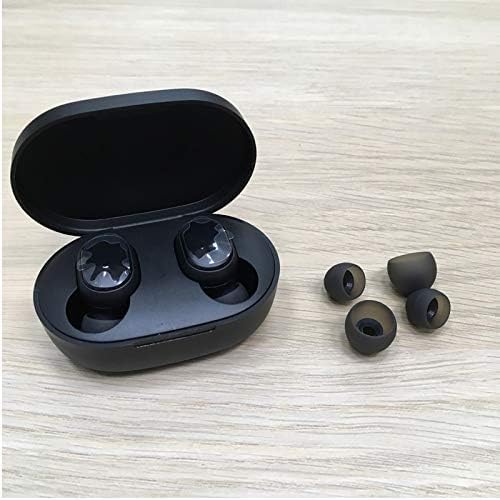
Image: Earbuds in charging case with various ear tip sizes.
3. Produktet er slutview
Each earbud features a multi-function button for controlling various operations. Familiarize yourself with the button's functions:

Image: Detailed diagram of earbud controls.
4. Opsætning
4.1. Opladning af øretelefoner og etuiet
Before first use, fully charge the earbuds and the charging case. Connect the charging case to a power source using a Micro USB cable (not included). The earbuds will charge automatically when placed inside the case.
- Earbuds charging time: Approximately 1 hour for full charge.
- Charging case charging time: Approximately 2 hours for full charge.
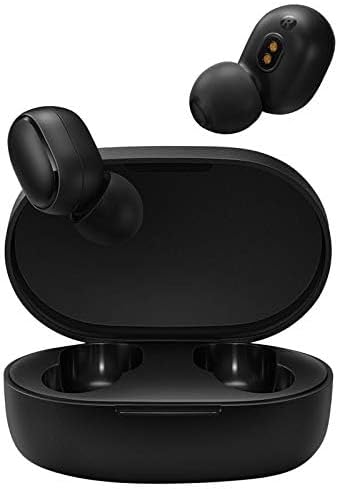
Image: Earbuds inside the charging case.
4.2. Førstegangsparring
- Remove both earbuds from the charging case. They will automatically turn on.
- Aktiver Bluetooth på din enhed (smartphone, tablet osv.).
- Søg efter available Bluetooth devices and select "Redmi Airdots" or "Mi True Wireless Earbuds Basic" from the list.
- Once connected, the earbuds are ready for use. For subsequent uses, they will automatically connect to the last paired device when removed from the case.

Image: Earbuds and charging case.
5. Betjeningsvejledning
5.1. Grundlæggende kontroller
| Handling | Fungere |
|---|---|
| Single Click (during call) | Besvar/læg på |
| Single Click (music playback) | Afspil / pause musik |
| Dobbeltklik | Aktiver Voice Assistant |
| Long Press (approx. 1 second during call) | Afvis indgående opkald |
5.2. Stemmeassistent
Double-click the multi-function button on either earbud to activate your device's voice assistant (e.g., Google Assistant, Siri). This allows for hands-free control of navigation, calls, and other functions.
5.3. Sådan tager du ørepropperne på
Insert the earbuds gently into your ear canal and rotate them slightly to find a comfortable and secure fit. Choose the ear tips that provide the best seal for optimal sound quality and comfort.

Image: Proper way to insert an earbud.

Image: Earbud worn securely during activity.
6. Vedligeholdelse
To ensure the longevity and optimal performance of your Redmi Airdots, follow these maintenance guidelines:
- Rensning: Rengør regelmæssigt ørepropperne og opladningsetuiet med en blød, tør og fnugfri klud. Brug ikke skrappe kemikalier eller slibende materialer.
- Ørespidser: Fjern og rengør ørepropperne med jævne mellemrum med vand og mild sæbe. Sørg for, at de er helt tørre, før du sætter dem på igen.
- Opbevaring: Når ørepropperne ikke er i brug, skal de opbevares i deres opladningsetui for at beskytte dem mod støv og skader.
- Undgå ekstremer: Udsæt ikke ørepropperne eller etuiet for ekstreme temperaturer, fugtighed eller direkte sollys.
- Vandtæthed: The earbuds are sweatproof, but not designed for submersion in water. Avoid swimming or showering with them.
7. Fejlfinding
If you encounter issues with your Redmi Airdots, please refer to the following common solutions:
- Ørepropper parrer ikke med hinanden: If only one earbud connects, try resetting both earbuds. Place them back in the case, then remove them simultaneously. If issues persist, manually re-pair them by forgetting the device on your phone and repeating the first-time pairing steps.
- Ingen lyd eller lav lydstyrke: Ensure the earbuds are properly charged and connected. Check the volume level on both your device and the earbuds. Clean any debris from the earbud speakers and charging contacts.
- Opladningsproblemer: Ensure the charging cable is securely connected to both the case and the power source. Check the charging pins inside the case and on the earbuds for any obstructions or damage. Sometimes, a charging pin might be stuck; gently adjust it if necessary.
- Intermitterende forbindelse: Ensure you are within the Bluetooth range (up to 10 meters) of your device. Avoid environments with strong electromagnetic interference.
- Stemmeassistent svarer ikke: Ensure your device's voice assistant is enabled and configured correctly. Double-click the multi-function button firmly.
Hvis disse trin ikke løser dit problem, bedes du kontakte kundesupport.
8. Specifikationer
| Feature | Detalje |
|---|---|
| Modelnummer | TWSEJ04LS |
| Mærke | XIAOMI |
| Forbindelsesteknologi | Trådløs (Bluetooth 5.0) |
| Kontroltype | Berøring, stemmestyring |
| Øretelefon batterilevetid | Op til 4 timer |
| Opladningsetui Batterilevetid | Extends to 12 Hours total (with case) |
| Bluetooth rækkevidde | Op til 10 meter |
| Vægt (ørepropper) | Ca. 4.1 g pr. øreprop |
| Vandmodstandsniveau | Sweatproof (IPX4 equivalent) |
| Audio driver størrelse | 7.2 mm |
| Støjkontrol | Noise Cancellation Design |
| Produktdimensioner | 2.44 x 1.57 x 1.1 tommer (etui) |
9. Garanti og support
Your Xiaomi Redmi Airdots are covered by a standard manufacturer's warranty. Please refer to the warranty card included in your original packaging for specific terms and conditions, including the warranty period and coverage details.
For teknisk support, service eller garantikrav bedes du kontakte din lokale Xiaomi-kundeservice eller den forhandler, hvor du købte produktet. Gem din købsbevis for at validere garantien.
For more information, visit the official Xiaomi webwebstedet eller kontakt deres supportkanaler.


