1. Introduktion
This manual provides comprehensive instructions for the setup, operation, and maintenance of your Snom M325 Wireless SIP Phone System. The Snom M325 is a single-cell DECT package that includes an M300 base station and one M25 handset, designed for reliable voice communication in professional environments. It supports up to 20 handsets and allows for up to 5 parallel calls, offering broad coverage that can be extended with additional Snom M5 repeaters.
2. Pakkens indhold
Please verify that all items listed below are present in your package. If any items are missing or damaged, please contact your vendor.
- Snom M300 Base Station
- Snom M25 Cordless Handset
- Handset Charging Cradle
- Strømadapter til basestation
- Strømadapter til opladningsholder
- Ethernet kabel
- Genopladelig batteripakke til håndsæt
- Hurtig startvejledning
3. Opsætning
3.1. Tilslutning af basestationen
- Tilslut strøm: Plug the power adapter into the "Power" port on the Snom M300 Base Station, then plug the adapter into a wall outlet.
- Opret forbindelse til netværk: Connect one end of the Ethernet cable to the "LAN" port on the base station and the other end to an available port on your network router or switch.
- Placering: Place the base station in a central location, away from large metal objects or other electronic devices that may cause interference. The range is up to 50 meters indoors and 300 meters outdoors.
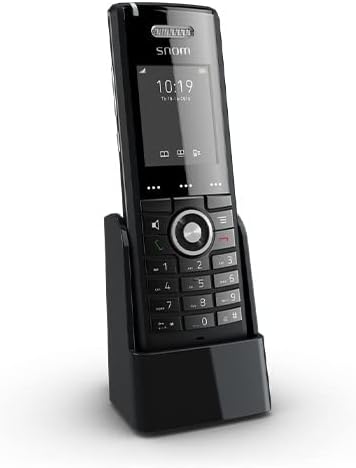
Figure 3.1: Snom M25 Cordless Handset in its charging cradle, illustrating the compact design and display. This image shows the primary components of the system.
3.2. Preparing the Handset
- Installer batteri: Open the battery compartment cover on the back of the Snom M25 Handset. Insert the rechargeable battery pack, ensuring correct polarity. Close the cover.
- Oplad håndsættet: Place the handset in its charging cradle. Ensure the charging contacts align. The battery indicator on the handset display should show it is charging. Allow at least 4 hours for the initial charge.
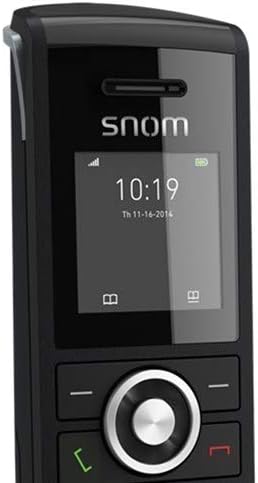
Figur 3.2: Et nærbillede view of the Snom M25 Handset's display showing time and date, along with the navigation and numeric keypads. This highlights the user interface.
3.3. Registrering af håndsæt
The M25 handset included in the M325 package is typically pre-registered to the M300 base station. If you need to register additional handsets or re-register an existing one, follow these steps:
- På basestationen: Press and hold the registration button on the M300 Base Station until the LED indicator starts flashing.
- På håndsættet: Navigate to the "Settings" or "Registration" menu on the M25 Handset. Select "Register Handset" or a similar option.
- Indtast pinkode: If prompted, enter the base station's PIN (default is usually 0000).
- Bekræftelse: Håndsættets display bekræfter, at registreringen er gennemført.
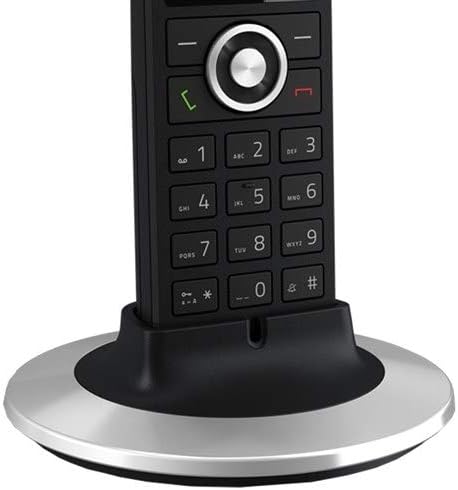
Figure 3.3: The Snom M25 Handset placed in an alternative circular charging base, demonstrating charging functionality. This image provides another perspective of the handset and its charging accessory.
4. Betjeningsvejledning
4.1. Grundlæggende opkaldsfunktioner
- Foretag et opkald:
- Pick up the handset or press the green call key.
- Ring til det ønskede telefonnummer.
- Press the green call key again to initiate the call.
- Besvare et opkald: When the phone rings, press the green call key.
- Afslutning af et opkald: Press the red end call key or place the handset back in the charging cradle.
- Justering af lydstyrke: During a call, use the navigation keys (up/down) to adjust the earpiece volume.
- Stum: During a call, press the mute key (if available) to mute your microphone. Press again to unmute.
4.2. Avancerede funktioner
- 3-vejs konference:
- While on an active call, press the "Options" or "Menu" key.
- Select "Conference" or "Add Call".
- Dial the number of the third party and wait for them to answer.
- Press the "Conference" or "Join" key to merge all calls.
- Flerlinjedrift: The system supports multi-line operation, allowing up to 5 parallel calls. You can switch between active calls or place a call on hold via the handset's menu options.
- Programmerbare nøgler: The M25 handset features programmable keys that can be configured for speed dial, line appearance, or other functions via the base station's web interface.
5. Vedligeholdelse
- Rensning: Brug en blød, tør eller let damp cloth to clean the handset and base station. Do not use abrasive cleaners or solvents.
- Batteripleje:
- Always use the original Snom battery pack.
- Undgå at udsætte batteriet for ekstreme temperaturer.
- Hvis håndsættet ikke skal bruges i længere tid, skal batteriet fjernes.
- Firmwareopdateringer: Periodically check the Snom website for firmware updates for your M300 base station and M25 handsets to ensure optimal performance and security. Updates are typically managed via the base station's web interface.
6. Fejlfinding
| Problem | Mulig årsag | Løsning |
|---|---|---|
| Ingen klartone / Kan ikke foretage opkald | Base station not powered or connected to network; Handset not registered; SIP account not configured. |
|
| Håndsættets display er tomt | Batteriet er lavt eller ikke installeret korrekt. |
|
| Poor range or call quality | Base station placement; Interference from other devices. |
|
| Cannot register additional handsets | Maximum number of handsets reached; Incorrect registration procedure. |
|
7. Specifikationer
| Feature | Detalje |
|---|---|
| Model | Snom M325 (M300 Base Station + M25 Handset) |
| Teknologi | DECT, SIP (Voice Over Internet Protocol) |
| Handset Support | Up to 20 handsets per base station |
| Parallel Calls | Op til 5 parallelle opkald |
| Range (Indoor) | Cirka 50 meter |
| Rækkevidde (udendørs) | Op til 300 meter |
| Standby tid | Op til 75 timer |
| Taletid | Op til 7 timer |
| Mulighed for telefonmøder | 3-vejs konference |
| Ethernet | Dual-Port 10/100 Mbps Ethernet Switch (on base station) |
| Strømkilde | Battery Powered (Handset), AC Adapter (Base Station) |
| Farve | Black (SNO-M65 Cordless Handset) |
8. Sikkerhedsoplysninger
- Udsæt ikke enheden for vand eller fugt.
- Brug kun de medfølgende strømadaptere og batterier.
- Undgå at placere enheden i nærheden af varmekilder eller i direkte sollys.
- Forsøg ikke at åbne eller reparere enheden selv. Overlad al service til kvalificeret personale.
- Opbevar enheden utilgængeligt for børn.
9. Garanti og support
Snom products are designed for reliability and performance. For specific warranty terms and conditions, please refer to the warranty card included with your product or visit the official Snom website. Technical support is available through your authorized Snom reseller or directly from Snom's support channels.
For the latest documentation, FAQs, and support resources, please visit: www.snom.com/support


