Indledning
The Alvoxcon Wireless Headset Lavalier Microphone System provides high-quality audio capture for a variety of applications, including video recording, presentations, and public speaking. This manual will guide you through the setup, operation, and maintenance of your new wireless microphone system.
Pakkens indhold
- 1x Wireless Transmitter
- 1x trådløs modtager
- 1x headset mikrofon
- 1x Lavalier mikrofon
- 1x USB opladningskabel
- 3x Adapters (for various devices)
- 1x brugermanual

Figure 1: All components included in the Alvoxcon Wireless Microphone System package.
Opsætningsvejledning
1. Opladning af enhederne
Before initial use, fully charge both the wireless transmitter and receiver using the provided USB charging cable. The charging indicator light will show charging status.

Figure 2: Transmitter and Receiver charging ports and indicators.
Video 1: Official Alvoxcon overview of the TG210 system, demonstrating charging and basic setup.
2. Tilslutning af mikrofonerne
Choose between the headset microphone for secure wear during vocal performance or the lavalier (clip-on) microphone for discreet placement on clothing. Connect your chosen microphone to the transmitter's mic input with screw lock for a secure connection.

Figure 3: Headset and lavalier microphone options.
3. Parring af sender og modtager
The system features one-key auto-pairing. Simply turn on both the transmitter and the receiver. They should automatically pair within seconds, indicated by a solid blue light on the receiver.
Video 2: Official Alvoxcon overview of the TG210 system, demonstrating auto-pairing.
Betjeningsvejledning
1. Tilslutning til lydenheder
The wireless receiver is equipped with a universal 1/4" plug. Use the appropriate adapter (included) to connect to various devices:
- PA Speaker/Mixer: Plug the 1/4" receiver directly into the MIC IN jack.
- DSLR Camera: Use the included 1/8" adapter cable to connect the receiver to your camera's microphone input. The receiver can be mounted on the camera's hot shoe.
- Smartphone: Use the included 1/8" TRRS adapter cable to connect the receiver to your smartphone's headphone/mic jack. (Note: Some newer smartphones may require an additional Lightning or USB-C to 3.5mm adapter, not included).

Figure 4: Connection methods for the wireless receiver.
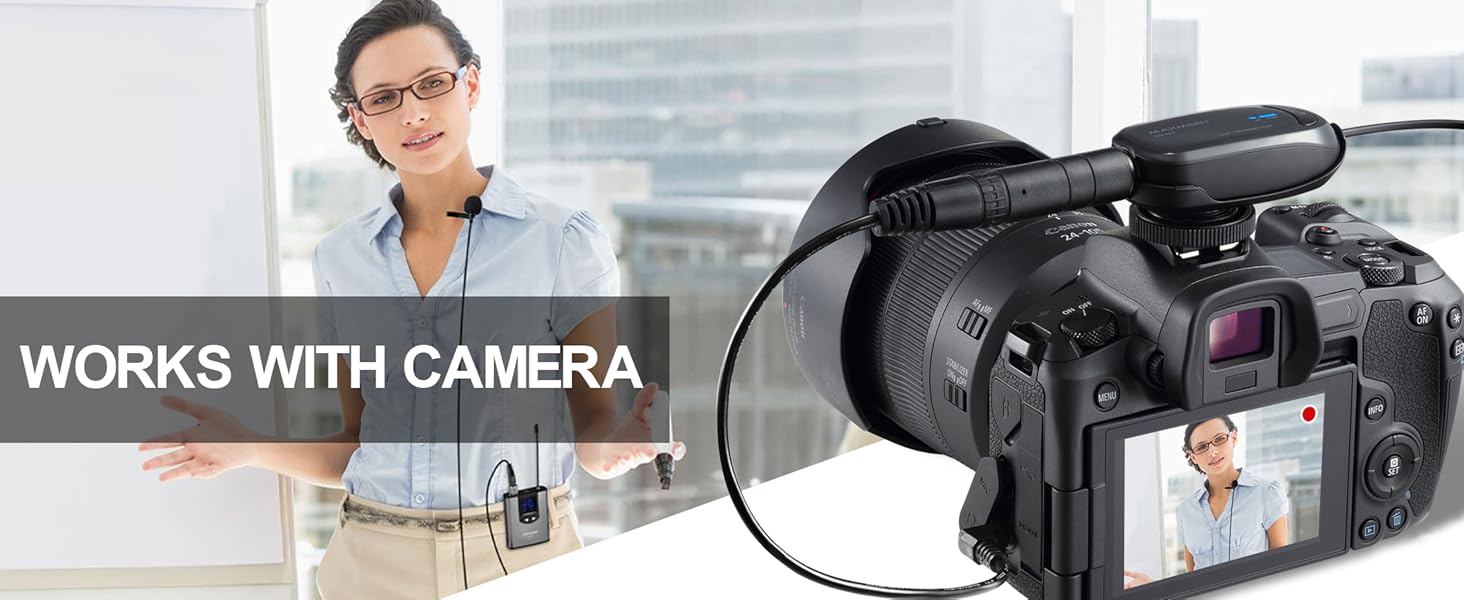
Figure 5: System in use with a DSLR camera.
Video 3: Official Alvoxcon overview of the TG210 system, demonstrating connection to a speaker and camera.
2. Justering af lydstyrke og kanaler
The transmitter features buttons to adjust the volume level and select different frequencies (channels). This allows you to optimize sound output and avoid interference from other wireless devices.
- Brug Op/Ned pile on the transmitter to adjust the microphone's volume.
- Tryk på CHA/M/V button to cycle through available channels if you experience interference.
Opretholdelse
To ensure the longevity and optimal performance of your Alvoxcon Wireless Microphone System, follow these maintenance guidelines:
- Rensning: Use a soft, dry cloth to clean the transmitter, receiver, and microphones. Avoid using harsh chemicals or abrasive materials.
- Opbevaring: Opbevar systemet et køligt, tørt sted væk fra direkte sollys og ekstreme temperaturer.
- Batteripleje: Fully charge the devices before long periods of storage. If storing for extended periods, charge them every 3-6 months to maintain battery health.
- Håndtering: Avoid dropping the devices or subjecting them to strong impacts.
Fejlfinding
| Spørgsmål | Mulig årsag | Løsning |
|---|---|---|
| Ingen lyd eller lav lydstyrke | Low battery; Incorrect volume setting; Loose connection; Incorrect adapter. | Charge devices; Adjust transmitter volume; Secure all connections; Use correct adapter for your device. |
| Interferens eller dårlig lydkvalitet | Other wireless devices on the same frequency; Obstructions; Exceeding range. | Change the channel on the transmitter; Reduce distance between transmitter and receiver; Ensure clear line of sight. |
| Cannot pair transmitter and receiver | Devices not powered on; Out of range; Pairing error. | Ensure both devices are powered on; Bring devices closer together; Follow auto-pairing steps again. |
| Kort batterilevetid | Ufuldstændig opladning; Gammelt batteri. | Ensure full charge cycle; Contact support if battery life significantly degrades. |
Video 4: Official Alvoxcon video demonstrating sound quality and working distance, useful for troubleshooting range issues.
Specifikationer
| Feature | Detalje |
|---|---|
| Modelnummer | TG210G-SP |
| Forbindelsesteknologi | Wireless, UHF |
| Trådløs mikrofon frekvens | 900 MHz |
| Driftsområde | Op til ca. 12 meter |
| Mikrofon formfaktor | Microphone system (Headset & Lavalier) |
| Polar mønster | Omnidirectional (Lavalier), Cardioid (Headset) |
| Strømkilde | Batteridrevet (2 Lithium Polymer batterier inkluderet) |
| Varens vægt | 12.6 ounce (ca. 357 gram) |
| Produktmål (L x B x H) | 9.33 x 2.24 x 8.54 tommer |
| Materiale | Acrylonitril Butadien Styren (ABS) |
Garanti og support
Alvoxcon products are designed for reliability and performance. For warranty information, technical support, or any inquiries regarding your product, please refer to the official Alvoxcon webhjemmeside eller kontakt deres kundeservice direkte.
Du kan også besøge Alvoxcon Store on Amazon for yderligere ressourcer og kontaktmuligheder.


