
1. Introduktion
This manual provides detailed instructions for the safe and efficient operation of your Blackweb Portable Blu-ray/DVD Player, model SDVD1183-BW. Please read this manual thoroughly before using the device and retain it for future reference. This portable player features an 11.4-inch HD screen, USB and SD card slots for media playback, and supports both Blu-ray and DVD discs.
2. Sikkerhedsoplysninger
- Strømkilde: Use only the provided AC adapter. Ensure the voltage opfylder de krav, der er angivet på adapteren.
- Batterisikkerhed: The device contains a Lithium-Ion battery. Do not expose to extreme temperatures, puncture, or disassemble. Dispose of batteries according to local regulations.
- Ventilation: Do not block ventilation openings. Ensure adequate airflow around the device during operation.
- Vand og fugt: Hold enheden væk fra vand, regn og høj luftfugtighed. Må ikke betjenes med våde hænder.
- Rensning: Afbryd strømmen før rengøring. Brug en blød, tør klud. Undgå flydende rengøringsmidler eller aerosoler.
- Diskhåndtering: Handle discs by their edges. Avoid touching the playback surface. Keep discs clean and free from scratches.
- Temperatur: Brug enheden inden for et temperaturområde på 5 °C til 35 °C (41 °F til 95 °F).
- Børn: Denne enhed er ikke legetøj. Opbevares utilgængeligt for små børn.
3. Produktet er slutview
Familiarize yourself with the components and controls of your portable Blu-ray/DVD player.

Figur 3.1: Front view af den sorteweb Portable Blu-ray/DVD Player (SDVD1183-BW) with the screen open. The 11.4-inch display is visible at the top, and the control panel with navigation buttons, volume controls, and disc tray area is at the bottom.
3.1 Front Panel Controls (Open View)
- Skærm: 11.4-inch HD display.
- Diskbakke: Area for inserting Blu-ray or DVD discs.
- Power knap: Tænder eller slukker for enheden.
- MODE/SOURCE Button: Switches between input sources (Disc, USB, SD).
- Navigationsknapper (venstre/højre/op/ned/enter): Til menunavigation og valg.
- Afspil/pause knap: Starter eller sætter afspilning på pause.
- Stop-knap: Stopper afspilning.
- Knapper til hurtig fremspoling/tilbagespoling: Skips chapters or fast forwards/rewinds playback.
- SETUP knap: Åbner menuen for systemindstillinger.
- VOL +/- knapper: Justerer lydstyrken.
- Højttalere: Integrerede stereohøjttalere.
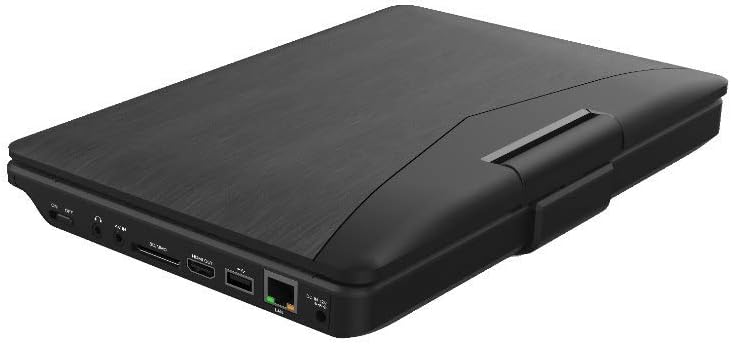
Figur 3.2: Side view af den sorteweb Portable Blu-ray/DVD Player (SDVD1183-BW) when closed, highlighting the various input/output ports. These include the DC IN port, USB port, SD card slot, HDMI OUT port, and LAN (RJ45) port.
3.2 Sidepanelporte
- DC IN: Strømindgang til AC-adapteren.
- USB-port: Tilslut USB-flashdrev til medieafspilning.
- SD-kortplads: Insert SD memory cards for media playback.
- HDMI OUT: Connect to an external display (TV, monitor) for larger viewing.
- LAN (RJ45) Port: For wired network connection (if applicable for online features, though not explicitly stated for this model).
- Hovedtelefonstik: 3.5mm audio output for private listening.
4. Opsætning
4.1 Opladning af batteriet
- Connect the supplied AC power adapter to the DC IN port on the player.
- Sæt den anden ende af AC-adapteren i en almindelig stikkontakt.
- The charging indicator light will illuminate, typically red, during charging. It will change color (e.g., green or off) when fully charged.
- Vent cirka 4-6 timer til en fuld opladning før første brug.
4.2 Tænd/sluk
- For at tænde: Open the screen and press the MAGT button. The screen will light up.
- For at slukke: Tryk og hold på MAGT knappen, indtil skærmen slukker.
5. Betjeningsvejledning
5.1 Playing Blu-ray/DVD Discs
- Sørg for, at afspilleren er tændt.
- Åbn forsigtigt dækslet til diskbakken.
- Place a Blu-ray or DVD disc onto the spindle with the label side facing up. Press down gently until it clicks into place.
- Close the disc tray cover. The player will automatically detect the disc and begin playback or display the disc menu.
- Use the navigation buttons and ENTER to select options from the disc menu.
- Brug AFSPIL/PAUSE, STOP, FF, og REW knapper til at styre afspilning.
5.2 Playing Media from USB/SD Card
- Sæt et USB-flashdrev i USB-porten eller et SD-kort i SD-kortstikket.
- Tryk på MODE/KILDE -knappen for at vælge "USB" eller "SD" som inputkilde.
- Afspilleren vil vise file browser. Use the navigation buttons to browse your media files (videoer, fotos, musik).
- Trykke ENTER at vælge og afspille en file.
5.3 Justering af indstillinger
- Tryk på OPSÆTNING button to access the system settings menu.
- Use the navigation buttons to select categories such as "Video Setup," "Audio Setup," "Language Setup," etc.
- Trykke ENTER to enter a sub-menu and adjust settings like screen brightness, contrast, aspect ratio, audio output, and subtitle preferences.
- Trykke OPSÆTNING igen for at forlade menuen.
5.4 Tilslutning til en ekstern skærm (HDMI)
- Ensure both the portable player and the external display (TV/monitor) are powered off.
- Tilslut den ene ende af et HDMI-kabel (medfølger ikke) til HDMI OUT port on the portable player.
- Connect the other end of the HDMI cable to an HDMI input port on your external display.
- Power on both devices. Select the corresponding HDMI input on your external display.
- The portable player's output will now be displayed on the external screen. The portable player's screen may turn off or mirror the content, depending on settings.
5.5 Brug af hovedtelefoner
- Plug standard 3.5mm headphones into the headphone jack on the side of the player.
- De interne højttalere vil automatisk slå lyden fra, når der tilsluttes hovedtelefoner.
- Juster lydstyrken ved hjælp af VOL +/- knapper.
6. Vedligeholdelse
6.1 Rengøring af enheden
- Afbryd altid strømadapteren før rengøring.
- Brug en blød, tør og fnugfri klud til at tørre de udvendige overflader af.
- For the screen, use a screen-specific cleaning cloth or solution, applying it to the cloth first, not directly to the screen.
- Brug ikke slibende rengøringsmidler, voks eller opløsningsmidler.
6.2 Pleje af disken
- Handle discs by their edges to avoid fingerprints and scratches on the playing surface.
- Opbevar diske i deres etuier, når de ikke er i brug.
- If a disc is dirty, wipe it gently from the center outwards with a soft, lint-free cloth. Do not use harsh chemicals.
7. Fejlfinding
| Problem | Mulig årsag | Løsning |
|---|---|---|
| Afspilleren tænder ikke. | Batteriet er afladet. Strømadapteren er ikke tilsluttet eller defekt. | Connect the AC adapter and charge the battery. Ensure the AC adapter is securely connected to both the player and a working power outlet. |
| Intet billede på skærmen. | Screen brightness too low. HDMI cable connected to external display. | Adjust screen brightness in the SETUP menu. Disconnect HDMI cable or ensure external display is correctly configured. |
| Ingen lyd. | Lydstyrken er for lav eller slået fra. Hovedtelefoner er tilsluttet. Audio settings incorrect. | Øg lydstyrken ved hjælp af VOL+ knap. Disconnect headphones if you want sound from speakers. Check audio settings in the SETUP menu. |
| Disken kan ikke afspilles. | Disken er snavset, ridset eller isat forkert. Disc format not supported. Region code mismatch. | Clean the disc and reinsert it correctly. Ensure the disc is a supported Blu-ray or DVD format. This player supports region-free or compatible region discs. |
| USB/SD media not recognized. | Forkert inputkilde valgt. File format ikke understøttet. USB drive/SD card corrupted or incompatible. | Trykke MODE/KILDE to select "USB" or "SD". Refer to specifications for supported file formater. Try a different USB drive or SD card. Ensure it is formatted correctly (e.g., FAT32). |
8. Specifikationer
- Model: SDVD1183-BW
- Skærmstørrelse: 11.4 tommer
- Skærmopløsning: 1280x720
- Medietype: Blu-Ray, DVD
- Forbindelse: USB, SD Card Slot, HDMI Out, LAN (RJ45), 3.5mm Headphone Jack
- Strømkilde: AC Adapter, Built-in Lithium Ion Battery
- Varens vægt: Cirka 4.15 pund (1.88 kg)
- Produktmål (LxBxH): 16 x 14.5 x 3.5 tommer (40.64 x 36.83 x 8.89 cm)
- Fabrikant: Sortweb
9. Garanti og support
For warranty information and technical support, please refer to the documentation provided at the time of purchase or contact the retailer. As this product is often sold as "Renewed," specific warranty terms may vary. Please consult the Amazon Renewed Guarantee for details regarding refurbished products purchased through Amazon.
For further assistance, you may also visit the official Blackweb støtte webwebstedet eller kontakt deres kundeservice, hvis tilgængelig.