Indledning
This manual provides essential instructions for the safe and efficient operation of your AmazonBasics Bread Maker. Please read all instructions carefully before first use and retain this manual for future reference. This appliance is designed for household use only.
Vigtige sikkerhedsinstruktioner
- Sørg altid for, at apparatet er taget ud af stikkontakten før rengøring eller når det ikke er i brug.
- Nedsænk ikke apparatet, ledningen eller stikket i vand eller andre væsker.
- Hold hænder, hår, tøj og redskaber væk fra bevægelige dele under drift.
- Do not touch hot surfaces. Use oven mitts when handling hot parts like the bread pan or baked bread.
- Sørg for, at apparatet er placeret på en stabil, varmebestandig overflade, væk fra brandfarlige materialer.
- Hold nøje opsyn med børn, når apparatet er i brug.
Produkt overview
Familiarize yourself with the components of your bread maker for optimal use.

Billede: Front view of the AmazonBasics Bread Maker. This image displays the overall design of the appliance, including the control panel and viewvindue på låget.
Hovedkomponenter:
- Hovedenhed: Indeholder motor, varmeelement og kontrolpanel.
- Låg: Funktioner a viewvinduet til at overvåge bageprocessen.
- Kontrolpanel: Includes display, menu buttons, and function buttons.
- Brødform: Removable non-stick pan where ingredients are mixed and baked.
- Æltepaddel: Detachable paddle inside the bread pan for mixing and kneading dough.
- Målekop og ske: For accurate ingredient measurement (usually included).
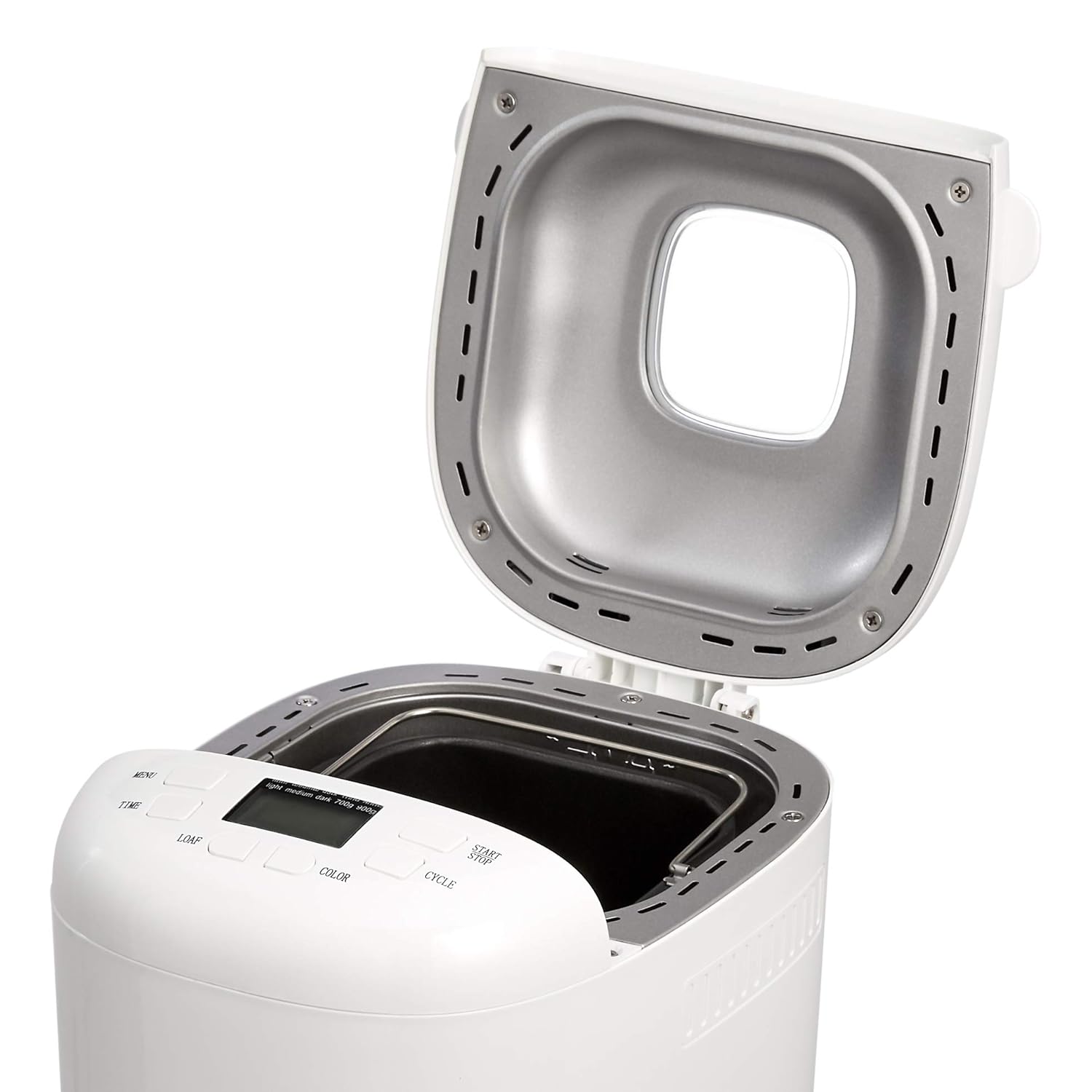
Billede: Top-down view of the AmazonBasics Bread Maker with the lid open, revealing the interior cavity where the bread pan is placed.

Billede: Close-up of the removable bread pan with its handle, showing the non-stick interior and the shaft for the kneading paddle.
Opsætning
Udpakning og første brug
- Tag forsigtigt brødbagemaskinen og alt tilbehør ud af emballagen.
- Wash the bread pan and kneading paddle with warm, soapy water. Rinse thoroughly and dry completely.
- Aftør ydersiden af apparatet med adamp klæde. Brug ikke slibende rengøringsmidler.
- Before first use, it is recommended to run the BAKE program (Program 14) for 10 minutes without ingredients to burn off any manufacturing residues. Ensure good ventilation during this process.
Placering
Place the bread maker on a stable, level, and heat-resistant surface. Ensure there is adequate ventilation around the appliance, with at least 10-15 cm of clear space on all sides and above. Do not place it near heat sources or in direct sunlight.
Betjeningsvejledning
Kontrolpanel

Billede: Nærbillede view of the control panel on the AmazonBasics Bread Maker, showing the digital display and various function buttons like MENU, TIME, LOAF, COLOR, CYCLE, and START/STOP.
- MENU: Vælger et af de 15 tilgængelige programmer.
- TIME (+/-): Justerer forsinkelsestimeren for udskudt bagning.
- LOAF: Selects loaf size (700g or 900g).
- FARVE: Selects crust color (Light, Medium, Dark).
- CYKLUS: Used for custom program settings (Program 15).
- START / STOP: Starter, sætter på pause eller annullerer et program.
- LCD-skærm: Shows program number, time remaining, loaf size, and crust color.
Tilføjelse af ingredienser
Always add ingredients in the order specified by your recipe. Typically, liquids are added first, followed by dry ingredients, with yeast placed last, away from liquids and salt.
- Attach the kneading paddle to the shaft inside the bread pan.
- Add all liquid ingredients to the bread pan.
- Add dry ingredients, ensuring the yeast is placed in a small well on top of the flour, away from liquids and salt.
- Place the bread pan into the bread maker and close the lid.
Valg af et program
The AmazonBasics Bread Maker offers 15 programs:
- GRUNDLÆGGENDE: For white and mixed breads.
- FRANSK: Til lette brød lavet af fint mel.
- Fuld hvede: For breads with whole wheat flour.
- HURTIG: Til hurtig tilberedning af hvidt brød.
- SØD: For sweet breads with additives like fruit or sugar.
- GLUTENFRI: Til glutenfri opskrifter.
- DEJ: For preparing dough for rolls, pizza, etc., without baking.
- KNEADING: Kun til æltning af dej.
- KAGE: For cakes and quick breads using baking powder/soda.
- SANDWICH: For light, fluffy sandwich bread.
- SPECIALITY: For specific recipes not covered by other programs.
- MARMELADE: Til fremstilling af hjemmelavet syltetøj og marmelade.
- YOGHURT: For preparing yogurt.
- BAGE: Til bagning af færdiglavet dej eller til at tilføje ekstra bagetid.
- HOMEMADE: Muliggør brugerdefineret indstilling af ælte-, hæve- og bagetid.
Tryk på MENU button repeatedly to cycle through the programs until the desired program number appears on the display.
Loaf Size and Crust Color
- Tryk på LOAF button to select between 700g and 900g loaf sizes, depending on your recipe.
- Tryk på FARVE button to choose your preferred crust darkness: Light, Medium, or Dark.
Forsinket timerfunktion
To delay the start of a program, use the TIME (+/-) buttons. Set the desired delay time, including the baking cycle duration. For example, if a program takes 3 hours and you want the bread ready in 8 hours, set the delay timer to 8:00. Do not use the delay timer with recipes containing perishable ingredients like milk, eggs, or fresh fruit.
Start og stop
- Tryk på START/STOP button once to begin the selected program. The colon on the display will flash, indicating operation.
- For at sætte et program på pause, tryk på START/STOP once. To resume, press it again.
- To cancel a program, press and hold the START/STOP button for approximately 3 seconds until a beep sounds and the display returns to the default setting.
Removing Baked Bread
Once the program is complete, the bread maker will beep and may enter a 'Keep Warm' cycle. Unplug the appliance. Using oven mitts, carefully remove the bread pan by twisting it counter-clockwise and lifting it out. Invert the pan to release the bread onto a wire rack to cool. If the kneading paddle remains in the bread, remove it carefully with a non-metallic utensil after the bread has cooled slightly.
Vedligeholdelse og rengøring
Regular cleaning ensures the longevity and performance of your bread maker.
Cleaning the Bread Pan and Kneading Paddle
- After each use, allow the bread pan and kneading paddle to cool completely.
- Fill the bread pan with warm, soapy water and let it soak for 10-15 minutes to loosen any stuck-on dough or residue.
- Remove the kneading paddle and clean both the pan and paddle with a soft sponge or cloth. Do not use abrasive materials or metal utensils, as this can damage the non-stick coating.
- Skyl grundigt og tør helt inden opbevaring eller næste brug.
Rengøring af ydersiden
- Unplug the bread maker and allow it to cool.
- Tør de udvendige overflader af med en blød, damp klæde.
- Do not use harsh chemicals, abrasive cleaners, or immerse the main unit in water.
- Rengør viewing window with a soft, damp klæde.
Opbevaring
Ensure the bread maker is clean, dry, and completely cool before storing. Store it in a dry place, away from direct sunlight and out of reach of children.
Fejlfinding
Se følgende tabel for almindelige problemer og deres løsninger.
| Problem | Mulig årsag | Løsning |
|---|---|---|
| Brødet hæver ikke eller hæver for meget. | Incorrect yeast amount, old yeast, incorrect water temperature, wrong ingredient ratio. | Check yeast freshness and quantity. Ensure water is lukewarm (not too hot or cold). Verify ingredient measurements. |
| Brødet er for tæt eller tungt. | For meget mel, for lidt væske, utilstrækkelig æltning, forkert program valgt. | Accurately measure flour and liquid. Ensure the correct program is selected for the recipe. |
| Æltepaddel sidder fast i brød. | Almindelig forekomst. | Allow bread to cool slightly, then carefully remove the paddle with a non-metallic utensil. |
| Bread pan difficult to remove. | Residue buildup or pan not properly seated. | Ensure pan is clean. Twist firmly counter-clockwise to unlock. |
| Apparatet starter ikke. | Ikke tilsluttet, strømmen er slukkettage, START/STOP not pressed correctly. | Check power connection. Ensure START/STOP button is pressed firmly. |
Specifikationer
Technical details for the AmazonBasics Bread Maker BM1349DB-GS.
- Modelnummer: BM1349DB-GS
- Magt: 550W
- Brødstørrelser: 700 g, 900 g
- Antal programmer: 15
- Varens vægt: 3 kg 630 g
- Emnedimensioner (LxBxH): 29.7 x 14.2 x 29.2 centimeter
- Produktplejeinstruktioner: Tør af med en tør klud
Garanti og support
Garantioplysninger
This AmazonBasics Bread Maker comes with a 1 års garanti from the date of purchase. Please retain your proof of purchase for warranty claims. The warranty covers manufacturing defects under normal household use. It does not cover damage resulting from misuse, accident, alteration, or unauthorized repair.
Kundesupport
For technical assistance, troubleshooting beyond this manual, or warranty inquiries, please contact AmazonBasics customer support through the Amazon website or your local Amazon customer service channels. Provide your model number (BM1349DB-GS) and purchase details when contacting support.


