1. Introduktion og produktoversigtview
The PIXAPRO ORTA600B Video Lighting Panel is a versatile and powerful LED lighting solution designed for various applications, including video conferencing, photography, studio work, and content creation. This kit includes the circular ORTA600B LED panel, two LINEAR80 LED panels, light stands, a boom arm, and a clamshell reflector, providing a comprehensive lighting setup for professional and amateur users alike.
This manual provides detailed instructions for the safe and effective setup, operation, and maintenance of your PIXAPRO ORTA600B lighting system.
2. Sikkerhedsoplysninger
Læs alle sikkerhedsinstruktioner omhyggeligt, inden produktet tages i brug. Manglende overholdelse af disse instruktioner kan resultere i elektrisk stød, brand eller alvorlig personskade.
- Elektrisk sikkerhed:
- Always use the provided power adapters and cables.
- Do not operate the lights with wet hands or in wet conditions.
- Sørg for, at strømkilden matcher voltage krav til enheden.
- Tag stikket ud af stikkontakten, når enheden ikke er i brug, eller før rengøring.
- Varme:
- The LED panels can become warm during extended use. Avoid direct contact with the light surface when operating.
- Ensure adequate ventilation around the light panels to prevent overheating.
- Håndtering og placering:
- Handle the equipment with care. Avoid dropping or subjecting it to strong impacts.
- Place light stands on a stable, level surface to prevent tipping.
- Do not block the ventilation openings on the light panels.
- Keep the equipment away from water, flammable liquids, and corrosive materials.
- Øjenbeskyttelse:
- Do not stare directly into the LED lights when they are on, as this may cause eye strain or damage.
3. Pakkens indhold
Bekræft, at alle nedenstående varer er til stede i din pakke:
- 1x PIXAPRO ORTA600B Circular LED Panel
- 2x PIXAPRO LINEAR80 LED Panels
- 3x Light Stands (typically 2 for LINEAR80, 1 for ORTA600B)
- 1x Boom Arm with Counterweight
- 1x Clamshell Reflector/Diffuser
- Power Adapters and Cables for all LED Panels
- Carry Bag (for kit components)
4. Opsætningsvejledning
4.1 Samling af lysstativer
Extend the legs of each light stand until they are fully spread and stable. Secure the legs using the locking knob. Extend the central column to the desired height and tighten the locking collars.

Figure 4.1: An assembled light stand with legs extended for stability.
4.2 Attaching the ORTA600B LED Panel
Mount the ORTA600B circular LED panel onto the top spigot of one of the light stands. Ensure it is securely fastened using the panel's mounting knob. Adjust the tilt angle as needed.
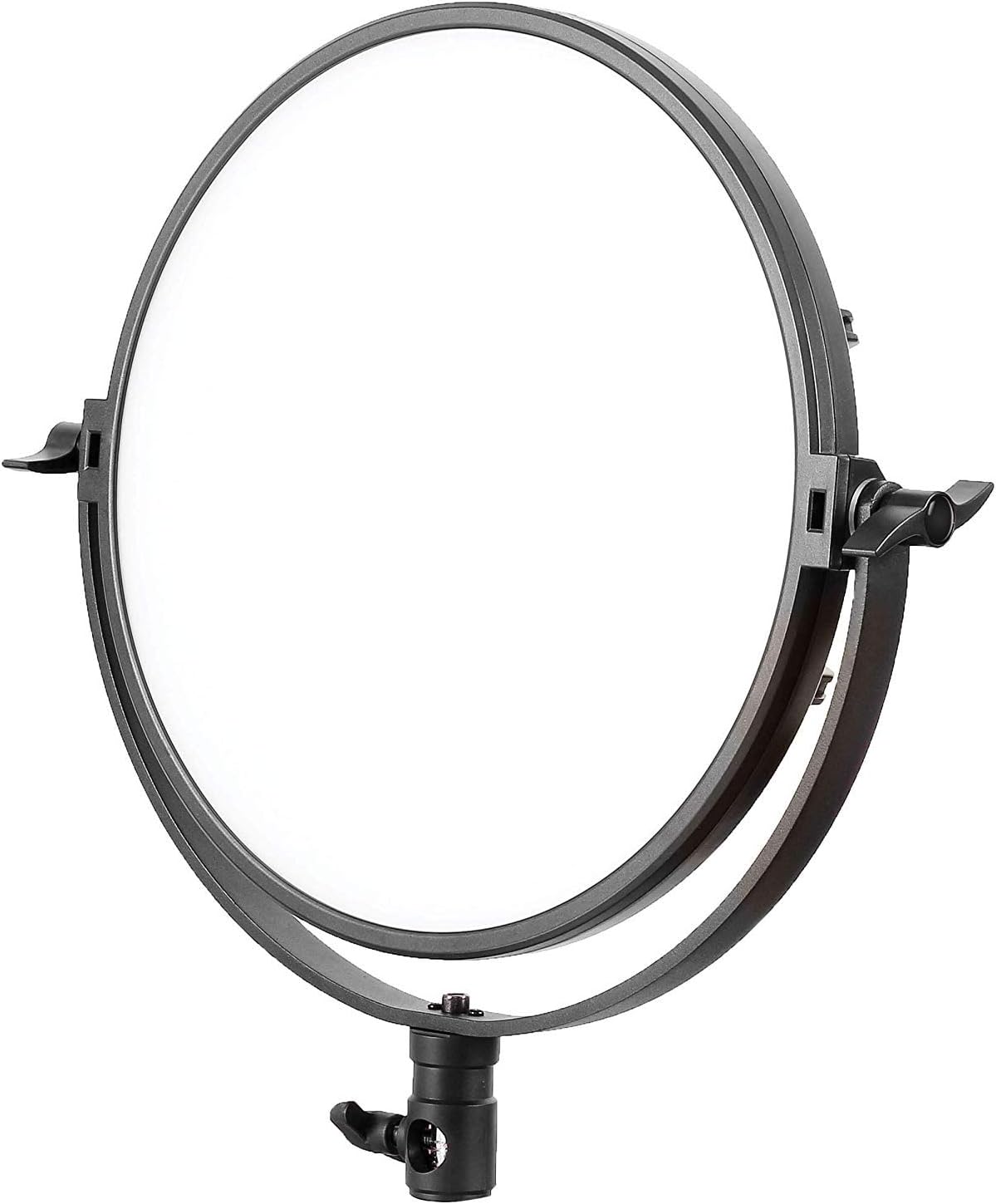
Figure 4.2: The PIXAPRO ORTA600B circular LED panel.
4.3 Attaching the LINEAR80 LED Panels
Attach each LINEAR80 LED panel to the remaining two light stands. Secure them firmly. These panels are often used as side or fill lights.
4.4 Assembling and Positioning the Boom Arm
The boom arm allows for overhead lighting or precise positioning. Attach the boom arm to a heavy-duty light stand or C-stand. Secure the counterweight to the opposite end of the arm to balance the weight of the light fixture.
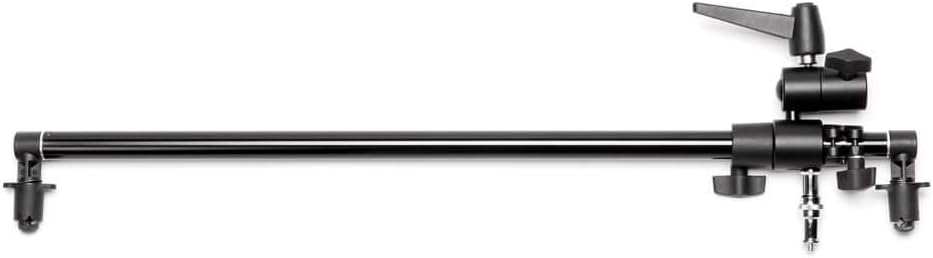
Figure 4.3: A boom arm, used for extending light placement.

Figure 4.4: A light stand with an attached boom arm, demonstrating typical setup.
4.5 Setting up the Clamshell Reflector
The clamshell reflector can be mounted on a stand or held to shape and direct light, often used for portrait photography to create a flattering catchlight in the eyes.

Figure 4.5: A clamshell reflector mounted on a stand.
4.6 Tilslutning af strøm
Connect the power adapters to each LED panel and then plug them into a suitable power outlet. Ensure all connections are secure before powering on.

Figur 4.6: Et example of the full PIXAPRO ORTA600B kit setup, including the ORTA600B, LINEAR80 panels, stands, and clamshell reflector.
5. Betjeningsvejledning
5.1 Tænd/sluk
Locate the power switch on each LED panel (ORTA600B and LINEAR80). Flip the switch to the "ON" position to power on the light. Flip it to "OFF" to power off.
5.2 Adjusting Brightness (Dimming)
Each panel features a control knob or buttons to adjust the light intensity. Rotate the knob or press the buttons to increase or decrease the brightness output to your desired level.
5.3 Adjusting Color Temperature (ORTA600B)
The ORTA600B panel allows for adjustment of color temperature (CCT) to match ambient light or create specific moods. Use the dedicated control knob or buttons to cycle through or fine-tune the color temperature, typically ranging from warm (e.g., 3200K) to cool (e.g., 5600K).
5.4 Using the LINEAR80 Panels
The LINEAR80 panels are ideal for edge lighting, hair light, or creating a broad, soft light source. Adjust their position and angle to complement the main light from the ORTA600B.
6. Vedligeholdelse
- Rensning:
- Before cleaning, ensure the unit is powered off and unplugged.
- Use a soft, dry cloth to wipe down the exterior of the light panels and stands.
- For genstridige mærker, en let damp en klud med mildt rengøringsmiddel kan bruges, efterfulgt af en tør aftørring.
- Brug ikke slibende rengøringsmidler, opløsningsmidler eller stærke kemikalier.
- Opbevaring:
- When not in use, store the lighting kit in its original packaging or the provided carry bag.
- Opbevares på et køligt, tørt sted væk fra direkte sollys og ekstreme temperaturer.
- Kabelstyring:
- Regularly inspect power cables for any signs of damage. Replace damaged cables immediately.
- Avoid kinking or bending cables excessively.
7. Fejlfinding
| Problem | Mulig årsag | Løsning |
|---|---|---|
| Lyset tændes ikke. | Ingen strøm, løs forbindelse, defekt strømadapter. | Check if the power cable is securely plugged into the light and the outlet. Try a different outlet. Ensure the power switch is "ON". |
| Lyset flimrer eller dæmpes uventet. | Unstable power supply, loose connection, overheating. | Ensure stable power. Check all cable connections. Allow the unit to cool down if it has been in continuous use. |
| Betjeningen reagerer ikke. | Temporary software glitch, control panel issue. | Sluk enheden, vent 30 sekunder, og tænd den derefter igen. Hvis problemet fortsætter, skal du kontakte kundesupport. |
| Light stand is unstable. | Legs not fully extended, locking knob not tightened. | Ensure all legs are fully extended and spread. Tighten all locking knobs on the stand. Use sandbags or weights for added stability, especially with boom arms. |
8. Specifikationer
| Feature | Detalje |
|---|---|
| Mærke | PIXAPRO |
| Model | ORTA600B (C-030805) |
| Produkttype | LED Video Lighting Panel Kit |
| Lyskilde | LED |
| Farvetemperatur | Adjustable (specific range not provided, typical for LED panels) |
| Dæmpning | Ja |
| ASIN | B07TKCF5MY |
| Dato først tilgængelig | 17. november 2019 |
9. Garanti og support
PIXAPRO products are designed for reliability and performance. For warranty information, please refer to the warranty card included with your purchase or visit the official PIXAPRO website. If you encounter any issues not covered in the troubleshooting section, or require further assistance, please contact PIXAPRO customer support.
Kontaktoplysninger: Please refer to the PIXAPRO official website or your purchase documentation for the most up-to-date contact details for customer service and technical support.


