1. Introduktion
The AIYIMA DAC-A2 is a versatile Digital-to-Analog Converter (DAC) and headphone amplifier designed to enhance your audio experience. It features multiple digital input options and provides both RCA line-out and a 3.5mm headphone output, along with adjustable bass and treble controls for personalized sound. This manual provides detailed instructions for setup, operation, and maintenance of your DAC-A2.

Figure 1: AIYIMA DAC-A2 Headphone Amplivligere DAC
2. Nøglefunktioner
- Integrated DAC and Headphone Amplifier: Built-in Hi-Fi headphone amplifier chip capable of driving 16ohm to 200ohm headphones.
- Advanced Chipset: Utilizes SA9023+CS8416+97220+NE5532 for optimal audio performance.
- Multiple Digital Inputs: Supports PC-USB, Optical, and Coaxial S/PDIF inputs, compatible with most home audio systems, PCs, and Macs.
- Versatile Outputs: Features RCA line-out for connecting to powered speakers or external amplifiers, and a 3.5mm headphone output.
- High-Resolution Audio: PC-USB input supports up to 24Bit/96KHz; Optical/Coaxial inputs support up to 24Bit/192kHz.
- Tone Controls: Independent bass and treble controls to customize your audio output.
- Compact and Portable: DC 5V power input allows for a portable and professional desktop audio device.

Figure 2: Internal Chipset and Features Overview
3. Pakkens indhold
Tjek venligst pakken for følgende varer:
- AIYIMA DAC-A2 Unit
- USB-kabel (type A til type B)
- Optical Cable (Toslink)
- DC 5V Power Cable (USB-C for power)
- Brugermanual
4. Kontrol og grænseflader

Figur 3: For- og bagpanellayout
4.1 Frontpanel
- Indgangskontakt: Toggle between USB, Optical (OPT), and Coaxial (COA) inputs.
- 3.5 mm hovedtelefonudgang: Tilslut dine hovedtelefoner her.
- Baskontrolknap: Adjust the low-frequency response.
- Diskantknap: Adjust the high-frequency response.
- Volumenkontrolknap: Adjust the overall output volume. This knob also acts as the power switch (push to turn on/off) and has a power indicator light.
4.2 Bagpanel
- DC 5V strømindgang: Connect the provided DC 5V power cable.
- RCA Audio Output (L/R): Connect to powered speakers or an external amplivligere.
- Koaksialindgang (COA): Connect a coaxial digital audio source.
- Optisk indgang (OPT): Connect an optical digital audio source.
- PC-USB-indgang: Connect to your computer for USB audio.
5. Opsætning og forbindelser
Follow these steps to connect your AIYIMA DAC-A2 to your audio system:
- Strømtilslutning: Connect the provided DC 5V power cable to the "DC 5V" input on the rear panel of the DAC-A2. Connect the other end to a suitable 5V power source (e.g., a USB wall adapter, not included). Ensure the power indicator light on the front panel illuminates when the volume knob is pressed to turn on.
- Inputkildeforbindelse: Vælg en af følgende inputmetoder:
- PC-USB: Connect the provided USB cable from your computer's USB port to the "PC-USB" input on the DAC-A2.
- Optisk: Connect an optical cable from your audio source (e.g., TV, game console) to the "OPTICAL" input.
- Koaksial: Connect a coaxial cable from your audio source to the "COAXIAL" input.
- Udgangsforbindelse: Choose one of the following output methods:
- RCA-udgang: Connect RCA cables from the "AUDIO OUT" (L/R) ports on the DAC-A2 to your powered speakers or an external amplifers input.
- 3.5 mm hovedtelefonudgang: Plug your headphones into the 3.5mm jack on the front panel. Note: The headphone output takes priority. If headphones are connected, sound will be routed to them and not the RCA outputs.
- Vælg input: Use the input switch on the front panel to select the desired audio source (USB, OPT, or COA).
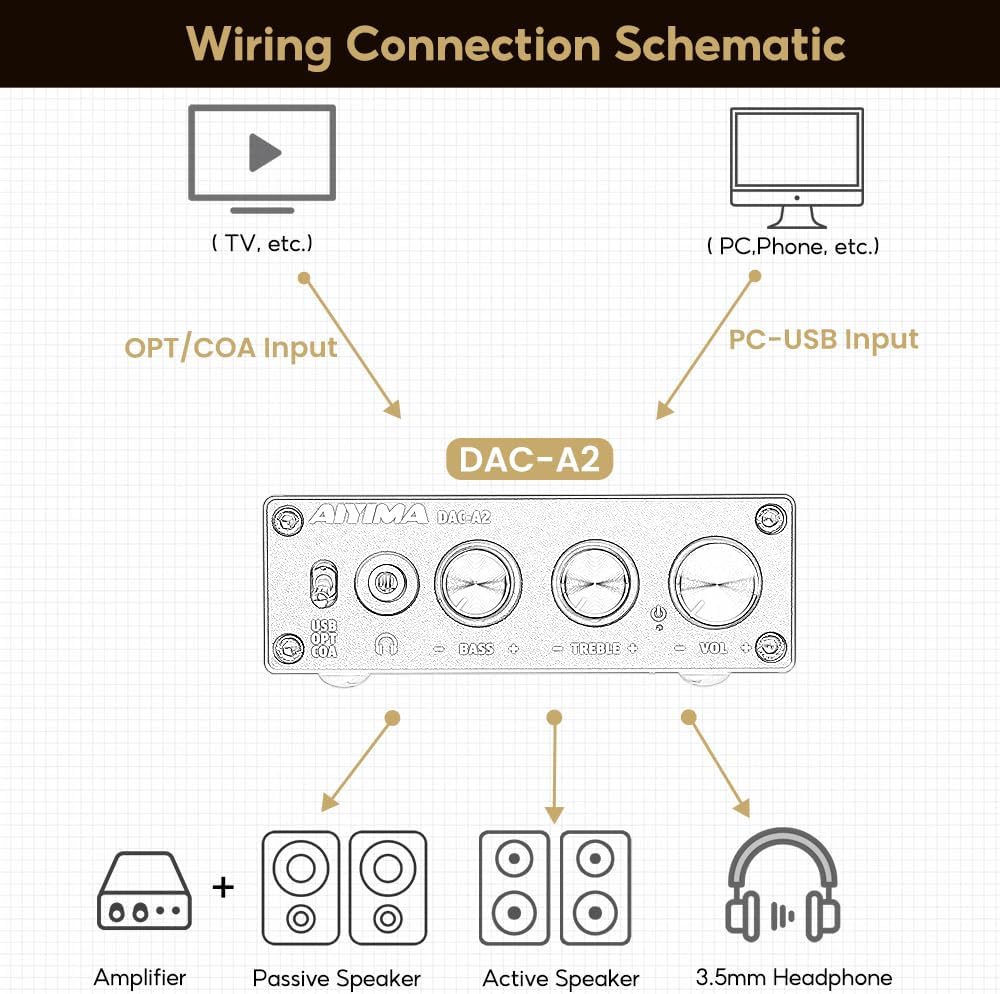
Figur 4: Tilslutningsdiagram
Video 1: Demonstrates connecting the AIYIMA DAC-A2 to a laptop and an amplifier, showing the audio output to speakers and headphones. It illustrates switching between PC-USB input and adjusting volume, bass, and treble controls.
6. Betjeningsvejledning
- Tænd/sluk: Press the Volume Control Knob to turn the unit on or off. The power indicator light will illuminate when on.
- Valg af input: Use the Input Switch (USB/OPT/COA) on the front panel to select your active audio source.
- Lydstyrkejustering: Rotate the Volume Control Knob clockwise to increase volume and counter-clockwise to decrease it.
- Basjustering: Rotate the Bass Control Knob to increase or decrease the bass frequencies according to your preference.
- Diskantjustering: Rotate the Treble Control Knob to increase or decrease the treble frequencies according to your preference.

Figure 5: Adjustable Bass and Treble Controls
Video 2: Shows the AIYIMA DAC-A2 in a desktop setup, demonstrating the connection of headphones and the adjustment of volume, bass, and treble controls for an enhanced audio experience.
7. Specifikationer

Figur 6: Produktmål
| Feature | Specifikation |
|---|---|
| Mærke | AIYIMA |
| Modelnummer | DAC-A2 |
| Chipsæt | SA9023+CS8416+97220+NE5532 |
| PC-USB-indgang Sampling Rate | 24Bit/96KHz |
| Optisk/koaksial indgang Sampling Rate | 24Bit/192kHz |
| Hovedtelefonimpedansområde | 16ohm to 200ohm |
| Maksimal forsyning Voltage | 5 volt |
| Minimumsforsyning Voltage | 5 volt (DC) |
| Interface Type | Coaxial, USB, Optical |
| Antal kanaler | 1 |
| Produktmål (L x B) | 3.86"L x 2.89"W (approx. 98mm x 73mm) |
| Varens vægt | 14.8 ounces (ca. 420 g) |
8. Fejlfinding
If you encounter issues with your DAC-A2, please refer to the following common problems and solutions:
- Ingen lydoutput:
- Ensure the DAC-A2 is powered on and the power indicator is lit.
- Verify that the correct input source (USB, OPT, COA) is selected using the front panel switch.
- Check all cable connections (input and output) are secure.
- If using headphones, ensure they are fully plugged into the 3.5mm jack. Remember the headphone output has priority over RCA.
- Adjust the volume knob on the DAC-A2 and ensure your connected speakers/amplifier also have their volume turned up.
- For PC-USB input, check your computer's sound settings to ensure the DAC-A2 is selected as the default playback device.
- Forvrænget eller dårlig lydkvalitet:
- Sørg for, at alle kabler er korrekt tilsluttet og ikke er beskadiget.
- Tjek lydkilden for kvalitetsproblemer.
- Adjust the Bass and Treble controls to see if they are set to extreme levels causing distortion.
- Ensure the power supply is stable and providing sufficient 5V power. An unstable power supply can cause noise.
- Intermitterende lyd:
- Tjek for løse kabelforbindelser.
- Ensure the power supply is consistent.
- If using PC-USB, try a different USB port on your computer or a different USB cable.
9. Vedligeholdelse
- Rensning: Brug en blød, tør klud til at rengøre enhedens yderside. Brug ikke flydende rengøringsmidler eller opløsningsmidler.
- Opbevaring: Opbevar enheden et køligt, tørt sted væk fra direkte sollys og ekstreme temperaturer.
- Håndtering: Undgå at tabe enheden eller udsætte den for kraftige stød.
- Ventilation: Sørg for tilstrækkelig ventilation omkring enheden for at forhindre overophedning.
10. Garanti og support
AIYIMA products are designed for reliability and performance. For warranty information, technical support, or service inquiries, please refer to the contact information provided with your purchase or visit the official AIYIMA webwebsted. Gem venligst din købsbevis til garantikrav.
11. Vigtige sikkerhedsoplysninger
- Do not expose this unit to rain, moisture, or extreme temperatures.
- Åbn ikke c'enasing. Der er ingen dele indeni, som kan serviceres af brugeren. Overlad al service til kvalificeret personale.
- Brug kun den angivne strømforsyning (DC 5V).
- Undgå at placere enheden i nærheden af varmekilder eller i direkte sollys.
- Opbevares utilgængeligt for børn.


