Indledning
This manual provides detailed instructions for setting up, operating, and maintaining your seenda Wireless Keyboard and Mouse Combo. Please read this manual thoroughly before use to ensure optimal performance and longevity of your device.
Pakkens indhold
- Trådløst tastatur
- Trådløs mus
- USB-modtager (opbevares i musens batterirum)
- Brugermanual
Note: AAA batteries are not included and must be purchased separately for both the keyboard and mouse.
Produkt overview
Familiarize yourself with the components of your wireless keyboard and mouse combo.

Image: The seenda Wireless Keyboard and Mouse Combo, showcasing the full-size keyboard, ergonomic mouse, and the compact USB receiver.
Tastaturfunktioner
- Full-size layout with numeric keypad
- Media/FN keys for quick access to functions
- Power Indicator, Caps Lock Indicator, NumLK Indicator, FN Lock Indicator
- Tænd/sluk afbryder
- Battery slot (requires 2 AAA batteries, not included)
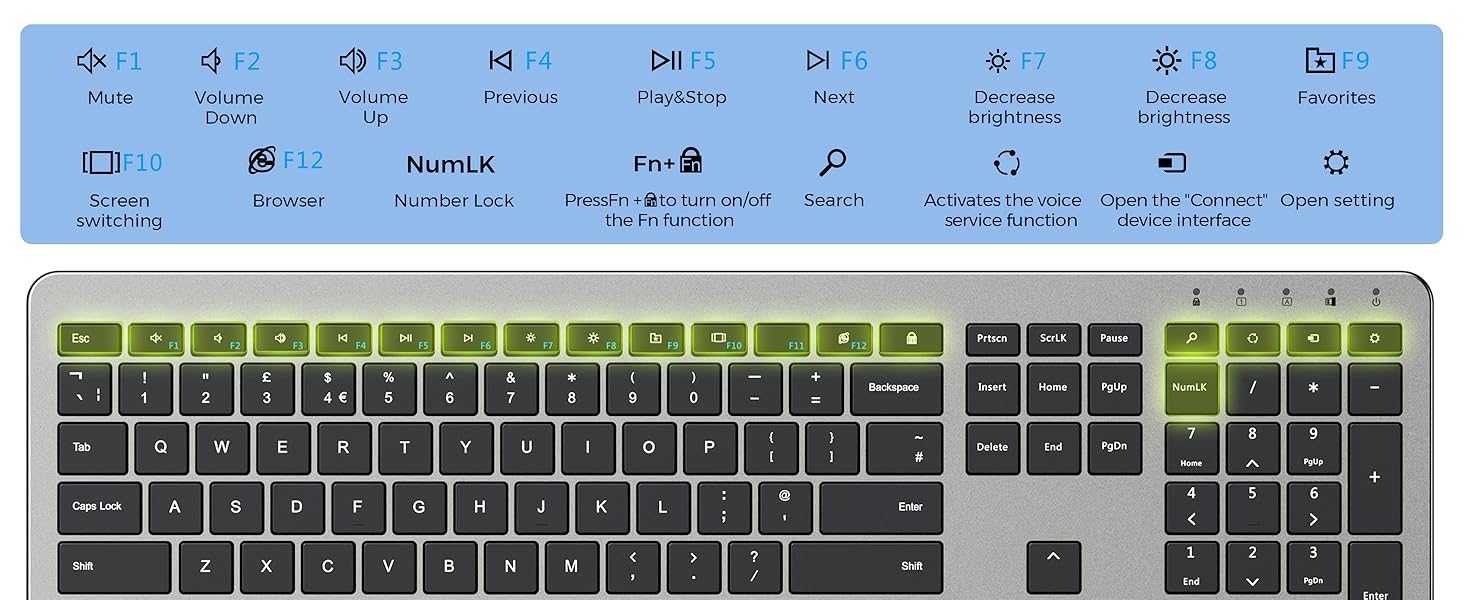
Image: Diagram illustrating the function keys (F1-F12) on the keyboard and their respective actions, such as mute, volume control, brightness adjustment, and browser access.
Musfunktioner
- Left and Right click buttons
- Scrollhjul
- DPI Switch Button (800-1200-1600 DPI)
- Strømafbryder
- Battery slot (requires 2 AAA batteries, not included)
- USB Receiver storage compartment
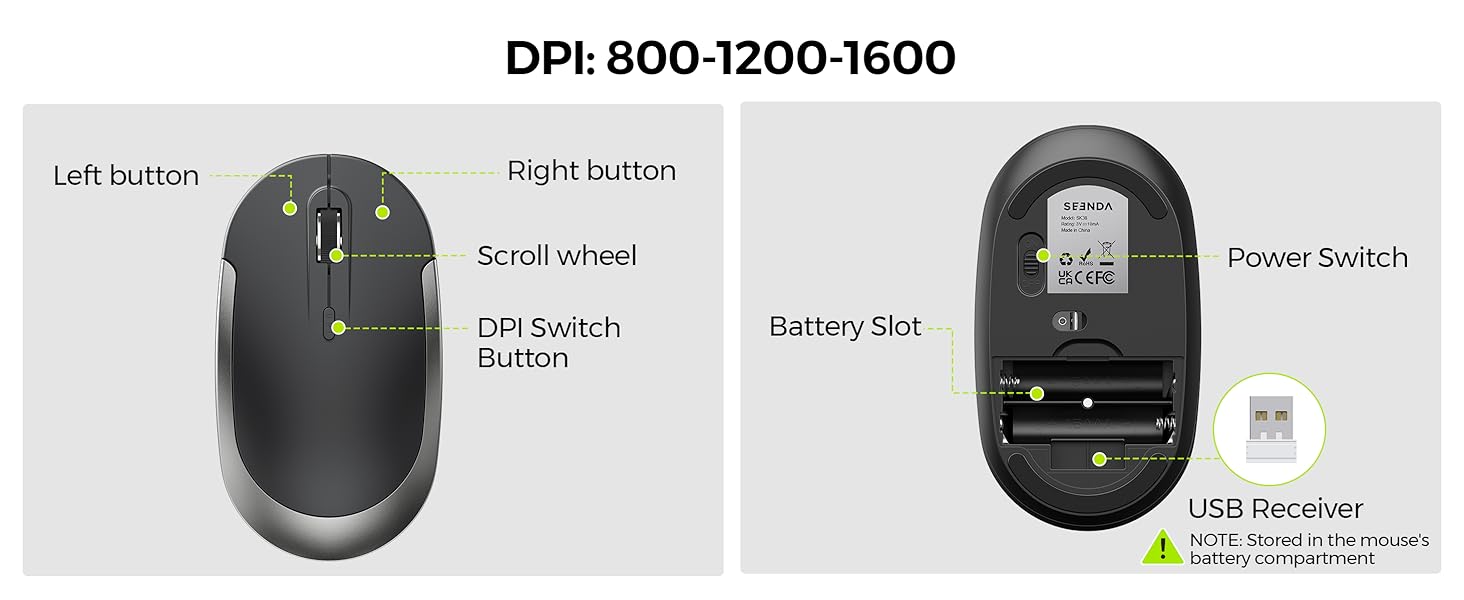
Image: Detailed diagram of the wireless mouse, highlighting the left button, right button, scroll wheel, DPI switch button, power switch, battery slot, and the location of the USB receiver.
Opsætningsinstruktioner
- Installer batterier:
- Open the battery compartment on the back of the keyboard and insert 2 AAA batteries (not included), ensuring correct polarity.
- Open the battery compartment on the bottom of the mouse and insert 2 AAA batteries (not included), ensuring correct polarity.
- Hent USB-modtager: The USB receiver is stored in the battery compartment of the mouse. Carefully remove it.
- Tilslut modtager: Sæt USB-modtageren i en ledig USB-port på din computer.
- Tænd:
- Tænd for tastaturet ved hjælp af afbryderknappen på bagsiden.
- Tænd for musen ved hjælp af afbryderknappen i bunden.
- Automatisk forbindelse: The keyboard and mouse should automatically connect to your computer within a few seconds. No additional drivers are typically required.
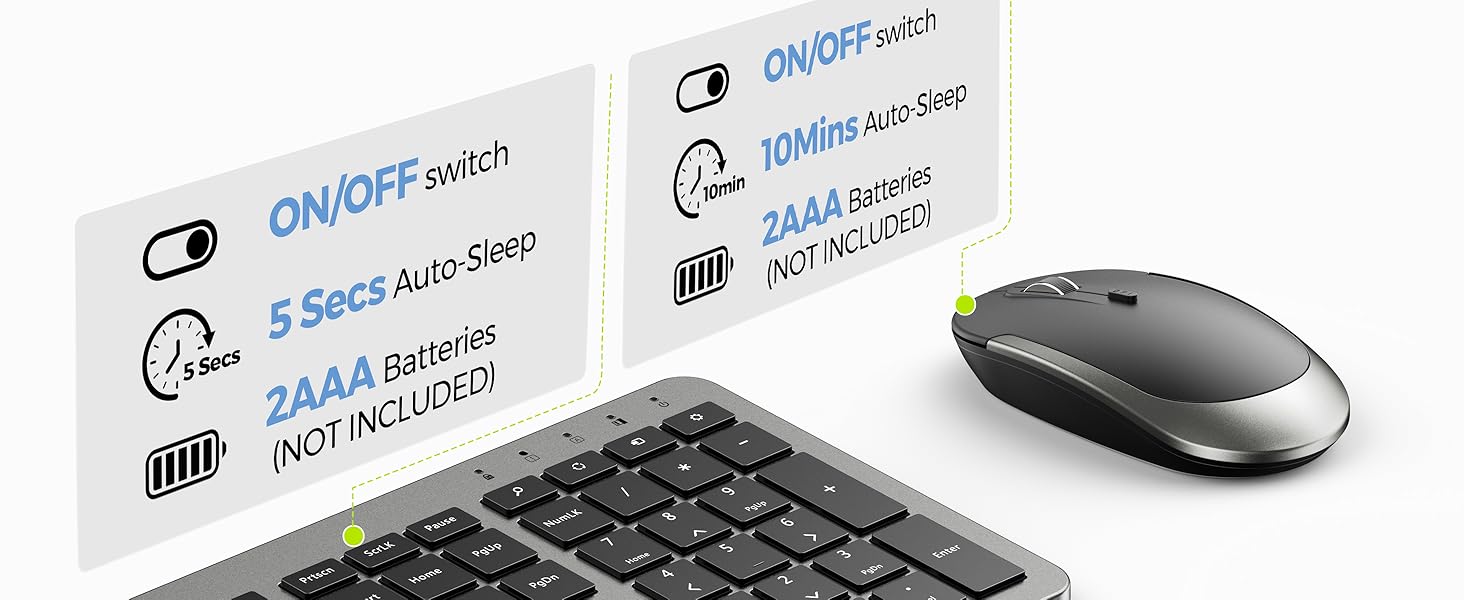
Image: Diagram showing the battery compartments for both the keyboard and mouse, indicating the need for 2 AAA batteries each. It also illustrates the auto-sleep feature for power saving.
Betjeningsvejledning
Tastaturbrug
- Function Keys (FN): The keyboard features multimedia and function keys (F1-F12). To activate the secondary functions printed on these keys, press and hold the FN tasten samtidig med den ønskede funktionstast.
- Numerisk tastatur: The dedicated numeric keypad provides efficient data entry. Ensure the Num Lock indicator is on for numeric input.
Brug af mus
- DPI-justering: The mouse features an adjustable DPI (Dots Per Inch) setting. Press the DPI-kontaktknap (located on top of the mouse) to cycle through sensitivity levels: 800, 1200, and 1600 DPI. This allows you to customize cursor speed for different tasks.
Intelligent dvaletilstand
To conserve battery life, both the keyboard and mouse are equipped with an intelligent sleep mode. If there is no activity for approximately 10 minutes, the devices will enter sleep mode. To wake them up, simply press any key on the keyboard or click the left/right button on the mouse. The devices will reactivate within 3 seconds.
Opretholdelse
- Rensning: Brug en blød, tør klud til at rengøre overfladerne på tastaturet og musen. Ved genstridigt snavs kan du bruge en let tør klud.amp cloth with mild soap can be used, ensuring no liquid enters the device.
- Udskiftning af batteri: When performance degrades or devices stop responding, replace the AAA batteries in both the keyboard and mouse. Dispose of old batteries responsibly.
- Opbevaring: When not in use for extended periods, turn off both the keyboard and mouse using their respective power switches to further conserve battery life. Store the USB receiver in the mouse's battery compartment to prevent loss.
Fejlfinding
| Problem | Løsning |
|---|---|
| Tastatur/mus reagerer ikke |
|
| Lag eller intermitterende forbindelse |
|
| Mouse cursor moves too fast/slow | Tryk på DPI-kontaktknap on the mouse to adjust sensitivity (800/1200/1600 DPI). |
| Function keys (F1-F12) not working as expected | Sørg for at du trykker på FN key simultaneously with the desired function key to activate its secondary function. |
Specifikationer
| Feature | Detalje |
|---|---|
| Produktdimensioner | 15.5 x 5 x 0.75 inches (Keyboard) |
| Varens vægt | 1.39 pund |
| Forbindelsesteknologi | 2.4G trådløs (USB-modtager) |
| Wireless Range | Op til 33 fod (10 meter) |
| Mus DPI-indstillinger | 800 / 1200 / 1600 DPI |
| Strømkilde | Keyboard: 2x AAA Batteries (not included) Mouse: 2x AAA Batteries (not included) |
| Kompatible enheder | Personal Computer (Windows OS recommended) |
| Speciel funktion | Numeric Keypad, Intelligent Sleep Mode |
Garanti og support
seenda products are designed for reliability and performance. For specific warranty information and customer support, please refer to the warranty card included with your product or visit the official seenda website. If you encounter any issues not covered in this manual, please contact seenda customer service for assistance.
Online support: Visit the seenda Store on Amazon


