1. Introduktion og overview
This manual provides detailed instructions for the setup, operation, and maintenance of your Marantz Melody M-CR412 Hi-Fi System. Please read this manual thoroughly before using the unit to ensure proper and safe operation. Keep this manual for future reference.

Figur 1: Forside view of the Marantz Melody M-CR412 Hi-Fi System, showcasing its elegant silver-gold design with a central display, CD tray, and control buttons.
2. Nøglefunktioner
- Kraftfuld lydudgang: Delivers 2 × 60W (into 6 ohms) or 4 × 30W for A/B speaker configuration, ensuring a rich and dynamic sound experience.
- Alsidig tilslutning: Equipped with two optical inputs for connecting to your TV, enhancing audio for movies and games.
- Kompakt design: Its compact size allows for flexible placement in various living spaces without compromising on sound quality.
- Trådløs streaming: Integrated Bluetooth for streaming music from popular services like Spotify, TuneIn, and Deezer.
- Integrated Radio Tuner: Supports both analog FM and digital DAB+ radio.
- CD Player & USB Input: Plays standard CDs (CD-R/RW) and supports high-resolution audio formats including WAV, FLAC, AIFF, ALAC, DSD, WMA, and MP3 via USB.
3. Opsætningsvejledning
3.1 Udpakning
Carefully remove the unit and all accessories from the packaging. Ensure all components are present:
- Marantz Melody M-CR412 Unit
- Fjernbetjening
- Quick Start Guide (refer to the full online manual for detailed instructions)
- Strømledning
- FM/DAB antenne
3.2 Tilslutning af højttalere
The M-CR412 supports either a 2-speaker (stereo) setup or a 4-speaker (A/B) setup. Connect your speakers to the appropriate terminals on the rear panel. Ensure correct polarity (+ to + and - to -) for optimal sound.

Figure 2: Rear panel connections of the Marantz Melody M-CR412, highlighting speaker terminals (A and B), digital optical inputs, analog input, USB port, and antenna connections.
For a 2-speaker setup, connect to either the A or B terminals. For a 4-speaker setup, connect two pairs of speakers to A and B terminals respectively. Ensure speaker impedance is within the recommended range (4-16 Ω).
3.3 Tilslutning af antenner
Connect the supplied FM/DAB antenna to the DAB/FM 50Ω coaxial input on the rear panel for radio reception.
3.4 Tilslutning af eksterne enheder
- Optical Inputs (TV, Game Console): Use an optical cable to connect your TV or other digital audio sources to the OPTICAL 1 (TV) or OPTICAL 2 inputs.
- Analog input: Connect analog audio devices (e.g., a turntable with a built-in phono preamp, or another audio player) to the ANALOG IN (RCA) ports.
- USB-indgang: Insert a USB storage device into the USB port on the rear panel for playing audio files.
- Subwooferudgang: If you have an active subwoofer, connect it to the SUBWOOFER OUT port.
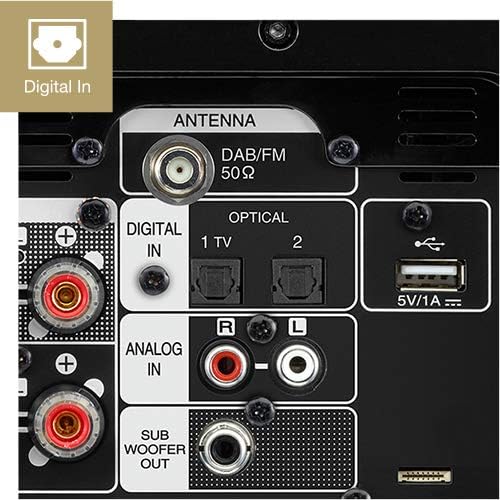
Figur 3: Detaljeret view of the digital optical inputs (1 TV, 2), analog RCA input, and USB port on the rear panel, facilitating connection to various audio sources.
3.5 Strømtilslutning
Once all audio connections are made, connect the supplied power cord to the AC IN port on the rear of the unit and then to a wall outlet.
4. Betjeningsvejledning
4.1 Tænd/sluk
Press the power button on the front panel or the remote control to turn the unit on or off. The unit will enter standby mode when turned off.
4.2 Kildevalg
Press the "INPUT" button on the front panel or the remote control to cycle through available input sources (CD, DAB/FM, Bluetooth, USB, Optical 1, Optical 2, Analog In).
4.3 CD-afspilning
- Select "CD" as the input source.
- Gently insert a CD into the disc tray. The tray will automatically pull the disc in.
- Playback will usually start automatically. Use the Play/Pause, Stop, Skip (forward/backward) buttons on the front panel or remote control to manage playback.
4.4 Radio (DAB+/FM)
- Select "DAB/FM" as the input source.
- For DAB+, the unit will scan for available stations. For FM, you can manually tune or use auto-scan.
- Use the navigation buttons to browse stations or recall presets.

Figure 4: The Marantz Melody M-CR412 supports DAB+ digital radio, offering a wide range of stations with clear digital sound.
4.5 Bluetooth-streaming
- Select "Bluetooth" as the input source. The unit will enter pairing mode.
- On your smartphone or tablet, enable Bluetooth and search for "Marantz M-CR412" (or similar).
- Select the unit to pair. Once paired, you can stream audio from your device.
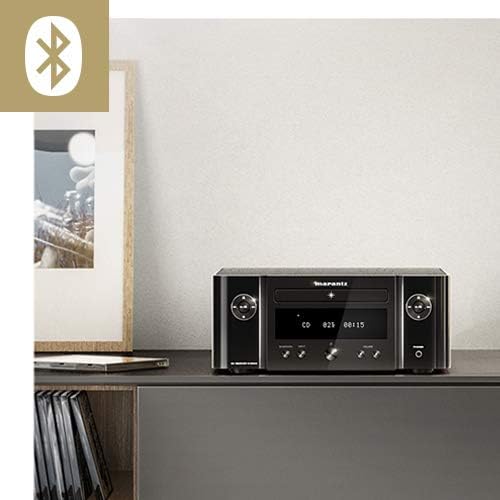
Figure 5: The Marantz Melody M-CR412 features integrated Bluetooth connectivity, allowing for wireless audio streaming from compatible devices.
4.6 USB-afspilning
- Insert a USB storage device (e.g., USB flash drive) into the USB port on the rear panel.
- Select "USB" as the input source.
- Brug navigationsknapperne til at søge efter og vælge lyd files. The M-CR412 supports WAV, FLAC, AIFF, ALAC, DSD, WMA, and MP3 formats.

Figure 6: The Marantz Melody M-CR412 supports a wide range of audio formats via its USB input, including high-resolution files like WAV, FLAC, AIFF, ALAC, and DSD, in addition to WMA and MP3.
4.7 Lydstyrkekontrol
Adjust the volume using the large rotary knob on the front panel or the Volume +/- buttons on the remote control.
5. Vedligeholdelse
- Rensning: Use a soft, dry cloth to clean the unit’s exterior. Do not use abrasive cleaners, waxes, or solvents.
- Ventilation: Sørg for tilstrækkelig ventilation omkring enheden for at forhindre overophedning. Bloker ikke ventilationsåbningerne.
- Diskbakke: Keep the CD disc tray clean and free of dust. Avoid touching the lens inside the tray.
- Opbevaring: If storing the unit for an extended period, disconnect it from the power outlet and cover it to protect from dust.
6. Fejlfinding
If you encounter issues with your Marantz Melody M-CR412, refer to the following common problems and solutions:
| Problem | Mulig årsag | Løsning |
|---|---|---|
| Ingen strøm | Netledningen er frakoblet; problem med stikkontakten. | Ensure power cord is securely connected. Try a different outlet. |
| Ingen lyd | Incorrect input source selected; speaker cables loose; volume too low; mute activated. | Select correct input. Check speaker connections. Increase volume. Deactivate mute. |
| CD not playing / "Unsupported" message | Disc inserted incorrectly; disc dirty/scratched; unsupported disc format. | Reinsert disc correctly. Clean disc. Ensure it’s an audio CD or supported data CD (WMA/MP3). |
| Bluetooth not connecting or no audio | Unit not in pairing mode; device too far; interference; previously paired device connected. | Ensure unit is in Bluetooth input mode. Move device closer. Disconnect from other Bluetooth devices. Try re-pairing. |
| Unit automatically turns off (after 8 hours) | Auto-standby timer activated. | Refer to the full online manual for instructions on disabling or adjusting the auto-standby timer. |
For more detailed troubleshooting, please refer to the comprehensive online user manual available on the Marantz support webwebsted.
7. Specifikationer
| Feature | Detalje |
|---|---|
| Mærke | Marantz |
| Modelnavn | M-CR412 |
| Produktdimensioner | 30.3 x 28 x 11.1 cm (11.9 x 11 x 4.4 tommer) |
| Varens vægt | 4.7 kg (10.4 lbs) |
| Output Wattage | 60 Watts (2x60W into 6 ohms or 4x30W) |
| Forbindelsesteknologi | USB, Trådløs (Bluetooth) |
| Understøttede lydformater | WAV, FLAC, AIFF, ALAC, DSD, WMA, MP3 |
| Antal kanaler | 4 (for A/B speaker configuration) |
| Kompatible enheder | Tablet, smartphone |
| Strømkilde | Elektrisk med ledning |
| Farve | Silver-Gold |
| Inkluderede komponenter | Quick Start Guide, Remote Control |
8. Garanti og support
Marantz products are designed and manufactured to the highest quality standards. For information regarding warranty coverage, technical support, or service, please visit the official Marantz website or contact your local authorized Marantz dealer.
Always ensure you have your product model number (M-CR412) and serial number ready when contacting support.
Online ressourcer:


