Indledning
Tak for købetasing the Artlii Stone Full HD 1080P Projector. This manual provides essential information for setting up, operating, and maintaining your projector to ensure optimal performance and longevity. Please read this manual thoroughly before using the product and keep it for future reference.
The Artlii Stone projector delivers a native 1080P resolution, supporting 4K content, with 7200L brightness and an 8000:1 contrast ratio. It features a 75%-100% zooming function, a 300-inch projection screen capability, and a HIFI level built-in speaker. Connectivity options include dual HDMI, VGA, and USB inputs, making it versatile for various home theater and presentation needs.
Sikkerhedsoplysninger
For at undgå brand eller elektrisk stød må dette apparat ikke udsættes for regn eller fugt. For at undgå elektrisk stød må kabinettet ikke åbnes. Overlad kun service til kvalificeret personale.
- Se ikke direkte ind i projektorlinsen, når lamp er tændt.
- Sørg for tilstrækkelig ventilation omkring projektoren. Bloker ikke ventilationsåbningerne.
- Brug kun den strømadapter, der følger med projektoren.
- Hold projektoren væk fra vand eller andre væsker.
- Tag projektorens stik ud af stikkontakten under tordenvejr eller når den ikke bruges i længere perioder.
- Do not attempt to repair this product yourself. Contact qualified service personnel for assistance.
Pakkens indhold
Bekræft at alle varer er inkluderet i din pakke:

The image displays the Artlii Stone projector along with its standard accessories. These include the projector unit, a remote control (batteries not included), a power cable, an AV cable, an HDMI cable, and the instruction manual.
- Artlii Stone Projector
- Strømkabel
- Fjernbetjening (batterier ikke inkluderet)
- AV-kabel
- HDMI kabel
- Instruktionsmanual
Produkt overview
Familiarize yourself with the main components and ports of your Artlii Stone projector.

Dette billede viser forsiden og toppen view of the Artlii Stone projector, highlighting its sleek design, the main projection lens, and the focus/keystone adjustment dials located on the top surface.

The rear panel of the Artlii Stone projector is displayed, detailing the various connectivity ports. These include an SD Card slot, two HDMI ports, a USB port, and a VGA port, along with an audio output jack.
Nøglekomponenter:
- Projektionsobjektiv: Sender billedet ud på skærmen.
- Fokusring: Justerer klarheden af det projicerede billede.
- Keystone-korrektion: Korrigerer trapezformet forvrængning af billedet.
- Kontrolpanel: Knapper til grundlæggende navigation og indstillinger.
- Indgangsporte: HDMI (x2), USB, VGA, Audio Output, Micro SD.
- Ventilationsåbninger: Til varmeafledning.
- Indbygget højttaler: Giver lydoutput.
Opsætning
1. Placement and Projection Size
Position the projector on a stable, flat surface. The distance from the projector to the screen will determine the size of the projected image. Refer to the diagram below for recommended projection distances and corresponding screen sizes.

This diagram illustrates the relationship between projection distance and screen size. For example, a distance of 1.7m yields a 50-inch screen, 2.6m for an 80-inch screen, and up to 9.2m for a 300-inch screen.
- Minimum Projection Distance: 2 meters (approx. 50 inches)
- Maximum Projection Distance: 9 meters (approx. 300 inches)
2. Strømtilslutning
Connect the supplied power cable to the projector's power input port and then plug the other end into a wall outlet (AC 90-240V, 50-60Hz).
3. Tilslutning af inputenheder
The Artlii Stone projector supports various input sources. Choose the appropriate cable and port for your device.

This image illustrates the wide range of devices compatible with the Artlii Stone projector. It shows connections for game consoles, Blu-ray/DVD players, home cinema systems, TV boxes, iPads/Tablets, streaming devices (like Roku, Chromecast), USB drives, and SD cards.
- HDMI: Connect Blu-ray players, game consoles, laptops, TV sticks, etc., using an HDMI cable. The projector has two HDMI ports.
- USB: Indsæt et USB-flashdrev for at afspille medier files direkte.
- VGA: Tilslut ældre computere eller bærbare computere med et VGA-kabel.
- Micro SD: Indsæt et Micro SD-kort for at afspille medier files.
- AV: Use the supplied AV cable to connect devices with RCA outputs.
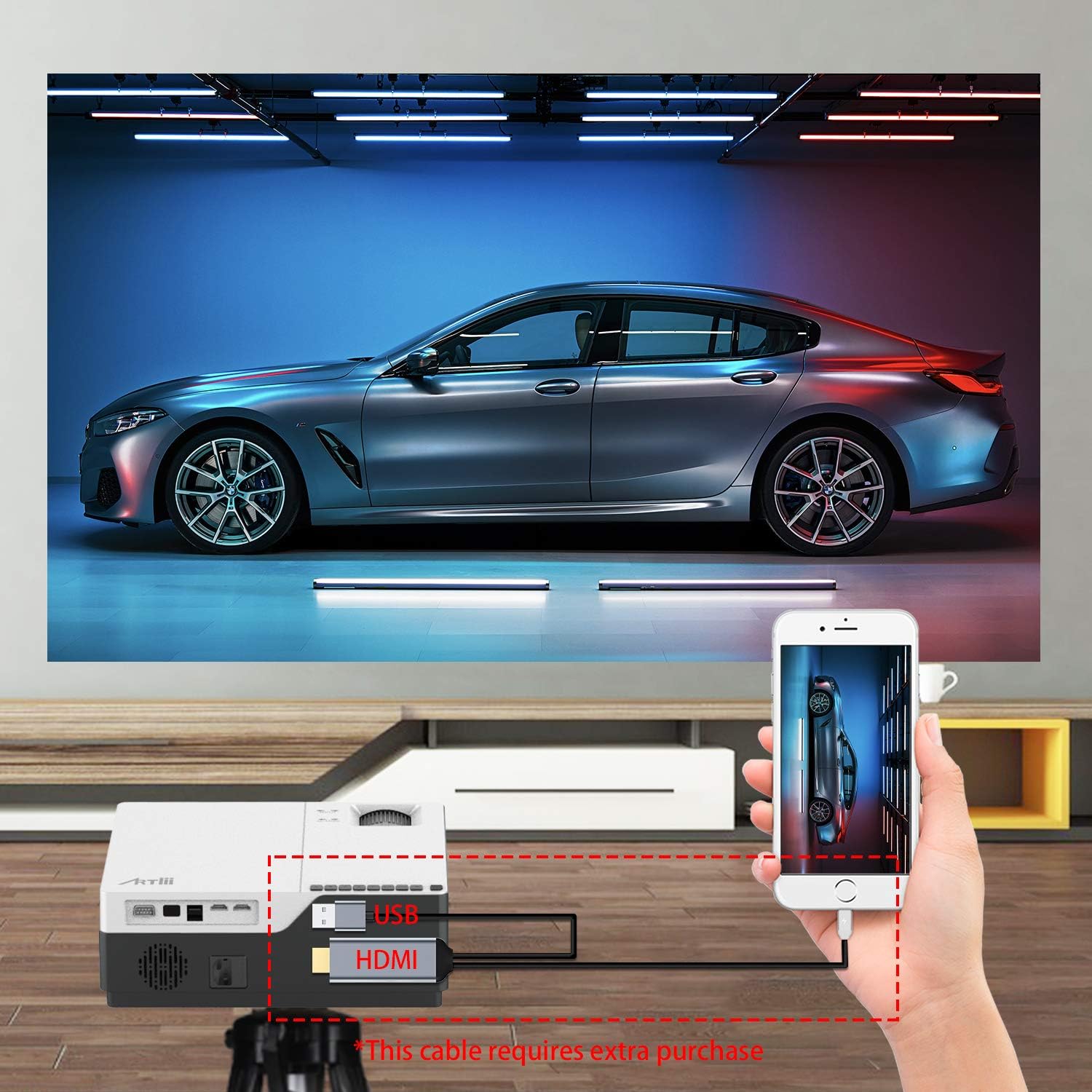
This image demonstrates connecting a smartphone to the projector. Note that an additional cable (not included) may be required for smartphone connectivity, typically an MHL to HDMI adapter or a USB-C to HDMI adapter, depending on the phone model.
4. Fokus- og Keystone-justering
After powering on and selecting an input source, adjust the image for clarity and shape.
- Fokus: Drej fokusringen på projektorlinsen, indtil billedet fremstår skarpt og klart.
- Keystone-korrektion: If the projected image appears trapezoidal (wider at the top or bottom), use the keystone correction dial to adjust it into a perfect rectangle. The projector supports ±15 degrees keystone correction.
Drift
1. Tænd/sluk
- Tænd: Tryk på tænd/sluk-knappen på projektoren eller fjernbetjeningen.
- Sluk: Press the power button again. The projector will go into standby mode.
2. Menu navigation
Use the buttons on the projector's control panel or the remote control to navigate the on-screen menu. Select input sources, adjust picture settings (brightness, contrast, color), and sound settings.
3. Zoomfunktion
The Artlii Stone projector features a digital zoom function, allowing you to adjust the screen size without moving the projector.

This image illustrates the projector's zoom capability, allowing the user to reduce the screen size from 100% down to 75% using the remote control, providing flexibility in screen fitting without physical repositioning.
- Access the zoom setting through the projector's menu.
- Adjust the zoom factor between 75% and 100% to fit your screen or wall.
4. Lydudgang
The projector has a built-in HIFI level speaker. For external audio, connect speakers or a sound system to the Audio Output port.
Opretholdelse
- Rengøring af linser: Use a soft, lint-free cloth specifically designed for optical lenses to gently wipe the projector lens. Do not use abrasive cleaners or cloths.
- Fjernelse af støv: Regularly clean the projector's exterior with a soft, dry cloth. Use a small brush or compressed air to clear dust from ventilation openings.
- Opbevaring: Når projektoren ikke er i brug i længere perioder, skal den opbevares køligt og tørt, beskyttet mod støv og ekstreme temperaturer.
Fejlfinding
| Problem | Mulig årsag | Løsning |
|---|---|---|
| Intet billede på skærmen | Løst strømkabel; Forkert inputkilde; Enhed ikke tilsluttet korrekt. | Check power connection; Select correct input source (HDMI, USB, VGA); Ensure device is connected securely. |
| Billedet er sløret | Fokus ikke justeret; Projektoren er for tæt på/langt fra skærmen. | Juster fokusringen; Juster projektionsafstanden. |
| Billedet er trapezformet | Keystone ikke justeret. | Juster keystone-korrektionshjulet. |
| Ingen lyd | Volume too low; Muted; External speakers not connected/powered. | Increase volume; Unmute; Check external speaker connections and power. |
| Fjernbetjening virker ikke | Batterier døde/forkert isat; Blokering mellem fjernbetjening og projektor. | Udskift batterierne; Sørg for frit udsyn til IR-modtageren. |
Specifikationer
| Feature | Detalje |
|---|---|
| Driftssystem | Linux |
| Projektionsteknologi | TFT LCD |
| Projektionsafstand | 2-9m |
| Projektionsstørrelse | 50-300 tommer |
| Indfødt opløsning | 1920x1080 pixels (Full HD) |
| Lamp Type | LED |
| LED Lamp Liv | 55,000 timer |
| Kasteforhold | 1.35 |
| Kontrastforhold | 8000:1 |
| Zoomfaktor | 75%-100% |
| Keystone korrektion | ±15 grader |
| Projektionstilstand | Front projection, Rear projection, Lifting |
| Materiale | Metal + ABS |
| Indbygget højttaler | Ja |
| Input bindtage | AC 90-240V, 50-60Hz |
| Stik | HDMI x2, USB, Audio Output, Micro SD |
| Vægt | 5.7 lb (2.59 kg) |
| Dimension (L x B x H) | 9.1 x 12.1 x 4.1 tommer (23.1 x 30.7 x 10.4 cm) |
Bemærk: Specifikationerne kan ændres uden varsel.
Garanti og support
The Artlii Stone Projector comes with a comprehensive warranty and support:
- Money Back Policy: 1-month 100% Money Back Policy.
- Factory Policy: 1-year factory policy.
- Certificeringer: FCC, RoHS, and CE certified.
- Local Maintenance: Artlii provides a local maintenance center with professional engineers to assist you.
For any inquiries or technical assistance, please refer to the contact information provided on the Artlii official webwebstedet eller din købsdokumentation.


