Indledning
This manual provides essential instructions for the installation, operation, maintenance, and troubleshooting of your SonicWall TZ400 Network Security Appliance. Please read this document thoroughly before setting up your device to ensure proper functionality and security.
1. Opsætning og installation
1.1 Pakkens indhold
Bekræft at alle varer er til stede i pakken:
- SonicWall TZ400 Appliance
- Strømadapter
- Strømledning
- Ethernet kabel
- Lynstartguide (se denne manual for detaljerede instruktioner)
1.2 Fysisk installation
- Placering: Position the appliance in a cool, dry, and well-ventilated area. Ensure adequate space around the device for airflow. Avoid placing it near heat sources or in direct sunlight.
- Strømtilslutning: Connect the power adapter to the appliance's power input and then plug the power cord into a suitable electrical outlet. The device will power on automatically.
- Netværksforbindelser:
- Connect your Internet Service Provider's (ISP) modem or router to the WAN port (typically labeled X1) on the SonicWall TZ400 using an Ethernet cable.
- Connect your internal network devices (e.g., switch, computer) to the LAN ports (typically labeled X0, X2-X6) using Ethernet cables.
- For initial configuration, connect a computer directly to the X0 (LAN) port.

Billede 1.1: Front view of the SonicWall TZ400 appliance, showing LED indicators, a USB port, and network port labels.
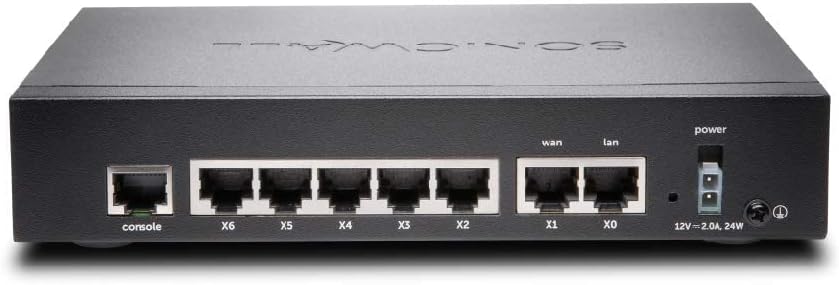
Billede 1.2: Bag view of the SonicWall TZ400 appliance, displaying the console port, multiple LAN/WAN Ethernet ports (X0-X6), and the power input.
1.3 Adgang til indledende konfiguration
- Ensure your computer is connected to the X0 (LAN) port of the TZ400.
- Configure your computer's network adapter to obtain an IP address automatically (DHCP). The TZ400's X0 interface typically acts as a DHCP server.
- Åbn a web browser and navigate to the default management IP address, usually http://192.168.168.168.
- Log in using the default credentials (refer to the Quick Start Guide or device label for initial username and password). You will be prompted to change the password upon first login.
- Follow the on-screen setup wizard to configure basic network settings, including WAN connectivity and time zone.
2. Betjening
2.1 Netværkskonfiguration
The SonicWall TZ400 provides extensive options for network configuration. Access these settings via the web ledelsesgrænseflade.
- WAN-indstillinger: Configure your Internet connection type (e.g., Static IP, DHCP, PPPoE).
- LAN-indstillinger: Manage IP addressing, DHCP server settings, and VLANs for your internal network.
- Wireless (if applicable): If your model includes wireless capabilities, configure SSIDs, security protocols, and wireless channels. The TZ400 supports 802.11ac wireless type.
2.2 Sikkerhedsfunktioner
The TZ400 is designed to provide robust network security. Key features include:
- Firewall regler: Create and manage access rules to control traffic flow between network zones.
- System til forebyggelse af indtrængen (IPS): Protect against network-based attacks and vulnerabilities.
- Gateway Anti-Virus/Anti-Spyware: Scan incoming and outgoing traffic for malicious content.
- VPN (virtuelt privat netværk): Establish secure connections for remote access or site-to-site communication.
- Indholdsfiltrering: Control access to inappropriate or unproductive web tilfreds.
2.3 Monitoring and Reporting
The appliance offers tools to monitor network activity and generate reports:
- Systemlogfiler: View detailed logs of network events, security alerts, and system status.
- Overvågning i realtid: Observe current network traffic, connections, and resource utilization.
- Rapporter: Generate customizable reports on security threats, user activity, and bandwidth usage.
3. Vedligeholdelse
3.1 firmwareopdateringer
Regularly update the appliance firmware to ensure optimal performance, security, and access to new features. Firmware updates can be performed via the web ledelsesgrænseflade.
- Download the latest firmware from the official SonicWall support portal.
- Navigate to the firmware update section in the web interface.
- Upload den downloadede firmware file and follow the on-screen prompts. The device will reboot after the update.
3.2 Konfiguration af sikkerhedskopiering og gendannelse
It is recommended to regularly back up your configuration settings. This allows for quick recovery in case of misconfiguration or system issues.
- Backup: From the management interface, locate the backup option to save your current configuration to your computer.
- Restore: Use the restore option to upload a previously saved configuration file til apparatet.
3.3 Regelmæssig kontrol
Perform periodic checks to ensure the appliance is functioning correctly:
- Monitor system logs for unusual activity or errors.
- Verify that all security services (e.g., IPS, Anti-Virus) are active and up-to-date.
- Check the physical connections and LED indicators for normal operation.
4. Fejlfinding
4.1 Fælles problemer
- Ingen internetadgang:
- Verify the WAN cable connection to your ISP modem.
- Check WAN status in the management interface.
- Ensure your ISP connection is active.
- Kan ikke få adgang til administrationsgrænsefladen:
- Confirm your computer is connected to a LAN port (e.g., X0) and has an IP address from the TZ400.
- Try pinging the default gateway (192.168.168.168).
- Clear your browser cache or try a different browser.
- Langsom netværksydelse:
- Check for high CPU or memory usage in the system monitoring section.
- Review firewall logs for excessive blocked traffic or attacks.
- Ensure firmware is up-to-date.
4.2 LED-indikatorer
LED'erne på frontpanelet giver statusoplysninger:
- Power LED: Angiver strømstatus. Konstant grøn for normal drift.
- Activity LEDs (10/100/act, 1000/act): Indicate network activity and link speed for each port.
- Refer to the device's specific documentation for a complete list of LED behaviors and their meanings.
4.3 Fabriksindstilling
A factory reset will revert all configuration settings to their default values. This should be used as a last resort for troubleshooting.
- Locate the reset button on the device (often recessed).
- With the device powered on, use a paperclip or similar pointed object to press and hold the reset button for approximately 10-15 seconds until the device reboots.
- After the reset, the device will return to its default IP address and credentials.
5. Specifikationer
| Feature | Detalje |
|---|---|
| Mærke | Sonicwall |
| Modelnavn | TZ400 |
| Varemodelnummer | TZ400 |
| Operativsystem | SonicOS 6.x |
| Trådløs type | 802.11ac |
| Frekvensbåndsklasse | Dual-Band |
| Forbindelsesteknologi | Ethernet |
| Antenne type | Indre |
| Varens vægt | 0.16 ounces (ca. 4.54 g) |
| Produktmål (LxBxH) | 5.28 x 7.48 x 3.26 tommer |
| Dato først tilgængelig | 4. juni 2015 |
6. Garanti og support
6.1 Produktgaranti
The SonicWall TZ400 Network Security Appliance typically comes with a manufacturer's limited warranty. For specific warranty terms and conditions, including duration and coverage, please refer to the documentation provided with your purchase or visit the official SonicWall website. Warranty details may vary based on region and reseller.
6.2 Teknisk support
For technical assistance, firmware downloads, and additional resources, visit the official SonicWall support portal. Please note that access to certain technical support services, including direct assistance from SonicWall, may require an active support license or subscription. Ensure your device is registered on MySonicWALL to manage licenses and access available support options.
For mere information, besøg: SonicWall support


