Indledning
Thank you for choosing the ONIKUMA K8 Gaming Headset. This manual provides detailed instructions for setting up, operating, and maintaining your headset to ensure optimal performance and longevity. The ONIKUMA K8 is a versatile wired gaming headset designed for an immersive audio experience across multiple platforms, including PC, PlayStation 4, Xbox One, tablets, and laptops. It features a high-quality stereo sound, an omni-directional microphone, and integrated LED lighting.

Image: The ONIKUMA K8 Gaming Headset, featuring black earcups with red LED accents, a flexible microphone, and a padded headband.
Pakkens indhold
Kontroller venligst pakken omhyggeligt for at sikre, at alle varer er til stede:
- 1 x ONIKUMA K8 Gaming Headset
- 1 x 3.5mm Audio Splitter Cable (for PC with separate audio/mic jacks)
- 1 x Brugermanual (dette dokument)

Image: The ONIKUMA K8 Gaming Headset shown alongside its included 3.5mm audio splitter cable, which separates the headphone and microphone signals.
Opsætningsvejledning
The ONIKUMA K8 headset connects via a 3.5mm audio jack and a USB-A connector for LED lighting. Follow these steps to connect your headset to your device:
Tilslutning til pc:
- If your PC has a single 3.5mm combined audio jack (headphone and microphone), plug the headset's 3.5mm jack directly into it.
- If your PC has separate 3.5mm jacks for audio (green) and microphone (pink), use the included 3.5mm audio splitter cable. Plug the headset's 3.5mm jack into the splitter, then plug the splitter's green plug into your PC's audio output and the pink plug into your PC's microphone input.
- Plug the USB-A connector into an available USB port on your PC to power the LED lights.
Forbinder til PlayStation 4:
- Plug the headset's 3.5mm jack into the 3.5mm port on your PS4 controller.
- Go to PS4 Settings > Devices > Audio Devices.
- Indstil "Output til hovedtelefoner" til "Al lyd".
- Juster "Lydstyrkekontrol (hovedtelefoner)" til det ønskede niveau.
- The USB connection is not required for audio on PS4, but can be used for LED lighting if a USB port is available on the console or a powered USB hub.
Connecting to Xbox One:
- For Xbox One controllers with a 3.5mm jack, plug the headset's 3.5mm jack directly into the controller.
- For older Xbox One controllers without a 3.5mm jack, an Xbox One Stereo Headset Adapter (sold separately) is required. Plug the headset into the adapter, then plug the adapter into the controller.
- The USB connection is not required for audio on Xbox One, but can be used for LED lighting if a USB port is available on the console or a powered USB hub.
Connecting to Tablet/Laptop:
- Plug the headset's 3.5mm jack into the 3.5mm audio port on your tablet or laptop.
- Plug the USB-A connector into an available USB port for LED lighting.

Image: The ONIKUMA K8 Gaming Headset with its USB connector (for LED power) and 3.5mm audio jack clearly visible, ready for connection to various devices.
Betjeningsvejledning
The ONIKUMA K8 headset features intuitive controls for an enhanced gaming and communication experience.
Lydstyrkekontrol:
- Locate the volume roller on the left earcup or inline control on the cable.
- Roll it up to increase volume and down to decrease volume.
Mikrofonbrug:
- The headset features a flexible, omni-directional microphone. Adjust its position for optimal voice pickup.
- To mute the microphone, locate the microphone mute switch on the inline control or left earcup and toggle it.
LED belysning:
- The LED lights on the earcups are powered by the USB-A connector. Ensure the USB-A connector is plugged into a powered USB port for the lights to function.
- There is no separate switch for the LED lights; they illuminate automatically when the USB is connected.
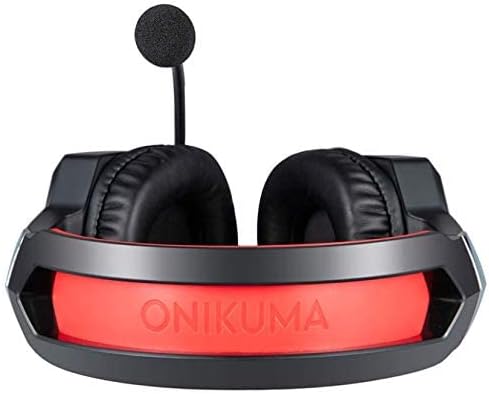
Billede: En top-down view of the ONIKUMA K8 Gaming Headset, highlighting the illuminated ONIKUMA logo on the earcups when the LED feature is active.
Opretholdelse
Proper care and maintenance will extend the life of your ONIKUMA K8 headset.
- Rensning: Brug en blød, tør klud til at tørre ørekopperne og hovedbøjlen af. Ved genstridigt snavs kan du bruge en let tør klud.amp En klud kan bruges, men sørg for, at der ikke kommer fugt ind i højttalergitrene eller mikrofonen. Brug ikke skrappe kemikalier eller slibende rengøringsmidler.
- Opbevaring: Store the headset in a cool, dry place away from direct sunlight and extreme temperatures. Avoid tangling the cable by coiling it neatly.
- Håndtering: Do not pull on the cable to disconnect the headset. Always grasp the plug firmly. Avoid dropping the headset or subjecting it to strong impacts.
Fejlfinding
If you encounter issues with your ONIKUMA K8 headset, please refer to the following common problems and solutions:
| Problem | Mulig årsag | Løsning |
|---|---|---|
| Ingen lyd fra headsettet. |
|
|
| Mikrofon virker ikke. |
|
|
| LED-lysene virker ikke. |
|
|
Specifikationer
Detailed technical specifications for the ONIKUMA K8 Gaming Headset:
- Model: ONIKUMA K8
- Højttalerstørrelse: 50 mm
- Følsomhed: 106 +/- 3dB
- Impedans: 16Ω +/- 15 %
- Frekvensområde: 20Hz - 20KHz
- Mikrofondimensioner: 6.0 x 2.7 mm
- Mikrofonfølsomhed: -38 +/- 1dB
- Mikrofonimpedans: 2.2kΩ
- Mikrofonens retningsbestemmelse: Omni-directional
- Hovedtelefonstik: 3.5mm 4-pin (combined audio/mic)
- LED Drift Voltage: DC 5V (via USB)
- Forbindelse: Wired (3.5mm audio + USB for LED)
- Kabellængde: Cirka 2.2 meter / 7.22 fod
- Forsendelsesdimensioner: 21.4 x 18.2 x 10.2 cm
- Vægt: 480 gram
- Fabrikant: ONIKUMA
- ASIN: B07RDWLLVC
Garanti og support
ONIKUMA products are manufactured to high quality standards. For information regarding warranty coverage, technical support, or service inquiries, please refer to the warranty card included with your purchase or visit the official ONIKUMA webwebsted. Gem venligst din købsbevis til garantikrav.
For further assistance, you may contact ONIKUMA customer support through their official channels.


