Indledning
Thank you for choosing the RHM K222 Karaoke Machine. This versatile system is designed to deliver high-quality audio and an enjoyable karaoke experience for various indoor activities, including home entertainment, parties, and meetings. This manual provides essential information for setting up, operating, and maintaining your device to ensure optimal performance and longevity.

Figure 1: RHM K222 Karaoke Machine with two wireless microphones.
Sikkerhedsoplysninger
Læs venligst alle sikkerhedsinstruktioner omhyggeligt, inden produktet tages i brug. Gem denne manual til senere brug.
- This machine is designed for indoor use only. Do not expose it to rain, moisture, or extreme temperatures.
- Ensure the power adapter is connected to a compatible power outlet (110-240V, 50/60Hz).
- Du må ikke selv adskille, reparere eller ændre enheden. Overlad al service til kvalificeret personale.
- Keep the unit away from heat sources, direct sunlight, and strong magnetic fields.
- Undgå at blokere ventilationsåbningerne for at forhindre overophedning.
- Rengør enheden med en blød, tør klud. Brug ikke flydende rengøringsmidler eller aerosoler.
Pakkens indhold
Bekræft, at alle nedenstående varer er inkluderet i din pakke:
- RHM K222 Stereo Speaker Unit
- 2 x UHF trådløse mikrofoner
- Fjernbetjening
- Strømadapter
- USB Charging Cable (for microphones)
- AUX-kabel (3.5 mm)
- Optisk kabel
- Brugervejledning (dette dokument)
- 2 x mikrofonbeskyttere

Figure 2: All items included in the RHM K222 package.
Opsætning
Follow these steps to set up your RHM K222 Karaoke Machine:
- Strømtilslutning: Connect the power adapter to the DC IN port on the back of the karaoke machine and then plug it into a wall outlet. The unit will power on automatically or can be turned on using the power button on the top panel.
- Mikrofonopladning: Before first use, ensure the wireless microphones are fully charged using the provided USB charging cable. The microphones have a 400mAh rechargeable battery.
- Mikrofonparring: The two UHF wireless microphones are pre-paired with the main unit. Simply turn on the microphones, and they should automatically connect to the speaker.
- Tilslutning af lydkilde: Choose your preferred audio input method:
- Bluetooth: Press the 'MODE' button on the top panel or remote until 'BLUE' appears on the display. Enable Bluetooth on your device (e.g., smartphone, tablet) and select 'RHM K222' from the list of available devices to pair.
- Optisk: Connect an optical cable (included) from your TV's optical output to the OPTICAL input on the back of the karaoke machine. Select 'OPTICAL' mode on the unit.
- AUX: Use the provided 3.5mm AUX cable to connect your audio device (e.g., PC, MP3 player) to the 'LINE IN' port on the back of the machine. Select 'AUX' mode.
- USB: Indsæt et USB-drev, der indeholder lyd files into the USB port on the back of the machine. The unit will automatically switch to USB mode and begin playback.
- PC: Connect your PC to the 'PC' port on the back of the machine using a compatible cable. Select 'PC' mode.

Figure 3: Rear panel connections for various audio sources.
Betjeningsvejledning
Hovedenhedens kontrol
- Power knap: Located on the top panel. Press to turn the unit on/off.
- MODE knap: Cycles through input modes (Bluetooth, Optical, AUX, USB, PC).
- Volume Controls (VOL+/-): Adjust the overall volume of the speaker.
- Afspilningskontroller: Play/Pause, Next/Previous Track buttons are available on the top panel and remote.
Wireless Microphone Controls
The wireless microphones offer convenient control over your singing experience:
- Power knap: Tryk og hold nede for at tænde/slukke mikrofonen.
- Mikrofonlydstyrke: Use the dedicated volume buttons on the microphone to adjust your vocal volume independently.
- Echo Adjustment: Adjust the echo effect to add depth to your voice.
- Voice Mixing: Control the balance between your voice and the background music.
- Key Change: Juster musikkens toneart, så den passer til dit vokale register.

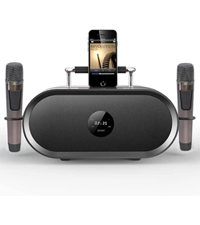
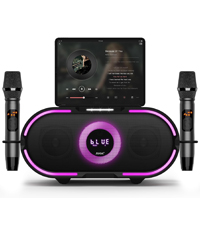
Figure 4: Microphone LED display, control panel, and charging port details.
Lydtilstande
The RHM K222 offers 5 distinct sound modes to enhance your audio experience:
- Original: Standard audio playback.
- Musik: Optimeret til generel musiklytning.
- KTV: Enhanced vocal presence for karaoke performances.
- Biograf: Provides a wider soundstage til filmvisning.
- Klassisk: Balanceret lydprofffile for classical music.

Figure 5: Explore different sound modes for various entertainment needs.
Opretholdelse
Korrekt vedligeholdelse sikrer din karaokemaskines levetid og optimale ydeevne.
- Rensning: Use a soft, dry, lint-free cloth to wipe down the exterior of the unit and microphones. Do not use abrasive cleaners, waxes, or solvents.
- Opbevaring: When not in use for extended periods, store the machine in a cool, dry place, away from direct sunlight and dust.
- Mikrofonpleje: Always place microphones back into their designated holders on the unit to prevent damage.
Fejlfinding
If you encounter issues with your RHM K222 Karaoke Machine, refer to the following common problems and solutions:
| Problem | Mulig årsag | Løsning |
|---|---|---|
| Ingen strøm | Strømadapteren er ikke tilsluttet, eller der er en defekt stikkontakt. | Sørg for, at strømadapteren er korrekt tilsluttet enheden og en fungerende stikkontakt. |
| Ingen lyd fra højttaleren | Volume too low; incorrect input mode; audio source issue. | Increase speaker volume. Check if the correct input mode is selected. Verify audio source is playing and connected properly. |
| Mikrofoner virker ikke | Microphones off or low battery; out of range; not paired. | Turn on microphones and ensure they are charged. Stay within 40ft range. If not paired, turn off both microphones and the unit, then restart. |
| Bluetooth-forbindelsen er ustabil | Too far from unit; interference; device issues. | Move closer to the unit. Avoid obstacles. Disconnect and re-pair the Bluetooth device. |
| Echo/Voice mixing not working | Settings on microphone not adjusted. | Adjust echo and voice mixing settings directly on the wireless microphone. |
Specifikationer
Detailed technical specifications for the RHM K222 Karaoke Machine:
| Feature | Specifikation |
|---|---|
| Mærke | RHM |
| Modelnummer | K222 wooden brown |
| Monteringstype | Bordplade |
| Strømkilde | Stik i el |
| Konnektortyper | Aux, USB, Optical |
| Varens vægt | 15.97 pund |
| Output Wattage | 70 watt |
| Antal kanaler | 1 |
| Lydindgang | Bluetooth, USB, Aux In, Optical, iPhone, Android mobile phones, iPad, TV, PC |
| Produktmål (L x B x H) | 9.84 x 14.96 x 8.07 tommer |
| Farve | Træ |
| Talertal | 1 |
| Forbindelsesteknologi | Optical, Bluetooth, Line in |
Garanti og support
RHM products are manufactured to the highest quality standards. For warranty information, technical support, or any inquiries regarding your RHM K222 Karaoke Machine, please refer to the contact information provided on the product packaging or visit the official RHM webwebsted. Behold din købskvittering som købsbevis i tilfælde af garantikrav.


