1. Introduktion
This manual provides instructions for the Meetion GM21 Polychrome RGB Gaming Mouse. Please read this manual thoroughly before using the product to ensure proper setup, operation, and maintenance. Retain this manual for future reference.
2. Nøglefunktioner
- Kabelført USB-forbindelse
- Optical Movement Detection
- Adjustable DPI up to 4800
- Polychrome RGB Lighting
- 6 Buttons (Left, Right, Scroll Wheel, Forward, Backward, DPI)
- Ergonomisk design
- Compatible with PC (Windows operating systems)
3. Pakkens indhold
Sørg for at alle varer er til stede i pakken:
- Meetion GM21 Polychrome RGB Gaming Mouse
- Brugervejledning (dette dokument)
4. Opsætning
Follow these steps to set up your Meetion GM21 Gaming Mouse:
- Tilslut musen: Locate an available USB port on your computer (PC or Laptop). Insert the USB connector of the Meetion GM21 mouse into the USB port.
- Driver installation: The mouse is plug-and-play. Your operating system (Windows) will automatically detect and install the necessary drivers. No additional software installation is typically required for basic functionality.
- Bekræft funktionalitet: Once connected, the mouse's RGB lighting should illuminate, and the cursor should respond to movement.

Image: The Meetion GM21 Polychrome RGB Gaming Mouse, showcasing its design and wired USB connection.

Billede: En top-down view of the Meetion GM21 mouse, highlighting its chromatic RGB lighting effects.
5. Betjeningsvejledning
The Meetion GM21 mouse features 6 buttons for enhanced control during gaming and general use.
5.1 Knapfunktioner

Image: A diagram illustrating the location and labels of the six buttons on the Meetion GM21 gaming mouse.
- Venstre knap: Primær klikfunktion.
- Højre knap: Sekundær klikfunktion (kontekstmenu).
- Scrollhjul: Scrolls content up or down. Can also be pressed for a middle-click function.
- Frem-knap: Navigerer fremad i web browsere eller file opdagelsesrejsende.
- Baglæns knap: Navigerer baglæns i web browsere eller file opdagelsesrejsende.
- DPI knap: Justerer musens følsomhed (DPI).
5.2 DPI-justering
The DPI (Dots Per Inch) button allows you to change the sensitivity of the mouse cursor. Press the DPI button located behind the scroll wheel to cycle through different DPI settings. The GM21 supports DPI settings up to 4800 DPI, allowing for precise control or rapid movement as needed.
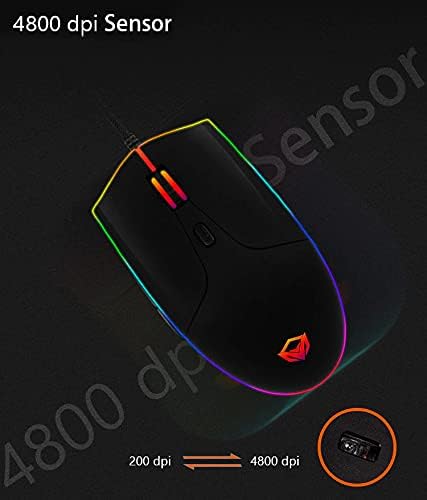
Image: An illustration highlighting the 4800 DPI sensor capability of the Meetion GM21 mouse, showing a range from 200 DPI to 4800 DPI.
5.3 RGB-belysning
The Meetion GM21 features polychrome RGB lighting. The lighting effects are pre-set and cycle automatically. There is no active software or button control for adjusting the RGB lighting patterns or colors directly on the mouse.

Billede: Et nærbillede view of the Meetion GM21 mouse, emphasizing its vibrant polychrome RGB lighting along the sides and scroll wheel.
6. Vedligeholdelse
To ensure the longevity and optimal performance of your Meetion GM21 Gaming Mouse, follow these maintenance guidelines:
- Rensning: Brug en blød, tør klud til at tørre musens overflade af. Ved genstridigt snavs, tør let afampRengør kluden med vand eller en mild rengøringsopløsning. Undgå at bruge skrappe kemikalier eller slibende materialer.
- Sensorrensning: Occasionally inspect the optical sensor on the underside of the mouse for dust or debris. Use a cotton swab or compressed air to gently clean the sensor area.
- Opbevaring: Når musen ikke er i brug, skal den opbevares et rent, tørt sted væk fra ekstreme temperaturer og direkte sollys.
- Kabelpleje: Undgå at bøje eller vride musekablet skarpt for at forhindre indre skader.
7. Fejlfinding
If you encounter issues with your Meetion GM21 Gaming Mouse, refer to the following common problems and solutions:
| Problem | Mulig årsag | Løsning |
|---|---|---|
| Musen reagerer ikke | Løs USB-forbindelse, defekt USB-port, driverproblem. |
|
| Markørbevægelsen er uregelmæssig eller hoppende | Beskidt optisk sensor, uegnet overflade på musemåtten. |
|
| DPI-knappen ændrer ikke følsomhed | Knapfejl, midlertidig softwarefejl. |
|
| RGB-belysning virker ikke | Strømproblem, intern fejl. |
|
8. Specifikationer
| Mærke | MØDE |
| Modelnummer | MT-GM21 |
| Forbindelsestype | Kablet (USB) |
| Bevægelsesdetektion | Optisk |
| DPI rækkevidde | Op til 4800 DPI |
| Antal knapper | 6 |
| Håndorientering | Ambidekstrøs |
| RGB belysning | Polychrome RGB |
| Hardware platform | PC |
| Operativsystem | Windows |
| Produktdimensioner | 12 x 6.4 x 6 cm |
| Varens vægt | 145 g |
| Farve | Sort |
9. Garanti og support
Meetion products are designed and manufactured to the highest quality standards. For information regarding warranty coverage, please refer to the warranty card included with your purchase or visit the official Meetion webwebsted. Gem din købsbevis til garantikrav.
For technical support or further assistance, please contact your local retailer or the Meetion customer service department. Contact details can typically be found on the product packaging or the official Meetion webwebsted.


