1. Introduktion
Thank you for choosing the EWEADN GX-50 USB Keyboard. This manual provides essential information for setting up, operating, and maintaining your new keyboard. Please read these instructions carefully to ensure optimal performance and longevity of your device.
2. Pakkens indhold
Tjek venligst pakken for følgende varer:
- EWEADN GX-50 USB Keyboard
- Brugervejledning (dette dokument)
3. Produktet er slutview
The EWEADN GX-50 is a full-sized 104-key USB keyboard designed for PC and laptop use. It features a standard QWERTY layout and USB connectivity for reliable performance. The keyboard also includes customizable backlighting for enhanced visibility and aesthetics.

Figur 3.1: EWEADN GX-50 USB Keyboard. This image displays the full 104-key layout of the keyboard in its standard white color, viewfra en lille vinkel.
3.1 Nøglefunktioner
- Layout i fuld størrelse: 104 keys, including a numeric keypad.
- USB-forbindelse: Plug-and-play functionality.
- Baggrundsbelysning: Integrated backlighting with multiple color options.
- Holdbart design: Constructed for everyday use.
4. Opsætningsvejledning
Follow these steps to connect your EWEADN GX-50 USB Keyboard to your computer:
- Pak tastaturet ud: Tag forsigtigt tastaturet ud af emballagen.
- Locate a USB Port: Identify an available USB Type-A port on your PC or laptop.
- Tilslut USB-kablet: Insert the USB connector of the keyboard cable firmly into the USB port on your computer.
- Driver installation: The operating system (e.g., Windows 10) will automatically detect and install the necessary drivers. This process may take a few moments.
- Bekræft funktionalitet: Once the drivers are installed, the keyboard is ready for use. Test by typing in a text editor or browser.
5. Betjeningsvejledning
5.1 Grundlæggende skrivning
The EWEADN GX-50 keyboard functions like a standard 104-key keyboard. Simply press the desired keys to input text or commands into your computer.
5.2 Function Keys (F1-F12)
The function keys (F1 through F12) perform various tasks depending on the application or operating system. Some common uses include:
- F1: Hjælp
- F2: Rename (files/folders)
- F5: Refresh (web sider)
- F11: Fuldskærmstilstand
5.3 Backlight Control
The GX-50 keyboard features integrated backlighting. Use the following key combinations to control the backlight:
- Fn + Scroll Lock: Toggles backlight on/off or cycles through lighting modes.
- Fn + Home/End: Adjusts backlight brightness (if supported).
- Fn + Page Up/Page Down: Changes backlight color or effect (if supported).
Refer to the visual examples below for different backlight appearances:
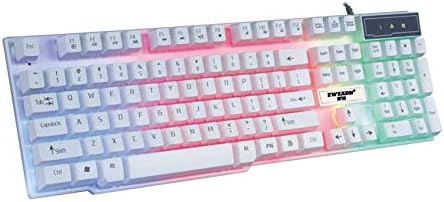
Figur 5.1: Keyboard with multi-color (RGB) backlighting activated. This image shows the keys illuminated with a spectrum of colors.
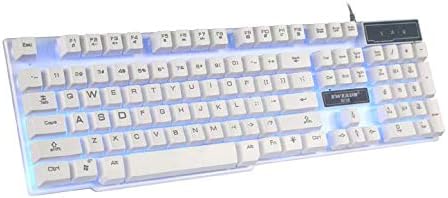
Figur 5.2: Keyboard with blue backlighting. The keys are illuminated with a solid blue color.

Figur 5.3: Keyboard with pink backlighting. The keys are illuminated with a solid pink color.
6. Vedligeholdelse og pleje
To ensure the longevity and proper functioning of your EWEADN GX-50 keyboard, follow these maintenance guidelines:
- Rensning:
- Frakobl tastaturet fra computeren, før du rengør det.
- Brug en blød, fnugfri klud lidt damprengøres med vand eller en mild rengøringsopløsning til at tørre tasterne og overfladen af.
- Undgå at bruge skrappe kemikalier, slibende rengøringsmidler eller opløsningsmidler.
- Brug trykluft til at fjerne støv og snavs mellem tasterne.
- Opbevaring: Opbevar tastaturet et køligt, tørt sted væk fra direkte sollys og ekstreme temperaturer.
- Undgå spild: Hold væsker væk fra tastaturet for at forhindre beskadigelse af interne komponenter.
7. Fejlfinding
If you encounter issues with your EWEADN GX-50 keyboard, refer to the following common troubleshooting steps:
| Problem | Mulig løsning |
|---|---|
| Tastaturet reagerer ikke. |
|
| Visse taster virker ikke. |
|
| Backlighting is not working or behaving incorrectly. |
|
If the problem persists after trying these solutions, please contact EWEADN customer support for further assistance.
8. Specifikationer
| Feature | Detalje |
|---|---|
| Mærke | Eweadn |
| Modelnummer | GX-50 |
| Forbindelse | USB kablet |
| Antal nøgler | 104 |
| Tastatursprog | engelsk |
| Kompatible enheder | PC, bærbar |
| Operativsystemkompatibilitet | Windows 10 (and generally compatible with other Windows versions, macOS, Linux) |
| Farve | Hvid |
| Vandmodstandsniveau | Ikke vandafvisende |
9. Garanti og support
EWEADN products are designed for reliability and performance. For warranty information, please refer to the warranty card included with your purchase or visit the official EWEADN website. If you require technical support or have questions not covered in this manual, please contact EWEADN customer service through their official channels.
Gem din købskvittering som købsbevis i tilfælde af garantikrav.


