Indledning
This manual provides detailed instructions for the setup, operation, and maintenance of your Homtime C1 Mini Snooze Alarm Clock. Please read this manual thoroughly before using the product to ensure proper function and longevity.

Image: The Homtime C1 Mini Alarm Clock, light blue in color, is shown on a decorative tray next to a small potted plant. The digital display shows the time 20:08.
Produkt overview
The Homtime C1 Mini is a compact digital alarm clock designed for convenience and functionality. It features a clear LCD display, dual USB charging ports for mobile devices, and a snooze function. Its design is suitable for various environments including bedrooms, offices, and for travel.
Nøglefunktioner:
- Digital tidsvisning
- Snooze funktion
- Dual USB opladningsporte
- Dimmable LCD Screen
- Kompakt og bærbart design
Pakkeindhold:
- Homtime C1 Mini Alarm Clock
- Strømadapter
- Brugervejledning (dette dokument)
Opsætning
- Strømtilslutning: Connect the provided power adapter to the DC input port on the back of the alarm clock. Plug the adapter into a standard wall outlet. The display will illuminate.
- Battery Installation (Optional for backup): Sikkerhedskopiering af tids- og alarmindstillinger under strømafbrydelsetages, install 3 AAA batteries (not included) into the battery compartment located on the bottom of the unit. Ensure correct polarity.
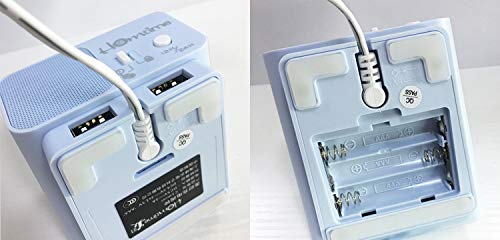
Image: A split image showing the bottom of the Homtime C1 Mini. The left side displays the rear with two USB charging ports and a power input. The right side shows the open battery compartment, designed for AAA batteries.
Betjeningsvejledning
1. Indstilling af tid
- Tryk og hold på "Tidsindstilling" knappen (normalt placeret øverst eller bagpå), indtil timecifrene begynder at blinke.
- Brug "+" or "-" buttons to adjust the hour. Pay attention to AM/PM indicators if present.
- Tryk på "Tidsindstilling" knappen igen for at bekræfte timeindstillingen og gå videre til minutjustering.
- Brug "+" or "-" knapper for at justere minutterne.
- Tryk på "Tidsindstilling" en sidste gang for at gemme tidsindstillingen.
2. Indstilling af alarmen
- Tryk og hold på "Alarm Set" knappen, indtil alarmens timecifre begynder at blinke.
- Brug "+" or "-" knapper for at justere alarmtiden.
- Tryk på "Alarm Set" button again to confirm the alarm hour and move to alarm minute adjustment.
- Brug "+" or "-" knapper til at justere alarmens minutter.
- Tryk på "Alarm Set" button one last time to save the alarm setting.
- For at aktivere/deaktivere alarmen skal du trykke på "Alarm On/Off" button (or a dedicated alarm icon button). An alarm icon will appear on the display when active.
3. Snooze-funktion
When the alarm sounds, press the large button on the top of the clock (often labeled "Snooze" or simply the main control button). The alarm will pause for approximately 9 minutes and then sound again. To turn off the alarm completely, press any other button or let it sound for its full duration.
4. Displayets lysstyrke
The LCD screen has multiple brightness levels. Press the "Dæmper" button (or a dedicated light icon button) repeatedly to cycle through the available brightness settings (e.g., High, Medium, Low, Off).
5. USB-opladningsporte
The Homtime C1 Mini features dual USB charging ports on the back of the unit. These ports are designed to charge compatible mobile devices such as smartphones and tablets. Simply connect your device's USB charging cable to one of the ports. Charging will begin automatically.
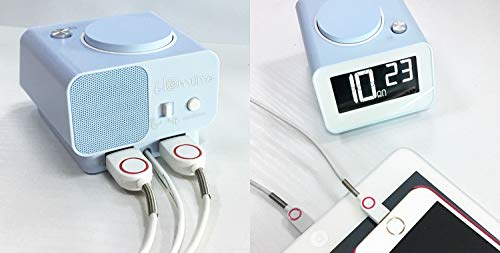
Billede: Bagsiden view of the Homtime C1 Mini alarm clock, showing two white USB charging cables plugged into its dual USB ports. This illustrates the charging functionality.
Opretholdelse
- Rensning: Wipe the unit with a soft, dry cloth. Do not use abrasive cleaners or solvents, as they may damage the surface.
- Magt: Ensure the power adapter is securely connected. Disconnect from power during extended periods of non-use.
- Miljø: Avoid placing the clock in direct sunlight, near heat sources, or in excessively humid environments.
Fejlfinding
| Problem | Mulig årsag | Løsning |
|---|---|---|
| Urdisplayet er tomt. | Ingen magt eller magt outage. | Check power adapter connection. If using battery backup, ensure batteries are installed correctly and are not depleted. |
| Alarmen lyder ikke. | Alarmen er ikke aktiveret eller indstillet forkert. | Ensure the alarm is turned ON (alarm icon visible). Verify the alarm time is set correctly. |
| USB-opladning virker ikke. | Kabelproblem eller enhedsinkompatibilitet. | Try a different USB cable. Ensure the device is compatible with USB charging. Check if the clock is powered on. |
| Skærmen er for lys/mørket. | Lysstyrkeindstillingen skal justeres. | Press the "Dimmer" button to cycle through brightness levels. |
Specifikationer
- Mærke: Hjemmetid
- Model: C1 Mini
- Skærmtype: Digital LCD
- Strømkilde: Elektrisk (AC-adapter)
- Batteri-sikkerhedskopi: 3 x AAA batterier (medfølger ikke)
- Særlige funktioner: Alarm, Dual USB Charging Ports, Dimmable Screen
- Rammemateriale: Acrylonitril Butadien Styren, Plast
- Monteringstype: Bordplade
- Oprindelsesland: Kina
Garanti og support
For warranty information and customer support, please refer to the warranty card included with your product or visit the official Homtime webwebsted. Gem din købskvittering for garantikrav.
For further assistance, you may contact Homtime customer service through their official channels. Please have your model number (C1 Mini) and purchase details ready.


