1. Introduktion
The SanA Smart Light Switch is designed to provide wireless control of your home lighting using your existing Wi-Fi network. This device allows for remote control via a mobile application, voice commands through compatible smart assistants, and traditional manual operation. It integrates seamlessly into modern smart home ecosystems without requiring a separate hub.
Nøglefunktioner omfatter:
- Control lights from any location with internet access.
- Set schedules for lights to turn on or off automatically.
- Voice control compatibility with Amazon Alexa and Google Home.
- LED indicators for night navigation and status.
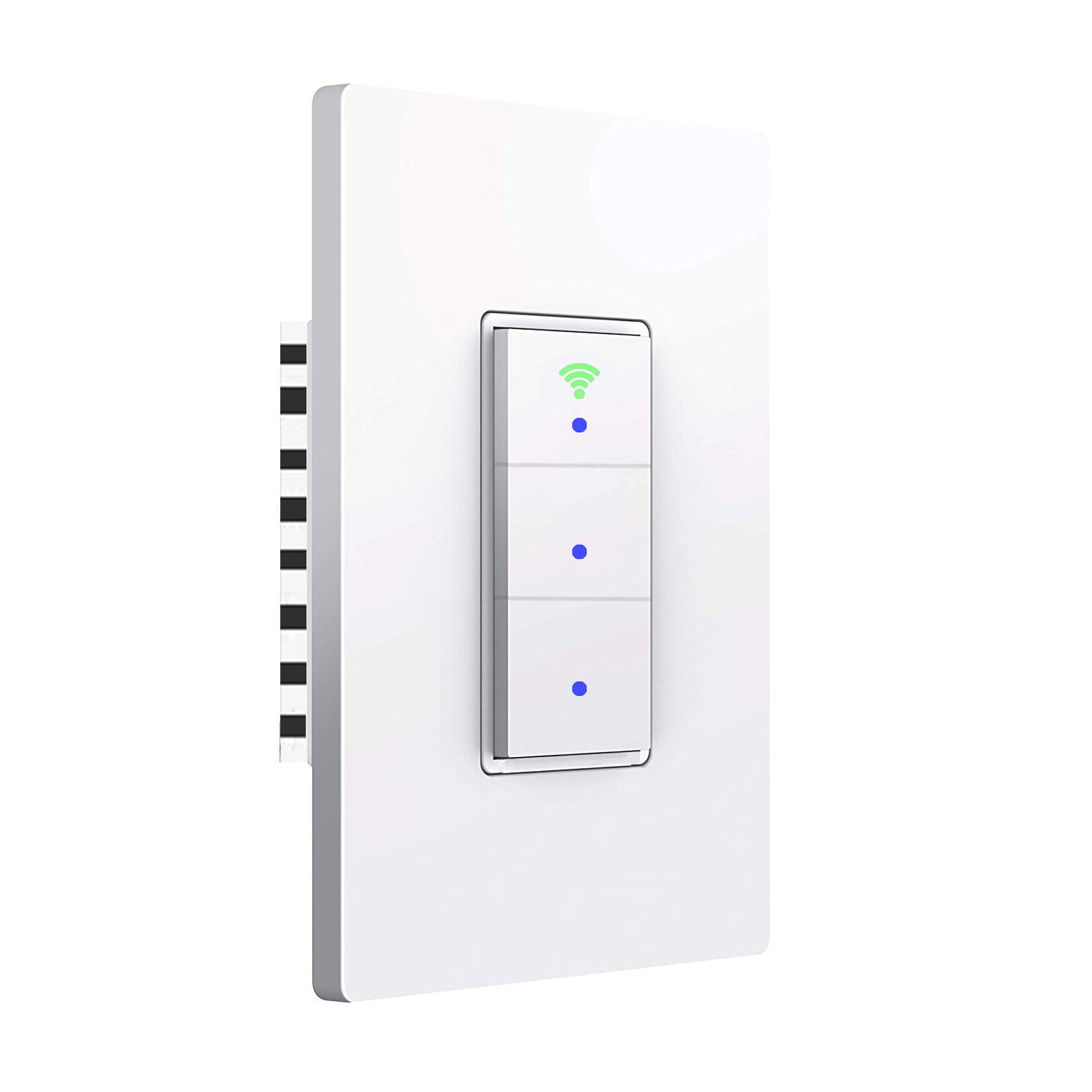
Billede: Forside view of the SanA Smart Light Switch, showing its three buttons and Wi-Fi indicator.
2. Vigtige sikkerhedsoplysninger
ADVARSEL: RISIKO FOR ELEKTRISK STØD.
- Installation must be performed by a qualified electrician or a person with thorough knowledge of electrical wiring.
- Sluk altid for strømmen ved afbryderen, før du installerer eller servicerer afbryderen.
- Ensure the switch is rated for the load it will control.
- This device requires a neutral wire for proper operation. If your existing wiring does not include a neutral wire, consult a professional electrician.
- Installer ikke med våde hænder eller når du står på våde eller våde steder.amp overflader.
- Brug kun indendørs.
3. Pakkens indhold
Bekræft at alle komponenter er til stede i pakken:
- 1x SanA Smart Wall Light Switch (3 Switches in 1 Gang)
- 1x Brugermanual (dette dokument)
- 2x skruer til montering
4. Produktspecifikationer
| Feature | Detalje |
|---|---|
| Type | Smart væglyskontakt |
| Materiale | PC flame retardant polymer, Copper, Brass |
| Operation Voltage | AC 100V-240V / 50Hz~60Hz |
| Max Power (Resistance Load) | 1100W / bande |
| Max Power (Capacitive Load) | 400W / bande |
| Arbejdsstrøm | Max 10A |
| Arbejdsfugtighed | <80 % |
| Radioprotokol | WiFi 2.4GHz (5GHz not supported) |
| Standby strømforbrug | <0.1mA |
| Driftsmiljø Temperatur | -20 ~ 45 ° C (-4 ~ 113 ° F) |
| Life Long | >100,000 gange |
| Switch Dimension | 5.04 x 3.31 x 0.91 tommer (12.8 x 8.4 x 2.3 cm) |
| Kredsløbstype | 3-way (Note: This switch is not a 3-way switch replacement, it controls 3 separate loads from one location) |
| Connector Type | Trådløs |
| Aktuator type | Tryk knap |

Image: Diagram showing the dimensions of the SanA Smart Light Switch: 5.04 inches height, 3.31 inches width, and 0.91 inches depth.
5. Installationsvejledning
5.1 Tjekliste før installation
- Neutral ledning påkrævet: This smart switch requires a neutral wire for operation. Confirm your electrical box has a neutral wire (usually white). If not, consult a qualified electrician.
- Sluk: Before starting, turn off the power to the switch location at the circuit breaker. Verify power is off using a voltage tester.
- 2.4GHz Wi-Fi netværk: Ensure your home Wi-Fi network is 2.4GHz. This switch does not support 5GHz Wi-Fi.
5.2 Ledningsinstruktioner
- Sluk for strømmen ved afbryderen.
- Remove the existing wall plate and switch from the wall box.
- Identificer ledningerne:
- Live Wire (L): Usually black, carries power from the breaker.
- Neutral Wire (N): Usually white, required for the smart switch.
- Load Wires (Load1, Load2, Load3): Wires going to the light fixtures.
- Ground Wire (Optional): Normalt grønt eller bart kobber.
- Connect the wires from the wall box to the corresponding terminals on the SanA Smart Light Switch using wire nuts (not included, but recommended for secure connections):
- Connect the Live wire to the 'L' terminal.
- Tilslut neutralledningen til 'N'-terminalen.
- Connect Load1 to the 'Load1' terminal, Load2 to 'Load2', and Load3 to 'Load3'.
- Connect the Ground wire (if present) to the 'Ground' terminal.
- Skub forsigtigt den kablede afbryder ind i vægdåsen.
- Secure the switch to the wall box with the provided screws.
- Fastgør den nye vægplade.
- Tænd for strømmen ved afbryderen.

Image: Detailed wiring diagram showing connections for Live, Neutral, Ground (optional), and three Load wires to the smart switch terminals.
5.3 Download og parring af app
- Download appen: Søg efter "Smart Life" in the Apple App Store (for iOS) or Google Play Store (for Android) and download the application.
- Registrer/Log ind: Open the Smart Life app and register for a new account or log in if you already have one.
- Tilføj enhed:
- Tap the "+" icon in the top right corner of the app to add a device.
- Select "Electrical" then "Switch (Wi-Fi)" or "Wall Switch".
- Follow the on-screen instructions to put the switch into pairing mode. This usually involves pressing and holding one of the switch buttons until the Wi-Fi indicator light blinks rapidly.
- Enter your 2.4GHz Wi-Fi network name and password when prompted.
- The app will then search for and connect to the switch. Once connected, you can rename the switch and individual gangs within the app.

Image: Icons representing key features: Timing Function, Voice Control, Sharing, Remote Control, and 2.4GHz WiFi compatibility.
6. Betjeningsvejledning
6.1 Manuel kontrol
Each button on the switch functions as a traditional light switch. Press a button to toggle the connected light on or off.
The Wi-Fi indicator light on the switch will show its status:
- Blåt lys: Indicates the switch is working and powered on.
- Grønt lys: Indicates the switch is successfully connected to your Wi-Fi network.

Image: Illustration showing the smart switch with blue dots indicating power on, and a green Wi-Fi icon indicating network connection.
6.2 App kontrol
Once paired, you can control your lights from the "Smart Life" app:
- Åbn Smart Life-appen.
- Select your SanA Smart Light Switch from the device list.
- Tap on the individual switch icons within the app to turn lights on or off.
- You can also set up scenes, groups, and automations within the app for more advanced control.
6.3 Stemmestyring (Alexa og Google Home)
To enable voice control, link your Smart Life account to your Amazon Alexa or Google Home app:
- Åbn Alexa- eller Google Home-appen.
- Naviger til afsnittet "Færdigheder" (Alexa) eller "Fungerer med Google" (Google Home).
- Søg efter "Smart Life" and enable the skill/service.
- Log in with your Smart Life account credentials.
- Once linked, discover devices (Alexa) or sync devices (Google Home).
- Du kan nu bruge stemmekommandoer som:
- "Alexa, turn on living room light."
- "Hey Google, turn off kitchen light."
- "Alexa, set bedroom light to 50%." (If dimmable bulbs are used and supported by the switch/app)
6.4 Timer and Schedule Settings
The Smart Life app allows you to set schedules and timers for your lights:
- Planlægning: Set specific times for lights to turn on or off daily or on selected days of the week.
- Nedtællingstimer: Set a countdown for a light to turn off after a certain duration.

Image: Screenshot of the Smart Life app interface showing the timer function, allowing users to set schedules for lights to work automatically.
6.5 Deling af enhed
You can share control of your smart switch with family members or other users through the Smart Life app. This allows multiple users to control the lights from their own devices.
7. Vedligeholdelse
- Rensning: To clean the switch, wipe it with a soft, dry cloth. Do not use abrasive cleaners or solvents. Ensure power is off before cleaning.
- Firmwareopdateringer: Periodically check the Smart Life app for firmware updates for your switch. Updates can improve performance and add new features.
- Netværksstabilitet: Ensure your Wi-Fi network is stable and strong in the area where the switch is installed for optimal performance.
8. Fejlfinding
| Problem | Mulig årsag/løsning |
|---|---|
| Switch not turning on/off manually. |
|
| Cannot connect to Wi-Fi / App control not working. |
|
| Stemmestyringen svarer ikke. |
|
| Lysene flimrer eller slukker ikke helt. |
|
| Switch feels warm. |
|
9. Garanti og support
For any questions regarding installation, operation, or troubleshooting, please contact SanA customer support. Refer to the contact information provided on the product packaging or the seller's information on the purchase platform.
This product comes with a standard manufacturer's warranty. Please retain your proof of purchase for warranty claims.
For further assistance, you may visit the SanA official webwebstedet eller kontakt deres supportteam direkte.


