1. Introduktion
This manual provides essential information for the safe and efficient operation of your Muse M-1990 DJ Bluetooth Party Speaker. Please read these instructions thoroughly before using the device and retain them for future reference.
The Muse M-1990 DJ is a powerful party speaker designed to deliver high-quality audio with dynamic light effects. It features multiple connectivity options including Bluetooth, CD player, USB, and AUX inputs, making it versatile for various audio sources.

Image 1.1: The Muse M-1990 DJ Bluetooth Party Speaker showcasing its integrated light effects.
2. Sikkerhedsoplysninger
Overhold følgende sikkerhedsforanstaltninger for at forhindre elektrisk stød, brand eller beskadigelse af enheden:
- Udsæt ikke enheden for regn eller fugt.
- Åbn ikke c'enasing. Overlad al service til kvalificeret personale.
- Sørg for, at strømforsyningen voltage stemmer overens med klassificeringsmærkatet på enheden.
- Hold enheden væk fra direkte sollys, varmekilder og for meget støv.
- Sørg for tilstrækkelig ventilation omkring enheden.
- Anbring ikke tunge genstande på enheden.
- Tag stikket ud af enheden under tordenvejr, eller når den ikke skal bruges i længere perioder.
3. Pakkens indhold
Kontroller, at alle varer er til stede i emballagen:
- Muse M-1990 DJ Party Speaker Unit
- Fjernbetjening (kræver 2 AA-batterier, medfølger)
- Kablet mikrofon
- AUX IN Cable (3.5mm jack)
- Strømkabel (AC 100-240V, 50/60Hz)

Image 3.1: Included accessories: remote control, wired microphone, and AUX cable.
4. Produktet er slutview
Familiarize yourself with the main components and controls of your M-1990 DJ speaker.
4.1 Øverste kontrolpanel
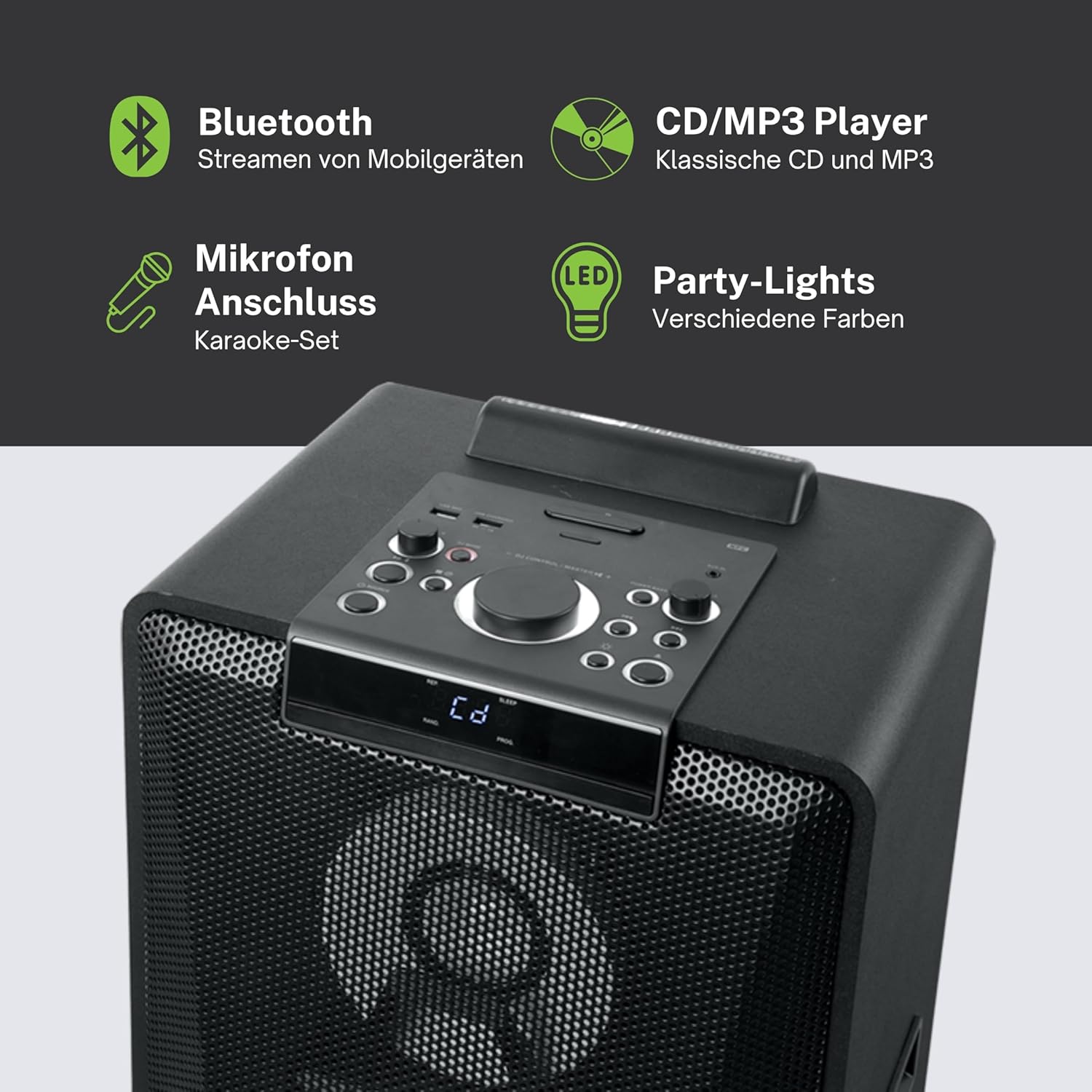
Billede 4.1: Detaljeret view of the top control panel, showing various buttons and the LED display.
The top panel features controls for power, volume, source selection, playback, light effects, and a white LED display. It also includes a built-in cradle for a tablet or smartphone.
4.2 Rear Connectivity Ports
The rear panel provides various input and output options:
- USB 2.0 Port (for MP3 playback and charging)
- AUX IN 1 (2 x RCA jacks)
- AUX IN 2 (3.5mm jack)
- Microphone Inputs (2 jacks)
- Guitar Input (1 jack)
- AC Power Input (100-240V, 50/60Hz)
5. Opsætning
5.1 Placering
Place the speaker on a stable, flat surface. Ensure there is adequate space around the unit for ventilation. The unit is designed for floor mounting.
5.2 Strømtilslutning
- Connect the supplied power cable to the AC power input on the rear of the speaker.
- Plug the other end of the power cable into a standard wall outlet (AC 100-240V, 50/60Hz).
- The unit does not contain a rechargeable battery and must be connected to a power source for operation.
6. Betjeningsvejledning
6.1 Tænd/sluk
Press the Power button on the top control panel or the remote control to turn the unit on or off.
6.2 Bluetooth -parring
- Press the Source button to select Bluetooth mode. The LED display will show 'BT' and the Bluetooth indicator will flash.
- Aktiver Bluetooth på din smartphone, tablet eller anden kompatibel enhed.
- Søg efter 'M-1990 DJ' in your device's Bluetooth list and select it to pair.
- Once paired, the Bluetooth indicator will stop flashing, and you can begin streaming audio.
- For NFC-enabled devices, simply tap your device on the NFC area of the speaker for automatic pairing.
6.3 CD-afspilning
- Tryk på Source-knappen for at vælge CD-tilstand.
- Open the CD tray and place a CD (CD, CD-R/RW, MP3 compatible) with the label side up.
- Close the CD tray. Playback will start automatically or can be initiated using the Play/Pause button.
6.4 USB-afspilning
- Indsæt et USB-flashdrev, der indeholder MP3 files into the USB 2.0 port.
- Press the Source button to select USB mode.
- Playback will start automatically or can be controlled using the playback buttons.
- The USB port also functions as a charging port for external devices.
6.5 AUX-indgang
- Connect your external audio device to either the AUX IN 1 (RCA jacks) or AUX IN 2 (3.5mm jack) using the appropriate cable.
- Press the Source button to select the corresponding AUX input.
- Styr afspilningen fra din tilsluttede enhed.
6.6 Mikrofon- og guitarindgange
- Plug your microphone(s) into the Microphone input jacks.
- Plug your guitar into the Guitar input jack.
- Adjust the microphone/guitar volume using the dedicated controls on the top panel.
6.7 lyseffekter
The M-1990 DJ features color-changing lights and strobe effects. Use the dedicated Light Effects button on the control panel or remote to cycle through different modes or turn the lights off.
6.8 Stereo Pairing (Dual Bluetooth)
If you have two M-1990 DJ units, you can pair them wirelessly for a stereo sound experience. Refer to the specific instructions for stereo pairing in the full manual (if provided by manufacturer) or on the manufacturer's webwebsted.
7. Vedligeholdelse
7.1 Rengøring
- Tag altid stikket ud af stikkontakten før rengøring.
- Brug en blød, tør klud til at rengøre de udvendige overflader.
- Brug ikke slibende rengøringsmidler, voks eller opløsningsmidler, da de kan beskadige finishen.
7.2 Opbevaring
Når højttaleren ikke er i brug i længere perioder, skal den opbevares køligt og tørt, væk fra direkte sollys og ekstreme temperaturer.
8. Fejlfinding
If you encounter issues with your M-1990 DJ speaker, refer to the following common problems and solutions:
| Problem | Mulig årsag | Løsning |
|---|---|---|
| Ingen strøm | Strømkabel ikke tilsluttet; Strømudtag ikke aktivt | Ensure power cable is securely connected; Try a different outlet |
| Ingen lyd | Volume too low; Incorrect source selected; Audio cable not connected | Increase volume; Select correct input source; Check audio cable connections |
| Bluetooth ikke parring | Speaker not in pairing mode; Device Bluetooth off; Device too far | Ensure speaker is in BT mode and flashing; Enable Bluetooth on device; Move device closer (within 10m) |
| CD'en afspiller ikke | CD inserted incorrectly; CD scratched/dirty; Incorrect format | Reinsert CD correctly; Clean CD; Ensure CD is audio CD or MP3 compatible |
| USB afspilles ikke | USB-drevet er ikke isat korrekt; Files not MP3 format; USB drive corrupted | Sæt USB-drevet i igen; Sørg for files are MP3; Try a different USB drive |
Hvis problemet fortsætter efter at have forsøgt disse løsninger, bedes du kontakte kundesupport.
9. Specifikationer
Detailed technical specifications for the Muse M-1990 DJ Party Speaker:
- Modelnummer: M-1990 DJ
- Mærke: MUSE
- Udgangseffekt: 1000 watt
- Antal kanaler: 2
- Forbindelse teknologi: Bluetooth V4.2
- Kompatible enheder: Smartphone, tablet
- Lydindgange: 2 x Microphone jacks, 1 x Guitar jack, 2 x RCA AUX IN, 1 x 3.5mm AUX IN
- USB-port: 1 x USB 2.0 (for MP3 playback and charging)
- CD-afspiller: CD, CD-R/RW, MP3 compatible
- Lyseffekter: Color changing lights, Strobe effects, Light projection
- Strømkilde: AC 100-240V, 50/60Hz (Electric Cable)
- Genopladeligt batteri: Ingen
- Materiale: Træ (skab)
- Farve: Sort
- Varens vægt: 17.9 kilo
- Dimensioner (L x B x H): 35.6 x 34.8 x 105.7 centimeter
- Anbefalet brug: Party and entertainment
- Monteringstype: Gulvmontering
- Medfølgende batterier: 2 AA (for remote control)

Image 9.1: Dimensional drawing of the Muse M-1990 DJ speaker.
10. Garanti og support
10.1 Garantioplysninger
Warranty terms and conditions for the Muse M-1990 DJ speaker are typically provided with the product packaging or can be found on the official Muse webwebsted. Gem venligst din købsbevis i tilfælde af garantikrav.
10.2 Kundesupport
For further assistance, technical support, or service inquiries, please refer to the contact information provided in your product documentation or visit the official Muse customer support webwebsted.


