1. Introduktion
Tak for købetasing the ECOXGEAR Ecotrek GDI-EXTRK210 Portable Bluetooth Speaker. This manual provides essential information for setting up, operating, and maintaining your speaker to ensure optimal performance and longevity. The Ecotrek is designed for rugged outdoor use, featuring waterproof and dustproof capabilities, long battery life, and powerful audio output.
2. Produktet er slutview
2.1 Komponenter
The ECOXGEAR Ecotrek GDI-EXTRK210 includes the following main components:
- Main Speaker Unit with integrated handle
- Control Panel with LED display and backlit buttons
- Front Speaker Grille covering 2.5-inch tweeters, 5.25-inch full-range speakers, and dual 5.25-inch passive subwoofers
- Integrated USB charging port
- Ekstra indgangsport
- Mikrofonindgangsport
- Integrated Cup Holders (2) on top panel
- AC Power Cable for charging and continuous operation
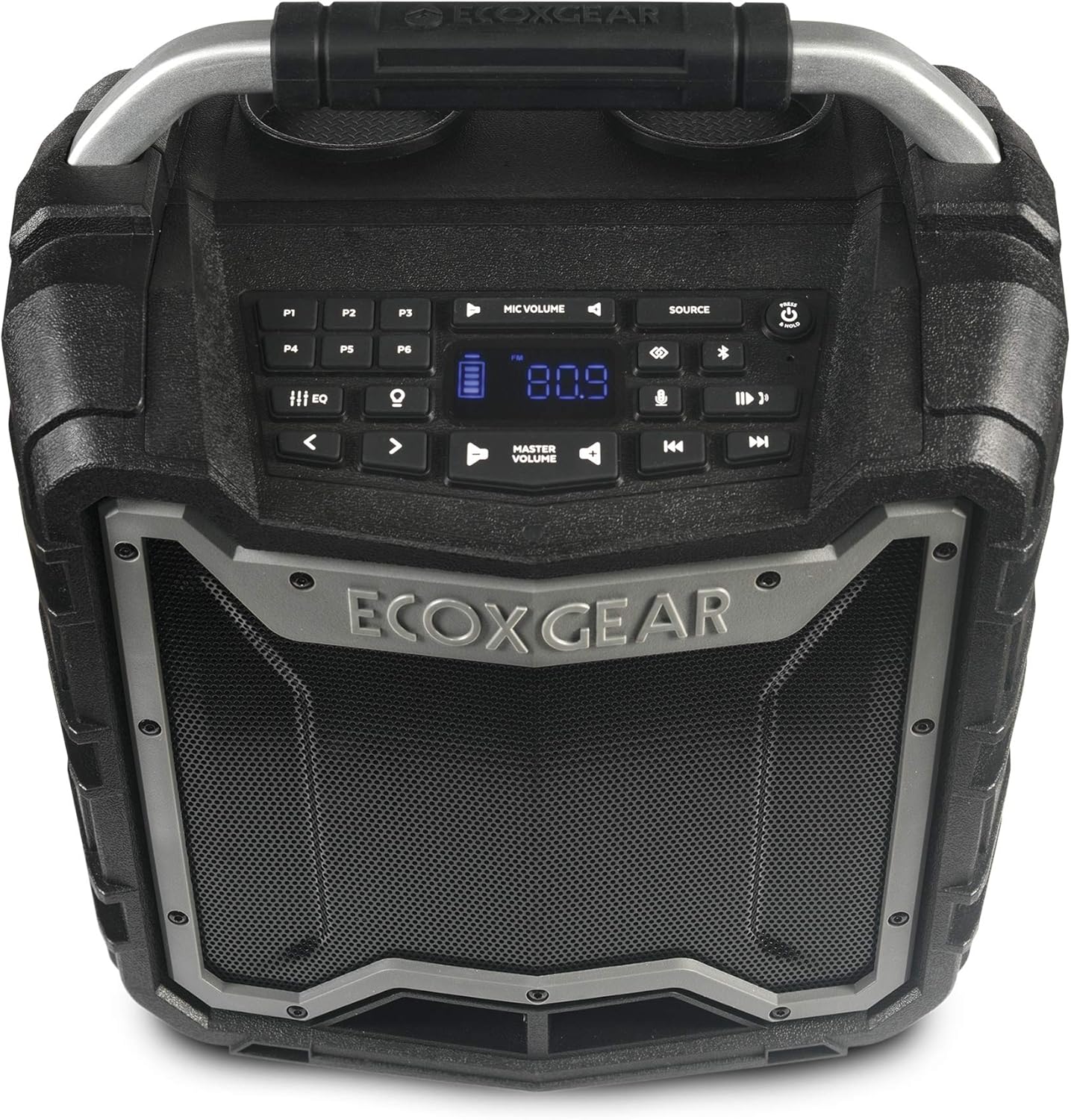
Figur 1: Øverst view of the ECOXGEAR Ecotrek speaker, highlighting the control panel and sturdy handle.

Figure 2: The Ecotrek features two integrated cup holders for convenience.
2.2 Nøglefunktioner
- 100% Waterproof & Dustproof (IP67): Designed to withstand rain, dirt, snow, and can float in water.
- Kraftfuld lydudgang: 100 watts of peak power with 2.5-inch tweeters, 5.25-inch full-range speakers, and dual 5.25-inch passive subwoofers for balanced stereo sound.
- Forlænget batterilevetid: Over 10 hours at full volume, up to 50 hours at low volume. Recharges in 7-8 hours.
- EcoConnect: Pair two Ecotrek units wirelessly for true stereo sound within 30 feet.
- Flere lydkilder: Bluetooth 4.2 (up to 30m range), AM/FM radio with 6 presets, and auxiliary wired connection.
- Integreret USB-opladning: 5V, 2.1A USB output port to charge compatible devices.
- EcoTalk knap: Connects to Siri or Google OK for voice control.
- Tilpasset lyd: 6 preset EQ modes to adjust audio output.
- Sigtbarhed: Backlit buttons and large LED display for night viewing.
- Eksternt mikrofonstik: For PA function or Karaoke (microphone sold separately).
- Holdbar konstruktion: Robust design for outdoor environments, including shockproof capabilities.

Figure 3: The ECOXGEAR Ecotrek is IP67 rated, making it fully waterproof and dustproof.

Figure 4: The Ecotrek offers over 50 hours of play time on a single charge at lower volumes.

Figure 5: The Ecotrek is built with a shockproof design for enhanced durability.
3. Opsætning
3.1 Indledende opladning
Before first use, fully charge your Ecotrek speaker. Connect the supplied AC power cable to the speaker's power input and plug it into a standard wall outlet. The battery indicator on the LED display will show charging progress. A full charge typically takes 7-8 hours.
3.2 Tænd/sluk
For at tænde højttaleren skal du trykke på og holde Magt knap () located on the control panel until the LED display illuminates. To power off, press and hold the same button until the display turns off.
3.3 Bluetooth -parring
- Ensure the Ecotrek speaker is powered on.
- Tryk på KILDE button until "Bluetooth" mode is selected. The Bluetooth icon on the display will flash, indicating it's in pairing mode.
- Aktiver Bluetooth på din mobilenhed (smartphone, tablet osv.) og søg efter tilgængelige enheder.
- Select "ECOXGEAR Ecotrek" from the list of devices.
- Once connected, the Bluetooth icon on the speaker's display will stop flashing and remain solid.
3.4 EcoConnect Pairing (True Wireless Stereo)
To pair two Ecotrek speakers for true wireless stereo sound:
- Ensure both Ecotrek speakers are powered on and in Bluetooth mode.
- On the first speaker (which will be the Left channel), press and hold the EcoConnect button (often indicated by a chain link or double speaker icon) until you hear a confirmation tone.
- On the second speaker (which will be the Right channel), press and hold the EcoConnect button until you hear a confirmation tone.
- The speakers will automatically search and connect to each other. Once connected, one speaker will act as the Left channel and the other as the Right channel.
- Now, connect your mobile device to the Left channel speaker via Bluetooth as described in Section 3.3.

Figure 6: EcoConnect allows two Ecotrek speakers to be paired for a wider stereo soundstage.
4. Betjeningsvejledning
4.1 Valg af lydkilde
Tryk på KILDE button repeatedly to cycle through available audio sources: Bluetooth, AM Radio, FM Radio, and Auxiliary Input.
4.2 Lydstyrkekontrol
- Hovedvolumen: Brug MASTER VOLUME knapper ( og ) on the control panel to adjust the overall speaker volume.
- Mikrofonlydstyrke: If an external microphone is connected, use the MIC LYDSTYRKE buttons to adjust its level independently.
4.3 Radiobetjening (AM/FM)
When in AM or FM radio mode:
- Brug Tune Up og Indstil knapperne til manuelt at justere frekvensen.
- Tryk og hold på Tune Up or Indstil buttons to auto-scan for the next available station.
- Preset Stations (P1-P6): To save a station, tune to the desired frequency, then press and hold one of the P1-P6 buttons until you hear a confirmation beep. To recall a preset, simply press the corresponding P1-P6 button.

Figure 7: The Ecotrek features AM/FM radio with 6 programmable presets for easy access to your favorite stations.
4.4 Equalizer-tilstande (EQ)
The Ecotrek offers 6 preset EQ modes to optimize sound for different music genres or listening preferences. Press the EQ button repeatedly to cycle through the available modes (e.g., Classic, Rock, Pop, Jazz, Flat, Bass Boost).
4.5 Brug som powerbank
The integrated 5V, 2.1A USB output port allows you to charge your USB-compatible devices (smartphones, tablets, etc.) directly from the Ecotrek speaker. Simply connect your device's USB charging cable to the speaker's USB port.
4.6 EcoTalk Button (Voice Assistant)
Tryk på EcoTalk button (often indicated by a microphone icon) to activate your smartphone's voice assistant (Siri or Google OK). This allows for hands-free control of music playback and other functions.
4.7 PA / Karaoke Function
Connect an external microphone (sold separately) to the dedicated microphone input jack on the speaker. Adjust the microphone volume using the MIC LYDSTYRKE controls. This feature is ideal for public address or karaoke use.
5. Vedligeholdelse
5.1 Rengøring
Due to its IP67 waterproof and dustproof rating, the Ecotrek speaker is easy to clean. You can rinse it with fresh water to remove dirt, sand, or salt. Avoid using harsh chemicals or abrasive cleaners. Ensure all port covers are securely closed before rinsing.
5.2 Pleje af batterier
The Ecotrek uses a sealed lead-acid battery. For optimal battery life, it is recommended to fully charge the speaker after each use and avoid completely draining the battery frequently. If storing the speaker for an extended period, ensure it is fully charged and recharge it every few months to maintain battery health.
6. Fejlfinding
| Problem | Mulig årsag | Løsning |
|---|---|---|
| Højttaleren tænder ikke. | Batteriet er afladet. | Connect the speaker to AC power and allow it to charge for several hours. |
| Ingen lyd fra højttaleren. | Volume is too low or muted; incorrect audio source selected; device not connected. | Increase master volume. Ensure correct source (Bluetooth, FM, Aux) is selected. Re-pair Bluetooth device or check auxiliary cable connection. |
| Bluetooth-enheden vil ikke parres. | Højttaler ikke i parringstilstand; enhed for langt væk; interferens | Ensure speaker is in Bluetooth pairing mode (flashing icon). Move device closer to speaker (within 30m). Turn off other Bluetooth devices nearby. |
| EcoConnect pairing fails. | Højttalerne er for langt fra hinanden; én højttaler er allerede tilsluttet en enhed. | Ensure both speakers are within 30 feet of each other. Disconnect any Bluetooth devices from both speakers before attempting EcoConnect pairing. |
| Dårlig radiomodtagelse. | Svagt signal; miljøforstyrrelser. | Relocate the speaker to an area with better reception. Extend the antenna if available (not explicitly mentioned but common for radios). |
7. Specifikationer
| Feature | Detalje |
|---|---|
| Modelnavn | ECOTREK (GDI-EXTRK210) |
| Strømudgang | 100 watt (peak) |
| Højttalerkonfiguration | 2 x 2.5" Tweeters, 2 x 5.25" Full-Range, 2 x 5.25" Passive Subwoofers |
| Forbindelse | Bluetooth 4.2, Auxiliary Input, AM/FM Radio |
| Bluetooth rækkevidde | Op til 30 meter (100 fod) |
| Vandtæt/støvtæt vurdering | IP67 (Tåler nedsænkning ned til 1 meter i 30 minutter) |
| Batteritype | Sealed Lead-Acid (7 Amp timer) |
| Batterilevetid | 10+ hours (full volume), up to 50 hours (low volume) |
| Opladningstid | 7-8 timer |
| USB udgang | 5V, 2.1A |
| Dimensioner (L x B x H) | 25.9 x 39.1 x 42.4 cm (10.2 x 15.4 x 16.7 tommer) |
| Vægt | 19.2 lbs (8.7 kg) |
| Materiale | Plast |
8. Garanti og support
8.1 Garantioplysninger
The ECOXGEAR Ecotrek GDI-EXTRK210 comes with a 3 års garanti covering parts and labor. This warranty ensures your product is free from defects in material and workmanship under normal use. Please retain your proof of purchase for warranty claims.
8.2 Kundesupport
For technical assistance, troubleshooting not covered in this manual, or warranty inquiries, please contact ECOXGEAR customer service. Refer to the official ECOXGEAR webwebstedet eller produktemballagen for de mest aktuelle kontaktoplysninger.
Note: ECOXGEAR is committed to providing excellent customer service and support for their products.


