Indledning
This manual provides comprehensive instructions for the setup, operation, and maintenance of your HUAYU RM-L1316 Universal Remote Control. This remote is designed to control various LED, LCD, HD, Smart, and Plasma televisions, offering convenient access to common functions and dedicated buttons for popular streaming services like Netflix and YouTube.
Please read this manual carefully before using the remote control to ensure proper functionality and to maximize your user experience.
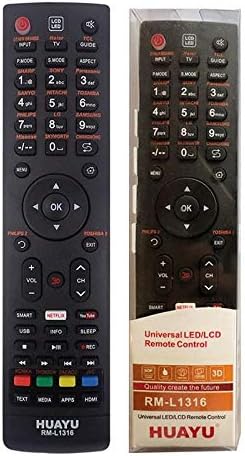
Billede: Forside view of the HUAYU RM-L1316 Universal Remote Control, displaying its full button layout including power, number keys, navigation, volume, channel, and dedicated buttons for Smart TV functions, Netflix, and YouTube.
Opsætning
1. Batteriinstallation
The HUAYU RM-L1316 remote control requires two AAA batteries (not included) for operation. Follow these steps to install them:
- Find batterirummets dæksel på bagsiden af fjernbetjeningen.
- Tryk ned på tappen, og skub dækslet af.
- Isæt to AAA-batterier, og sørg for, at de positive (+) og negative (-) poler stemmer overens med diagrammerne i batterirummet.
- Skub batteridækslet tilbage på plads, indtil det klikker sikkert.

Billede: Vinklet side view of the HUAYU RM-L1316 remote control, showing its ergonomic design and the location of the battery compartment on the rear.
2. Programmering af fjernbetjeningen
The RM-L1316 is a universal remote control designed to work with a wide range of TV brands. It typically requires no complex programming for most modern TVs. For initial setup, point the remote at your TV and test basic functions like Power, Volume, and Channel. If the remote does not respond, you may need to use the auto-search function or manually enter a code.
Auto-Search Method (Common for Universal Remotes):
- Sørg for, at dit tv er tændt.
- Tryk og hold på SÆT button (or a similar button, refer to specific instructions if provided with packaging) until the indicator light stays on.
- Point the remote at the TV and repeatedly press the MAGT knap (eller CH+) until the TV turns off.
- Når tv'et slukkes, skal du straks trykke på SÆT button again to save the code. The indicator light should turn off.
- Test all functions. If some functions do not work, repeat the auto-search process.
Note: Specific programming instructions may vary slightly. If the auto-search method is unsuccessful, consult the original packaging or the manufacturer's website for a list of TV codes and manual entry procedures.
Betjeningsvejledning
The HUAYU RM-L1316 remote control features a standard layout for easy navigation and control of your television. Below is a general guide to its buttons and their functions:
- Power knap (●): Tænder eller slukker for tv'et.
- Input/kilde: Selects video input sources (HDMI, AV, Component, etc.).
- Talknapper (0-9): Directly select channels or input numerical values.
- Lydstyrke op/ned (VOL +/-): Adjusts the audio volume.
- Kanal op/ned (CH +/-): Skifter tv-kanaler.
- Stum: Slår lyden fra eller til på tv'et.
- Navigationstastatur (op, ned, venstre, højre, OK)Bruges til at navigere i menuer og bekræfte valg.
- Menu/Hjem: Accesses the TV's main menu or smart home screen.
- Udgang: Afslutter den aktuelle menu eller applikation.
- Tilbage/retur: Går tilbage til den forrige skærm eller menu.
- Smart/Apps: Direct access to the TV's smart features or application list.
- Netflix: Dedicated button to launch the Netflix application.
- YouTube: Dedicated button to launch the YouTube application.
- Medieafspilningskontrol: Play, Pause, Stop, Fast Forward, Rewind, Skip.
- Farvede knapper (rød, grøn, gul, blå): Functionality varies by TV model and application, often used for interactive features.
Note: The functionality of some buttons may depend on your specific TV model and its operating system.
Opretholdelse
Rengøring af fjernbetjeningen
To maintain the remote control's appearance and functionality, follow these cleaning guidelines:
- Tør overfladen af med en blød, tør klud.
- Til genstridigt snavs, let dampda kluden med vand eller et mildt, ikke-slibende rengøringsmiddel.
- Undgå at bruge skrappe kemikalier, opløsningsmidler eller slibende rengøringssvampe, da disse kan beskadige fjernbetjeningens overflade eller interne komponenter.
- Ensure no liquid enters the remote control, especially around buttons or the battery compartment.
Udskiftning af batteri
Replace the batteries when the remote control's response becomes sluggish or stops working. Always replace both batteries at the same time with new AAA batteries. Do not mix old and new batteries, or different types of batteries.
Bortskaf brugte batterier i henhold til lokale regler.
Fejlfinding
If you encounter issues with your HUAYU RM-L1316 Universal Remote Control, refer to the following common problems and solutions:
| Problem | Mulig årsag | Løsning |
|---|---|---|
| Remote is not working at all. | Dead or incorrectly installed batteries. Remote not programmed correctly. Obstruction between remote and TV. |
|
| Nogle knapper virker ikke. | Remote not fully compatible with TV model. Programming error. |
|
| Kort driftsrækkevidde. | Weak batteries. Obstruction. Interference. |
|
Specifikationer
- Mærke: Huayu
- Modelnavn/nummer: RM-L1316
- Farve: Sort
- Kompatible enheder: Television (LED, LCD, HD, Smart, Plasma TVs)
- Forbindelse teknologi: Infrarød
- Controller type: Knap kontrol
- Maksimal rækkevidde: 10 meter
- Varens vægt: 15 gram
- Pakkedimensioner: 17.9 x 7.1 x 2.4 cm
Garanti og support
Garantioplysninger
Specific warranty details for the HUAYU RM-L1316 Universal Remote Control are typically provided with the product packaging or by the retailer at the time of purchase. Please retain your proof of purchase for any warranty claims. For detailed warranty terms and conditions, refer to the documentation included with your remote or contact your point of purchase.
Kundesupport
For further assistance, troubleshooting not covered in this manual, or inquiries regarding your HUAYU RM-L1316 Universal Remote Control, please contact the retailer from whom you purchased the product. You may also visit the official Huayu website for potential support resources or contact information.


