1. Introduktion
The NERF Bulls-Eye Digital Target is designed to enhance your dart-blasting skills and provide engaging gameplay. Featuring 6 flip-back targets, a high-scoring bullseye, and an LCD screen for score tracking, this free-standing target offers solo and multiplayer game modes. Improve your aim and precision with this exciting addition to your Nerf collection.

Figur 1: Forside view of the NERF Bulls-Eye Digital Target.
2. Hvad er der i æsken
- One Digital Target Unit
3. Opsætning
- Batteri installation: Locate the battery compartment on the base of the target. Insert the required AA batteries (not included) according to the polarity indicators. Securely close the battery compartment.
- Assemble Top Piece: The target comes mostly pre-assembled. Attach the top section of the target to the main pole by aligning the connectors and pressing firmly until it clicks into place.
- Placering: Place the free-standing target on a flat, stable surface. Ensure there is ample space around the target for safe play and dart retrieval.
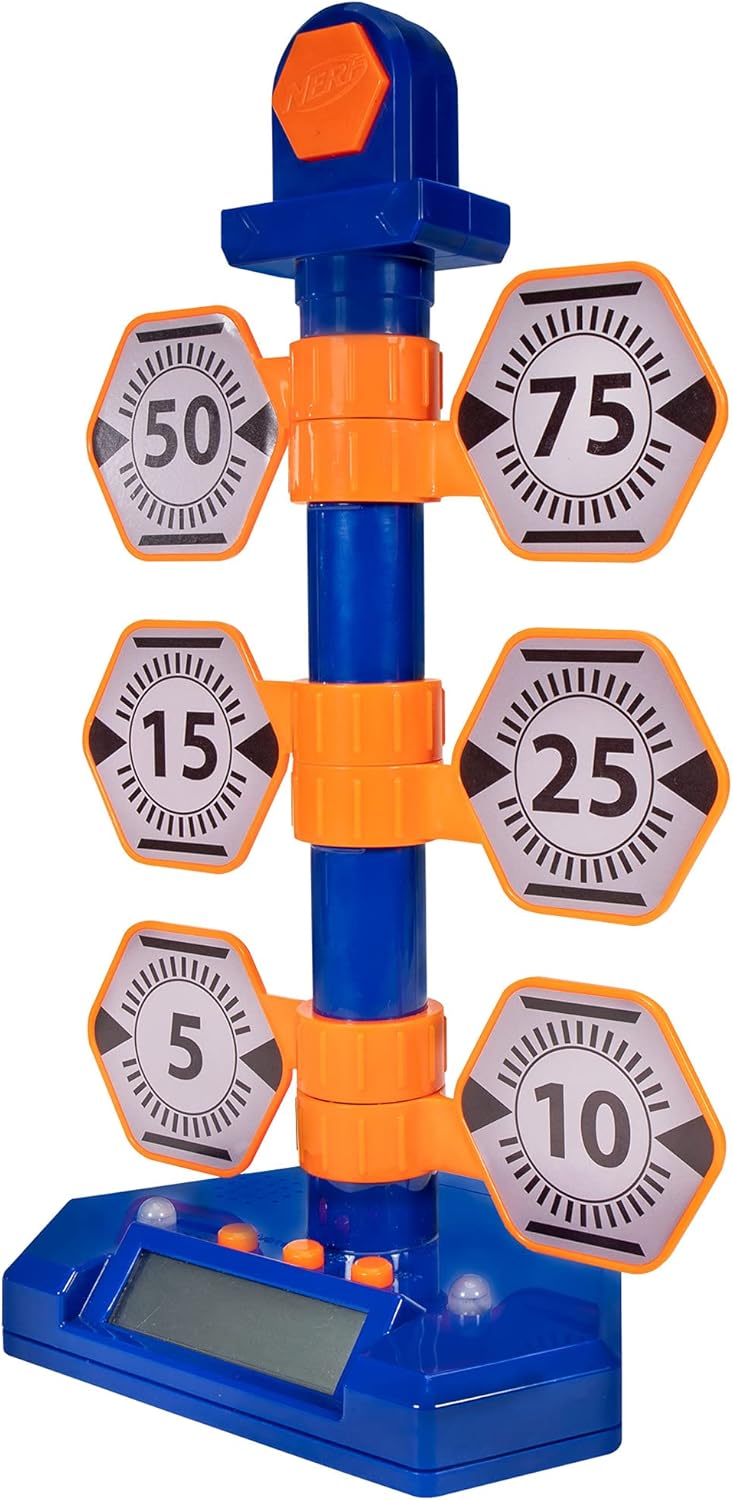
Figure 2: The fully assembled NERF Bulls-Eye Digital Target.
4. Betjeningsvejledning
The NERF Bulls-Eye Digital Target features an LCD screen for score tracking and multiple game modes to challenge your skills.
4.1 spiltilstande
- Pointtæller: Track your total score as you hit the various targets. Each target has a designated point value (e.g., 5, 10, 15, 25, 50, 75), and the bullseye awards 100 points.
- Stak dem: A game mode designed to test your speed and accuracy.
- Nøjagtighedstest: Focus on hitting specific targets to improve your precision.
The target allows for both solo and multiplayer gameplay, making it versatile for individual practice or competitive fun.

Figure 3: Key features of the Digital Target, including game modes and LCD screen.

Figur 4: Detaljeret view of the LCD screen and control buttons.
4.2 Target Mechanism
The target features 6 flip-back targets that reset manually after being hit. The high-scoring bullseye at the top lights up upon impact, providing visual feedback.

Figure 5: The swinging action of the targets upon impact.
4.3 Officiel produktvideo
Video 1: Official product demonstration of the NERF Bulls-Eye Digital Target, showcasindens funktioner og gameplay.
5. Vedligeholdelse
- Rensning: Tør måloverfladen af med en blød, tør klud. Brug ikke slibende rengøringsmidler, og nedsænk ikke enheden i vand.
- Udskiftning af batteri: If the target's lights, sounds, or LCD screen begin to malfunction, replace the AA batteries. Ensure proper polarity during installation.
- Opbevaring: Store the target in a cool, dry place away from direct sunlight and extreme temperatures when not in use.
6. Fejlfinding
- Target Not Responding: Check if the batteries are correctly installed and have sufficient charge. Replace batteries if necessary. Ensure targets are manually reset after being hit.
- Ingen lyd/lys: Verify battery power. If issues persist, ensure no debris is obstructing the sensors or speakers.
- Inaccurate Scoring: Ensure darts are hitting the targets directly and with sufficient force to register. Check for any physical obstructions or damage to the target mechanisms.
- Lydstyrkekontrol: Please note that this model does not feature a dedicated volume control.
7. Specifikationer
| Feature | Detalje |
|---|---|
| Produktdimensioner | 9 x 13 x 20 tommer |
| Varens vægt | 1.17 pund |
| Oprindelsesland | Kina |
| ASIN | B07PMLJ57D |
| Varemodelnummer | NER0226 |
| Producent anbefalet alder | 8 år og opefter |
| Fabrikant | Hasbro |
| Udgivelsesdato | 15. august 2019 |
8. Garanti og support
For detailed warranty information and customer support, please refer to the official NERF website or contact Hasbro customer service. You can also visit the NERF-butik på Amazon for mere produktinformation og tilbehør.


