Indledning
Tak for købetasing the Blow BT460 Portable Bluetooth Speaker. This manual provides essential information for the safe and efficient operation of your device. Please read it thoroughly before use and retain it for future reference.
Sikkerhedsoplysninger
- Udsæt ikke enheden for ekstreme temperaturer, direkte sollys eller høj luftfugtighed.
- Undgå at tabe eller udsætte højttaleren for kraftige stød.
- Du må ikke selv adskille eller forsøge at reparere enheden. Overlad al service til kvalificeret personale.
- Keep the speaker away from water and other liquids. This device is not waterproof.
- Brug kun det specificerede opladningskabel og strømkilde.
Produkt overview
The Blow BT460 is a versatile portable Bluetooth speaker designed for high-quality audio playback. It features a maximum output of 20W, Bluetooth connectivity, FM radio, MicroSD card slot, and an AUX input. Its compact dimensions make it suitable for both home use and travel.

Billede: Forside view of the Blow BT460 Portable Bluetooth Speaker, showcasing its grey cylindrical design with a mesh grille and silver accents.
Pakkens indhold
Tjek venligst pakken for følgende varer:
- Blow BT460 Portable Bluetooth Speaker
- USB opladningskabel
- AUX lydkabel
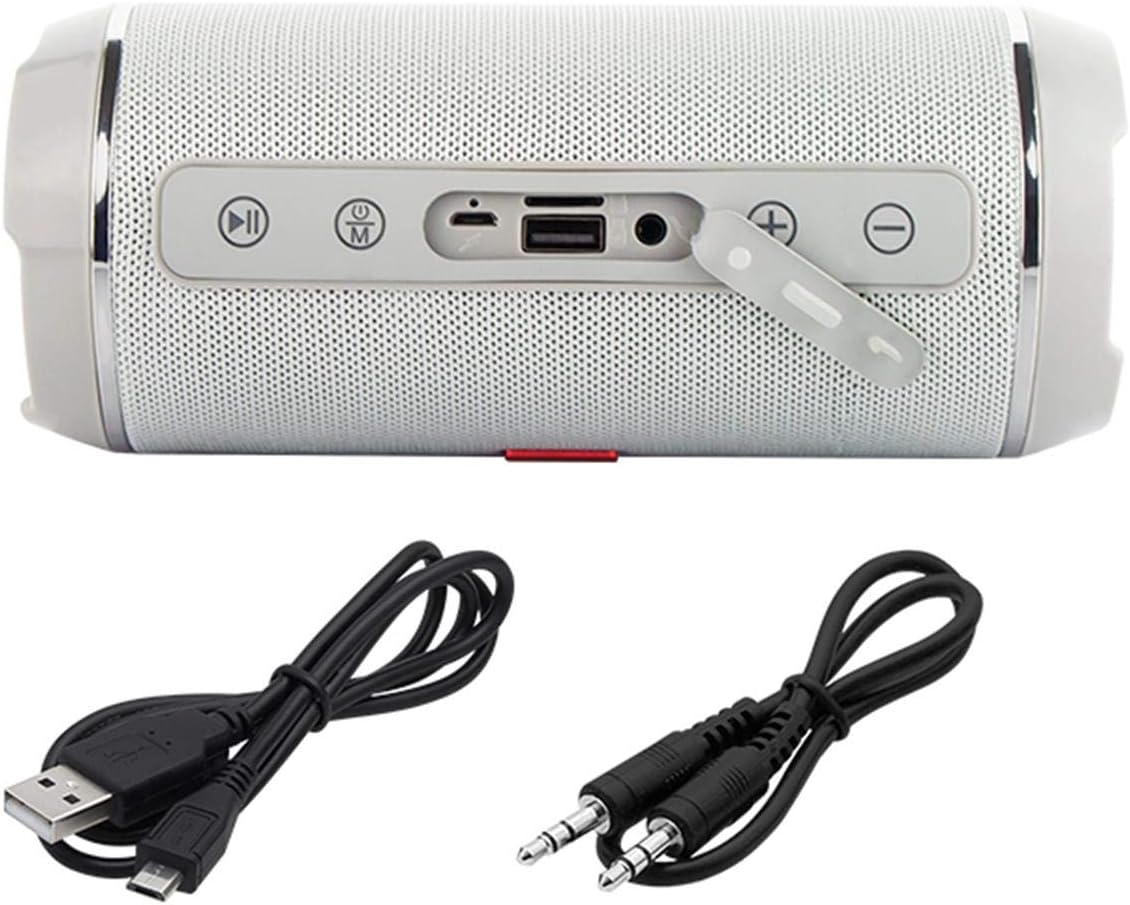
Image: The Blow BT460 speaker shown with its top panel revealing control buttons and ports, alongside the included USB charging cable and AUX audio cable.
Kontrol og porte
Gør dig bekendt med højttalerens betjeningselementer og tilslutningsporte:
- Power knap: Tryk og hold nede for at tænde eller slukke for højttaleren.
- Mode-knap (M): Press to switch between Bluetooth, FM Radio, AUX, and MicroSD modes.
- Afspil/pause knap: Afspil eller sæt lydafspilning på pause.
- Forrige nummer / Lydstyrke ned (-): Kort tryk for forrige nummer, langt tryk for at sænke lydstyrken.
- Næste nummer / Lydstyrke op (+): Kort tryk for næste nummer, langt tryk for at øge lydstyrken.
- MicroSD -kortplads: Indsæt et MicroSD-kort for lydafspilning.
- USB-port: For USB drive playback or charging other devices (if supported).
- AUX-indgang: Tilslut eksterne lydenheder med 3.5 mm AUX-kablet.
- Micro USB-opladningsport: Connect the USB charging cable to power the speaker.
Opsætning
1. Opladning af højttaleren
- Connect the Micro USB end of the charging cable to the speaker's charging port.
- Connect the standard USB end to a USB power adapter (not included) or a computer's USB port.
- Opladningsindikatorlampen lyser. Den slukker eller skifter farve, når den er fuldt opladet.
- A full charge typically takes 3-4 hours and provides 3-4 hours of music playback.
2. Tænd/sluk
- To power on, press and hold the Power button until you hear an audible indication.
- For at slukke skal du trykke på tænd/sluk-knappen igen, indtil højttaleren slukker.
Betjeningsvejledning
1. Bluetooth-parring
- Ensure the speaker is powered on and in Bluetooth mode (press the 'M' button if necessary). The speaker will enter pairing mode, indicated by a flashing LED.
- Aktiver Bluetooth på din mobilenhed (smartphone, tablet osv.) og søg efter tilgængelige enheder.
- Select "BT460" from the list of devices.
- Når højttaleren er parret, udsender den en bekræftelseslyd, og LED-indikatoren holder op med at blinke.
- You can now play audio from your device through the speaker. The Bluetooth range is approximately 10 meters.
2. AUX-tilstand
- Connect one end of the 3.5mm AUX audio cable to the speaker's AUX input port.
- Connect the other end to the headphone jack or audio output of your external audio device (e.g., MP3 player, CD player).
- Press the 'M' button on the speaker to switch to AUX mode.
- Styr afspilning og lydstyrke fra din eksterne enhed.
3. Afspilning fra microSD-kort
- Insert a MicroSD card (with audio files) into the MicroSD card slot on the speaker.
- The speaker will automatically switch to MicroSD mode and begin playing music. If not, press the 'M' button to select MicroSD mode.
- Brug knapperne Afspil/Pause, Forrige nummer og Næste nummer til at styre afspilningen.
4. FM Radio
- Tryk på 'M'-knappen for at skifte til FM-radiotilstand.
- For at automatisk scanne og gemme tilgængelige stationer skal du trykke på Afspil/Pause-knappen og holde den nede. Højttaleren scanner og gemmer stationer automatisk.
- Brug knapperne Forrige nummer (-) og Næste nummer (+) til at navigere mellem gemte FM-stationer.
5. Lydstyrkekontrol
- Long press the Next Track (+) button to increase the volume.
- Long press the Previous Track (-) button to decrease the volume.
Opretholdelse
- Rensning: Brug en blød, tør klud til at rengøre højttalerens overflade. Brug ikke slibende rengøringsmidler eller opløsningsmidler.
- Opbevaring: Når højttaleren ikke er i brug i længere perioder, skal den opbevares køligt og tørt, væk fra direkte sollys og ekstreme temperaturer.
- Batteripleje: For at forlænge batteriets levetid bør du undgå at aflade batteriet helt ofte. Oplad højttaleren regelmæssigt, selvom den ikke er i brug.
Fejlfinding
| Problem | Mulig årsag | Løsning |
|---|---|---|
| Højttaleren tænder ikke. | Batteriet er afladet. | Oplad højttaleren ved hjælp af det medfølgende USB-kabel. |
| Ingen lyd. | Lydstyrken er for lav; forkert tilstand valgt; enhed ikke parret. | Increase volume; press 'M' to select correct mode; re-pair Bluetooth device. |
| Bluetooth-enheden kan ikke oprette forbindelse. | Højttaler ikke i parringstilstand; enhed for langt væk; interferens | Ensure speaker is in Bluetooth pairing mode; move device closer (within 10m); restart both devices. |
| FM-radiomodtagelsen er dårlig. | Svagt signal; miljøforstyrrelser. | Flyt højttaleren til et område med bedre modtagelse. |
Specifikationer
| Mærke | Blæse |
| Modelnavn | BT460 |
| Trådløs kommunikationsteknologi | Bluetooth |
| Forbindelsesteknologi | Auxiliary, Bluetooth, USB |
| Højttaler udgangseffekt | 20 watt (RMS) |
| Strømkilde | Battery Powered (2000 mAh integrated battery) |
| Batterilevetid | 3-4 timer (musikafspilning) |
| Bluetooth rækkevidde | 10 meter |
| Kontrolmetode | Remote Control (if applicable, otherwise on-device buttons) |
| Dimensioner (L x B x H) | 2.79 x 24.64 x 16.51 cm |
| Varens vægt | 679 gram |
| Kompatible enheder | MP3-afspiller, smartphone |
| Farve | Grey (schwarz.) |
Garanti og support
This product comes with a limited warranty. Please refer to the warranty card included in your package for specific terms and conditions. For technical support or service inquiries, please contact your retailer or the manufacturer's customer service channels.


