1. Produktet er slutview
The JBL TUNE 110 In-Ear Headphones are designed to deliver JBL Pure Bass Sound in a lightweight, comfortable, and compact form factor. These wired headphones feature 9mm drivers for powerful audio reproduction and include a convenient one-button remote with a built-in microphone for easy control of music playback and calls. The tangle-free flat cable ensures hassle-free use and storage.

Image 1.1: The JBL TUNE 110 In-Ear Headphones in Blue, showcasing deres elegante design.
2. Hvad er der i æsken
Upon unboxing your JBL TUNE 110 In-Ear Headphones, you should find the following components:
- JBL TUNE 110 In-Ear hovedtelefoner
- Multiple sizes of ear tips (typically Small, Medium, Large) to ensure a comfortable and secure fit.
- A carrying pouch for convenient storage and portability.
Video 2.1: En officiel overview of the JBL TUNE 110 In-Ear Headphones, demonstrating key features and components.
3. Opsætning
Follow these steps to set up your JBL TUNE 110 In-Ear Headphones:
- Vælg ørepropper: Choose the ear tips that provide the most comfortable and secure fit for your ears. A good seal is crucial for optimal sound quality and bass performance. Gently attach them to the earbuds.
- Indsæt ørepropper: Carefully insert the earbuds into your ear canals. Ensure they are seated snugly.
- Opret forbindelse til enhed: Plug the 3.5mm audio jack into the headphone port of your audio device (smartphone, tablet, laptop, etc.).

Billede 3.1: Side view of the JBL TUNE 110 earbud, illustrating its in-ear design.
4. Betjeningsvejledning
The JBL TUNE 110 features a convenient one-button remote for easy control:
- Afspil/sæt musik på pause: Tryk én gang på knappen for at afspille eller sætte musikken på pause.
- Besvar/afslut opkald: Tryk én gang på knappen for at besvare et indgående opkald eller afslutte et igangværende opkald.
- Afvis opkald: Tryk og hold knappen nede i cirka 2 sekunder for at afvise et indgående opkald.
- Næste nummer: Tryk hurtigt to gange på knappen for at springe til næste nummer.
- Forrige nummer: Tryk hurtigt tre gange på knappen for at gå tilbage til det forrige nummer.
- Stemmeassistent: Press and hold the button for approximately 3 seconds to activate your device's voice assistant (if supported).
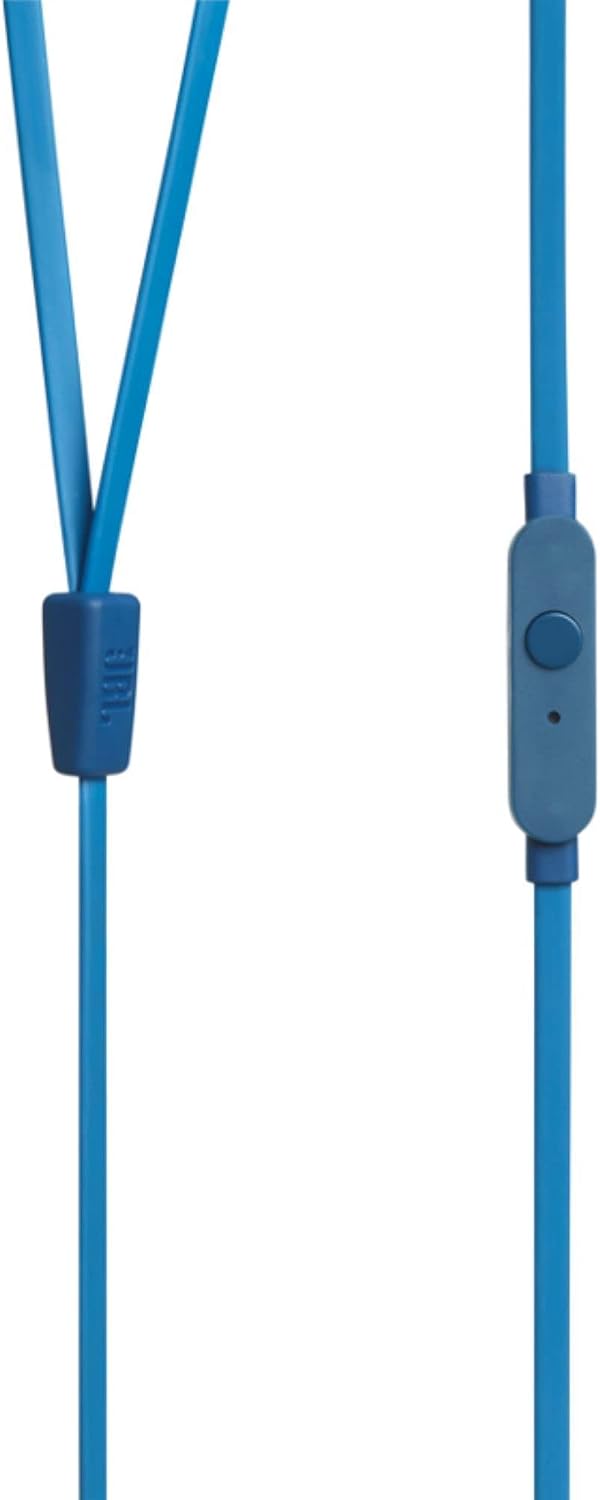
Image 4.1: Close-up of the one-button remote control and built-in microphone on the JBL TUNE 110 cable.
5. Funktioner
- JBL Pure Bass-lyd: Experience powerful and clear bass, a signature of JBL audio.
- 9 mm drivere: Equipped with dynamic 9mm drivers for high-quality sound reproduction.
- One-Button Remote with Microphone: Seamlessly manage music playback and hands-free calls.
- Filtfri fladkabel: Designed to prevent tangles, making the headphones easy to store and use.
- Let og behagelig: Ergonomically designed for extended listening comfort.
- Passiv støjreduktion: The in-ear design provides a degree of passive noise isolation.
6. Specifikationer
| Feature | Specifikation |
|---|---|
| Mærke | JBL |
| Modelnavn | JBL TUNE 110 |
| Modelnummer | JBLT110BLUAM |
| Forbindelsesteknologi | Kablet |
| Hovedtelefonstik | 3.5 mm Jack |
| Driver størrelse | 9 mm dynamisk driver |
| Impedans | 16 Ohm |
| Støjkontrol | Passiv støjreduktion |
| Varens vægt | 0.32 ounce (ca. 9 gram) |
| Produktdimensioner | 2.36 x 1.18 x 6.89 tommer |
| Materiale | Plast |
| Farve | Blå |
| Kabelfunktion | Tangle Fri |
7. Vedligeholdelse
Korrekt pleje vil forlænge dine hovedtelefoners levetid og ydeevne:
- Rengøring af ørepropper: Regularly remove the silicone ear tips and wash them with mild soap and water. Ensure they are completely dry before reattaching.
- Rengøring af ørepropper: Gently wipe the earbuds with a soft, dry cloth. Avoid using harsh chemicals or abrasive materials.
- Kabelpleje: Although the cable is tangle-free, avoid excessive pulling or sharp bends to prevent internal damage. When not in use, coil the cable neatly.
- Opbevaring: Store your headphones in the provided carrying pouch to protect them from dust, dirt, and physical damage.
8. Fejlfinding
If you encounter any issues with your JBL TUNE 110 headphones, refer to the following common solutions:
- Ingen lyd:
- Sørg for, at 3.5 mm-stikket er sat helt i enhedens lydport.
- Kontroller lydstyrkeniveauet på din lydenhed.
- Test hovedtelefonerne med en anden lydenhed for at udelukke et enhedsspecifikt problem.
- Dårlig lydkvalitet / Manglende bas:
- Verify that the ear tips are correctly sized and provide a good seal in your ear canal.
- Ensure the ear tips are clean and free from debris.
- Mikrofonen virker ikke:
- Bekræft, at 3.5 mm-stikket er sat helt i.
- Kontrollér din enheds lydindgangsindstillinger for at sikre, at den eksterne mikrofon er valgt.
- Test mikrofonen med en anden enhed eller et andet program.
9. Garanti og support
JBL products are manufactured to high standards and undergo rigorous quality control. For detailed warranty information, product registration, and technical support, please visit the official JBL website or contact your local JBL customer service center. Keep your proof of purchase for warranty claims.