Indledning
This manual provides essential information for the safe and efficient operation of your Pioneer VSX-834 7.2-Channel AV Receiver. Please read these instructions thoroughly before use and retain them for future reference.
Sikkerhedsoplysninger
ADVARSEL: Dette produkt kan udsætte dig for kemikalier, herunder bly, som er kendt af staten Californien for at forårsage kræft og fødselsdefekter eller anden reproduktionsskade. For mere information gå til www.P65Warnings.ca.gov.
- Udsæt ikke dette apparat for regn eller fugt.
- Bloker ikke ventilationsåbningerne. Installer i overensstemmelse med producentens anvisninger.
- Må ikke installeres i nærheden af varmekilder såsom radiatorer, varmeapparater, komfurer eller andre apparater (inklusive ampløftere), der producerer varme.
- Brug kun tilbehør/tilbehør specificeret af producenten.
- Overlad al service til kvalificeret servicepersonale.
Produkt overview
The Pioneer VSX-834 is a 7.2-channel AV receiver designed to deliver an immersive home theater experience. It supports the latest audio and video formats, offering versatile connectivity and advanced sound calibration features.
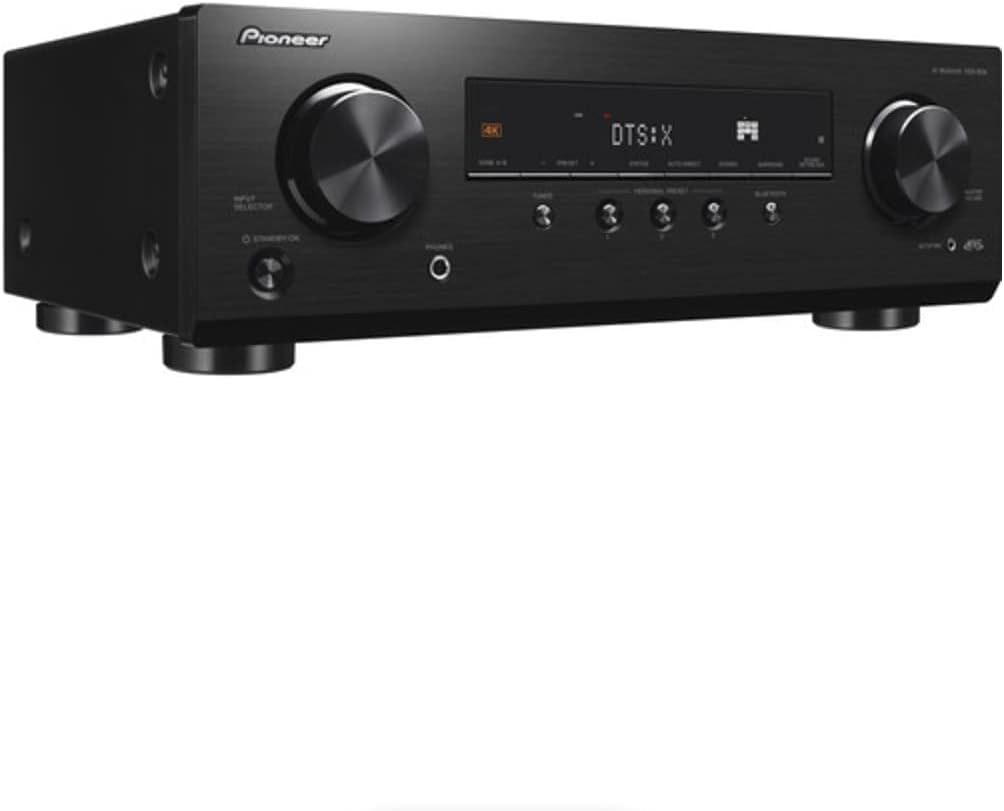
Figur 1: Forside view of the Pioneer VSX-834 AV Receiver.
Nøglefunktioner
- 4K videounderstøttelse: Supports pass-through for HDR10, HLG (Hybrid Log-Gamma), and Dolby Vision signals. All HDMI terminals support 4K (60p/4:4:4/24-bit), wide color gamut (BT.2020), and HDCP 2.2.
- Immersive Audio: Compatible with Dolby Atmos and DTS:X audio formats, including Dolby Atmos Height Virtualizer and DTS Virtual:X for virtual surround effects without physical height or surround speakers.
- MCACC (Multi-Channel Acoustic Calibration System): Pioneer's proprietary system automatically compensates for differences in speaker size, level, and distance, and equalizes response for optimal acoustic environment.
- Zone B Audio Output: Expand main zone sound by connecting wireless headphones, allowing music playback in another room.
- Indbygget Bluetooth: Stream audio wirelessly from compatible devices (Ver. 4.2 + LE) with A2DP/AVRCP profiles and SBC/AAC codecs.
- Personal Preset: Save up to three preferred settings (volume, listening mode) for quick recall via the front panel button or remote control.
Opsætning
1. Udpakning
Carefully remove the AV Receiver and all accessories from the packaging. The box should contain the AC Receiver, remote control, setup microphone, and FM/AM antennas.
2. Forbindelser
Ensure the receiver is powered off and unplugged before making any connections.

Figure 2: Rear panel connections for the Pioneer VSX-834 AV Receiver.
- HDMI-forbindelser: Connect your source devices (Blu-ray player, game console, streaming device) to the HDMI IN ports. Connect your TV or projector to the HDMI OUT port.
- Højttalerforbindelser: Connect your speakers to the corresponding terminals on the rear panel. Pay attention to polarity (+/-) for each speaker. The receiver supports 5.1ch or 7.1/5.1.2ch configurations.
- Antenneforbindelser: Tilslut de medfølgende FM- og AM-antenner til radiomodtagelse.
- Magt: Once all connections are made, plug the power cord into an AC outlet.
3. Initial Configuration (MCACC)
Use the supplied setup microphone and the MCACC system to automatically calibrate your speakers for optimal sound performance in your listening environment. Follow the on-screen instructions displayed on your connected TV.
Betjeningsvejledning
1. Grundlæggende betjening
- Tænd/sluk: Tryk på STANDBY/ON knappen på frontpanelet eller fjernbetjeningen.
- Valg af input: Brug INPUTVÆLGER knob on the front panel or the input buttons on the remote control to choose your desired source (e.g., BD/DVD, GAME, CBL/SAT).
- Lydstyrkekontrol: Juster MASTER VOLUME knappen på frontpanelet eller LYDSTYRKE +/- knapperne på fjernbetjeningen.
2. Avancerede funktioner
- Bluetooth-streaming: Tryk på BLUETOOTH button on the front panel to activate Bluetooth mode. Pair your device with the receiver to stream audio.
- Personal Presets: To save current settings, press and hold the PERSONLIG FORUDINDSTILLING button for three seconds. To recall, press the button briefly. Up to three presets can be stored.
- Zone B lyd: Connect wireless headphones to the Zone B audio output terminals to enjoy audio from the main zone in a separate location.
Opretholdelse
- Rensning: Tør enheden af med en blød, tør klud. Brug ikke slibende rengøringsmidler eller opløsningsmidler.
- Ventilation: Ensure adequate ventilation around the receiver to prevent overheating. Do not block any vents.
- Strømledning: Kontrollér regelmæssigt strømkablet for skader.
Fejlfinding
- Ingen strøm: Kontroller, om netledningen er tilsluttet korrekt, og om stikkontakten fungerer.
- Ingen lyd: Verify speaker connections, input selection, and volume level. Ensure the mute function is not active.
- Ingen video: Check HDMI cable connections between the source, receiver, and TV. Confirm correct input selection on both the receiver and TV.
- Problemer med Bluetooth-forbindelse: Ensure the receiver is in Bluetooth mode and your device is in pairing mode. Check for interference from other wireless devices.
For more detailed troubleshooting, refer to the comprehensive online manual available on the Pioneer support webwebsted.
Specifikationer
| Produktdimensioner | 17.1 x 12.6 x 6.8 tommer |
| Varens vægt | 19 pund |
| Modelnummer | VSX834 |
| Forbindelsesteknologi | Bluetooth |
| Total HDMI-porte | 5 |
| Lydkodning | DTS |
| Lydudgangstilstand | Omgive |
| Surround Sound Kanalkonfiguration | 7.2 kanal |
| Fabrikant | Pioner |
Garanti og support
For warranty information and customer support, please visit the official Pioneer webwebstedet eller kontakt din lokale forhandler. Gem din købskvittering som købsbevis i tilfælde af garantikrav.
Online resources and additional support can be found at: Pionerstøtte


