Indledning
This manual provides essential information for the safe and efficient operation of your Yootech X2 10W Max Wireless Charging Stand. Please read these instructions thoroughly before using the product and retain them for future reference.
Sikkerhedsoplysninger
- Do not disassemble the product. Unauthorized repairs may void the warranty and cause damage.
- Avoid exposure to extreme temperatures, direct sunlight, or humid environments.
- Hold enheden væk fra vand eller andre væsker.
- Use only certified power adapters (QC 2.0/3.0 or PD adapter recommended, not included) to ensure optimal performance and safety.
- Do not place metal objects, magnetic cards, or thick cases (over 4mm) between the phone and the charger, as this may interfere with charging or cause overheating.
- Discontinue use if the product becomes excessively hot, emits smoke, or shows any signs of damage.
Pakkens indhold
- 1 x Yootech Wireless Charging Stand
- 1 x 3.3ft USB Type C Cable
- 1 x brugermanual

Image: Contents of the Yootech Wireless Charging Stand package, showing the stand and the USB Type C cable.
Produktegenskaber
- Flere opladningstilstande: Supports 7.5W for compatible iPhones, 10W for compatible Samsung Galaxy devices, and 5W for other Qi-enabled phones.
- Wide Charging Area: Dual coils provide a broader charging area, allowing for flexible phone placement in vertical or horizontal orientation.
- Sleep-Friendly LED Indicator: A green LED indicator flashes for 3 seconds upon power connection, then turns on for 16 seconds when a phone is recognized. It then turns off to ensure a sleep-friendly environment during charging.
- Avancerede sikkerhedsfunktioner: Equipped with Multifunctional Intelligent Protect Technology for temperature control, surge protection, and short-circuit prevention. Constructed from fire-resistant ABS material.
- Etuivenligt design: Charges through most phone cases up to 4mm thick.
Opsætning
- Connect the provided USB Type C cable to the charging port on the back of the Yootech Wireless Charging Stand.
- Plug the other end of the USB Type C cable into a compatible power adapter (QC 2.0/3.0 or PD adapter recommended, not included).
- Plug the power adapter into a wall outlet. The green LED indicator on the charging stand will flash for 3 seconds, indicating it is powered on and ready for use.

Image: The Yootech Wireless Charging Stand, a black stand with a subtle green LED light at the base, connected via a USB cable.
Betjeningsvejledning
1. Opladning af din enhed
- Place your Qi-enabled smartphone directly onto the charging stand. Ensure the phone is centered on the stand for optimal charging.
- The green LED indicator will illuminate for 16 seconds to confirm that charging has begun, then turn off to avoid disturbing your sleep.
- You can place your phone vertically or horizontally on the stand.

Image: A smartphone is shown charging on the Yootech stand in both vertical and horizontal orientations, demonstrating its versatility for viewindhold.
2. Opladningstilstande
- 10W hurtig opladningstilstand: Compatible with Samsung Galaxy S25/S24/S23/S22/S22 Ultra/S21/S20/Note 10/S10/Note 9 and similar devices. Requires a QC 2.0/3.0 adapter.
- 7.5W Charge Mode: Compatible with iPhone 17/17 Pro/17 Pro Max/Air/16/15/14/13/SE 2022/12/11/X/8 and newer iOS devices. Requires a QC 2.0/3.0 or original PD adapter.
- 5W standardopladningstilstand: Works with any Qi-enabled wireless-charging phones like Google Pixel 3/3XL/4XL and others.
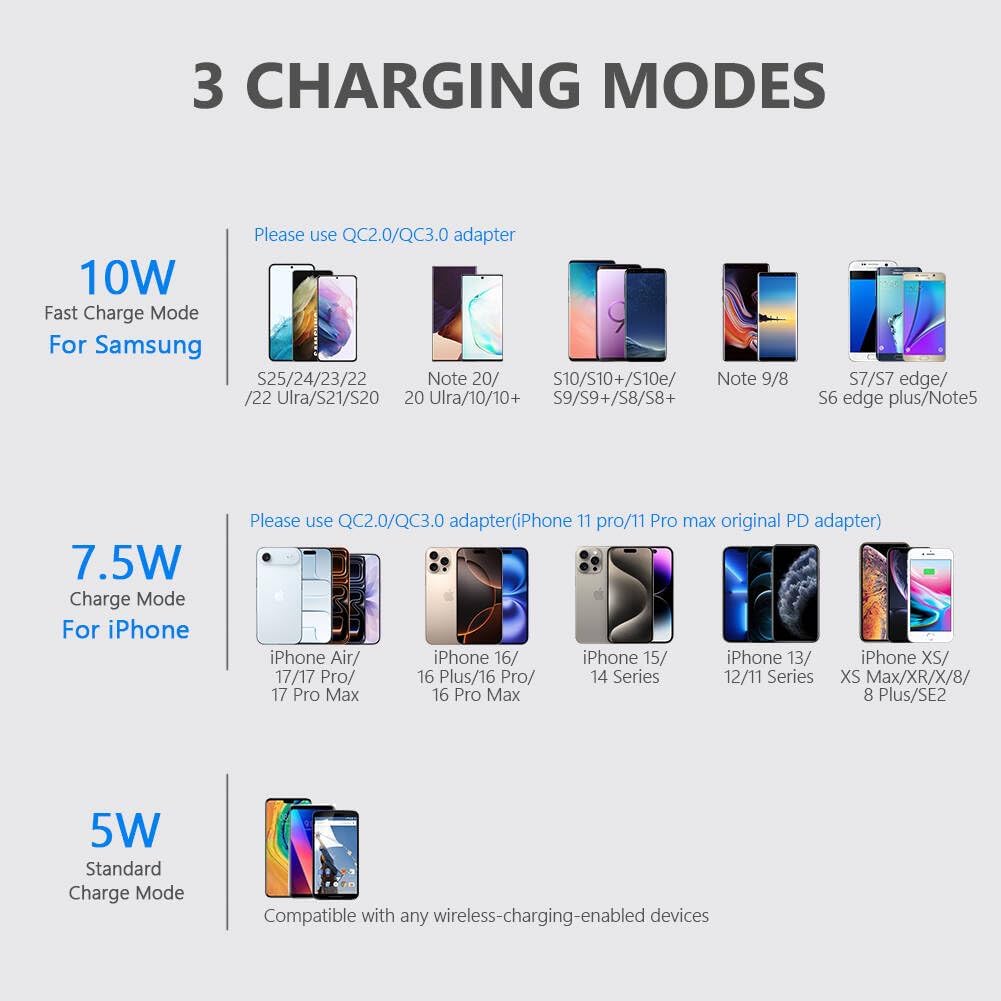
Image: A visual guide illustrating the three distinct charging modes (10W, 7.5W, 5W) and compatible phone models for each, along with recommended adapter types.
3. Case Compatibility
- The charger is designed to work with most phone cases up to 4mm thick.
- For optimal charging, remove cases that are thicker than 4mm, or contain metal, magnets, grips, stands, or credit cards.

Image: A diagram showing a phone charging through a thin case, with icons indicating incompatible case types such as those with magnets, metal, grips/stands, or credit cards.
4. LED Indicator Behavior
- Strøm tilsluttet: Green LED flashes for 3 seconds.
- Device Recognized/Charging Initiated: Green LED turns on for 16 seconds.
- Opladning i gang: Green LED turns off to provide a sleep-friendly environment.
- Foreign Object Detection/Error: Green LED may flash rapidly or remain off. Remove any foreign objects.

Image: A smartphone is shown charging on the Yootech stand in a bedroom setting, with the LED indicator off to emphasize its sleep-friendly design.
Opretholdelse
- To clean the charging stand, disconnect it from the power source.
- Use a soft, dry cloth to wipe the surface. Avoid using harsh chemicals or abrasive cleaners.
- Ensure the charging surface is free of dust and debris for optimal performance.
Fejlfinding
- Enheden oplader ikke: Ensure your phone is Qi-enabled and properly aligned on the charging stand. Check if the power adapter is securely connected and functioning. Remove any incompatible phone cases.
- Langsom opladning: Verify that you are using a QC 2.0/3.0 or PD adapter (not included) for fast charging modes. Ensure your phone is centered on the charging coils. Avoid using thick or metallic cases.
- LED-indikatoren lyser ikke: Check the power connection to the stand and the wall outlet. Try a different USB cable or power adapter.
- Overophedning: Remove your phone from the charger immediately. Ensure there are no foreign objects between the phone and the charger. Check if your phone case is too thick or contains metal. Allow the charger and phone to cool down before attempting to charge again.
Specifikationer
| Feature | Detalje |
|---|---|
| Produktdimensioner | 3.19 x 3.59 x 4.48 tommer |
| Varens vægt | 5.3 ounce |
| Varemodelnummer | X2 |
| Forbindelsesteknologi | USB |
| Særlige funktioner | Short Circuit Protection, Wireless Charging, Charging Indicator |
| Farve | Sort |
| Input bindtage | 9 volt |
| Ampslette | 2 Amps |
| Samlet USB-porte | 1 |
| Fabrikant | yootech |
| Dato først tilgængelig | 27. januar 2019 |
Garanti og support
Yootech products are designed for reliability and performance. For warranty information or technical support, please refer to the contact details provided with your purchase or visit the official Yootech website. We are committed to providing reliable 12-hour response service for any inquiries.


