1. Introduktion
Thank you for choosing the MIATONE BOOMBOX Bluetooth Speaker. This portable and waterproof wireless speaker is designed to deliver high-quality audio for various environments, from indoor relaxation to outdoor adventures. Please read this manual carefully before using the product to ensure proper operation and to maximize its lifespan.

Lyd i høj opløsning: Experience crisp highs, rich mids, and deep bass with advanced DSP-enhanced sound technology.
2. Sikkerhedsoplysninger
- Do not expose the speaker to extreme temperatures (heat or cold) or high humidity.
- Undgå at tabe eller udsætte højttaleren for kraftige stød.
- Du må ikke selv adskille, reparere eller ændre højttaleren. Kontakt kvalificeret servicepersonale.
- Keep the speaker away from medical devices, as its magnetic field may interfere with their operation.
- Ensure the charging port cover is securely closed when using the speaker near water to maintain its waterproof rating.
- Brug kun det medfølgende opladningskabel eller et tilsvarende certificeret kabel.
- Do not listen at excessively high volumes for prolonged periods to prevent hearing damage.
3. Pakkens indhold
Tjek venligst pakken for følgende varer:
- MIATONE BOOMBOX Bluetooth Speaker
- Micro USB opladningskabel
- Ekstra indgangskabel
- Brugervejledning
4. Produktet er slutview
Familiarize yourself with the various parts and controls of your MIATONE BOOMBOX speaker.
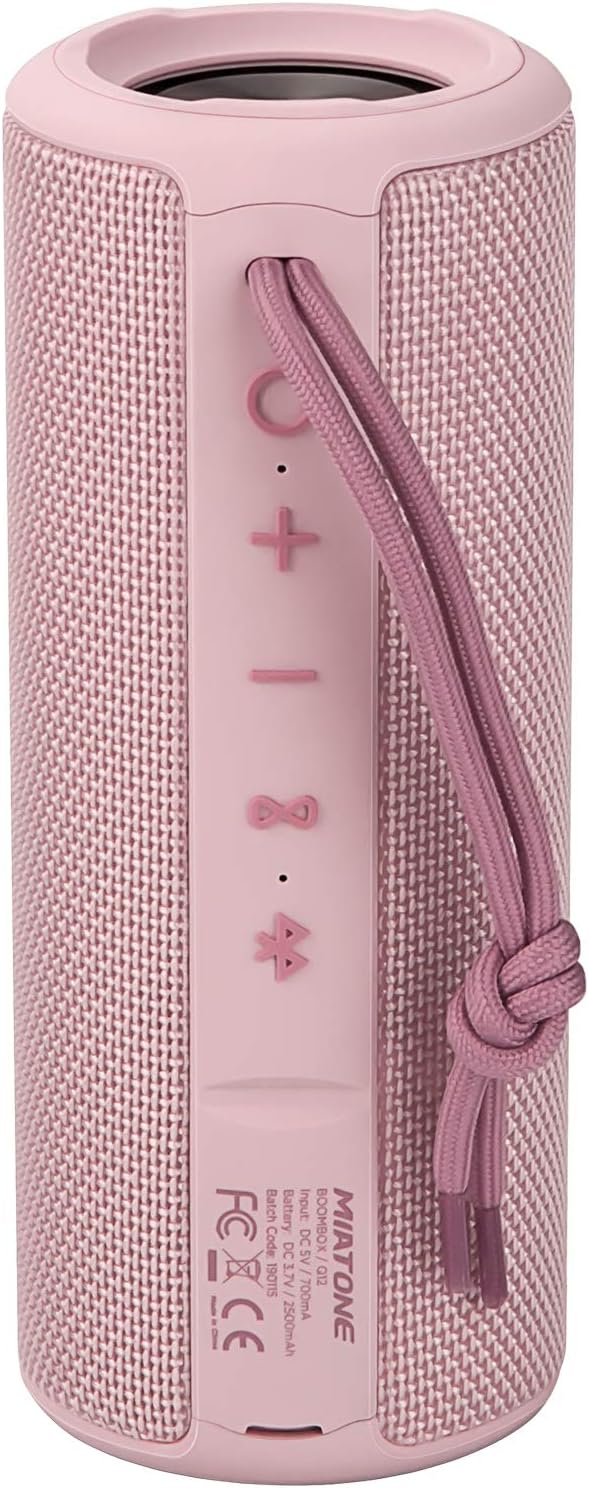
Front View: Shows the speaker grille and the MIATONE logo.

Bag View: Displays the control buttons (+, -, Play/Pause, Bluetooth, TWS) and the charging/AUX ports under a protective flap.

Reinforced Silicone End Caps: The speaker features durable silicone bumpers on both ends to absorb impact and prevent slipping.
Knap funktioner:
| Knap | Fungere |
|---|---|
| + | Short press: Volume Up; Long press: Next Track |
| - | Short press: Volume Down; Long press: Previous Track |
| Afspil/pause | Short press: Play/Pause; Short press (incoming call): Answer/End Call; Long press (incoming call): Reject Call |
| Bluetooth-ikon | Long press: Disconnect current Bluetooth device and enter pairing mode |
| TWS Icon | Short press: Initiate TWS pairing (True Wireless Stereo) |
| Power knap | Langt tryk: Tænd/sluk |
5. Opsætning
5.1 Opladning af højttaleren
- Open the protective flap on the back of the speaker to reveal the charging port.
- Connect the Micro USB charging cable to the speaker's charging port and the other end to a USB power adapter (not included) or a computer's USB port.
- LED-indikatoren viser opladningsstatus (f.eks. rød for opladning, slukket når den er fuldt opladet).
- A full charge takes approximately 12 hours. Ensure the protective flap is sealed after charging.
5.2 Tænd/sluk
- Tænd: Long press the Power button until you hear a power-on prompt.
- Sluk: Long press the Power button until you hear a power-off prompt.
5.3 Bluetooth -parring
- Ensure the speaker is powered on and in Bluetooth pairing mode (indicated by a flashing blue LED). If not, long press the Bluetooth icon button.
- Aktiver Bluetooth på din enhed (smartphone, tablet, computer).
- Søg efter "BOOMBOX" in your device's Bluetooth list.
- Select "BOOMBOX" to connect. You will hear a confirmation sound once paired.
- Højttaleren genopretter automatisk forbindelsen til den sidst parrede enhed, når den tændes, hvis den er inden for rækkevidde.

Opgraderet Bluetooth 5.3: Provides faster and more stable wireless connections.
5.4 TWS (ægte trådløs stereo) parring
TWS allows you to pair two MIATONE BOOMBOX speakers together for a true stereo sound experience.
- Ensure both BOOMBOX speakers are powered on and not connected to any Bluetooth device.
- On one speaker (this will be the primary speaker), short press the TWS icon button. It will enter TWS pairing mode.
- The two speakers will automatically connect to each other. You will hear a confirmation sound once TWS pairing is successful.
- Once TWS paired, connect your device to the primary speaker via Bluetooth as described in section 5.3.
- To disconnect TWS, short press the TWS icon button on either speaker.
6. Betjeningsvejledning
6.1 Musikafspilning
- Afspil/pause: Tryk kort på Play/Pause-knappen.
- Lydstyrke op: Tryk kort på + knap.
- Skrue ned for lyden: Tryk kort på - knap.
- Næste nummer: Tryk længe på + knap.
- Forrige nummer: Tryk længe på - knap.
6.2 Håndfri opkald
- Besvar opkald: Short press the Play/Pause button when an incoming call rings.
- Afslut opkald: Tryk kort på Afspil/Pause-knappen under et opkald.
- Afvis opkald: Tryk længe på Afspil/Pause-knappen, når et indgående opkald ringer.
6.3 Auxiliary Input (AUX Mode)
You can connect non-Bluetooth devices to the speaker using the provided 3.5mm auxiliary cable.
- Open the protective flap on the back of the speaker.
- Connect one end of the 3.5mm AUX cable to the speaker's AUX port and the other end to your audio device's headphone jack.
- Højttaleren skifter automatisk til AUX-tilstand.
- Styr afspilning og lydstyrke fra din tilsluttede enhed.
- Ensure the protective flap is sealed after use to maintain water resistance.
7. Vedligeholdelse
7.1 Rengøring
- Tør højttaleren af med en blød, damp klæde.
- Brug ikke slibende rengøringsmidler, alkohol eller kemiske opløsningsmidler.
- Sørg for, at højttaleren er helt tør, før den oplades eller opbevares.
7.2 Opbevaring
- Opbevar højttaleren et køligt, tørt sted væk fra direkte sollys og ekstreme temperaturer.
- If storing for a long period, charge the battery to about 50% every few months to preserve battery life.
7.3 Vandtæthedspleje (IPX6)
The MIATONE BOOMBOX is IPX6 waterproof, meaning it can withstand powerful water jets. It is not designed for submersion.
- Always ensure the charging port and AUX port protective flap is securely closed before exposing the speaker to water.
- If the speaker gets wet, wipe it dry with a clean cloth before opening the port flap or charging.
- Do not charge the speaker if the ports are wet.

IPX6 Waterproof Speaker: Designed to float and withstand water splashes, making it ideal for poolside or beach use.
8. Fejlfinding
| Problem | Mulig årsag | Løsning |
|---|---|---|
| Højttaleren tænder ikke. | Batteriet er lavt eller dødt. | Oplad højttaleren helt. |
| Kan ikke parre med Bluetooth-enhed. | Speaker is not in pairing mode; device's Bluetooth is off; speaker is already connected to another device; device list needs refresh. | Ensure speaker is in pairing mode (flashing blue LED). Turn device's Bluetooth off and on. Disconnect from other devices. Forget "BOOMBOX" on your device and re-scan. |
| Ingen lyd eller lav lydstyrke. | Volume too low on speaker or device; incorrect input mode; speaker not connected. | Increase volume on both speaker and device. Ensure correct input mode (Bluetooth/AUX). Re-establish Bluetooth connection. |
| Lydforvrængning. | Lydstyrken er for høj; lavt batteri; interferens. | Reduce volume. Charge the speaker. Move speaker closer to the device or away from other electronic devices. |
| TWS-parring mislykkedes. | Højttalerne er for langt fra hinanden; én højttaler er allerede tilsluttet en enhed. | Ensure both speakers are close to each other and not connected to any Bluetooth device before initiating TWS pairing. |
9. Specifikationer
| Feature | Detalje |
|---|---|
| Modelnavn | BOOMBOX (Q12) |
| Forbindelsesteknologi | Bluetooth 5.3, USB, AUX |
| Højttaler type | Portable Speaker, Bluetooth Speaker |
| Maksimal udgangseffekt | 20 watt |
| Frekvensrespons | 20 KHz |
| Batterilevetid | Op til 17 timer (ved 50 % volumen) |
| Opladningstid | 12 timer |
| Vandtæt vurdering | IPX6 |
| Bluetooth rækkevidde | Op til 100 fod (30.5 meter) |
| Dimensioner (L x B x H) | 7.11 x 7.11 x 18.54 cm (2.8 x 2.8 x 7.3 tommer) |
| Vægt | 421.84 gram (0.93 lbs) |
| Materiale | Aluminium |
| Kompatible enheder | Personal Computer, Laptop, Tablet, Smartphone |

Langvarig spilletid: Enjoy up to 17 hours of playback at 50% volume.
10. Garanti og support
MIATONE products are designed and manufactured to the highest quality standards. For information regarding warranty coverage, technical support, or service inquiries, please refer to the contact information provided on the product packaging or visit the official MIATONE webwebsted.
Gem venligst dit købsbevis for garantikrav.


