
1. Introduktion
This manual provides essential information for the setup, operation, and maintenance of your Blackweb BWC18SB001 2.0 Channel Google Assistant Smart Soundbar. Please read these instructions carefully before using the product to ensure proper functionality and to maximize your audio experience. This smart soundbar integrates speaker functionality with Google Assistant capabilities, enhancing your home entertainment system.
2. Hvad er der i æsken
Kontroller, at alle komponenter er til stede ved udpakning:
- Sortweb BWC18SB001 2.0 Channel Google Assistant Smart Soundbar
- Fjernbetjening
- Strømadapter
- Relevant Audio Cables (e.g., Optical, Aux)
- Brugervejledning (dette dokument)
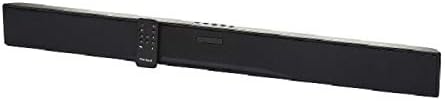
Billede: Den Sorteweb BWC18SB001 Smart Soundbar, shown with its included remote control. The soundbar is black and rectangular, designed to sit beneath a television.
3. Produktfunktioner
- 2.0-kanals lyd: Delivers clear stereo sound for an enhanced listening experience.
- Integreret Google Assistent: Control your soundbar and smart home devices using voice commands.
- Flere tilslutningsmuligheder: Supports HDMI, Optical, AUX, and Bluetooth for versatile audio input.
- Kontrolmetoder: Features on-device buttons and a dedicated remote control for easy operation.
- Kompakt design: Designed to fit seamlessly into your home theater setup.
4. Opsætning
4.1 Placering
Place the soundbar on a stable, flat surface directly in front of your television or mount it on a wall (mounting hardware not included). Ensure there is adequate ventilation around the unit.
4.2 Strømtilslutning
- Tilslut strømadapteren til DC IN-porten på bagsiden af soundbaren.
- Sæt den anden ende af strømadapteren i en stikkontakt.
4.3 Lydforbindelse
Choose one of the following methods to connect your soundbar to your TV or other audio source:
- HDMI (anbefales): Connect an HDMI cable (not included) from the HDMI ARC port on your TV to the HDMI ARC port on the soundbar. This allows for high-quality audio and control via your TV remote.
- Optisk: Connect an Optical cable (included) from the OPTICAL OUT port on your TV to the OPTICAL IN port on the soundbar.
- AUX: Connect a 3.5mm audio cable (included) from the AUX OUT port on your TV or audio device to the AUX IN port on the soundbar.
5. Betjeningsvejledning
5.1 Tænd/sluk
- Tryk på tænd / sluk-knappen (U) på soundbaren eller fjernbetjeningen for at tænde eller slukke enheden.
- A green indicator light on the soundbar signifies that it is powered on.
5.2 Lydstyrkekontrol
- Brug lydstyrke op (VOL+) og Lydstyrke ned (VOL-) buttons on the soundbar or remote control to adjust the volume.
- Tryk på mute-knappen (X) on the remote to mute or unmute the sound.
5.3 Indgangsvalg
Tryk på Input-knappen (M) on the soundbar or the corresponding input buttons (AUX, OPTICAL, HDMI, Bluetooth) on the remote control to switch between audio sources.
6. Google Assistant-integration
Din sorteweb soundbar features integrated Google Assistant. To activate, ensure the soundbar is connected to your home Wi-Fi network (refer to the separate Google Home app setup guide for detailed instructions). Once connected, you can use voice commands:
- Sig "Hey Google" eller "Ok Google" efterfulgt af din kommando.
- Examples: "Hey Google, play music," "Ok Google, what's the weather?" "Hey Google, turn up the volume."
You can also mute the Google Assistant microphone using the dedicated button on the soundbar or remote control if you prefer privacy.
7. Bluetooth-forbindelse
Sådan tilslutter du en Bluetooth-enhed:
- Tryk på Bluetooth-knappen (BT) on the remote control or cycle through inputs on the soundbar until "BT" is displayed or indicated. The soundbar will enter pairing mode.
- Aktiver Bluetooth på din mobile enhed (smartphone, tablet, bærbar computer), og søg efter tilgængelige enheder.
- Select "Blackweb BWC18SB001" from the list of devices.
- Once paired, the soundbar will indicate a successful connection, and you can play audio from your device.
Bluetooth-rækkevidden er cirka 10 meter (33 fod).
8. Vedligeholdelse
For at sikre din soundbars lange levetid og optimale ydeevne:
- Rensning: Use a soft, dry cloth to wipe the exterior of the soundbar. Do not use liquid cleaners or abrasive materials.
- Ventilation: Sørg for, at ventilationsåbningerne ikke er blokerede.
- Miljø: Avoid exposing the soundbar to extreme temperatures, humidity, or direct sunlight.
9. Fejlfinding
- Ingen strøm: Sørg for, at strømadapteren er korrekt tilsluttet både soundbaren og en fungerende stikkontakt.
- Ingen lyd:
- Check that the soundbar is powered on and not muted.
- Kontroller, at den korrekte inputkilde er valgt på soundbaren.
- Ensure audio cables (HDMI, Optical, AUX) are securely connected to both the soundbar and your TV/audio source.
- Adjust the volume on both the soundbar and your TV/audio source.
- Bluetooth forbinder ikke:
- Sørg for, at soundbaren er i Bluetooth-parringstilstand.
- Sørg for, at din enheds Bluetooth er aktiveret og inden for rækkevidde.
- Prøv at ophæve parringen og parre enheden igen.
- Google Assistent svarer ikke:
- Tjek din Wi-Fi-forbindelse.
- Ensure the Google Assistant microphone is not muted.
- Verify the soundbar is properly set up in the Google Home app.
10. Specifikationer
| Feature | Specifikation |
|---|---|
| Modelnavn | BWC18SB001 |
| Højttaler type | Soundbar |
| Surround Sound Kanalkonfiguration | 2.0 |
| Kontrolmetode | Voice, Remote, On-device Buttons |
| Forbindelsesteknologi | HDMI, Optical, AUX, Bluetooth |
| Bluetooth rækkevidde | 10 meter |
| Højttaler Maksimal udgangseffekt | 150 watt |
| Lydudgangstilstand | Stereo, Surround |
| Strømkilde | Elektrisk med ledning |
| Produktdimensioner | 32 x 2.77 x 3.26 tommer |
| Varens vægt | 3.97 pund |
| UPC | 681131237703 |
11. Garanti og support
For warranty information and technical support, please refer to the documentation provided at the time of purchase or visit the official Blackweb webwebsted. Gem din købsbevis til garantikrav.
