1. Introduktion
Thank you for choosing the SooPii 60W 6-Port Charging Station. This device is designed to efficiently charge multiple electronic devices simultaneously, helping to keep your space tidy and organized. This manual provides essential information for setting up, operating, and maintaining your charging station.

Image 1.1: The SooPii 60W 6-Port Charging Station with various devices connected.
2. Produktet er slutview & Funktioner
The SooPii 60W 6-Port Charging Station offers a centralized solution for charging and organizing your electronic devices. Key features include:
- 6 USB -porte: Supports simultaneous charging of up to 6 devices.
- USB-C Power Delivery (PD) Charging: Features one 20W USB-C fast charging port compatible with devices supporting PD protocol (e.g., iPhone, iPad, Samsung). Charges phones to 50% in approximately 30 minutes.
- Smart USB-A Ports: Five additional USB-A ports (5V/2.4A) for standard charging.
- Removable Dividers: Includes 7 sturdy, removable dividers to accommodate various device sizes and cases (up to 0.79 inches wide per slot).
- Upgraded 2-in-1 Holder: A dedicated holder for an Apple Watch and AirPods charger (Apple Watch charger not included).
- Avancerede sikkerhedsfunktioner: Equipped with Activeshield safety system, including a Dynamic Temperature Sensor and Power Tuner Chip for enhanced protection against overload, over-voltage, over-charge, short-circuit, over-heating, and over-current.
- Medfølgende kabler: Comes with 6 mixed charging cables: 1 USB-C to USB-C, 2 Type-C, 2 USB-A to Lightning, and 1 Micro USB cable.

Billede 2.1: Detaljeret view of the charging ports on the station.

Image 2.2: Illustration of 20W Power Delivery fast charging capability.
3. Hvad er der i æsken
Ved udpakning bør du finde følgende ting:
- 1x SooPii 60W 6-Port Charging Station (Model CS60)
- 1x netledning
- 7x Removable Dividers
- 1x 2-in-1 Holder for Apple Watch & AirPods
- 6x Mixed Charging Cables (1 USB-C to USB-C, 2 Type-C, 2 USB-A to Lightning, 1 Micro USB)
- 2x SooPii Cable Ties

Image 3.1: All components included with the charging station.
4. Opsætningsvejledning
- Placer ladestationen: Choose a stable, flat surface for the charging station, ensuring adequate ventilation.
- Insert Dividers: Insert the clear plastic dividers into the slots on the charging station. You can adjust the spacing by removing or repositioning dividers to fit devices with different thicknesses or cases.
- Attach 2-in-1 Holder: If using, attach the 2-in-1 holder to one of the end slots. Follow the instructions below for proper Apple Watch charger installation.
- Tilslut strømledningen: Plug the provided power cord into the charging station's power input port and then into a wall outlet.
- Connect Charging Cables: Plug the short charging cables into the appropriate USB ports on the station. Use the included cable ties to manage excess cable length.
4.1. Installing Apple Watch Charger in 2-in-1 Holder
To properly install your Apple Watch charger (not included) into the 2-in-1 holder:
- Insert the holder onto the designated slot on the charging station.
- Pass your Apple Watch charger cable through the holder's opening.
- Press the Apple Watch charger into the slot until you hear a click. Ensure the concave surface of the charger is facing upwards.
- Place your Apple Watch on the holder to charge.

Image 4.1: Step-by-step guide for Apple Watch charger installation.

Image 4.2: The upgraded 2-in-1 holder in use with an iPhone, Apple Watch, and AirPods.
4.2. Video: How to Ensure Power Cord is Plugged in Tightly
Video 4.1: A short demonstration on how to securely plug in the power cord to the charging station.
5. Betjeningsvejledning
- Tænd/sluk: Use the power switch located on the side of the charging station to turn the unit on or off.
- Opladningsenheder: Connect your devices to the appropriate charging cables plugged into the USB ports. Place your devices in the slots between the dividers.
- LED-indikatorer: Blue LED lights will illuminate when a device is plugged in and charging. The dividers also feature blue LED light indicators when a product is plugged into the corresponding port for charging.
- Hurtig opladning: For devices compatible with PD fast charging, use the 20W USB-C port. Other devices will charge at their optimal speed via the Smart USB-A ports.
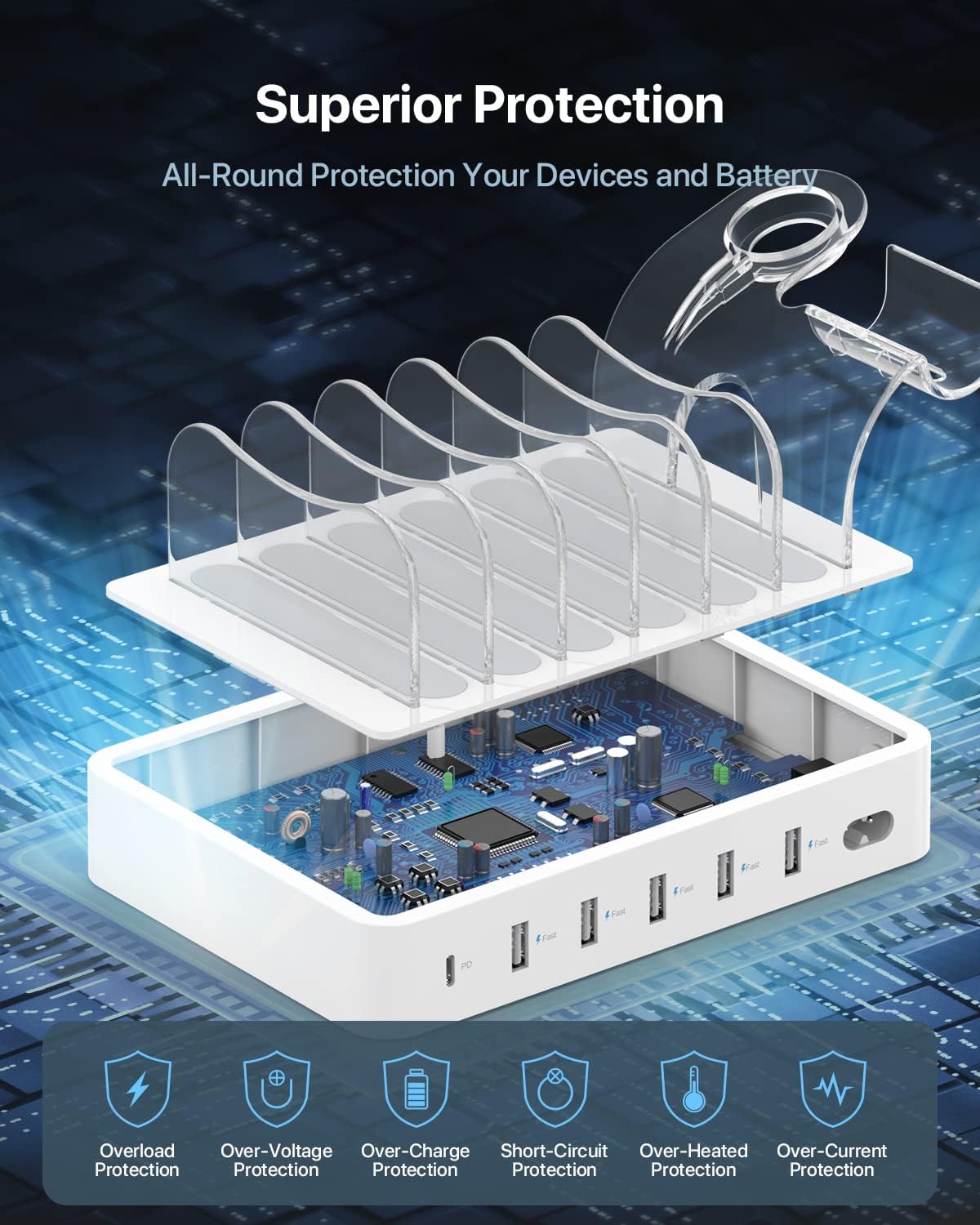
Billede 5.1: Intern view showcasing the superior protection mechanisms.
6. Advanced Safety Features
The SooPii Charging Station is equipped with the Activeshield safety system to ensure the protection of your devices and battery. This system includes:
- Dynamisk temperatursensor: Actively monitors the temperature of the charging station.
- Power Tuner Chip: Adjusts power output to safeguard all connected devices.
- Flere beskyttelser: Overload Protection, Over-Voltage Protection, Over-Charge Protection, Short-Circuit Protection, Over-Heated Protection, and Over-Current Protection.

Image 6.1: Visual representation of the advanced safety features.
7. Vedligeholdelse
To ensure the longevity and optimal performance of your SooPii Charging Station, follow these maintenance guidelines:
- Rensning: Disconnect the power cord before cleaning. Use a soft, dry cloth to wipe the surface of the charging station. Avoid using liquid cleaners or abrasive materials.
- Opbevaring: Når ladestationen ikke er i brug i længere perioder, skal den opbevares køligt og tørt, væk fra direkte sollys og ekstreme temperaturer.
- Kabelstyring: Regularly check charging cables for any signs of wear or damage. Replace damaged cables immediately to prevent potential hazards. Use the included cable ties to keep cables organized and prevent tangling.
8. Fejlfinding
If you encounter any issues with your charging station, refer to the following common troubleshooting steps:
- Enheden oplades ikke:
- Ensure the power cord is securely plugged into both the charging station and the wall outlet.
- Verify that the power switch on the charging station is in the 'ON' position.
- Check if the charging cable is properly connected to both the device and the charging station.
- Try a different charging cable or a different port on the station to rule out a faulty cable or port.
- Ensure your device is compatible with the charging port (e.g., USB-C PD for fast charging).
- Langsom opladning:
- Confirm that your device supports fast charging if using the PD port.
- Sørg for at bruge et kabel af høj kvalitet, der understøtter hurtigopladning.
- Avoid charging too many high-power devices simultaneously, as this can distribute the total wattage.
- LED-indikator lyser ikke:
- Check if the charging station is powered on and connected to a working outlet.
- Ensure a device is properly connected to the corresponding port.
9. Specifikationer
| Feature | Detalje |
|---|---|
| Produktdimensioner | 7.24 x 5 x 1.26 tommer |
| Varens vægt | 12.3 ounce |
| Modelnummer | CS60 |
| Input bindtage | 120 volt |
| Samlet USB-porte | 6 |
| USB-C PD udgang | 20W |
| USB-A-output | 5V/2.4A (per port) |
| Ampslette | 12 Amps (I alt) |
| Farve | Hvid |
10. Garanti og support
SooPii products are designed for reliability and user satisfaction. Your SooPii 60W 6-Port Charging Station comes with a 36-måneders problemfri garanti and Lifetime Customer Care.
For any questions, concerns, setup guidance, or if you need spare parts (such as different types of cables), please contact us. We aim to provide solutions and guidance within 24 hours.
Kontaktoplysninger:
E-mail: support@soopii.com
Everything you buy from SooPii is safe and promised to be a working product.


