Velkomst
Thank you for choosing the iTek GGC 30-inch Curved Monitor. This manual provides essential information for setting up, operating, and maintaining your new monitor. Please read it thoroughly before use to ensure optimal performance and safety.
Vigtige sikkerhedsinstruktioner
To prevent damage and ensure safe operation, please observe the following precautions:
- Udsæt ikke skærmen for regn, fugt eller ekstreme temperaturer.
- Sørg for tilstrækkelig ventilation omkring skærmen. Bloker ikke ventilationsåbningerne.
- Brug kun den strømadapter, der følger med skærmen.
- Undgå at placere tunge genstande på netledningen.
- Tag stikket ud af stikkontakten, hvis skærmen ikke skal bruges i længere tid.
- Forsøg ikke selv at udføre service på skærmen. Overlad al service til kvalificeret personale.
- Rengør skærmbilledet og casinmed en blød, tør klud. Undgå at bruge slibende rengøringsmidler eller opløsningsmidler.
Pakkens indhold
Tjek venligst pakken for følgende varer:
- iTek GGC 30-inch Curved Monitor
- Monitorstativ (base og hals)
- Strømadapter og kabel
- DisplayPort-kabel
- HDMI kabel
- Brugermanual
- Skruer til stativmontering
Produkt overview
The iTek GGC 30-inch Curved Monitor is designed for an immersive viewing experience, ideal for gaming and professional use. It features a WFHD (2560x1080) resolution, a high 200Hz refresh rate, and a rapid 1ms MPRT response time.

Key Performance Highlights
- 200Hz Refresh Rate & AMD FreeSync Technology: Experience ultra-smooth visuals and tear-free gaming with a high refresh rate and adaptive sync technology.

Figure 2: 200Hz Refresh Rate and AMD FreeSync Technology in action. - Flicker-Free & Low Blue Light: Designed to reduce eye strain during prolonged use, providing a more comfortable viewoplevelse.

Figure 3: Flicker-Free and Low Blue Light features for eye comfort. - 1 ms MPRT-svartid: Minimizes motion blur and ghosting, crucial for fast-paced games and action sequences.

Figure 4: Rapid Refresh Rate and Response Time for smooth visuals. - 1800R buet skærm: The immersive curvature brings the edges of the screen closer to your field of view, enhancing depth perception and reducing distortion.

Figure 5: 1800R Curved Display for an immersive experience.
Opsætning
Montering af stativet
- Tag forsigtigt skærmens og stativets komponenter ud af emballagen.
- Attach the stand neck to the monitor panel using the provided screws. Ensure it clicks securely into place or is fastened tightly.
- Attach the stand base to the stand neck, securing it with the thumb screw or screws from underneath.
- Placer den samlede skærm på en stabil, plan overflade.
Tilslutning af din skærm
The iTek GGC monitor offers multiple connectivity options for various devices:
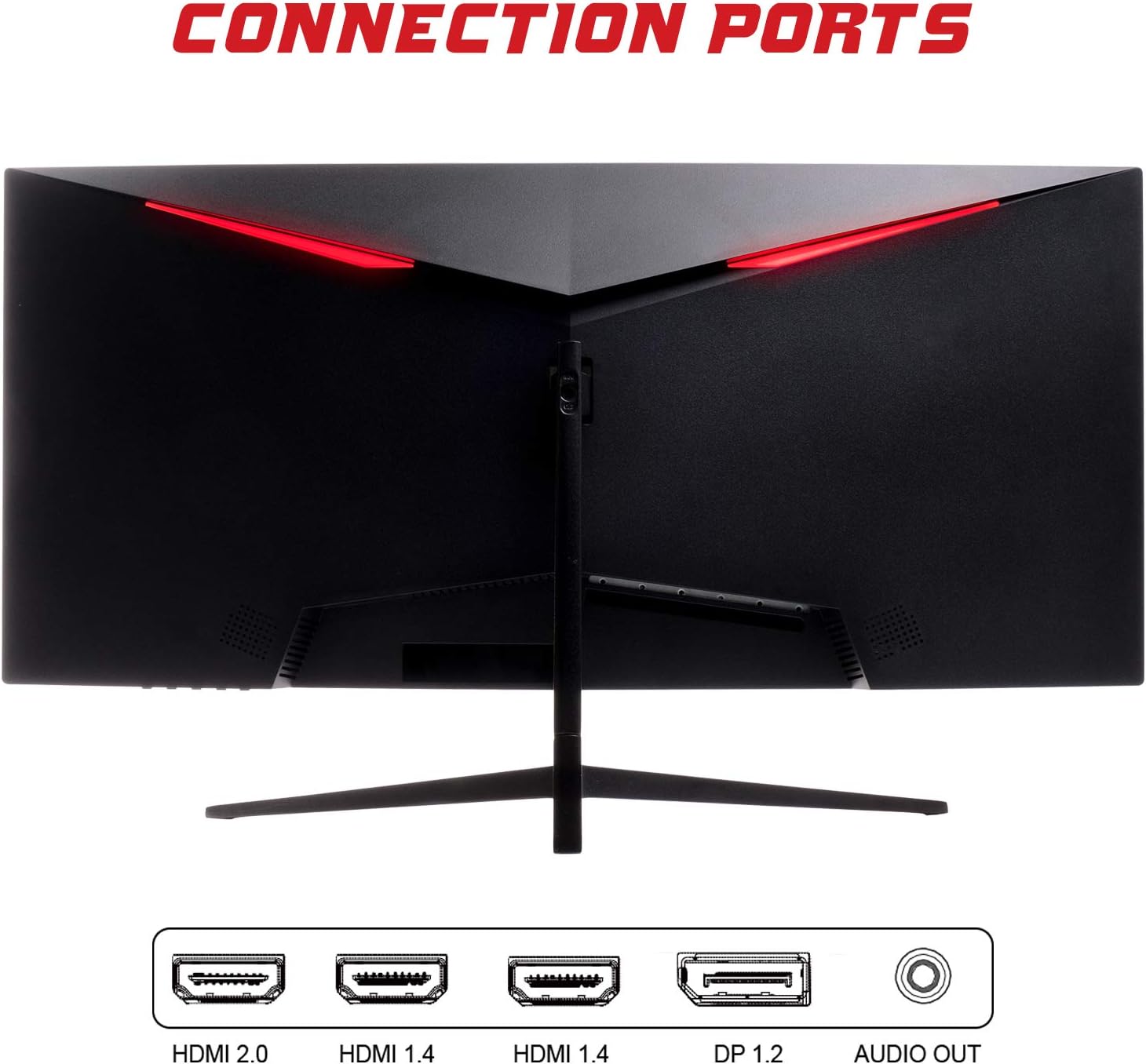
- DisplayPort (DP 1.2): For high-resolution and high-refresh-rate connections to your PC.
- HDMI (HDMI 2.0, HDMI 1.4 x2): Connect to PCs, gaming consoles, and other multimedia devices. HDMI 2.0 supports higher refresh rates at certain resolutions.
- Lydudgang: Tilslut eksterne højttalere eller hovedtelefoner.
Når du har tilsluttet videokablet, skal du tilslutte strømadapteren til skærmen og derefter til en stikkontakt.
Betjening af monitoren
Tænd/sluk
Press the power button, usually located on the bottom or back of the monitor, to turn it on or off. The power indicator light will illuminate when the monitor is on.
On-Screen Display (OSD) menu
The OSD menu allows you to adjust various monitor settings. Use the buttons on the monitor (typically on the back or bottom right) to navigate the menu.
- Billedindstillinger: Juster lysstyrke, kontrast, skarphed og gamma.
- Farveindstillinger: Rediger farvetemperatur, farvetone og mætning.
- Indgangsvalg: Skift manuelt mellem DisplayPort- og HDMI-indgange.
- Lyd: Adjust volume for the audio output.
- Systemindstillinger: Access language, OSD timeout, and reset options.
- Spilfunktioner: Enable/disable FreeSync, adjust response time overdrive, and activate crosshair overlays if available.
Opretholdelse
Korrekt pleje sikrer din skærms levetid:
- Sluk altid skærmen og tag netledningen ud, inden rengøring.
- Brug en blød, fnugfri klud til forsigtigt at tørre skærmen af. Tør skærmen let af, hvis der opstår genstridige mærker.ampRengør kluden med vand eller et mildt, ikke-slibende skærmrensemiddel.
- Rengør skærmen casinmed en blød, tør klud.
- Avoid spraying liquids directly onto the screen or casing.
- Do not use benzene, thinner, ammonia-based cleaners, or abrasive materials.
Fejlfinding
If you encounter issues with your monitor, please refer to the following table for common problems and solutions:
| Problem | Mulig løsning |
|---|---|
| Ingen strøm | Ensure the power cable is securely connected to the monitor and the power outlet. Check if the power outlet is working. |
| Intet signal / Blank skærm | Verify the video cable (DisplayPort or HDMI) is firmly connected to both the monitor and your computer. Select the correct input source via the OSD menu. Ensure your computer is powered on and not in sleep mode. |
| Billedet flimrer eller er ustabilt | Check the video cable connection. Try a different cable or port. Ensure your graphics card drivers are up to date. Adjust the refresh rate in your computer's display settings. |
| Poor image quality (blurry, distorted colors) | Adjust brightness, contrast, and color settings in the OSD menu. Ensure the display resolution on your computer matches the monitor's native resolution (2560x1080). |
| Ingen lyd fra lydudgang | Check the audio cable connection to your speakers/headphones. Verify the volume setting in the OSD menu and on your computer. Ensure the correct audio output device is selected in your computer's sound settings. |
Tekniske specifikationer
| Feature | Specifikation |
|---|---|
| Mærke | Itek |
| Model | ITMC30V201FHD |
| Skærmstørrelse | 30 tommer |
| Paneltype | VA |
| Krumning | R1800 |
| Opløsning | 2560 x 1080 (WFHD) |
| Aspektforhold | 21:9 |
| Opdateringshastighed | 200 Hz |
| Svartid | 1ms MPRT |
| Lysstyrke | 350 cd/m² |
| Kontrastforhold | 3000:1 |
| Viewi vinkel | 178° (Horisontal/Lodret) |
| Forbindelse | 1x DisplayPort 1.2, 1x HDMI 2.0, 2x HDMI 1.4, Audio Out |
| Særlige funktioner | HDR Ready, FreeSync, Low Blue Light, Flicker Free, VESA Mountable |
| Produktmål (med stativ) | 70.68 x 40.89 x 18.48 cm |
| Vægt | 6.9 kg |
Energieffektivitet

For detailed energy consumption information and product registration, please refer to the official EPREL database:
Garanti og support
Your iTek GGC monitor is backed by a manufacturer's warranty. Please retain your proof of purchase for warranty claims.
- Garanteret produktsupport: This product is guaranteed to have support available until at least January 1, 2031.
- For technical support, warranty inquiries, or service requests, please contact iTek customer service through their official webwebstedet eller de kontaktoplysninger, der er angivet med dit køb.


