1. Introduktion
Welcome to the user manual for your new Bissell EV675 Robot Vacuum Cleaner. This document provides essential information for the safe and efficient operation, maintenance, and troubleshooting of your robotic vacuum. Please read this manual thoroughly before using your device.
2. Vigtige sikkerhedsinstruktioner
To reduce the risk of fire, electric shock, or injury, always follow basic precautions, including the following:
- Læs alle instruktioner før brug af apparatet.
- Må ikke bruges udendørs eller på våde overflader.
- Må ikke bruges som legetøj. Omhyggelig opmærksomhed er nødvendig, når den bruges af eller i nærheden af børn.
- Brug kun som beskrevet i denne manual. Brug kun producentens anbefalede tilbehør.
- Må ikke bruges med beskadiget ledning eller stik. Hvis apparatet ikke fungerer, som det skal, er blevet tabt, beskadiget, efterladt udendørs eller tabt i vand, skal det returneres til et servicecenter.
- Undlad at trække eller bære i snoren, bruge snoren som håndtag, lukke en dør på snoren eller trække snoren rundt om skarpe kanter eller hjørner. Kør ikke apparatet over ledningen. Hold ledningen væk fra opvarmede overflader.
- Tag ikke stikket ud ved at trække i ledningen. For at tage stikket ud skal du tage fat i stikket, ikke i ledningen.
- Håndter ikke stikket eller apparatet med våde hænder.
- Stik ikke genstande ind i åbninger. Må ikke bruges med blokerede åbninger; holdes fri for støv, fnug, hår og alt, hvad der kan reducere luftstrømmen.
- Hold hår, løstsiddende tøj, fingre og alle dele af kroppen væk fra åbninger og bevægelige dele.
- Tag ikke noget op, der brænder eller ryger, såsom cigaretter, tændstikker eller varm aske.
- Vær ekstra forsigtig ved rengøring på trapper.
- Må ikke bruges til at opsamle brændbare eller brændbare væsker, såsom benzin, eller brug i områder, hvor de kan være til stede.
- Saml ikke giftigt materiale op (klorblegemiddel, ammoniak, afløbsrens osv.).
- Do not use in an enclosed space where vapors are present from oil base paint, paint thinner, some mothproofing substances, flammable dust, or other explosive or toxic vapors.
- Må ikke bruges til at opsamle hårde eller skarpe genstande såsom glas, søm, skruer, mønter osv.
- Må ikke bruges uden støvkop og/eller filtre på plads.
- Sluk for alle knapper, før du trækker stikket ud.
- Tag stikket ud af stikkontakten, når den ikke er i brug, og før servicering.
3. Pakkens indhold
Your Bissell EV675 Robot Vacuum Cleaner package includes the following items:
- Bissell EV675 Robot Vacuum Cleaner
- Self-Charging Dock
- Strømadapter
- Fjernbetjening
- Bonus Filter
- Bonus Edge Cleaning Brushes (2 sets)
- Rengøringsværktøj

This image displays the additional filter and two sets of edge cleaning brushes that come with your robot vacuum, ensuring you have spare parts for maintenance.
4. Produktet er slutview
The Bissell EV675 is a robotic vacuum designed for efficient floor cleaning, especially effective on pet hair. It features a low-profile design to clean hard-to-reach spaces and a self-charging dock for convenience.
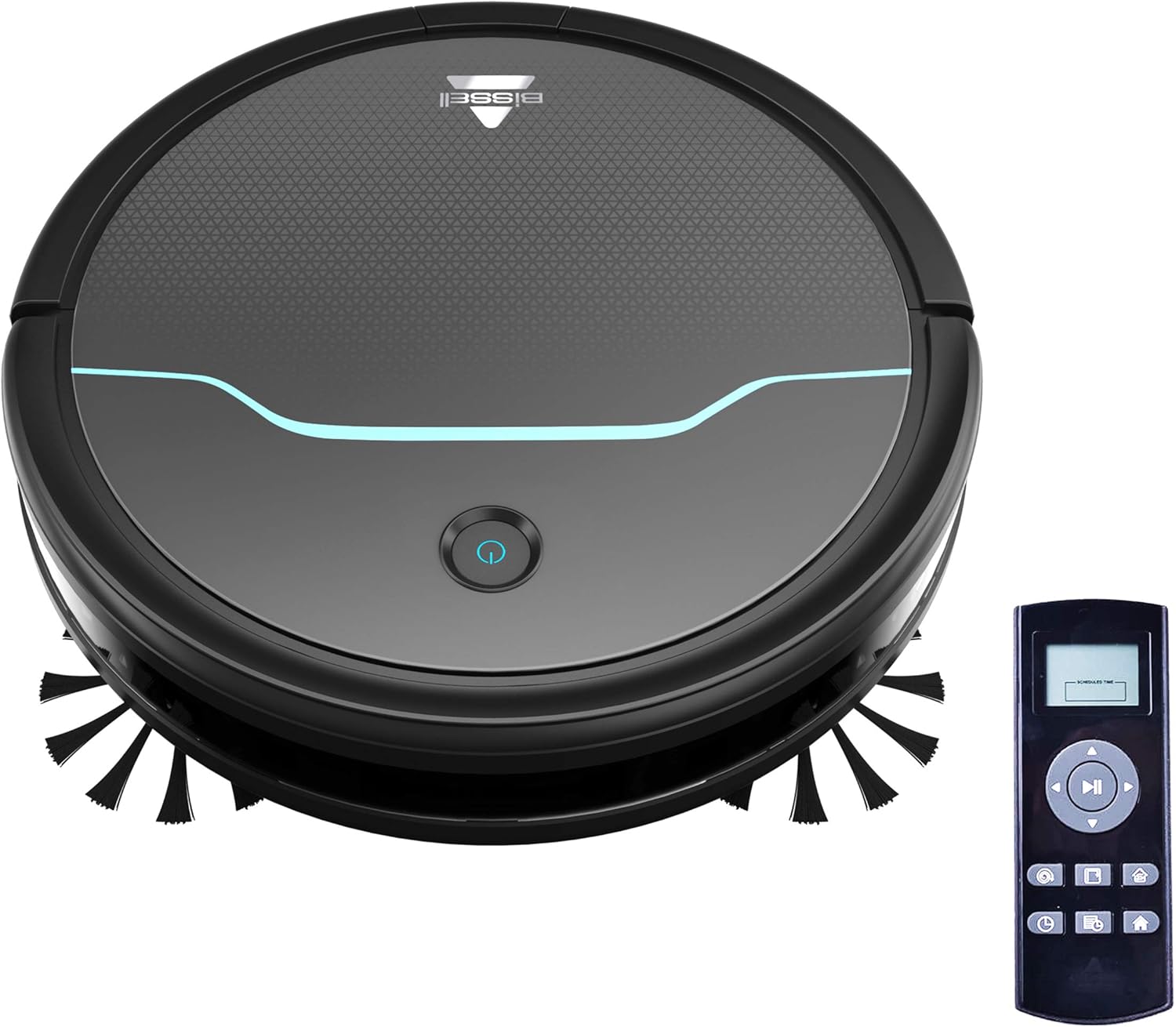
This image shows the main unit of the robot vacuum and its accompanying remote control, highlighting its compact, circular design.

This image illustrates the vacuum's ability to clean under furniture, reaching areas that are typically difficult to access.
5. Opsætning
5.1 Placering af ladestation
Place the self-charging dock against a wall in an open, uncluttered area. Ensure there is at least 0.5 meters (1.6 feet) of clear space on either side of the dock and 1.5 meters (4.9 feet) in front of it for optimal navigation and docking.
5.2 Indledende opladning
Connect the power adapter to the charging dock and plug it into a wall outlet. Place the robot vacuum onto the charging contacts of the dock. Ensure the indicator light on the robot illuminates, indicating it is charging. Allow the robot to fully charge before its first use (approximately 4-5 hours).
5.3 Montering af sidebørster
Gently press the side brushes onto the square posts on the underside of the robot until they click into place. Ensure they are securely attached.
6. Betjening
6.1 Tænd/sluk
To power on the robot, press and hold the power button on the top of the robot until the indicator light turns blue. To power off, press and hold the power button until the light turns off.
6.2 Start af en rengøringscyklus
Press the power button once to start a cleaning cycle. The robot will automatically begin cleaning in a systematic pattern. Alternatively, use the remote control to select a cleaning mode or start cleaning.

This image shows the robot vacuum in action, effectively picking up debris from the floor.
6.3 Rengøringstilstande
The remote control allows you to select various cleaning modes:
- Autorengøring: The robot automatically cleans based on its environment.
- Spot Clean: The robot intensely cleans a specific small area.
- Kantrensning: Robotten rengør langs vægge og møbelkanter.
- Manuel kontrol: Use the directional buttons on the remote to guide the robot.

This image highlights the vacuum's versatility in cleaning different floor types, including carpets.
6.4 Planlægning
Use the remote control to set a cleaning schedule for your robot vacuum. Refer to the remote control section in the full manual for detailed instructions on setting daily or weekly cleaning times.

This image depicts the robot vacuum in a typical home setting, ready to execute its programmed cleaning schedule.
7. Vedligeholdelse
Regular maintenance ensures your Bissell EV675 operates efficiently and prolongs its lifespan. Always power off the robot before performing any maintenance.
7.1 Tømning af støvbeholderen
It is recommended to empty the dust bin after each cleaning cycle, especially if you have pets. Press the release button on the dust bin, pull it out, open the lid, and discard the collected debris.
7.2 Rengøring/udskiftning af filtre
Remove the filter from the dust bin. Tap off loose dirt. Rinse the filter under running water if necessary, ensuring it is completely dry before reinserting. Replace the filter every 3-6 months, or as needed, to maintain optimal suction.
7.3 rengøringsbørster
Remove the main brush and side brushes. Use the included cleaning tool to cut and remove any hair or debris tangled around the brushes. Ensure the brushes spin freely after cleaning.
7.4 Rengøring af sensorer og opladningskontakter
Wipe the cliff sensors, anti-collision sensors, and charging contacts on both the robot and the dock with a clean, dry cloth. This prevents dust buildup from affecting performance.
7.5 Maintenance Video
This video offers a visual demonstration of the Bissell EV675 Robot Vacuum Cleaner, covering its key functionalities and how it operates.
This short video clip showcases the Bissell EV675 Robotic Vacuum Cleaner performing a cleaning task, illustrating its mobility and cleaning path.
8. Fejlfinding
If your Bissell EV675 is not operating as expected, refer to the common issues and solutions below:
| Problem | Mulig årsag | Løsning |
|---|---|---|
| Robotten tænder eller oplader ikke. | Battery drained; charging contacts dirty; power adapter not connected. | Ensure robot is properly docked; clean charging contacts; check power adapter connection. |
| Robotten sidder ofte fast. | Obstacles (cords, rugs with tassels); low-hanging furniture. | Clear obstacles; use virtual barriers if available; ensure charging dock has sufficient clearance. |
| Poor suction or not picking up debris. | Dust bin full; filters clogged; main brush tangled. | Empty dust bin; clean or replace filters; clean main brush. |
| Side brushes not spinning. | Brushes tangled with hair/debris; brushes not installed correctly. | Remove and clean side brushes; ensure they are clicked into place. |
| Robotten laver usædvanlige lyde. | Debris in main brush; foreign object in wheels. | Inspect and clean main brush and wheels for obstructions. |
9. Specifikationer
- Mærke: Bissell
- Modelnavn: BISSELL EV675 Robot Vacuum Cleaner for Pet Hair with Self Charging Dock, Bonus Filter, Bonus Edge Cleaning Brushes, 2503
- Modelnummer: 2503
- Speciel funktion: Automatisk støvopsamling, programmerbar, selvrensende børsterulle
- Farve: Black With Disco Teal Accents
- Filtertype: Disk
- Batterilevetid: 100 minutter
- Kapacitet: 0.4 liter
- Strømkilde: Trådløs genopladelig
- Kontrolmetode: Fjern
- Formfaktor: Robotisk
- Produktdimensioner: 12.75 x 12.75 x 3.5 tommer
- Varens vægt: 6.62 pund
- Overfladeanbefaling: Floors, Carpet, Floor
10. Garanti og support
For warranty information, product registration, or customer support, please visit the official Bissell webwebstedet eller kontakt deres kundeserviceafdeling. Gem din købskvittering til garantikrav.


