1. Introduktion
Thank you for choosing the Rapoo M300G Multi-Device Wireless Mouse. This manual provides detailed instructions on how to set up, operate, maintain, and troubleshoot your new mouse. Please read this manual carefully before use to ensure optimal performance and longevity of your device.
2. Produktet er slutview
Nøglefunktioner:
- Multitilstandsforbindelse: Supports Bluetooth 3.0, Bluetooth 4.0, and 2.4GHz wireless connections, allowing connection to up to three devices simultaneously.
- Lydløse klik: Designed with 90% noise reduction for quiet operation.
- Justerbar DPI: Four adjustable DPI levels (600/1000/1300/1600) for precise control.
- Ergonomisk design: Comfortable design for right-hand users, suitable for extended use.
- Lang batterilevetid: Built-in 1 AA battery provides up to 9 months of battery life under normal conditions.
- High Precision Optical Engine: Works reliably on various surfaces without a mouse pad.
Pakkeindhold:
- Rapoo M300G Multi-Device Wireless Mouse
- USB-modtager (gemt inde i musen)
- 1 AA Alkaline Battery (pre-installed or included)
- Quick Start Guide (denne manual)
Muskomponenter:

Figure 2.1: Labeled diagram of the Rapoo M300G mouse showing the scroll wheel, DPI switch button, multi-device conversion indicator, right click button, left click button, forward button, and backward button.
- Venstreklikknap: Standard primær klikfunktion.
- Højreklik-knap: Standard sekundær klikfunktion.
- Scrollhjul: Til lodret rulning og mellemklikfunktion.
- DPI-knap: Skifter mellem DPI-indstillinger (600/1000/1300/1600).
- Indikator for konvertering fra flere enheder: Shows current connection mode (Bluetooth A, Bluetooth B, or 2.4GHz).
- Frem-knap: Navigerer fremad i web browsere eller file opdagelsesrejsende.
- Baglæns knap: Navigerer baglæns i web browsere eller file opdagelsesrejsende.
3. Opsætning
3.1 Batteriinstallation:
The Rapoo M300G mouse uses one AA battery. The battery is typically pre-installed. If not, open the battery compartment on the bottom of the mouse, insert the AA battery with the correct polarity, and close the compartment.

Figur 3.1: Nederst view of the Rapoo M300G mouse, illustrating the battery compartment, power switch, and Bluetooth pairing button.
3.2 Tænd/sluk:
Locate the power switch on the bottom of the mouse. Slide it to the 'ON' position to power on the mouse. Slide it to 'OFF' when not in use to conserve battery life.
3.3 Connecting to Devices:
The M300G mouse supports three connection modes: 2.4GHz wireless via USB receiver, Bluetooth 3.0, and Bluetooth 4.0. You can switch between connected devices using the mode switch button on the bottom of the mouse.
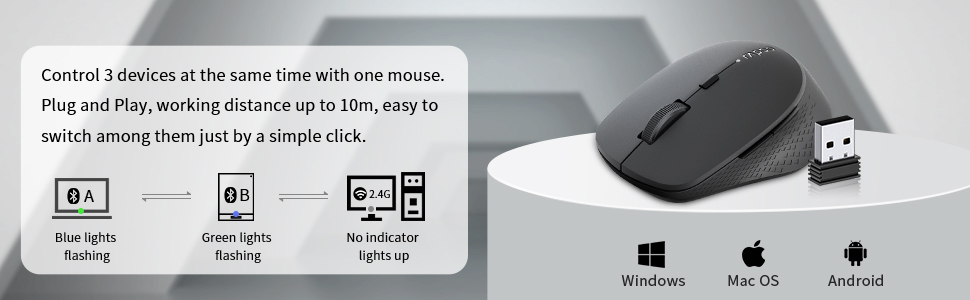
Figure 3.2: The Rapoo M300G mouse can control three devices, with easy switching. It is compatible with Windows, Mac OS, and Android operating systems.
2.4 GHz trådløs forbindelse:
- Take out the USB receiver from the battery compartment of the mouse.
- Sæt USB-modtageren i en ledig USB-port på din computer.
- Turn on the mouse. The mouse will automatically connect to the receiver. No indicator light will illuminate for 2.4GHz mode.
Bluetooth Connection (Device A & B):
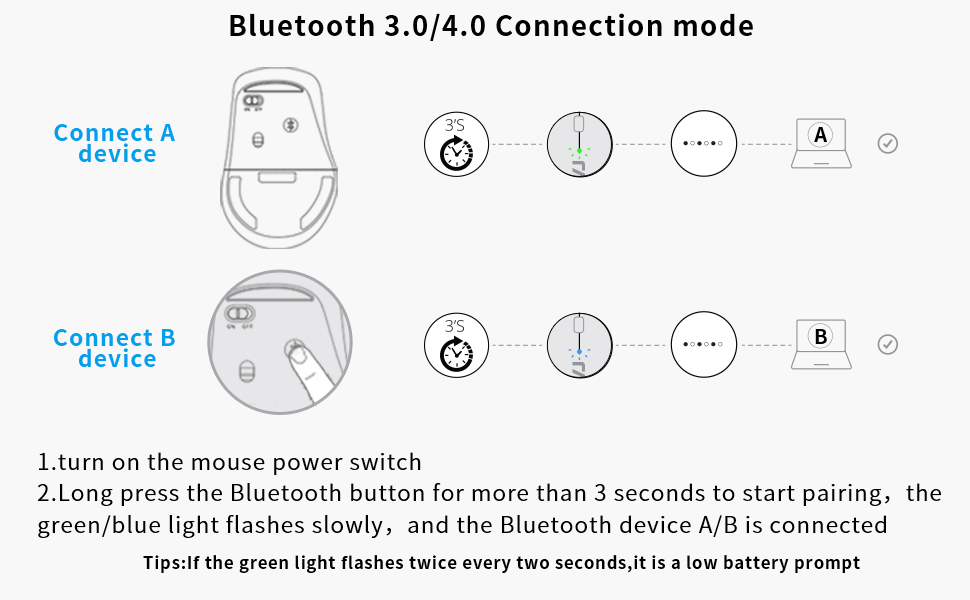
Figure 3.3: Detailed steps for connecting the mouse via Bluetooth 3.0/4.0 to Device A and Device B.
- Tænd for musens strømafbryder.
- Press the Bluetooth button on the bottom of the mouse to switch to Bluetooth Channel A (blue light flashing) or Bluetooth Channel B (green light flashing).
- Long press the Bluetooth button for more than 3 seconds until the blue or green light flashes slowly. This indicates the mouse is in pairing mode.
- On your device (computer, laptop, tablet), go to Bluetooth settings and search for new devices.
- Select 'Rapoo BT3.0 Mouse' or 'Rapoo BT4.0 Mouse' from the list of found devices to complete the pairing.
- Once connected, the corresponding indicator light will stop flashing and remain solid for a few seconds before turning off.
Tip: If the green light flashes twice every two seconds, it indicates a low battery.
3.4 Switching Between Devices:
Briefly press the Bluetooth button on the bottom of the mouse to cycle through the connected devices (Bluetooth A, Bluetooth B, 2.4GHz). The indicator light will briefly show the active channel.
4. Betjeningsvejledning
4.1 DPI Adjustment:
Press the DPI switch button located behind the scroll wheel to cycle through the four DPI settings: 600, 1000, 1300, and 1600 DPI. Adjust the DPI to match your preference for cursor speed and precision.
4.2 Basic Mouse Functions:
- Venstre klik: Bruges til at vælge elementer, åbne files, og aktivering af funktioner.
- Højreklik: Bruges til at få adgang til kontekstmenuer og yderligere muligheder.
- Scrollhjul: Rotate to scroll vertically through documents and web pages. Press down for middle-click functionality (e.g., opening links in new tabs).
- Frem/Tilbage-knapper: Disse knapper, der er placeret på siden af musen, giver mulighed for hurtig navigation i web browsere og file opdagelsesrejsende.
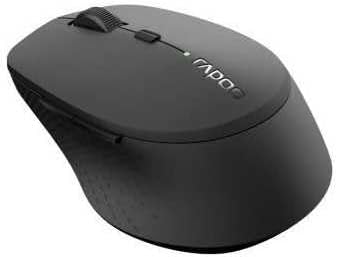
Figur 4.1: Vinklet view of the Rapoo M300G mouse, highlighting its ergonomic shape and button placement.
5. Vedligeholdelse
5.1 Rengøring:
To clean your mouse, gently wipe the surface with a soft, damp cloth. Do not use harsh chemicals or abrasive cleaners. Ensure no liquid enters the mouse's internal components.
5.2 Batteriudskiftning:
When the low battery indicator flashes, it's time to replace the AA battery. Open the battery compartment on the bottom of the mouse, remove the old battery, insert a new AA battery with the correct polarity, and close the compartment.
5.3 Opbevaring:
When not in use for an extended period, turn off the mouse to conserve battery life. Store the USB receiver inside the mouse's dedicated slot to prevent loss. Keep the mouse in a dry, cool place away from direct sunlight and extreme temperatures.
6. Fejlfinding
If you encounter issues with your Rapoo M300G mouse, please refer to the following common problems and solutions:
| Problem | Mulig årsag | Løsning |
|---|---|---|
| Musen reagerer ikke | Low battery; Mouse is off; Incorrect connection mode; USB receiver not plugged in (for 2.4GHz); Bluetooth not paired. | Replace battery; Turn on mouse; Switch to correct connection mode (2.4G, BT A, BT B); Plug in USB receiver; Re-pair Bluetooth. |
| Cursor erratic or not smooth | Snavset optisk sensor; Uegnet overflade; Lavt batteri. | Clean optical sensor; Use on a flat, non-reflective surface; Replace battery. |
| Kan ikke oprette forbindelse via Bluetooth | Mouse not in pairing mode; Device Bluetooth is off; Interference. | Long press Bluetooth button to enter pairing mode; Ensure device Bluetooth is on; Move closer to device; Try re-pairing. |
| Sideknapper virker ikke | Application does not support forward/backward functions; Driver issue. | Test in a different application (e.g., web browser); Check for updated drivers for your operating system. |
7. Specifikationer
| Feature | Specifikation |
|---|---|
| Modelnummer | 18048 |
| Forbindelsesteknologi | Bluetooth 3.0, Bluetooth 4.0, 2.4GHz Wireless |
| Bevægelsesdetekteringsteknologi | Optisk |
| DPI niveauer | 600, 1000, 1300, 1600 |
| Knapper | 6 (Venstre, Højre, Scrollhjul, DPI-knap, Frem, Bagud) |
| Batteritype | 1 x AA batteri |
| Anslået batterilevetid | Op til 9 måneder |
| Produktdimensioner | 4.09 x 2.6 x 0.04 tommer |
| Varens vægt | 2.08 ounce |
| Farve | SORT |
| Første ledige dato | 30. november 2018 |
8. Garanti og support
8.1 Garantioplysninger:
The Rapoo M300G Multi-Device Wireless Mouse comes with a Et års garanti fra købsdatoen. Derudover en 30 Days Return and Refund or Replacement policy is offered. This warranty covers manufacturing defects and issues arising from normal use.
8.2 Kundesupport:
For technical support, warranty claims, or any questions regarding your Rapoo M300G mouse, please contact Rapoo customer service. Refer to the official Rapoo webwebstedet eller din produktemballage for at få de mest aktuelle kontaktoplysninger.
Online support: Besøg den officielle Rapoo webwebsted med ofte stillede spørgsmål, driverdownloads og supportressourcer.
E-mail support: [Refer to Rapoo's official website for email contact]
Telefonsupport: [Refer to Rapoo's official website for phone contact]


