Indledning
Welcome to the user manual for your new Magnavox 32MV319R/F7 32-inch LED HDTV. This guide provides essential information for the safe and efficient use of your television, including setup instructions, operational procedures, maintenance tips, and troubleshooting advice. Please read this manual thoroughly before operating your TV and retain it for future reference.
Sikkerhedsoplysninger
Følg altid grundlæggende sikkerhedsforanstaltninger, når du bruger dette fjernsyn, for at mindske risikoen for brand, elektrisk stød og personskade.
- Udsæt ikke TV'et for regn eller fugt.
- Bloker ikke ventilationsåbninger.
- Sørg for korrekt jordforbindelse til strømstikket.
- Beskyt netledningen mod at blive trådt på eller klemt.
- Tag stikket ud af tv'et under tordenvejr eller når det ikke bruges i længere perioder.
- Overlad al service til kvalificeret servicepersonale.
Pakkens indhold
Bekræft at alle varer er til stede i pakken:
- Magnavox 32MV319R/F7 32-inch LED HDTV
- TV-bord (2 stk.)
- Fjernbetjening med batterier
- Strømledning
- Skruer til montering af stativ
Opsætning
1. Montering af tv-stativet
- Placer forsigtigt tv'et med forsiden nedad på en blød, ren overflade for at forhindre, at skærmen beskadiges.
- Juster stativstykkerne med monteringshullerne i bunden af tv'et.
- Fastgør stativerne med de medfølgende skruer. Spænd dem ikke for hårdt.
2. Tilslutning af enheder
The Magnavox 32MV319R/F7 offers various connectivity options. Refer to the image below for port locations.
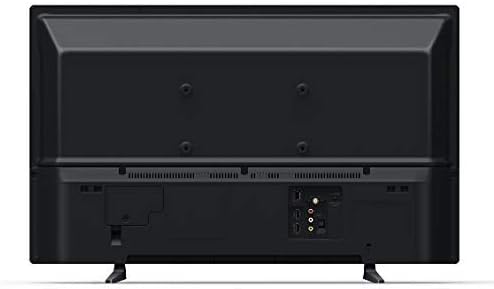
Billede: Bagside view of the Magnavox 32MV319R/F7 TV, displaying various input ports including HDMI, USB, and composite video inputs.
- HDMI: Connect Blu-ray players, game consoles, or cable/satellite boxes using HDMI cables.
- USB: Indsæt et USB-drev til view billeder, afspille musik eller se videoer.
- Antenne/kabel: Tilslut en antenne eller kabel-tv-feed til trådløse eller basale kabelkanaler.
- Sammensat video: Use for older devices with yellow (video), white (left audio), and red (right audio) RCA connectors.
3. Tænd og indledende opsætning
- Sæt netledningen i tv'et og derefter i en stikkontakt.
- Tryk på tænd/sluk-knappen på fjernbetjeningen eller på tv'et.
- Follow the on-screen instructions for the Roku TV guided setup. This includes selecting your language, connecting to a Wi-Fi network, and activating your Roku account.
Drift
Fjernbetjeningsfunktioner
The remote control allows you to navigate the Roku TV interface and control your television. Key buttons include:
- Magt: Tænder eller slukker for tv'et.
- Hjem: Vender tilbage til Roku TV-startskærmen.
- Retningstast (op/ned/venstre/højre): Navigerer i menuer og vælger elementer.
- OK/Vælg: Bekræfter valg.
- Tilbage: Vender tilbage til den forrige skærm.
- Lydstyrke op/ned: Justerer lydniveauet.
- Stum: Slår lyden fra på tv'et.
- Input: Selects the desired input source (HDMI, AV, TV).
- Streaming Channel Buttons: Dedikerede knapper til populære streamingtjenester.
Roku TV-grænseflade
The Roku TV home screen provides access to all your entertainment. You can:
- Browse and add streaming channels from the Roku Channel Store.
- Switch between connected devices (e.g., game console on HDMI 1, cable box on HDMI 2).
- Access TV settings to customize picture, sound, and network options.
Opretholdelse
Rengøring af TV
- Skærm: Tør forsigtigt skærmen af med en blød, fnugfri klud. Tør forsigtigt genstridige mærker afampRengør kluden med vand eller en skærmrens, der er specielt designet til tv'er. Sprøjt ikke væske direkte på skærmen.
- Skab: Tør tv-kabinettet af med en blød, tør klud. Undgå at bruge slibende rengøringsmidler eller opløsningsmidler.
- Tag altid stikket ud af tv'et inden rengøring.
Softwareopdateringer
Your Roku TV automatically checks for software updates when connected to the internet. To manually check for updates:
- Gå til startskærmen.
- Naviger til Indstillinger > System > Softwareopdatering.
- Vælge Tjek nu.
Fejlfinding
Hvis du støder på problemer med dit tv, kan du se følgende almindelige problemer og løsninger:
| Problem | Løsning |
|---|---|
| Ingen strøm | Sørg for, at netledningen er korrekt tilsluttet både tv'et og en fungerende stikkontakt. Prøv en anden stikkontakt. |
| Intet billede, men der er lyd | Kontrollér inputkilden. Sørg for, at den tilsluttede enhed er tændt og fungerer korrekt. Prøv et andet HDMI-kabel. |
| Ingen lyd, men der er billede | Check the volume level and ensure the TV is not muted. Verify audio settings in the TV menu. If using external audio, check its connections and power. |
| Kan ikke oprette forbindelse til Wi-Fi | Ensure your Wi-Fi router is on and within range. Re-enter the Wi-Fi password carefully. Restart your router and the TV. |
| Fjernbetjening virker ikke | Udskift batterierne. Sørg for, at der ikke er nogen forhindringer mellem fjernbetjeningen og tv'ets IR-sensor. |
Fabriksindstilling
A factory reset will erase all personal settings and data, returning the TV to its original factory state. This can resolve persistent software issues.
- Gå til startskærmen.
- Naviger til Indstillinger > System > Avancerede systemindstillinger > Fabriksindstilling.
- Følg anvisningerne på skærmen for at bekræfte nulstillingen.
Specifikationer
| Feature | Detalje |
|---|---|
| Modelnummer | 32MV319R/F7 |
| Skærmstørrelse | 32 tommer |
| Displayteknologi | LED |
| Opløsning | 720p |
| Aspektforhold | 16:9 |
| Forbindelsesteknologi | HDMI, USB, Wireless |
| Understøttede internettjenester | Roku TV |
| Produktmål (D x B x H) | 6.7 x 29.1 x 30.9 cm (med stativ) |
| Varens vægt | 11.23 pund |
| Wattage | 50 watt |
Garanti og support
For warranty information, please refer to the warranty card included with your product or visit the official Magnavox website. For technical support or service inquiries, please contact Magnavox customer service. Keep your purchase receipt and model number handy when contacting support.
Note: This product may be refurbished. Refurbished products are tested and certified to work like new. The refurbishing process includes functionality testing, basic cleaning, inspection, and repackaging.


