1. Introduktion
This manual provides detailed instructions for the setup, operation, and maintenance of your Xiaomi Mi Home Security Camera 360 1080P (Model MYSXJ02M). Please read this manual thoroughly before using the product to ensure proper functionality and safety.
2. Produktet er slutview
2.1 Nøglefunktioner
- Full HD 1080p video capture resolution for clear imaging.
- 360 graders panoramaudsigt viewvinklen for omfattende dækning.
- Advanced night vision with a range of up to 9 meters.
- Motion detection capabilities with instant alerts.
- Local recording to a microSDXC card (up to 64GB recommended).
- To-vejs lydkommunikation.
- Wireless Wi-Fi connectivity for remote access via the Mi Home app.
- Compact and durable design, suitable for indoor use.
2.2 Pakkens indhold
- Xiaomi Mi Home Security Camera 360 1080P
- USB Power Cable (approx. 2 meters)
- Mounting Accessories (for ceiling/wall installation)
- Brugermanual
Note: A power adapter (USB charger) is not included and must be supplied by the user. A 5V/2A adapter is recommended for optimal performance.
2.3 Produktkomponenter

Figur 1: Forside view af kameraet, der viser objektivet og indikatorlampen.

Figur 2: Vinklet view of the camera, highlighting its dome shape and base.

Figur 3: Bagside view of the camera, showing the speaker grille and USB power port.
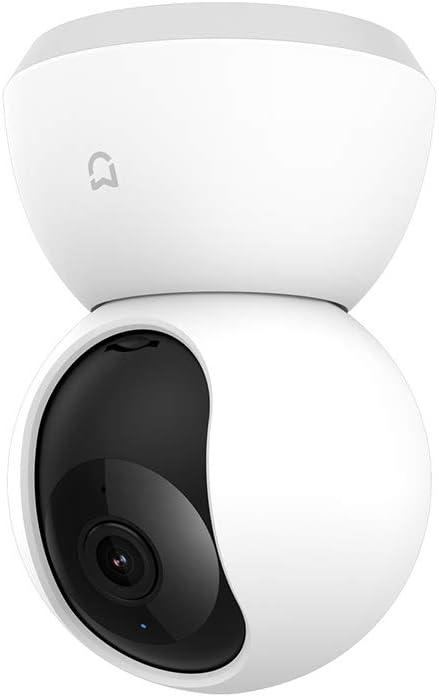
Figure 4: The camera with its lens rotated upwards, revealing the microSD card slot underneath.
3. Opsætningsvejledning
3.1 Tænding af kameraet
- Connect the provided USB cable to the camera's micro-USB port located at the rear base.
- Plug the other end of the USB cable into a 5V/2A USB power adapter (not included) and then into a power outlet.
- The camera will power on, and the indicator light will flash orange, indicating it is ready for connection.
3.2 Installing the Mi Home App
- Download Mit hjem app from the Google Play Store (for Android devices) or the Apple App Store (for iOS devices).
- Open the app and create a Mi account or log in with an existing one.
3.3 Parring af kameraet med appen
- Sørg for, at din smartphone er forbundet til et 2.4 GHz Wi-Fi-netværk. Kameraet understøtter ikke 5 GHz Wi-Fi.
- In the Mi Home app, tap the "+"-ikonet i øverste højre hjørne for at tilføje en ny enhed.
- Select "Mi Home Security Camera 360 1080P" from the list of available devices.
- Follow the on-screen instructions to reset the camera if prompted (usually by pressing a reset button, often located near the microSD slot, for a few seconds until the indicator light flashes orange).
- Scan the QR code displayed on your phone screen using the camera's lens. Hold the phone approximately 15-20 cm (6-8 inches) from the camera.
- Once the QR code is successfully scanned, the camera will emit a voice prompt indicating successful connection. The indicator light will turn blue.
- Name your camera and assign it to a room for easier management within the app.
3.4 Installing a MicroSD Card (Optional)
For local video recording, a microSD card is required. The camera supports cards up to 64GB. A High Endurance microSD card is recommended for continuous recording.
- Power off the camera by unplugging the USB cable.
- Gently push the camera lens upwards until the microSD card slot is revealed (refer to Figure 4).
- Insert the microSD card into the slot with the contacts facing down until it clicks into place.
- Return the camera lens to its original position.
- Reconnect the power cable. The camera will automatically detect the card. You may need to format the card via the Mi Home app settings.
3.5 Mounting the Camera (Optional)
The camera can be placed on a flat surface or mounted on a wall or ceiling using the included mounting accessories.
- Desktopplacering: Placer blot kameraet på en stabil, flad overflade.
- Væg/loft montering: Use the mounting base as a template to mark and drill holes. Secure the base with screws, then attach the camera to the base. Ensure the camera is securely fastened. In the Mi Home app settings, you can enable "Invert Image" if the camera is mounted upside down.

Figure 5: The camera positioned on a table, demonstrating typical indoor placement.
4. Betjeningsvejledning
All primary functions of the Xiaomi Mi Home Security Camera are controlled via the Mi Home app.
4.1 Live View og panorering/tilt-kontrol
- Open the Mi Home app and select your camera from the device list.
- Livevideofeedet vises.
- Swipe your finger across the screen to pan (horizontal movement) and tilt (vertical movement) the camera lens, utilizing its 360-degree viewing kapacitet.
- Use the pinch-to-zoom gesture to digitally zoom into the live feed.
4.2 Tovejslyd
- Mens i live view, tap the microphone icon to enable two-way audio.
- Tal ind i din telefons mikrofon for at sende din stemme gennem kameraets højttaler.
- The camera's built-in microphone will capture audio from its surroundings, which will be played through your phone's speaker.
4.3 Optagelse og afspilning
- Manuel optagelse: Tap the record icon in the live view interface to start or stop manual video recording directly to your phone.
- Local Recording (MicroSD): If a microSD card is installed, the camera can record continuously or based on motion detection. Configure these settings in the camera's settings within the Mi Home app.
- Afspilning: Få adgang til optaget footage by tapping the "Playback" or "History" icon in the camera's interface within the app. You can browse by date and time.
4.4 Bevægelsesdetektion og advarsler
- Enable motion detection in the camera settings within the Mi Home app.
- Juster følsomhedsniveauer og indstil detektionszoner efter behov.
- When motion is detected, the camera will automatically record a short video clip and send a notification to your smartphone.
4.5 Nattesyn
- Kameraet skifter automatisk til infrarød nattesynstilstand under dårlige lysforhold.
- Night vision provides clear black and white video up to 9 meters.
- Settings for night vision (auto, on, off) can be adjusted in the Mi Home app.
5. Vedligeholdelse
5.1 Rengøring af kameraet
- Sørg for, at kameraet er slukket, inden rengøring.
- Brug en blød, tør klud til at tørre kamerahuset af.
- Brug en rengøringsklud til linsen, der er specielt designet til optik, for at undgå ridser. Brug ikke skrappe kemikalier eller slibende materialer.
5.2 Administration af microSD-kort
- Regularly check the status of your microSD card in the Mi Home app.
- If the card is full, older recordings will be overwritten automatically (loop recording).
- Format the microSD card periodically through the app settings to maintain optimal performance and prevent data corruption.
6. Fejlfinding
| Problem | Mulig årsag | Løsning |
|---|---|---|
| Kameraet kan ikke oprette forbindelse til Wi-Fi. | Incorrect Wi-Fi password, 5 GHz network, weak signal, camera too far from router. | Ensure correct 2.4 GHz Wi-Fi password. Move camera closer to router. Reset camera and try pairing again. |
| Indicator light is not blue after setup. | Connection failed or camera is offline. | Check Wi-Fi connection. Restart camera and router. Reset camera and re-pair. |
| No video recording to microSD card. | No microSD card, card full, card not formatted, faulty card. | Ensure card is inserted correctly. Format card via app. Replace card if faulty (High Endurance recommended). |
| Dårlig billedkvalitet. | Dirty lens, low network bandwidth, insufficient lighting. | Clean the camera lens. Ensure stable internet connection. Adjust lighting conditions. |
| Kameraet reagerer ikke. | Strømproblem, softwarefejl. | Unplug and replug the power cable to restart. If issue persists, perform a factory reset. |
7. Specifikationer
| Feature | Detalje |
|---|---|
| Modelnummer | MYSXJ02M |
| Video opløsning | 1080p fuld HD |
| Viewi vinkel | 360 grader (panorering/vippe) |
| Night Vision Range | Op til 9 meter |
| Forbindelse | Wi-Fi (2.4 GHz) |
| Opbevaring | MicroSDXC card (up to 64GB) |
| Strømindgang | 5V/2A (USB) |
| Dimensioner (L x B x H) | 16 x 9 x 8 cm |
| Vægt | 260 gram |
| Indendørs/Udendørs brug | Indendørs |
| Kompatible enheder | Smartphone, Tablet (Android, iOS) |
8. Garanti og support
For warranty information, please refer to the warranty card included with your purchase or visit the official Xiaomi website for your region. If you encounter any issues not covered in this manual, please contact Xiaomi customer support for assistance.
Officiel Xiaomi Webwebsted: www.mi.com


