1. Produktet er slutview
The SilverStone Strider Gold S Series SST-ST75F-GS-V3 is a 750W fully modular ATX power supply designed for desktop computers. It features 80 PLUS Gold certification for high efficiency, a compact 140mm depth for easy integration, and a class-leading single +12V rail for stable power delivery. This power supply is built to provide reliable and continuous power output under various operating conditions.
- 750 Watt Maximum DC Output: Giver ample power for high-performance systems.
- Kompakt design: With a depth of 140mm, it allows for easy installation in various PC cases.
- 100% modulære kabler: Enhances cable management and airflow within the system.
- 80 PLUS Guld-certificering: Ensures high power efficiency, reducing heat and operating costs.
- Class-Leading Single +12V Rail: Delivers stable and consistent power to critical components.
- Strict 3% Voltage Regulation and Low Ripple & Noise: Guarantees clean and reliable power.
- 24/7 Continuous Power Output: Operates reliably with 40℃ operating temperature.
- Lydløs 120 mm blæser: Features an 18dBA minimum noise level for quiet operation.

Image: The SilverStone Strider Gold S 750W power supply shown alongside its retail packaging.
2. Sikkerhedsoplysninger
Please read and understand all safety instructions before installing or operating this power supply. Failure to follow these instructions may result in electric shock, fire, or damage to the product and connected components.
- Hazardous Area: This device is not designed to be user serviceable and contains high voltage inside that can be dangerous when opened. In the event of malfunction, please notify your dealer or local distributor for service.
- Professionel installation: Installation should be performed by qualified personnel to prevent damage or injury.
- Ventilation: Ensure adequate ventilation around the power supply. Do not block any ventilation openings.
- Fugtighed: Do not expose the power supply to water or excessive humidity.
- Strømkilde: Connect the power supply only to a grounded power outlet.
- Overbelastning: Do not overload the power supply beyond its specified wattage.
- Kabelstyring: Sørg for, at alle kabler er korrekt ført og fastgjort for at forhindre skader eller interferens.

Billede: Top view of the power supply showing the product label, including electrical specifications and safety warnings in multiple languages.
3. Pakkens indhold
Bekræft, at alle nedenstående varer er inkluderet i din produktpakke:
- SilverStone Strider Gold S 750W Power Supply (SST-ST75F-GS-V3)
- Modulært kabelsæt (forskellige typer til bundkort, CPU, PCIe, SATA, periferiudstyr)
- AC strømledning
- Monteringsskruer
- User Manual / Warranty Information Booklet
- Cable Ties / Velcro Straps (for cable management)

Image: A complete set of modular cables, mounting screws, cable ties, and documentation included with the power supply.
4. Opsætning og installation
Follow these steps to properly install your SilverStone Strider Gold S 750W power supply into your computer system.
4.1 Tjekliste før installation
- Sørg for, at dit computersystem er helt slukket og taget stikket ud af stikkontakten.
- Åbn computerens kabinet for at få adgang til monteringsområdet til strømforsyningen.
- If replacing an existing power supply, carefully disconnect all cables and remove it.
4.2 Fysisk installation
- Position the SilverStone SST-ST75F-GS-V3 power supply into the designated PSU bay in your computer case. Ensure the fan is oriented correctly for optimal airflow (typically facing downwards if there's a bottom vent, or upwards if not).
- Fastgør strømforsyningen til kabinettet med de medfølgende monteringsskruer.
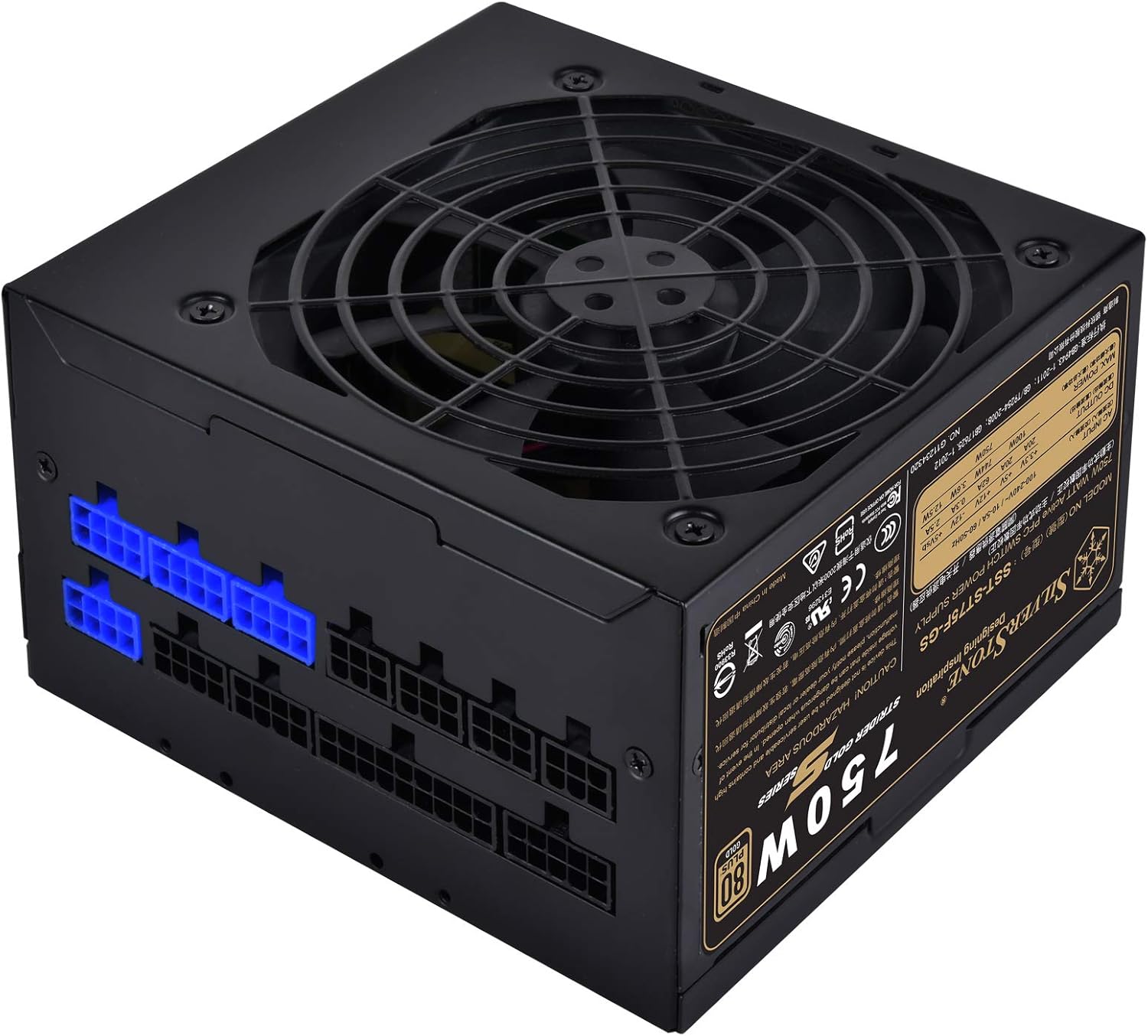
Billede: En vinklet view of the power supply, highlighting the modular cable connection ports on one side.
4.3 Cable Connection Guide
As a fully modular power supply, you only need to connect the cables required for your system components. This improves cable management and airflow.
- 24-bens ATX bundkortkabel: Connect the large 24-pin cable from the PSU to the corresponding port on your motherboard.
- 8-pin (4+4) EPS/ATX 12V CPU Cable: Connect the 8-pin or split 4+4-pin cable to the CPU power connector on your motherboard. Some motherboards may require two such connectors.
- PCI-E Cables: For graphics cards, connect the appropriate 6-pin or 8-pin (6+2) PCI-E power cables from the PSU to your graphics card(s). Use separate cables for each connector on the GPU if possible for better power delivery.
- SATA-strømkabler: Tilslut SATA-strømkabler til dine SSD'er, harddiske og optiske drev.
- Perifere (Molex) kabler: Connect Molex cables for any other components requiring this type of power, such as case fans or older peripherals.

Billede: En detaljeret view of the modular cable connection panel, showing various types of ports for different cables.
Ensure all connections are firm and secure. After connecting all necessary cables, organize them using the provided cable ties or Velcro straps to improve airflow and aesthetics.
5. Betjening
Once the power supply is installed and all components are connected, you can power on your system.
- Connect the AC power cord to the power supply's inlet and then to a grounded wall outlet.
- Flip the power switch on the back of the power supply to the 'ON' (I) position.
- Tryk på tænd/sluk-knappen på computerens kabinet for at starte systemet.
5.1 Ventilatordrift
The 120mm fan in the SST-ST75F-GS-V3 is designed for silent operation, with a minimum noise level of 18dBA. The fan speed will adjust automatically based on the power supply's load and temperature to maintain optimal cooling while minimizing noise.

Billede: Et nærbillede view of the 120mm cooling fan integrated into the power supply unit.
6. Vedligeholdelse
Proper maintenance can extend the lifespan of your power supply and ensure stable operation.
- Rensning: Periodically clean the exterior of the power supply and its fan grille to prevent dust buildup. Use compressed air to gently clear dust from the fan blades and vents. Ensure the system is powered off and unplugged before cleaning.
- Miljø: Operate the power supply in a clean, dry, and well-ventilventilated environment. Avoid extreme temperatures.
- Cable Checks: Kontrollér lejlighedsvis alle modulære kabelforbindelser for at sikre, at de forbliver fastgjorte.
7. Fejlfinding
If you encounter issues with your power supply, try the following basic troubleshooting steps:
- Ingen strøm:
- Sørg for, at netledningen er korrekt tilsluttet både strømforsyningen og stikkontakten.
- Check that the power switch on the back of the PSU is in the 'ON' (I) position.
- Kontroller, at stikkontakten fungerer ved at tilslutte en anden enhed.
- Ensure all modular cables are correctly and firmly seated in both the PSU and the components.
- Systemustabilitet/Tilfældige nedlukninger:
- Tjek for løse kabelforbindelser.
- Ensure adequate ventilation within the PC case to prevent overheating.
- Bekræft, at dit systems strømkrav ikke overstiger strømforsyningens kapacitet på 750 W.
- Høj ventilatorstøj:
- Fjern eventuelt støv fra ventilatoren og ventilationsåbningerne.
- Ensure the PSU is not operating under excessive load for prolonged periods.
If issues persist after performing these steps, please refer to the warranty information or contact SilverStone customer support.
8. Specifikationer
Detailed technical specifications for the SilverStone Strider Gold S 750W Power Supply (SST-ST75F-GS-V3).
| Feature | Specifikation |
|---|---|
| Modelnummer | SST-ST75F-GS-V3 |
| Maximum DC Output | 750W |
| 80 PLUS certificering | Guld |
| Formfaktor | ATX |
| Design af strømforsyning | Fuldt modulopbygget |
| Dimensioner (LxBxH) | 140 mm x 150 mm x 86 mm (5.51 x 5.91 x 3.39 tommer) |
| Vægt | 1.31 kg (2.89 pund) |
| Afkølingsmetode | Luft (120 mm blæser) |
| Minimum Fan Noise | 18dBA |
| Driftstemperatur | 0℃ ~ 40℃ |
| Voltage forordning | ±3 % |
| Ripple & Støj | ±3 % |
8.1 Electrical Output Specifications
| Jernbane | +3.3V | +5V | +12V | -12V | +5Vsb |
|---|---|---|---|---|---|
| Maks. Udgangsstrøm | 20A | 20A | 62A | 0.3A | 2.5A |
| Maks. Kombineret kraft | 100W | 744W | 3.6W | 12.5W | |
| Total Max. Strøm | 750W | ||||
9. Garanti og support
SilverStone Technology provides a limited warranty for its products. The specific terms and duration of the warranty may vary by region and product. Please refer to the warranty information booklet included with your product for detailed terms and conditions.
For technical support, warranty claims, or further assistance, please visit the official SilverStone Technology website or contact your local dealer or distributor. You can find contact information and support resources on their webwebsted.
Online ressourcer: www.silverstonetek.com


