Indledning
The Altec Lansing Evolution 2 Bluetooth Headphones (Model MZX668-BLK) are designed to provide a high-quality audio experience with convenient wireless connectivity. Featuring 40mm neodymium drivers, these headphones deliver powerful and crisp sound. With up to 8 hours of battery life and soft cushioned earcups, they are built for extended listening comfort. The integrated controls allow for easy navigation of music and calls, and the "Just Ask" feature provides direct access to Siri and Google Voice Assistant.
Nøglefunktioner omfatter:
- Just Ask Integration: Access Siri and Google Voice Assistant directly from your headphones.
- Forlænget spilletid: Up to 8 hours of battery life for prolonged listening.
- Komfortabelt design: Soft cushion headband and earcups for all-day wear.
- Dynamisk lyd: 40mm neodymium drivers for powerful and clear audio.
- Kablet mulighed: Includes an AUX-in cable for continued listening when battery runs low.
- Praktisk kontrol: Integrated microphone with wind cancellation, song navigation, and telephony buttons.
Opsætningsvejledning
1. Pakkens indhold
Før du begynder, skal du sørge for, at alle varer er til stede i pakken:
- Altec Lansing MZX668-BLK Evolution 2 Bluetooth Headphones
- USB opladningskabel
- 3.5 mm AUX-indgangskabel
- Brugervejledning (dette dokument)
2. Opladning af hovedtelefonerne
For optimal performance, fully charge your headphones before first use.
- Find opladningsporten på hovedtelefonerne.
- Connect the small end of the USB charging cable to the headphone's charging port.
- Tilslut den store ende af USB-opladerkablet til en USB-strømkilde (f.eks. en computers USB-port eller en USB-vægadapter).
- The LED indicator light will illuminate during charging and turn off when charging is complete. A full charge typically takes approximately 2-3 hours.

Billede: Side view of the Altec Lansing MZX668-BLK headphones, highlighting the location of the charging port and control buttons on the earcup.
3. Bluetooth-parring
Pair your headphones with your Bluetooth-enabled device (smartphone, tablet, laptop).
- Ensure the headphones are fully charged and turned off.
- Press and hold the Power button on the headphones for approximately 5-7 seconds until the LED indicator light flashes blue and red alternately. This indicates pairing mode.
- Gå til Bluetooth-indstillingerne på din enhed.
- Tænd Bluetooth, og scan efter tilgængelige enheder.
- Select "MZX668-BLK" from the list of found devices.
- Når de er parret, blinker LED-indikatoren på hovedtelefonerne langsomt blåt, og du vil høre en bekræftelse med en hørbar lyd.
- Hvis du bliver bedt om en adgangskode, skal du indtaste "0000".
Bemærk: Hovedtelefonerne vil automatisk forsøge at genoprette forbindelsen til den sidst parrede enhed, når de tændes.
Betjeningsvejledning
1. Tænd/sluk
- Tænd: Tryk på tænd/sluk-knappen og hold den nede i 3 sekunder. LED-lampen blinker blåt.
- Sluk: Tryk på tænd/sluk-knappen og hold den nede i 3 sekunder. LED-lampen slukker.
2. Musikafspilningskontroller

Billede: Forside view of the Altec Lansing MZX668-BLK headphones, showing the layout of the control buttons on the left earcup.
| Knap/handling | Fungere |
|---|---|
| Afspil/pause knap (Center button) | Tryk én gang for at afspille/pause musik. |
| Lydstyrke op (+) | Tryk én gang for at øge lydstyrken. |
| Skrue ned (-) | Tryk én gang for at sænke lydstyrken. |
| Next Track (>>) | Press and hold Volume Up (+) for 2 seconds. |
| Previous Track (<<) | Press and hold Volume Down (-) for 2 seconds. |
3. Opkaldsstyring
| Knap/handling | Fungere |
|---|---|
| Besvar/afslut opkald (Center button) | Press once during an incoming call to answer. Press once during a call to end. |
| Afvis opkald (Center button) | Tryk og hold nede i 2 sekunder under et indgående opkald. |
| Genopkald sidste nummer (Center button) | Double-press quickly. |
4. Voice Assistant (Just Ask)
The "Just Ask" feature allows you to access your smartphone's voice assistant (Siri or Google Assistant) directly through the headphones.
- Ensure your headphones are paired and connected to your smartphone.
- Tryk på Stemmeassistent-knap (often the Power button, or a dedicated button if present, refer to diagram) once.
- You will hear a prompt, indicating that your voice assistant is active.
- Speak your command clearly into the microphone.
5. Kablet forbindelse (AUX-tilstand)
If your headphones run out of battery or you prefer a wired connection, use the included 3.5mm AUX-in cable.
- Plug one end of the 3.5mm AUX-in cable into the AUX port on the headphones.
- Sæt den anden ende i 3.5 mm lydstikket på din enhed.
- The headphones will automatically switch to wired mode. Note that controls on the headphones may not function in wired mode; control playback directly from your device.
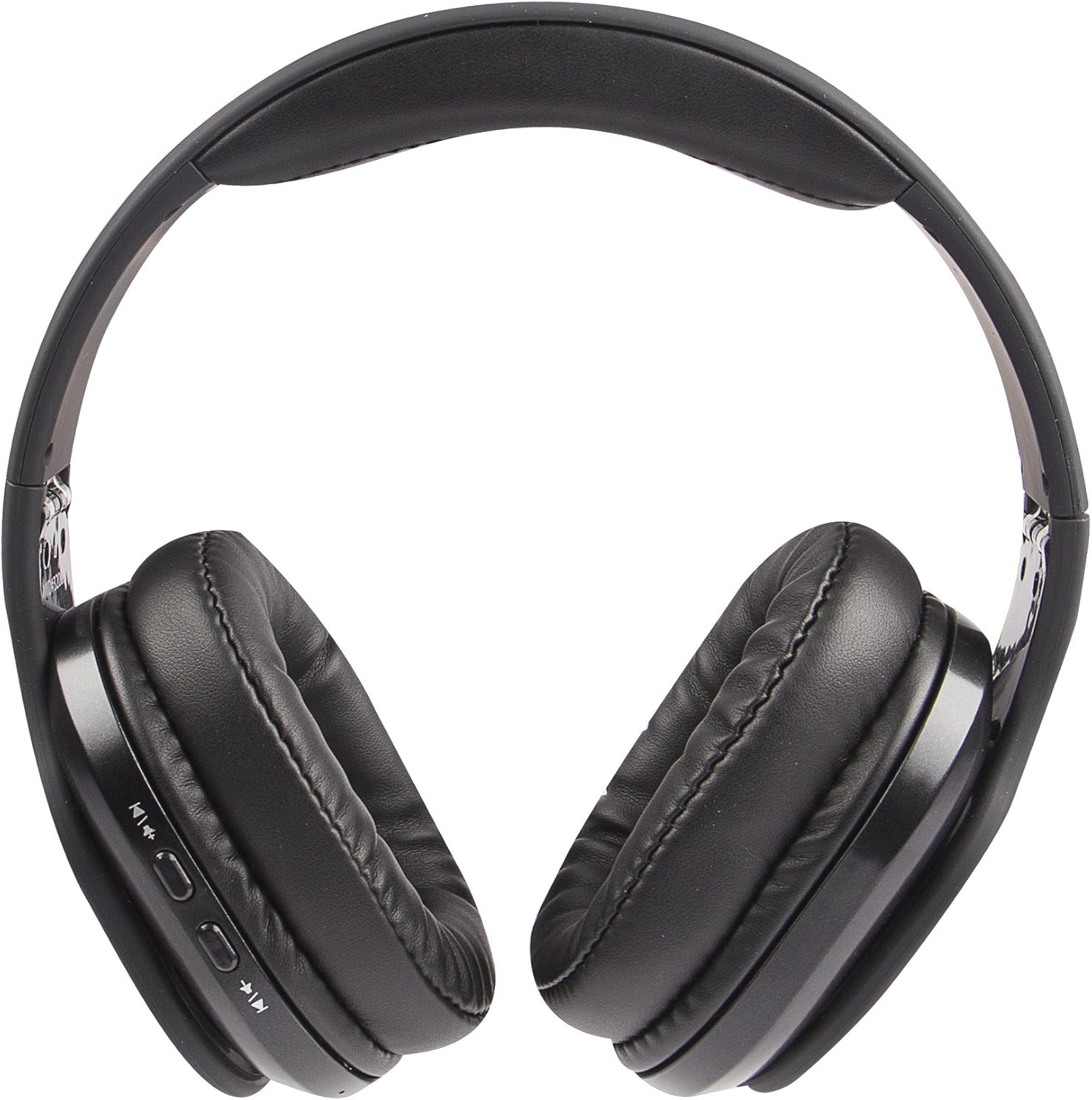
Image: The Altec Lansing MZX668-BLK headphones laid flat, providing a clear view of the earcups and the location of the AUX-in port.
Opretholdelse
1. Rensning
- Brug en blød, tør og fnugfri klud til at rengøre hovedtelefonernes overflader.
- Tør forsigtigt ørekopperne af med en let dip.amp klud om nødvendigt, og tør derefter straks.
- Do not use abrasive cleaners, alcohol, benzene, or other harsh chemicals, as these may damage the finish or internal components.
- Undgå at få fugt ind i åbninger eller porte.
2. Opbevaring
- Opbevar hovedtelefonerne et køligt, tørt sted væk fra direkte sollys og ekstreme temperaturer.
- Avoid storing in areas with high humidity.
- When not in use for extended periods, it is recommended to charge the headphones at least once every three months to maintain battery health.

Image: A person wearing the Altec Lansing MZX668-BLK headphones while sitting outdoors, demonstrating typical usage and comfort.
3. Batteripleje
- Do not expose the battery to excessive heat, such as direct sunlight, fire, or similar.
- Forsøg ikke at udskifte batteriet selv. Kontakt kundesupport, hvis der opstår problemer med batteriet.
- Bortskaf batterier i henhold til lokale regler.
Fejlfinding
| Problem | Mulig årsag | Løsning |
|---|---|---|
| Hovedtelefonerne tændes ikke. | Lav eller ingen batteriopladning. | Charge the headphones fully using the provided USB cable. |
| Kan ikke parres med enheden. | Headphones not in pairing mode; Device Bluetooth off; Too far from device; Interference. | Ensure headphones are in pairing mode (flashing blue/red). Turn Bluetooth off/on on your device. Move headphones closer to device. Avoid strong Wi-Fi signals or other Bluetooth devices. |
| Ingen lyd eller lav lydstyrke. | Volume too low on headphones or device; Not properly connected; Incorrect audio output selected. | Increase volume on both headphones and device. Re-pair the headphones. Check audio output settings on your device. If using AUX cable, ensure it's fully inserted. |
| Sound is distorted or cuts out. | Too far from device; Obstructions; Low battery. | Move closer to your device (within 30 feet/10 meters). Ensure no major obstructions. Charge the headphones. |
| Stemmeassistenten svarer ikke. | Not connected to smartphone; Voice assistant not enabled on phone. | Ensure headphones are paired and connected to your smartphone. Check your smartphone's settings to ensure Siri/Google Assistant is enabled. |

Image: A person wearing the Altec Lansing MZX668-BLK headphones in a winter environment, illustrating their use in various conditions.
Specifikationer
| Feature | Detalje |
|---|---|
| Modelnavn | MZX668-BLK |
| Mærke | Altec Lansing |
| Forbindelsesteknologi | Trådløs (Bluetooth) |
| Trådløs kommunikationsteknologi | Bluetooth |
| Bluetooth rækkevidde | 10 meter (30 fod) |
| Audio driver størrelse | 40 millimeter |
| Audio driver type | Dynamisk Driver |
| Frekvensområde | 20 Hz - 20,000 Hz |
| Batterilevetid | Op til 8 timer |
| Batterier påkrævet | 1 lithium-ion batteri (medfølger) |
| Hovedtelefonstik | 3.5 mm jackstik (til kablet brug) |
| Kontroltype | Stemmestyring, knapstyring |
| Kompatible enheder | Cellphones, Laptops, Desktops, Tablets, Telephones, Smart Speaker |
| Produktdimensioner | 8.27 x 3.15 x 6.69 tommer |
| Varens vægt | 0.007 ounces (ca. 0.21 gram) |
| Farve | Sort |
| UPC | 021331979483 |
| Fabrikant | Sakar International, Inc. |

Billede: Side profile of the Altec Lansing MZX668-BLK headphones, illustrating the adjustable headband and comfortable earcup design.
Garanti og support
Garantioplysninger
Altec Lansing products are covered by a standard manufacturer's warranty against defects in materials and workmanship. The specific warranty period may vary by region and product. Please retain your proof of purchase for warranty claims.
For detailed warranty terms and conditions, please refer to the warranty card included with your product or visit the official Altec Lansing webwebsted.
Kundesupport
If you encounter any issues or have questions regarding your Altec Lansing MZX668-BLK Evolution 2 Bluetooth Headphones that are not covered in this manual, please contact Altec Lansing customer support.
- Online support: Visit the Altec Lansing support page on their official webwebsted med ofte stillede spørgsmål, fejlfindingsvejledninger og kontaktformularer.
- Telefonsupport: Se kontaktoplysningerne på produktemballagen eller den officielle webhjemmeside for telefonsupportens åbningstider.
When contacting support, please have your product model number (MZX668-BLK) and proof of purchase ready.


