1. Introduktion
This manual provides detailed instructions for the operation and maintenance of your AUNA Worldwide Internet Radio. Please read this manual thoroughly before using the device to ensure proper function and to prevent damage. Keep this manual for future reference.
The AUNA Worldwide Internet Radio is a versatile audio system featuring Internet Radio, DAB/DAB+ and FM tuners, a CD player, Bluetooth connectivity, USB playback, and AUX input. It offers a wide range of listening options and convenient control features.
2. Sikkerhedsinstruktioner
- Læs alle instruktioner, før du betjener enheden.
- Udsæt ikke enheden for regn eller fugt for at forhindre brand eller elektrisk stød.
- Sørg for tilstrækkelig ventilation. Bloker ikke ventilationsåbninger.
- Placer enheden på en stabil, flad overflade.
- Brug kun den strømadapter, der fulgte med enheden.
- Tag stikket ud af enheden under tordenvejr, eller når den ikke skal bruges i længere perioder.
- Forsøg ikke at reparere enheden selv. Overlad al service til kvalificeret personale.
3. Pakkens indhold
Kontroller venligst, at alle varer er til stede og i god stand:
- 1 x AUNA Worldwide Internet Radio Unit
- 1 x strømadapter
- 1 x fjernbetjening
- 1 x User Manual (German, English, French)
4. Produktet er slutview
The AUNA Worldwide Internet Radio features a sleek design with intuitive controls and a clear LCD display.

Billede 4.1: Front view of the AUNA Worldwide Internet Radio, showcasing the central LCD display, control knobs, buttons for various functions (USB, Audio In, Mode, Scan, Stop, Tuning, Back), and the CD slot. Two speaker grilles are visible on either side.

Billede 4.2: A close-up of the radio's LCD display, showing 'Internet Radio' mode with 'Burn FM' and 'AIM - Wicked Game' displayed. The volume knob and 'SELECT' button are prominent, along with power and mode buttons.
4.1 Betjeningselementer på frontpanelet
- Power knap: Tænder/slukker enheden eller sætter den i standbytilstand.
- LCD-skærm: Shows current mode, station information, time, and date.
- Lydstyrkeknap: Justerer lydudgangsniveauet.
- Select Knob/Button: Navigerer i menuer og bekræfter valg.
- USB-port (5V 1A): For connecting USB storage devices and charging.
- AUDIO IN (3.5mm AUX): Til tilslutning af eksterne lydkilder.
- Mode knap: Switches between different operating modes (Internet Radio, DAB, FM, CD, Bluetooth, USB, AUX).
- Scan knap: Initiates station scanning in radio modes.
- Stop/Play/Pause Buttons: Styrer afspilning for CD, USB og Bluetooth.
- Tuning/Skip Buttons: Navigates through stations or tracks.
- Tilbage knap: Vender tilbage til den forrige menu eller skærm.
- Info knap: Displays additional information about the current track or station.
- Menu-knap: Accesses the main system menu.
4.2 Bagpaneltilslutninger
- DC IN: Strømadaptertilslutning.
- Teleskopantenne: For DAB/DAB+ and FM reception.
5. Opsætning
5.1 Strømtilslutning
- Tilslut den medfølgende strømadapter til DC IN-porten på bagsiden af radioen.
- Plug the power adapter into a standard wall outlet (220-240V ~ | 50/60Hz).
- Press the Power button on the front panel to turn on the device.
5.2 Antenneopsætning
Extend the telescopic antenna fully for optimal DAB/DAB+ and FM radio reception. Adjust its position to improve signal strength if needed.
5.3 Netværksforbindelse (Wi-Fi)
To access Internet Radio and Spotify Connect, the device requires a Wi-Fi connection.
- Upon first power-on, the radio will guide you through the initial setup, including Wi-Fi configuration.
- Alternativt kan du navigere til Menu > System Settings > Network > Wi-Fi Setup.
- Radioen vil søge efter tilgængelige Wi-Fi-netværk. Vælg dit netværk fra listen.
- Enter your Wi-Fi password using the Select knob and buttons.
- Når der er oprettet forbindelse, vises Wi-Fi-ikonet på displayet.

Billede 5.1: A hand holding a smartphone with a Wi-Fi symbol, illustrating the wireless connectivity feature of the AUNA radio, which allows for remote control via an app.
6. Betjeningsvejledning
6.1 Grundlæggende kontroller
- Tænd/sluk: Tryk på Power-knappen.
- Lydstyrkejustering: Rotate the Volume knob.
- Valg af tilstand: Press the Mode button repeatedly to cycle through available sources (Internet Radio, DAB, FM, CD, Bluetooth, USB, AUX).
- Menu navigation: Use the Select knob to scroll and press to confirm. Use the Back button to return.
6.2 Internetradio
Få adgang til tusindvis af radiostationer fra hele verden via din Wi-Fi-forbindelse.
- Select 'Internet Radio' mode using the Mode button.
- Navigate through categories (e.g., Location, Genre, Popular) using the Select knob.
- Vælg en station for at starte afspilningen.
6.3 DAB/DAB+ radio
Enjoy digital radio broadcasts with clear sound quality.
- Select 'DAB' mode.
- The radio will automatically scan for available DAB/DAB+ stations on first use or if you initiate a scan via the Menu.
- Use the Tuning/Skip buttons to browse through the station list.
6.4 FM radio
Stil ind på traditionelle analoge FM-udsendelser.
- Select 'FM' mode.
- Press the Scan button to automatically search for and store available stations.
- Use the Tuning/Skip buttons for manual tuning or to navigate stored stations.
- The RDS function provides additional information like station name and program details.
6.5 CD-afspiller
Play your favorite audio CDs and MP3 CDs.

Billede 6.1: A close-up of the AUNA Worldwide Internet Radio, showing a CD being inserted into the slot-loading CD player, highlighting its capability to play physical media.
- Select 'CD' mode.
- Insert an audio CD or MP3 CD into the slot. The disc will be loaded automatically.
- Playback will start automatically. Use the Play/Pause, Stop, and Skip buttons to control playback.
6.6 Bluetooth-forbindelse
Stream lyd trådløst fra dine Bluetooth-aktiverede enheder.
- Vælg 'Bluetooth'-tilstand. Radioen går i parringstilstand, hvilket vises på displayet.
- On your smartphone, tablet, or other Bluetooth device, enable Bluetooth and search for 'AUNA Worldwide'.
- Select the radio from your device's list to pair. Once connected, you can stream audio.
6.7 USB-afspilning
Afspil MP3 og WMA files fra en USB-lagerenhed.
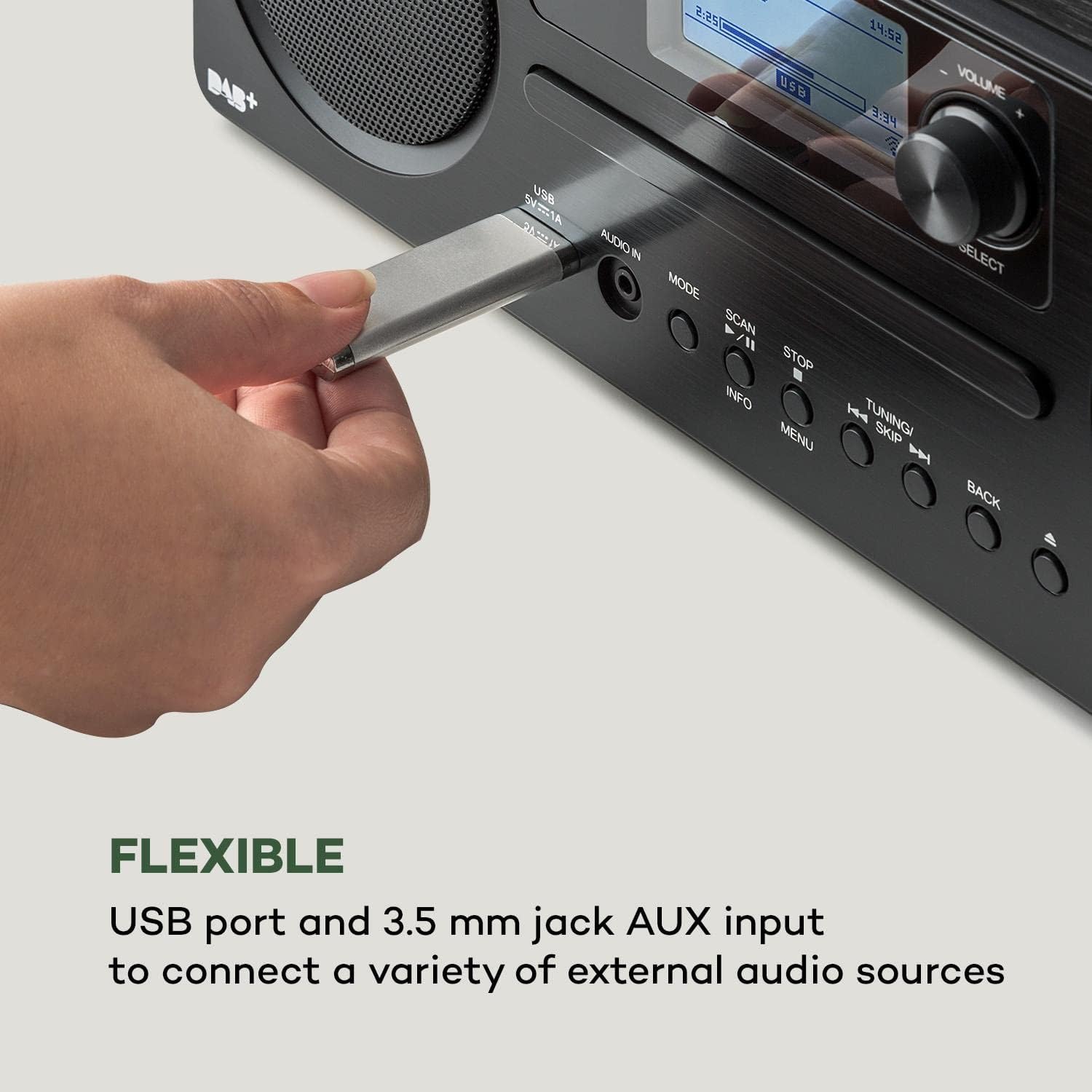
Billede 6.2: Et nærbillede view of a USB stick inserted into the USB port on the front panel of the AUNA Worldwide Internet Radio, demonstrating its capability for playing media from external storage.
- Insert a USB storage device into the USB port on the front panel.
- Select 'USB' mode. The radio will automatically detect and display the content.
- Naviger gennem mapper og files using the Select knob and buttons. Use playback controls as needed.
6.8 AUX-indgang
Tilslut eksterne lydenheder med et 3.5 mm lydkabel.
- Connect your external audio device to the 'AUDIO IN' (3.5mm AUX) port on the front panel.
- Select 'AUX' mode.
- Styr afspilning fra din tilsluttede eksterne enhed.
6.9 Spotify Connect
Stream music directly from your Spotify account.

Billede 6.3: A person relaxing on a couch, using a smartphone with the Spotify logo visible, illustrating the convenience of Spotify Connect for streaming music directly to the AUNA radio.
- Ensure your radio is connected to the same Wi-Fi network as your smartphone or tablet running the Spotify app.
- Åbn Spotify-appen på din enhed.
- Play a song and select the 'Devices Available' icon.
- Choose your AUNA Worldwide radio from the list to start streaming.
6.10 UNDOK App Control
Control your radio remotely using the UNDOK app on your smartphone or tablet.

Billede 6.4: A screenshot of the UNDOK app interface on a smartphone, displayed next to the physical remote control for the AUNA radio, demonstrating the dual control options available to the user.
- Download the 'UNDOK' app from your device's app store.
- Ensure your radio and smartphone/tablet are connected to the same Wi-Fi network.
- Open the UNDOK app. It will automatically detect your AUNA radio.
- Select your radio within the app to gain full control over modes, stations, volume, and settings.
6.11 Alarmfunktioner
The radio includes dual alarm, sleep timer, and snooze functions.
- Naviger til Menu > Alarms to set up dual alarms with customizable sources (buzzer, radio) and schedules.
- Indstil a Sleep Timer via the Menu to automatically turn off the radio after a set period.
- Når en alarm lyder, skal du trykke på Snooze button (often the Select knob) to temporarily silence it.
7. Vedligeholdelse
- Rensning: Brug en blød, tør klud til at rengøre enhedens yderside. Brug ikke slibende rengøringsmidler eller opløsningsmidler.
- CD-afspiller: Keep the CD slot free from dust and debris. Do not insert damaged or dirty CDs.
- Opbevaring: Hvis enheden opbevares i længere tid, skal den tages ud af stikkontakten og opbevares et køligt og tørt sted.
8. Fejlfinding
| Problem | Mulig årsag | Løsning |
|---|---|---|
| Ingen strøm | Strømadapteren er ikke tilsluttet; stikkontakten virker ikke. | Check power adapter connection; try a different outlet. |
| Ingen lyd | Lydstyrken er for lav; forkert kilde er valgt. | Increase volume; ensure correct mode (e.g., Internet Radio, CD) is selected. |
| Internetradioen forbinder ikke | Wi-Fi connection issue; incorrect password. | Check Wi-Fi settings and password; ensure router is working; restart radio and router. |
| Dårlig DAB/FM-modtagelse | Antennen er ikke strakt ud; svagt signal. | Fully extend and adjust the telescopic antenna; try repositioning the unit. |
| CD'en afspiller ikke | CD'en er isat forkert; CD'en er snavset eller ridset. | Re-insert CD correctly; clean or try a different CD. |
| Bluetooth ikke parring | Radio not in pairing mode; device too far. | Ensure radio is in Bluetooth mode; bring devices closer; restart Bluetooth on both devices. |
9. Specifikationer
- Model: MG2-2200-gfvd
- Strømforsyning: 220-240 V ~ | 50/60 Hz (via power adapter)
- Udgangseffekt: 2 x 5 W RMS
- Supported Playback Formats: MP3, WMA, WAV, AAC, FLAC
- Forbindelser: 1 x USB port (5 V, 1 A charging function), 1 x 3.5 mm jack AUX input, Bluetooth, Wi-Fi
- Radiotunere: Internet Radio, DAB/DAB+, FM/AM
- Særlige funktioner: Spotify Connect, UNDOK App Control, LCD Display, Time and Date Display, Standby Function, Alarm Functions (Dual Alarm, Sleep Timer, Snooze), RDS Function
- Dimensioner (B x H x D): 35 x 12 x 20 cm
- Vægt: Ca. 2.6 kg
- Farve: Sort
10. Garanti og support
AUNA products are designed and manufactured to the highest quality standards. In the unlikely event of a problem with your device, please refer to the troubleshooting section of this manual. If the issue persists, please contact your retailer or authorized service center for assistance.
Please retain your proof of purchase for warranty claims. Information regarding spare parts availability and software updates is not available at this time.


