1. Produktet er slutview
The GAMBER-JOHNSON 7160-0366 is a robust computer mount designed specifically for forklift applications. Constructed from durable steel, this mount provides a secure and stable platform for computing devices in demanding industrial environments. Its black finish and 7-inch length ensure compatibility and integration with various forklift models.
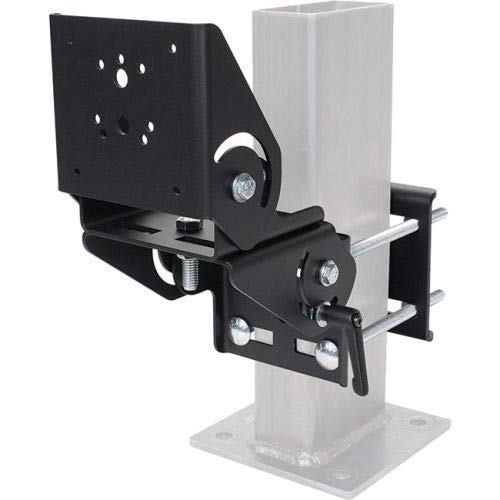
Figure 1: The GAMBER-JOHNSON 7160-0366 Computer Mount. This image shows the black steel mount attached to a vertical post, illustrating its adjustable components and secure clamping mechanism for forklift integration.
2. Sikkerhedsoplysninger
Read all instructions carefully before installation and use. Failure to follow these instructions may result in equipment damage, personal injury, or property damage.
- Ensure all fasteners are securely tightened before operating the forklift.
- Do not overtighten fasteners, as this may strip threads or damage components.
- Verify the mount is compatible with your specific forklift model and the computer device's weight and dimensions.
- Regularly inspect the mount for signs of wear, damage, or loose connections.
- Do not obstruct the operator's view or interfere with forklift controls.
- Installation should be performed by qualified personnel if you are unsure of the process.
3. Pakkens indhold
The package for the GAMBER-JOHNSON 7160-0366 Computer Mount typically includes:
- GAMBER-JOHNSON 7160-0366 Computer Mount (Forklift, 7 in. L. Steel)
- Necessary mounting hardware (bolts, nuts, washers)
- Instruktionsark (denne manual)
Note: Contents may vary slightly. Please check the packaging for a complete list of included items.
4. Opsætning og installation
This section provides general guidelines for installing the computer mount. Specific installation steps may vary depending on your forklift model and desired mounting location.
- Identificér monteringssted: Choose a secure, stable location on the forklift that does not obstruct the operator's view, controls, or safe operation. Common locations include overhead guards or vertical posts.
- Forbered monteringsoverfladen: Ensure the mounting surface is clean, dry, and free of obstructions.
- Fastgør monteringsbase: Secure the base of the 7160-0366 mount to the chosen forklift structure using the provided hardware. Ensure all bolts are tightened evenly and securely. Use appropriate tools for tightening.
- Adjust Mount Angle: The mount features adjustable components. Loosen the adjustment levers or bolts, position the mount at the desired angle for optimal viewing and access, and then securely tighten all adjustment points.
- Secure Computer Device: Attach your computer or display device to the mount's VESA-compatible plate (if applicable) or other securing mechanism. Ensure the device is firmly attached and will not vibrate loose during operation.
- Kabelstyring: Route any necessary power or data cables safely, ensuring they do not interfere with forklift operation or become pinched.
- Afsluttende inspektion: Before operating the forklift, perform a thorough inspection to ensure all components are securely fastened, the mount is stable, and the computer device is safely positioned.
5. Betjeningsvejledning
Once installed, the GAMBER-JOHNSON 7160-0366 mount is designed for stable and secure computer placement. Its primary operation involves adjusting the viewing angle and ensuring the computer remains securely attached.
- Vinkeljustering: To adjust the tilt or swivel angle of the mounted device, locate the adjustment levers or bolts on the mount. Loosen them slightly, reposition the device to the desired angle, and then firmly tighten the levers/bolts to lock the position.
- Enhedssikkerhed: Periodically check that the computer device is still firmly attached to the mount, especially after operating the forklift over rough terrain.
6. Vedligeholdelse
Regular maintenance ensures the longevity and safe operation of your GAMBER-JOHNSON computer mount.
- Rutinemæssig inspektion: At least once a month, or more frequently in harsh environments, inspect all bolts, nuts, and adjustment points for tightness. Tighten any loose fasteners.
- Renhed: Keep the mount clean from dust, dirt, and debris. Use a damp cloth to wipe down surfaces. Avoid abrasive cleaners.
- Skadetjek: Look for any signs of cracks, bends, or corrosion on the steel components. If significant damage is found, replace the mount immediately.
- Smøring: Moving parts or adjustment mechanisms may benefit from light lubrication if they become stiff, using a suitable lubricant that does not attract excessive dirt.
7. Fejlfinding
This section addresses common issues you might encounter with the computer mount.
| Problem | Mulig årsag | Løsning |
|---|---|---|
| Beslaget føles løst eller vakkelvornt. | Loose mounting bolts or adjustment points. | Inspect and tighten all mounting bolts and adjustment levers/bolts securely. |
| Computer device vibrates excessively. | Device not securely attached to the mount; mount not securely attached to forklift. | Ensure the computer device is firmly fastened to the mount. Verify the mount itself is tightly secured to the forklift. |
| Difficulty adjusting mount angle. | Adjustment levers/bolts are too tight or mechanism is stiff. | Loosen adjustment levers/bolts slightly. If stiff, apply a small amount of lubricant to the pivot points. |
8. Specifikationer
| Attribut | Detalje |
|---|---|
| Modelnummer | 7160-0366 |
| Produkttype | Computermontering |
| Anvendelse | Gaffeltruck |
| Længde | 7 tommer |
| Materiale | Stål |
| Farve | Sort |
| Fabrikant | GAMBER-JOHNSON |
| Pakkedimensioner | 14.5 x 12 x 9.5 tommer |
| Varens vægt | 9 pund |
| Første ledige dato | 5. oktober 2021 |
9. Garanti og support
For information regarding warranty coverage, technical support, or replacement parts for your GAMBER-JOHNSON 7160-0366 Computer Mount, please contact GAMBER-JOHNSON directly through their official webwebsted eller kundeservicekanaler.
It is recommended to have your model number (7160-0366) and purchase date available when contacting support.


