1. Introduktion
Thank you for choosing the AUNA Silver Star Internet Stereo Radio. This versatile music device combines powerful performance with multiple features and a stylish design. It offers a wide range of listening options including Internet Radio, DAB+, FM, Bluetooth, and USB playback. This manual provides essential information for setting up, operating, and maintaining your device to ensure optimal performance and longevity.

Figure 1: AUNA Silver Star Internet Stereo Radio, front view with display and controls.
2. Sikkerhedsoplysninger
Læs venligst alle sikkerhedsinstruktioner omhyggeligt, inden du bruger enheden. Gem denne manual til senere brug.
- Strømkilde: Brug kun den medfølgende strømadapter. Sørg for, at lydstyrkentage matcher kravene i din region.
- Vand og fugt: Udsæt ikke enheden for regn, fugt eller dryppende/sprøjtende væsker. Placer ikke genstande fyldt med væsker, såsom vaser, på enheden.
- Ventilation: Ensure adequate ventilation. Do not block ventilation openings. Maintain a minimum distance of 10 cm around the device for proper airflow.
- Varme: Hold enheden væk fra varmekilder såsom radiatorer, varmeapparater, komfurer eller andre apparater (herunder ampløftere), der producerer varme.
- Rensning: Tag enhedens stik ud af stikkontakten før rengøring. Brug en blød, tør klud. Brug ikke flydende rengøringsmidler eller sprayrengøringsmidler.
- Service: Forsøg ikke selv at servicere dette produkt. Overlad al service til kvalificeret servicepersonale.
3. Pakkens indhold
Carefully unpack your AUNA Silver Star Internet Stereo Radio and check that all items are present and in good condition:
- AUNA Silver Star Internet Stereo Radio Unit
- Fjernbetjening
- Netadapter
- Brugermanual (dette dokument)
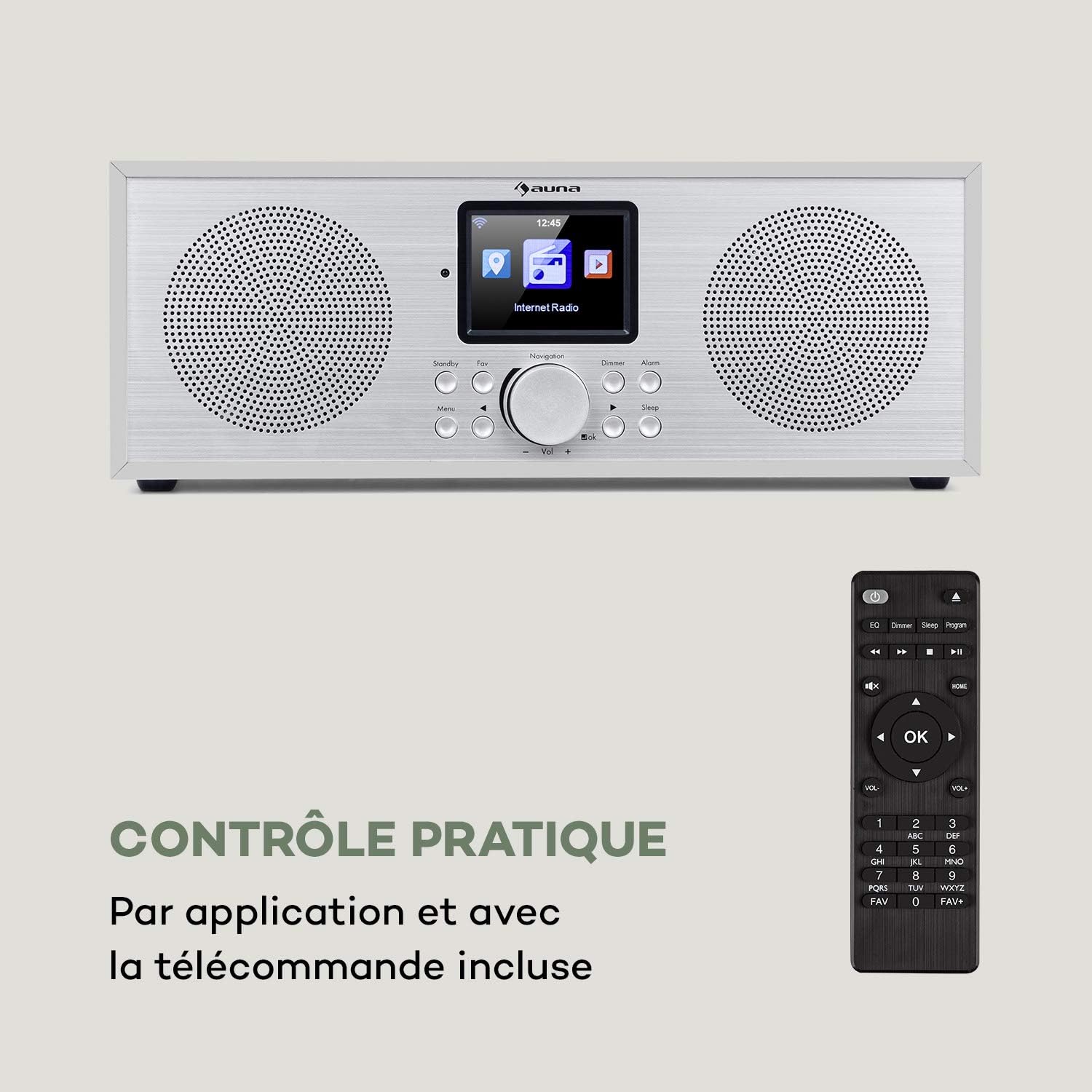
Figure 2: The AUNA Silver Star Internet Stereo Radio unit and its included remote control.
4. Opsætning
4.1 Tilslutning af strøm
Connect the provided mains adapter to the "DC IN" port on the rear of the radio and then plug the adapter into a wall outlet. Ensure the ON/OFF switch on the back is set to "ON".
4.2 Antenneforbindelse
For optimal FM and DAB+ reception, extend the telescopic antenna located at the rear of the unit fully.
4.3 Netværksforbindelse (Wi-Fi)
To access Internet Radio features, the device requires a Wi-Fi connection. Upon first power-on, the radio will guide you through the network setup process on its display. Select your Wi-Fi network from the list and enter the password using the navigation controls.
4.4 Eksterne forbindelser
The radio features various ports for external devices:
- AUX IN: Connect external audio sources (e.g., MP3 player) using a 3.5mm audio cable.
- LINE OUT: Connect the radio to an external amplifier or active speakers for enhanced audio output.
- USB: Insert a USB flash drive for MP3 file afspilning.

Figure 3: Rear panel connections including AUX IN, LINE OUT, USB, and DC IN.
5. Betjeningsvejledning
5.1 Grundlæggende kontroller
The radio can be operated using the buttons and rotary knob on the front panel, or via the included remote control. The 2.8" (7 cm) HCC display provides clear information and navigation.
- Strøm/Standby: Press the Standby button to turn the unit on or off.
- Navigation Knob: Rotate to scroll through menus or adjust volume. Press to confirm selection.
- Menu: Få adgang til hovedmenuen.
- Tilbage: Gå tilbage til den forrige menu.
- Favorit: Access favorite stations.
- lysdæmper: Juster skærmens lysstyrke.
- Alarm: Indstil alarmer.
- Sove: Indstil sleep timer.

Figure 4: The high-contrast color display for easy navigation.
5.2 Valg af tilstand
From the main menu, you can select different operating modes:
- Internet radio: Access thousands of online radio stations worldwide. Browse by genre, location, or search.
- DAB+: Tune into digital audio broadcasting stations for high-quality sound.
- FM: Listen to traditional analog FM radio stations.
- Bluetooth: Pair your smartphone, tablet, or computer to stream audio wirelessly.
- USB: Afspil MP3 files from a connected USB flash drive.
- AUX ind: Play audio from an external device connected to the AUX IN port.
5.3 Bluetooth -parring
Sådan parrer du en Bluetooth-enhed:
- Select "Bluetooth" mode on the radio. The radio will enter pairing mode.
- Aktiver Bluetooth på din mobilenhed, og søg efter tilgængelige enheder.
- Select "AUNA Silver Star" from the list. Once connected, you can stream audio to the radio.

Figure 5: Wireless audio streaming via Bluetooth from a smartphone.
5.4 USB-afspilning
Insert a USB flash drive into the USB port on the rear of the unit. Select "USB" mode from the menu. The radio will automatically detect and display playable MP3 files. Brug navigationsknapperne til at gennemse og vælge spor.

Figure 6: Connecting a USB flash drive for MP3 playback.
5.5 Air Music Control App
For convenient control, download the "Air Music Control" app from your smartphone's app store (available on App Store and Google Play). This app allows you to control the radio, browse stations, and manage settings from your mobile device.

Figure 7: Controlling the radio using the Air Music Control app.
6. Vedligeholdelse
6.1 Rengøring
Always unplug the radio from the power outlet before cleaning. Use a soft, dry, lint-free cloth to wipe the surfaces. Do not use abrasive cleaners, waxes, or solvents as they may damage the finish. Avoid spraying liquids directly onto the unit.
6.2 Opbevaring
If you plan to store the radio for an extended period, unplug it from the power supply and store it in a cool, dry place, away from direct sunlight and extreme temperatures.
7. Fejlfinding
If you encounter issues with your AUNA Silver Star Internet Stereo Radio, refer to the following common problems and solutions:
| Problem | Mulig årsag | Løsning |
|---|---|---|
| Ingen strøm | Strømadapteren er ikke tilsluttet; tænd/sluk-knappen er slukket. | Ensure power adapter is securely connected and plugged into a live outlet. Check ON/OFF switch on the back. |
| Ingen lyd | Lydstyrken er for lav; Lydløs aktiveret; Forkert kilde valgt. | Increase volume. Check if mute is active. Select the correct input source (Internet Radio, DAB+, FM, Bluetooth, USB, AUX). |
| Kan ikke oprette forbindelse til Wi-Fi | Incorrect password; Router issue; Weak signal. | Double-check Wi-Fi password. Restart your router. Move the radio closer to the router or use a Wi-Fi extender. |
| Dårlig DAB+/FM-modtagelse | Antenna not extended; Location interference. | Fully extend the telescopic antenna. Try repositioning the radio to a different location. |
| USB-afspilning virker ikke | USB format not supported; Files not MP3; USB drive issue. | Ensure USB drive is formatted to FAT32. Verify files are in MP3 format. Try a different USB drive. |
Hvis problemet fortsætter efter at have prøvet disse løsninger, bedes du kontakte kundesupport.
8. Specifikationer
| Mærke | AUNA |
| Modelnummer | KC6-SilverStar ST WHs |
| Produktdimensioner | 33 x 12 x 15 cm (L x H x D) |
| Varens vægt | 2.3 kg |
| Udgangseffekt | 2 x 8 Watt RMS |
| Vise | 2.8" (7 cm) HCC (High Contrast Color) |
| Tuner-teknologi | FM, Internet Radio, DAB+ |
| Forbindelsesteknologi | Bluetooth, Auxiliary, Wi-Fi, USB |
| Materiale | Wood, Aluminium |
| Strømkilde | Elektrisk med ledning |
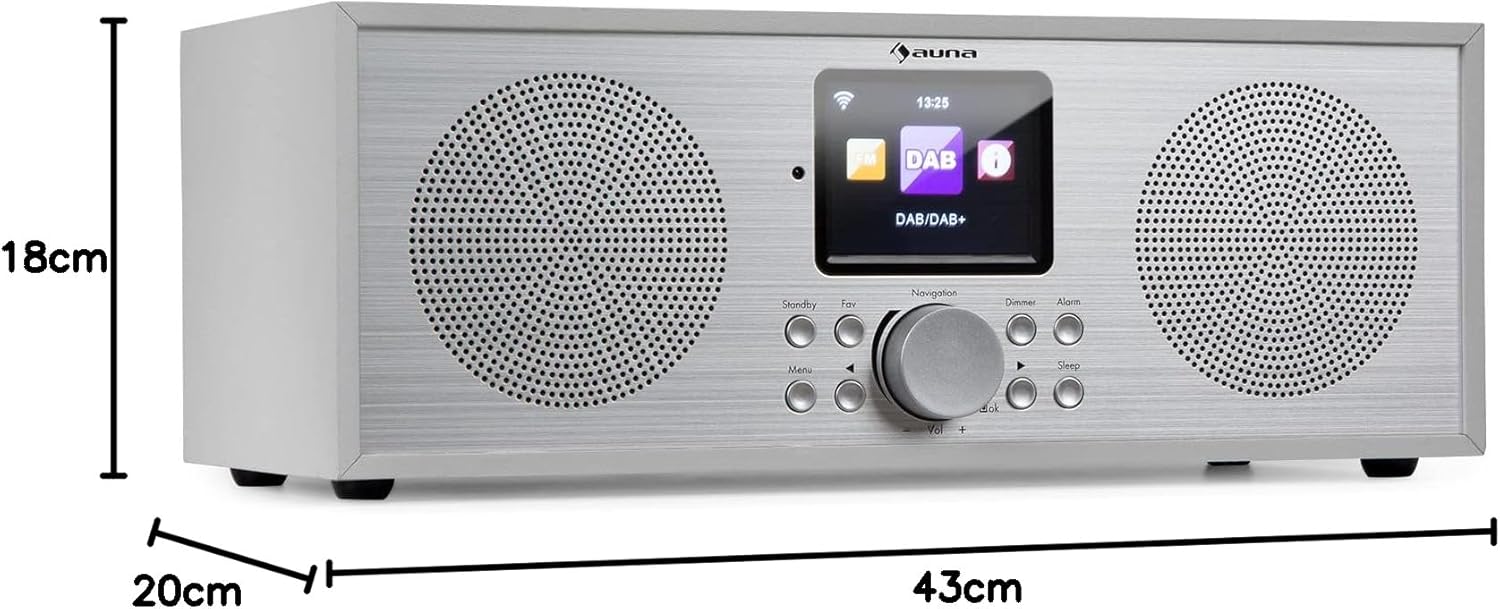
Figur 8: Produktdimensioner.
9. Garanti og support
Your AUNA Silver Star Internet Stereo Radio comes with a standard manufacturer's warranty. Please refer to the warranty card included in your package or visit the official AUNA webhjemmeside for detaljerede garantivilkår.
For technical support, troubleshooting assistance beyond this manual, or spare parts, please contact AUNA customer service through their official webwebstedet eller de kontaktoplysninger, der er angivet med dit køb.


