1. Introduktion
This manual provides essential information for the safe and efficient operation of your MEDION Boombox E65711. Please read it thoroughly before using the device and retain it for future reference.
The MEDION Boombox E65711 is a versatile portable audio system featuring a CD/MP3 player, FM radio, AUX input, and USB playback capabilities. It can be powered by mains electricity or batteries, offering flexibility for both indoor and outdoor use.
2. Sikkerhedsoplysninger
- Strømkilde: Brug kun den angivne strømadapter eller batterier. Sørg for, at lydstyrkentage matcher enhedskravene.
- Ventilation: Do not block ventilation openings. Maintain adequate space around the device for proper airflow.
- Vand og fugt: Hold enheden væk fra vand, regn og høj luftfugtighed. Må ikke betjenes med våde hænder.
- Varme: Avoid placing the device near heat sources such as radiators, stoves, or other heat-producing appliances.
- Rensning: Afbryd strømmen før rengøring. Brug en blød, tør klud. Brug ikke flydende rengøringsmidler eller aerosolrengøringsmidler.
- Service: Forsøg ikke selv at servicere dette produkt. Overlad al service til kvalificeret servicepersonale.
3. Pakkens indhold
Bekræft at alle varer er til stede i pakken:
- MEDION Boombox E65711
- Strømkabel
- Brugermanual
- Garantikort
4. Produktet er slutview
Gør dig bekendt med hovedkomponenterne og betjeningselementerne på din ghettoblaster.
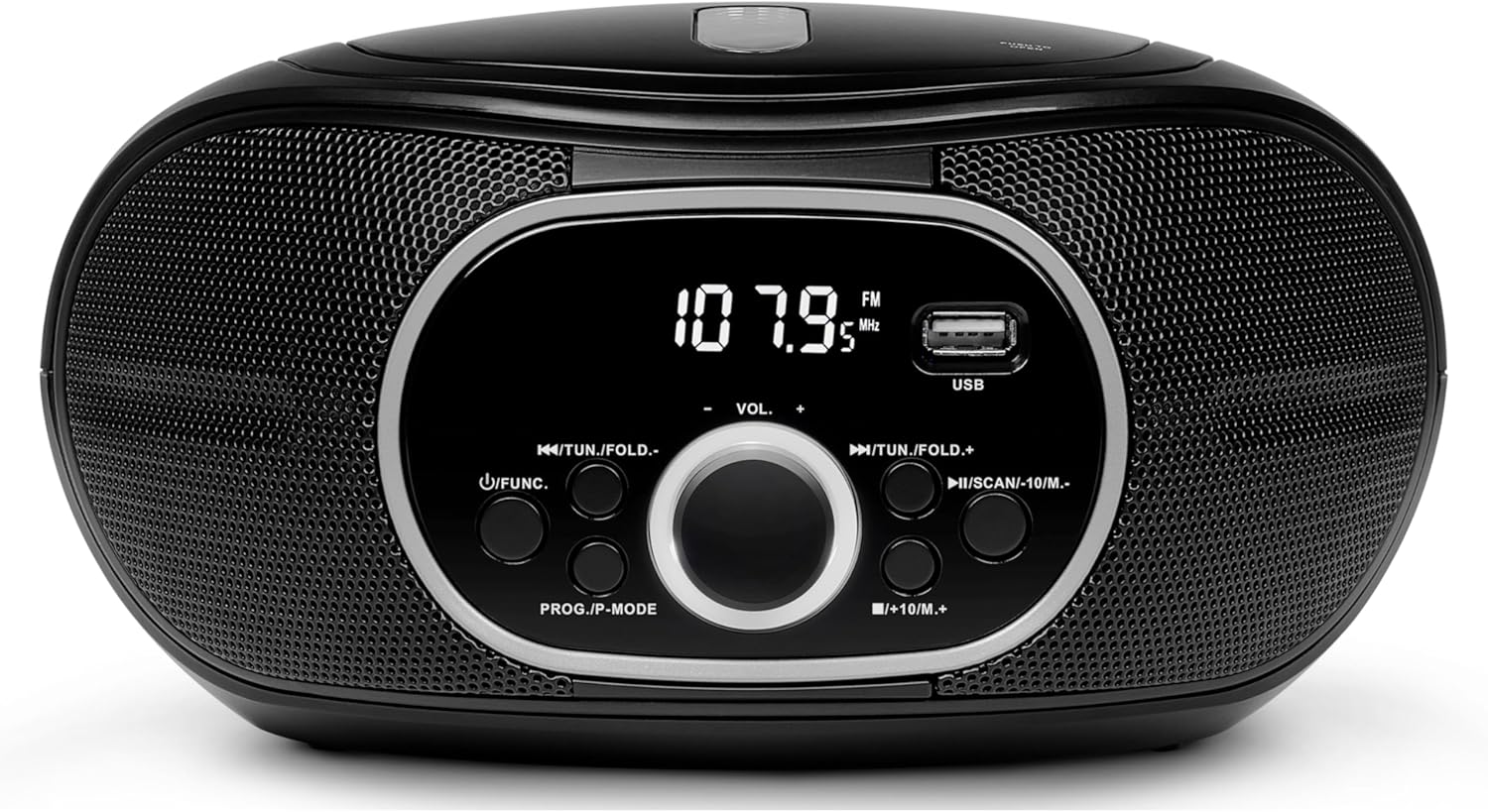
Billede 4.1: Front view of the MEDION Boombox E65711, highlighting the central display, volume knob, function buttons, and USB input.
Kontrol og porte:
- Power knap: Tænder eller slukker for enheden.
- Funktions-/tilstandsknap: Switches between CD, FM Radio, USB, and AUX modes.
- Lydstyrkeknap: Justerer lydudgangsniveauet.
- Afspil/pause knap: Styrer afspilning af CD og USB.
- Stop-knap: Stopper afspilning.
- Skip/Search Buttons (◀◀/▶▶): Skips tracks on CD/USB or tunes radio frequencies.
- Program/Repeat Button: Used for programming CD/MP3 tracks or repeating playback.
- USB-port: Til tilslutning af USB-lagerenheder til MP3-afspilning.
- AUX-indgang (3.5 mm): Til tilslutning af eksterne lydkilder.
- Hovedtelefonstik (3.5 mm): Til privat lytning.
- FM-antenne: Forlæng for optimal radiomodtagelse.

Billede 4.2: Side view illustrating the dimensions and various connection ports including headphone, USB, and AUX input.
5. Opsætning
5.1 Strømforsyning
The boombox can be powered by either mains electricity or batteries.
Netdrift:
- Ensure the boombox is switched off.
- Connect the power cable to the AC IN socket on the back of the boombox.
- Sæt den anden ende af strømkablet i en almindelig stikkontakt.
Batteridrift:
This device requires 6 x C-size batteries (not included).
- Ensure the boombox is switched off and disconnected from mains power.
- Open the battery compartment cover located on the bottom or back of the unit.
- Insert 6 C-size batteries, observing the correct polarity (+/-) as indicated inside the compartment.
- Luk batterirummets dæksel forsvarligt.
6. Betjeningsvejledning
6.1 Grundlæggende betjening
- Tænd/sluk: Tryk på Power-knappen for at tænde eller slukke for enheden.
- Vælg tilstand: Press the Function/Mode button repeatedly to cycle through available modes: CD, FM Radio, USB, AUX.
- Juster lydstyrken: Drej lydstyrkeknappen for at øge eller mindske lydniveauet.
6.2 CD-afspilning
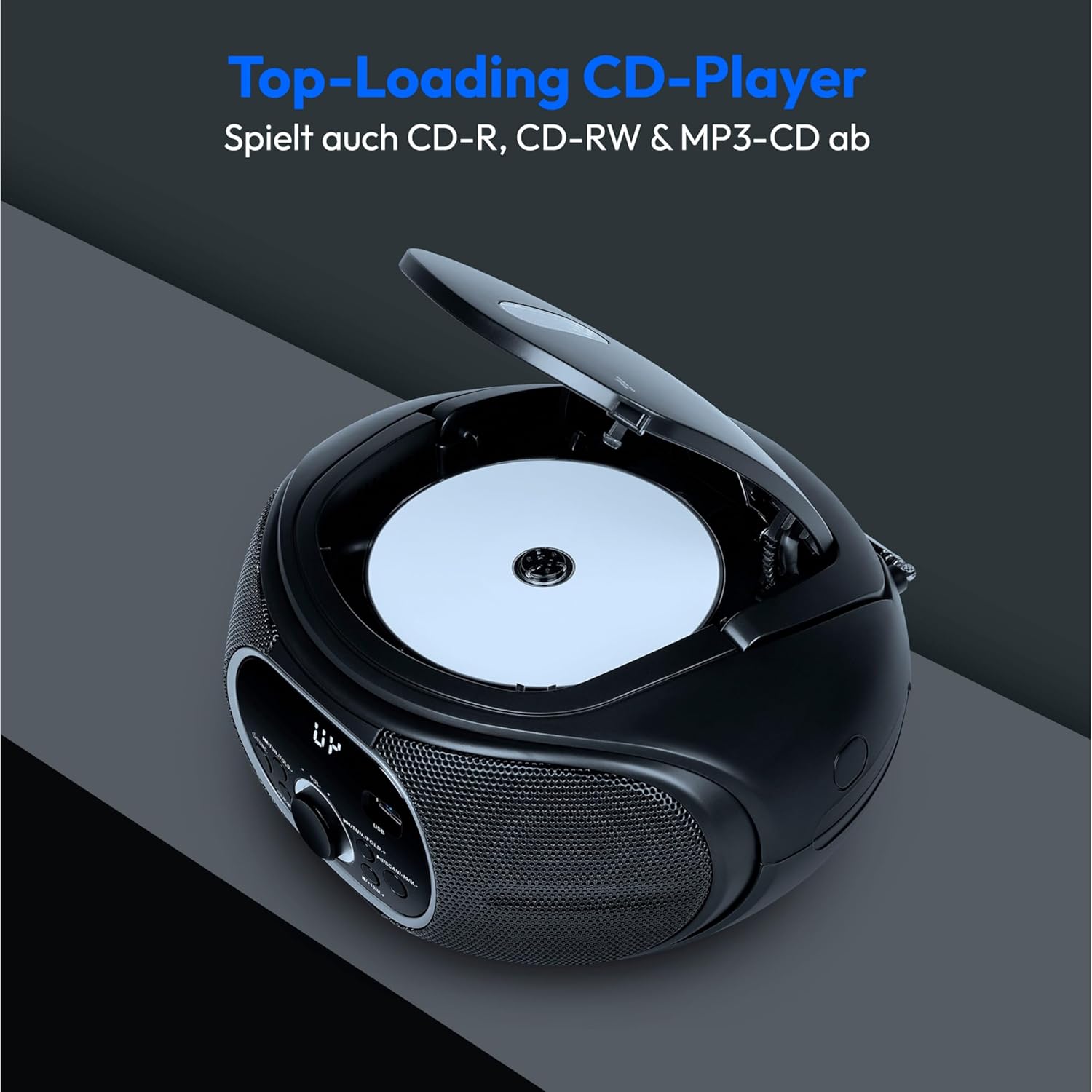
Billede 6.1: The top-loading CD compartment, ready for disc insertion.
- Press the Function/Mode button to select CD mode.
- Åbn dækslet til cd-rummet.
- Place a CD (CD, CD-R, CD-RW, or MP3-CD) onto the spindle with the label side facing up.
- Close the CD compartment cover. The boombox will begin reading the disc.
- Tryk på knappen Afspil/pause for at starte eller sætte afspilning på pause.
- Use the Skip/Search buttons (◀◀/▶▶) to navigate between tracks. Press and hold to fast forward or rewind.
- Tryk på Stop-knappen for at afslutte afspilningen.
- Programmering af spor: While in Stop mode, press the Program button. Select desired tracks using Skip/Search buttons and press Program again to confirm each track. Press Play to start programmed playback.
6.3 FM-radiofunktion

Billede 6.2: The boombox with its telescopic antenna extended for improved FM reception.
- Extend the telescopic FM antenna for better reception.
- Press the Function/Mode button to select FM Radio mode.
- Automatisk stationssøgning: Press and hold the Scan button (often combined with Skip/Search) to automatically scan and store available FM stations. The boombox can store up to 30 stations.
- Manuel indstilling: Briefly press the Skip/Search buttons (◀◀/▶▶) to manually tune to desired frequencies.
- Genkald forudindstillinger: Use the Preset buttons (if available, or Skip/Search after auto-scan) to cycle through stored stations.
6.4 USB-afspilning

Billede 6.3: Detail of the USB port, used for playing MP3 files fra en USB-stick.
- Insert a USB storage device containing MP3 music files i USB-porten.
- Press the Function/Mode button to select USB mode. The boombox will automatically detect and begin playing MP3 files.
- Use the Play/Pause, Stop, and Skip/Search buttons as you would for CD playback to control your music.
6.5 AUX-indgang
The AUX input allows you to connect external audio devices (e.g., MP3 players, smartphones) to the boombox.
- Connect one end of a 3.5mm audio cable (not included) to the AUX IN port on the boombox.
- Tilslut den anden ende af kablet til hovedtelefonstikket eller lydudgangen på din eksterne enhed.
- Press the Function/Mode button to select AUX mode.
- Control playback and volume from your external device. The boombox's volume control will also affect the output.
6.6 Brug af hovedtelefoner
For private listening, connect standard 3.5mm headphones (not included) to the Headphone Jack. When headphones are connected, sound will be muted from the boombox's speakers.
7. Vedligeholdelse
- Rensning: Wipe the exterior of the boombox with a soft, dry, lint-free cloth. Do not use abrasive cleaners or solvents.
- CD-linsepleje: If CD playback issues occur, use a specialized CD lens cleaner disc to clean the laser lens.
- Udskiftning af batteri: Hvis du bruger batterier, skal du udskifte alle batterier på samme tid. Bland ikke gamle og nye batterier eller forskellige typer batterier. Fjern batterierne, hvis enheden ikke skal bruges i en længere periode.
- Opbevaring: Opbevar ghettoblasteren et køligt, tørt sted væk fra direkte sollys og ekstreme temperaturer.
8. Fejlfinding
| Problem | Mulig årsag | Løsning |
|---|---|---|
| Ingen strøm | Strømkabel ikke tilsluttet; Batterier opbrugt eller forkert isat. | Kontroller strømkablets forbindelse; udskift batterierne, eller sørg for korrekt polaritet. |
| Ingen lyd | Volume too low; Wrong mode selected; Headphones connected. | Increase volume; Select correct mode (CD, FM, USB, AUX); Disconnect headphones. |
| CD'en springer over eller afspiller ikke | CD dirty or scratched; CD inserted incorrectly; Lens dirty. | Clean or replace CD; Insert CD correctly; Use a CD lens cleaner. |
| Dårlig FM -modtagelse | Antennen ikke strakt ud; Svagt signal. | Fully extend the FM antenna; Reposition the boombox for better reception. |
| USB afspilles ikke | USB-enhed ikke isat korrekt; Inkompatibel file format; USB device corrupted. | Reinsert USB device; Ensure files are MP3 format; Try a different USB device. |
9. Specifikationer
- Model: E65711
- Mærke: MEDION
- Farve: Sort
- Produkttype: Boombox
- Understøttede medier: CD, CD-R, CD-RW, MP3-CD, USB (MP3)
- Radio: PLL-UKW Stereo FM Radio with 30 station presets
- Vise: Negativ LCD-skærm
- Forbindelser: AUX Input (3.5mm), USB 2.0 Port, Headphone Jack (3.5mm)
- Udgangseffekt: 2 x 12 W Max. Music Output (2 x 1.2 W RMS)
- Strømkilde: AC 230V ~ 50Hz or 6 x 1.5V C-size batteries (not included)
- Dimensioner (L x B x H): 21.7 cm x 24 cm x 12.6 cm
- Fabrikant: MEDION
10. Garanti og support
Your MEDION Boombox E65711 comes with a warranty. Please refer to the included warranty card for detailed terms and conditions, including the warranty period and coverage.
For technical support, troubleshooting assistance beyond this manual, or warranty claims, please contact MEDION customer service. Contact information can typically be found on the warranty card or the official MEDION webwebsted.


