1. Introduktion
The Optex ORT 8930-HD is a digital terrestrial receiver designed to receive free-to-air digital programs broadcast in MPEG2/MPEG4 format, compatible with DVB-T2 and HEVC/H.265 standards. This device connects to your television via HDMI or SCART. It features a USB input for future software updates, multimedia file playback (photos, music, videos), and direct recording to an external USB storage device (not included).
This manual provides detailed instructions for the proper installation, operation, and maintenance of your Optex ORT 8930-HD receiver. Please read it thoroughly before use to ensure optimal performance and to prevent damage.
2. Sikkerhedsoplysninger
- Sørg for korrekt ventilation omkring enheden for at forhindre overophedning.
- Do not expose the receiver to rain, moisture, or extreme temperatures.
- Undgå at placere enheden i nærheden af varmekilder såsom radiatorer eller komfurer.
- Brug kun den strømadapter, der følger med enheden.
- Åbn ikke c'enasing; overlad al service til kvalificeret personale.
- Tag stikket ud af stikkontakten i lyset under tordenvejr eller når apparatet ikke bruges i længere perioder.
3. Pakkens indhold
Bekræft at alle varer er til stede i pakken:
- 1 x Optex ORT 8930-HD Digital Receiver
- 1 x fjernbetjening
- 1 x brugermanual
4. Produktet er slutview
4.1 Frontpanel

Billede 1: Front view of the Optex ORT 8930-HD receiver, showing the display, USB port, and control buttons.
The front panel includes a digital display for channel numbers, a USB 2.0 port for external storage, and basic control buttons (CH+, CH-, Power).
4.2 Bagpanel
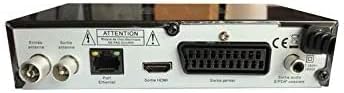
Billede 2: Bag view of the Optex ORT 8930-HD receiver, displaying various connectivity ports.
The rear panel provides the following connections:
- Antenna In/Out: IEC 9.52 mm connectors for terrestrial antenna.
- HDMI udgang: For connecting to an HD television.
- SCART Connector: For connecting to older televisions.
- S/PDIF Coaxial Audio: Digital lydudgang.
- Strømindgang: For the external power adapter.
4.3 Fjernbetjening

Billede 3: The remote control unit for the Optex ORT 8930-HD receiver.
The remote control allows full operation of the receiver, including power, channel selection, volume, menu navigation, recording functions, and multimedia playback controls.
5. Opsætning
5.1 Tilslutning af antennen
- Connect your terrestrial antenna cable to the "Antenna In" port on the rear panel of the receiver.
- If you wish to loop the antenna signal to another device, connect a coaxial cable from the "Antenna Out" port to the input of the next device.
5.2 Tilslutning til dit fjernsyn
Vælg en af følgende tilslutningsmetoder:
- HDMI (Recommended for HD): Connect an HDMI cable from the "HDMI Output" port on the receiver to an available HDMI input on your television.
- SCART: Connect a SCART cable from the "SCART Connector" on the receiver to the SCART input on your television.
5.3 Strømtilslutning
- Connect the power adapter to the power input port on the receiver.
- Sæt strømadapteren i en passende stikkontakt.
5.4 Initial Channel Scan
- Turn on your television and select the correct input source (HDMI or SCART) corresponding to your connection.
- Power on the Optex ORT 8930-HD receiver.
- The first-time setup wizard should appear. Follow the on-screen instructions to perform an automatic channel search. This will scan for all available digital terrestrial channels in your area.
- If the wizard does not appear, navigate to the "Menu" > "Installation" > "Automatic Search" using the remote control.
6. Betjeningsvejledning
6.1 Grundlæggende betjening
- Tænd/sluk: Tryk på MAGT knappen på fjernbetjeningen eller frontpanelet.
- Kanalvalg: Brug CH+ / CH- buttons or enter the channel number directly using the numeric keypad.
- Lydstyrkekontrol: Brug VOL+ / VOL- knapper.
- Stum: Tryk på STUM knappen for midlertidigt at slå lyden fra.
6.2 Kanalstyring
- Automatisk/Manuel søgning: Adgang igennem Menu > Installation to rescan for channels.
- LCN funktion: The Logical Channel Numbering (LCN) function automatically sorts channels into a logical order. This can usually be enabled/disabled in the installation menu.
- Favoritliste: Create personalized lists of your preferred channels for quick access. Refer to the on-screen menu for instructions on adding and managing favorite channels.
6.3 Optagelse og afspilning
To use recording and multimedia playback features, connect a USB storage device (e.g., USB flash drive or external hard drive) to the USB port on the front panel.
- USB-optagelse: Tryk på REC button on the remote control to start recording the current program. Press STOP for at afslutte optagelsen.
- Timeshift Function: This allows you to pause live TV and resume watching later. Activate Timeshift via the remote control (usually a dedicated button or through the menu).
- Multimedieafspilning: Access the multimedia player via the Menu. You can browse and play music, photo, and video files stored on your connected USB device.
6.4 Elektronisk programguide (EPG)
Tryk på EPG knappen på fjernbetjeningen til view the Electronic Program Guide, which displays program schedules for upcoming broadcasts.
6.5 Forældrelås
Set up a parental lock to restrict access to certain channels or programs. This feature is typically found in the Menu > Systemindstillinger > Forældrekontrol afsnit.
6.6 Timer funktion
The timer function allows you to schedule the receiver to turn on/off or record a specific program at a set time. Access this feature through the Menu.
6.7 Software Update via USB
Kontroller jævnligt producentens website for available software updates. Download the update file to a USB drive and follow the instructions in the Menu > Systemindstillinger > Softwareopdatering section to install it.
7. Vedligeholdelse
- Rensning: Use a soft, dry cloth to clean the exterior of the receiver. Do not use liquid or aerosol cleaners.
- Ventilation: Sørg for, at ventilationsåbningerne på enheden ikke er blokerede for at forhindre overophedning.
- Software: Keep the receiver's software updated to ensure optimal performance and access to the latest features.
8. Fejlfinding
| Problem | Mulig årsag | Løsning |
|---|---|---|
| Ingen strøm | Power cable disconnected; power outlet faulty. | Kontrollér strømkablets forbindelse; prøv en anden stikkontakt. |
| No signal / No channels | Antenna not connected; incorrect input source on TV; no channel scan performed. | Check antenna connection; select correct TV input; perform an automatic channel scan. |
| Fjernbetjening virker ikke | Batteries depleted; obstruction between remote and receiver. | Replace batteries; ensure clear line of sight to the receiver's IR sensor. |
| USB-optagelse virker ikke | USB device not connected or formatted incorrectly; insufficient storage space. | Ensure USB device is properly connected; format USB device (FAT32/NTFS); check available space. |
| Device freezes or becomes unresponsive | Midlertidig softwarefejl. | Disconnect power for a few seconds, then reconnect. If problem persists, check for software updates. |
9. Specifikationer
| Feature | Detalje |
|---|---|
| Model | ORT 8930-HD |
| Mærke | Optex |
| Tuner type | Terrestrisk (DVB-T2) |
| Video afkodning | HEVC/H.265, MPEG-2.5 |
| Forbindelse | 1x HDMI, 1x SCART, 1x USB 2.0, 1x S/PDIF Coaxial Audio, Antenna In/Out |
| Kanalkapacitet | Over 1000 channels |
| Indspilning | External USB media (PVR function) |
| Multimedieafspilning | Music, Photos, Videos |
| Særlige funktioner | Timeshift, EPG, Parental Lock, Favorite List, Multi-language Menu, LCN, 5V Antenna Power, Timer Function, Dolby Digital+ compatible |
| Lydudgangstilstand | [SOM] |
| Konfiguration af højttalersurroundlyd | 5.1 |
| Strømudgang | 5 watt |
| Produktets vægt | 600 g |
10. Garanti og support
Specific warranty information is not provided within this manual. Please refer to the warranty card included with your purchase, contact your retailer, or visit the official Optex webhjemmeside for detaljerede garantivilkår.
For technical support or service inquiries, please contact your local Optex distributor or the customer service department as indicated on the product packaging or manufacturer's webwebsted.


