1. Introduktion
This manual provides essential information for setting up, operating, and maintaining your Apple iPad Pro 12.9-inch (ML3T2LL/A). The iPad Pro is a versatile tablet designed for various tasks, featuring a large Retina display, a powerful A9X chip, and Wi-Fi + Cellular connectivity. Please read this guide thoroughly to ensure proper use and to maximize your device's capabilities.

Figur 1: Forside view of the Apple iPad Pro 12.9-inch, showcasing its display with standard iOS app icons.
2. Opsætning
2.1. Første opstart og opladning
- Oplad iPad'en: Before first use, connect your iPad Pro to the provided power adapter and charging cable. Allow it to charge for at least 30 minutes or until the Apple logo appears.
- Tænd: Tryk og hold tænd/sluk-knappen nede (placeret øverst til højre), indtil Apple-logoet vises.
- Følg instruktionerne på skærmen: iPad'en vil guide dig gennem den indledende opsætningsproces, herunder valg af sprog, region og tilgængelighedsindstillinger.
2.2. Wi-Fi and Cellular Setup
- Opret forbindelse til Wi-Fi: During setup, select your preferred Wi-Fi network and enter the password if required.
- Mobildata: For models with cellular capability, you may need to insert a nano-SIM card (if not pre-installed) or activate an eSIM plan with your carrier. Follow your carrier's instructions for cellular data activation.
2.3. Apple ID and Data Transfer
- Log ind med Apple-ID: Enter your existing Apple ID and password. If you do not have one, you can create a new Apple ID during this step. An Apple ID is essential for downloading apps, using iCloud, and other Apple services.
- Restore Data (Optional): If you are upgrading from another iOS device, you can restore data from an iCloud or iTunes backup during setup.
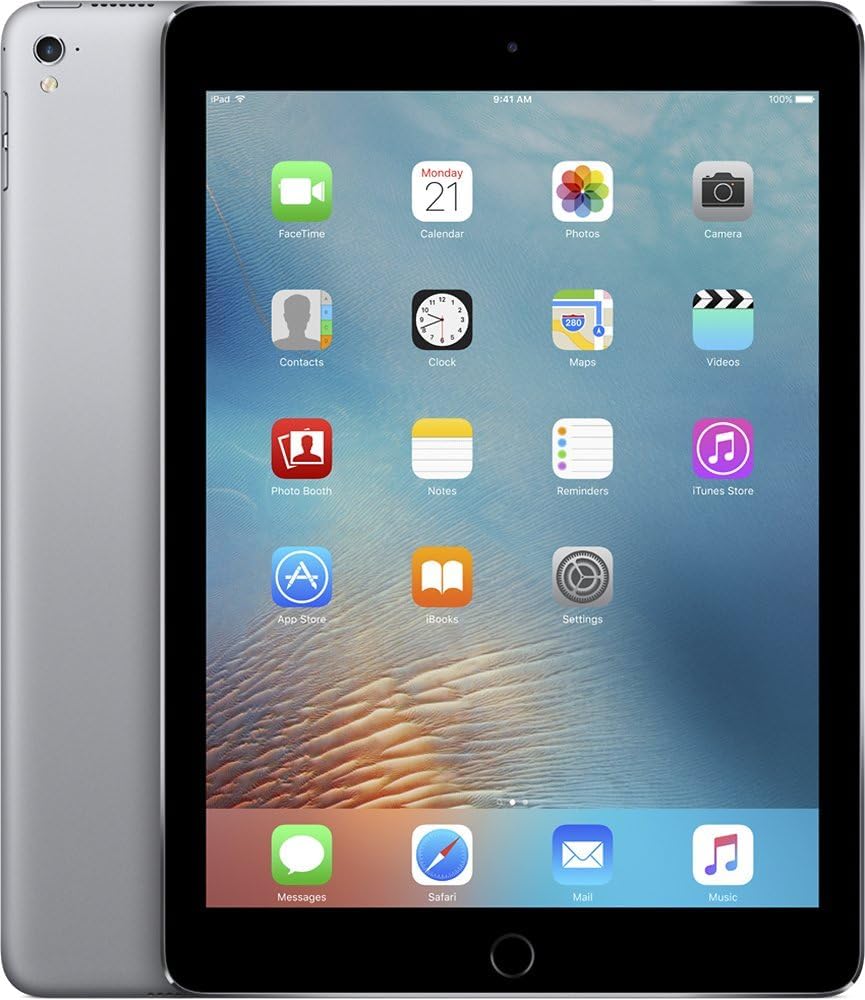
Figur 2: Forside og side view of the Apple iPad Pro, illustrating its thin profile and the rear casing.
3. Operating the iPad Pro
3.1. Grundlæggende navigation
- Hjemknappen: Press once to return to the Home screen. Double-press to open the App Switcher. Press and hold to activate Siri.
- Berøringsbevægelser: Use taps, swipes, pinches, and spreads to interact with the screen.
- Kontrolcenter: Swipe up from the bottom edge of the screen to access quick settings like Wi-Fi, Bluetooth, brightness, and volume.
- Notifikations center: Stryg nedad fra skærmens øverste kant for at view meddelelser.
3.2. Using Apps
- App Store: Tap the App Store icon to browse and download applications.
- Organisering af apps: Touch and hold an app icon until it jiggles, then drag it to rearrange or create folders.
- Multitasking: Use Split View or Slide Over to work with multiple apps simultaneously. Refer to the iPadOS user guide for detailed instructions on multitasking features.
3.3. Kamerafunktioner
- Bagkamera: The 8-megapixel rear-facing camera is suitable for capturing photos and videos.
- Forreste kamera: The 1.2-megapixel FaceTime camera is designed for video calls and selfies.
- Kamera app: Open the Camera app to switch between photo, video, panorama, and other modes.
3.4. Security with Touch ID
The Home button integrates Touch ID, allowing you to unlock your iPad and make purchases using your fingerprint. To set up Touch ID:
- Gå til Settings > Touch ID & Passcode.
- Følg instruktionerne på skærmen for at registrere dine fingeraftryk.
4. Vedligeholdelse og pleje
4.1. Rengøring af din iPad Pro
- Brug en blød, fnugfri klud til at rengøre skærmen og ydersiden.
- Avoid abrasive materials, aerosols, solvents, or ammonia-based cleaners.
- Sprøjt ikke rengøringsmidler direkte på enheden.
4.2. Batteripleje
- For optimal battery life, avoid exposing the iPad to extreme temperatures.
- Regularly update iPadOS to benefit from battery optimization features.
- If storing the device for an extended period, charge it to about 50% to prevent deep discharge.
4.3. Softwareopdateringer
Keep your iPad Pro updated to the latest version of iPadOS for security enhancements, new features, and performance improvements.
- Gå til Indstillinger > Generelt > Softwareopdatering.
- Hvis en opdatering er tilgængelig, skal du trykke på Download og installer.
5. Fejlfinding
5.1. Almindelige problemer og løsninger
- Enheden reagerer ikke: If the iPad is frozen or unresponsive, perform a force restart. Press and hold both the Home button and the Top (Sleep/Wake) button simultaneously until the Apple logo appears.
- Problemer med Wi-Fi-forbindelse:
- Ensure Wi-Fi is enabled in Control Center or Settings.
- Genstart din Wi-Fi-router.
- Gå til Indstillinger > Generelt > Nulstil > Nulstil netværksindstillinger (this will clear all Wi-Fi passwords).
- Apps der går ned:
- Close and reopen the app from the App Switcher.
- Søg efter appopdateringer i App Store.
- Slet og geninstaller appen.
5.2. Fabriksnulstilling (sidste udvej)
If persistent issues occur, you may consider a factory reset. This will erase all data and settings on your iPad. Ensure you have a backup before proceeding.
- Gå til Indstillinger > Generelt > Overfør eller nulstil iPad > Slet alt indhold og alle indstillinger.
- Følg anvisningerne på skærmen for at bekræfte nulstillingen.
6. Specifikationer

Figur 3: Multiple views of the Apple iPad Pro, detailing its physical design and components.
| Feature | Detalje |
|---|---|
| Modelnummer | ML3T2LL/A |
| Vise | 12.9-inch Retina LED, 2732x2048 resolution |
| Processor | Apple A9X (Dual-Core, 2.2GHz) |
| VÆDDER | 4GB DDR4 |
| Opbevaring | 256 GB flashhukommelse |
| Operativsystem | iPadOS |
| Bagkamera | 8 MP |
| Forreste kamera | 1.2 MP FaceTime HD |
| Trådløs forbindelse | Wi-Fi (802.11a/b/g/n/ac), Bluetooth, Cellular (Wi-Fi + Cellular model) |
| Batterilevetid | Up to 10 hours (Lithium Polymer) |
| Dimensioner (LxBxH) | 8.68 x 12 x 0.27 tommer |
| Vægt | 1.59 pund |
| Farve | Space Grey |
7. Garanti og support
This Apple iPad Pro is a renewed product. For information regarding returns, refunds, or replacements, please refer to the Amazon Renewed program's policies. Typically, Amazon Renewed products come with a 90-day refund or replacement policy.
For technical support related to iPadOS or Apple services, please visit the official Apple Support webwebsted: support.apple.com.
For issues specific to your purchase or the renewed condition, contact the seller directly through your Amazon order history.


