Indledning
This manual provides detailed instructions for the proper use and maintenance of your Casio MX-12 Desk Calculator. Please read this manual thoroughly before using the calculator to ensure optimal performance and longevity.
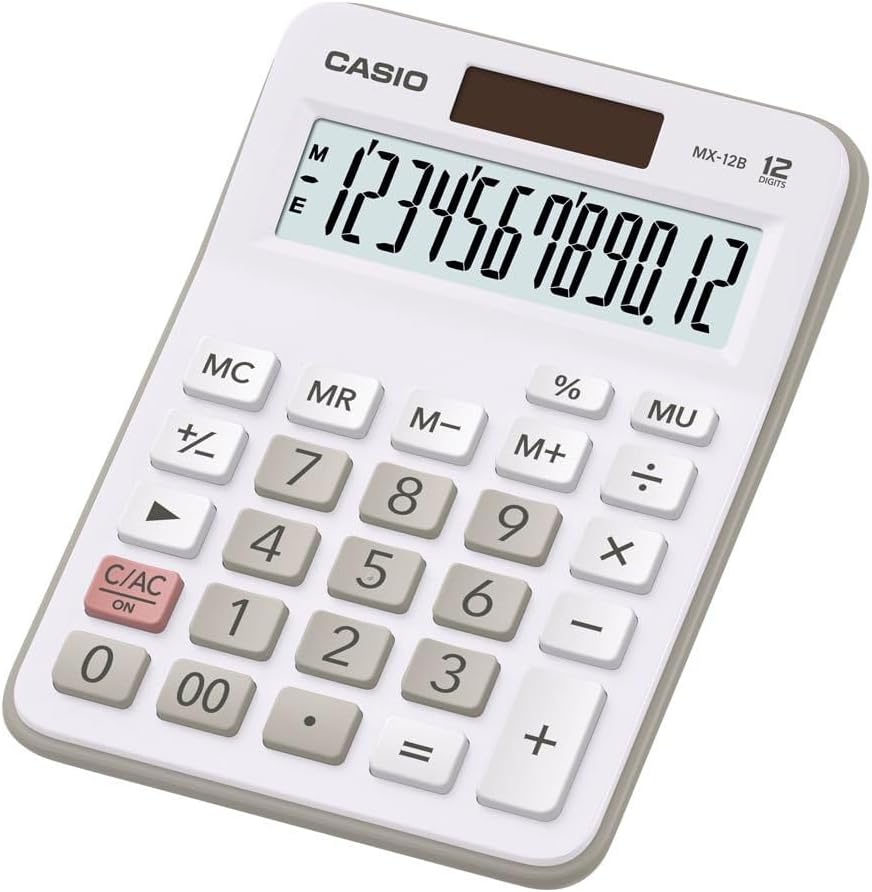
Image: The Casio MX-12 Desk Calculator, featuring a clear 12-digit display and a standard key layout for basic and advanced calculations.
Opsætning
Strømkilde
The Casio MX-12 calculator is dual-powered, operating on both solar energy and a battery backup. For optimal performance, use the calculator in a well-lit environment. The solar panel, located above the display, will power the unit and charge the internal battery.
Installation/udskiftning af batteri
The calculator requires one AAA battery (included) for backup power. If the display becomes dim or unresponsive in low light conditions, the battery may need replacement.
- Vend lommeregneren om.
- Find dækslet til batterirummet.
- Remove the screw (if present) and slide the cover off.
- Insert a new AAA battery, ensuring the correct polarity (+/-).
- Sæt batterirummets dæksel på igen og fastgør det.
Betjeningsvejledning
The Casio MX-12 features a large, clear 12-digit display and a user-friendly key layout for various calculations.
Grundlæggende aritmetiske operationer
- Tilføjelse (+): Indtast det første tal, tryk på +, indtast det andet tal, og tryk derefter på =.
- Subtraktion (-): Indtast det første tal, tryk på -, indtast det andet tal, og tryk derefter på =.
- Multiplikation (×): Indtast det første tal, tryk på ×, indtast det andet tal, og tryk derefter på =.
- Division (÷): Indtast det første tal, tryk på ÷, indtast det andet tal, og tryk derefter på =.
Særlige funktioner
- Clear/All Clear (C/AC): Trykke C/AC once to clear the last entry. Press it twice to clear all entries and reset the calculator.
- Procenttage (%): At beregne en procentdeltage, indtast nummeret, tryk på ×, indtast procententage-værdi, og tryk derefter på %. F.eksample, to find 15% of 200: 200 × 15 %.
- Change Sign (+/-): Trykke +/- to change the sign of the displayed number from positive to negative or vice versa.
- Mark-up (MU): De MU key is used for profit margin calculations. For example, to calculate the selling price with a 25% profit margin on a cost of 80: 80 ÷ 25 MU.
- Double Zero (00): Brug 00 key for quick entry of two zeros.
Hukommelsesfunktioner
The calculator includes a 4-key memory function:
- Hukommelse Plus (M+): Tilføjer den viste værdi til hukommelsen.
- Hukommelse Minus (M-): Trækker den viste værdi fra hukommelsen.
- Hukommelsesgenkaldelse (MR): Recalls the value stored in memory to the display.
- Memory Clear (MC): Sletter den værdi, der er gemt i hukommelsen.
Opretholdelse
Rensning
To clean the calculator, wipe it gently with a soft, dry cloth. Do not use abrasive cleaners, solvents, or excessive moisture, as these can damage the display or internal components.
Opbevaring
Store the calculator in a cool, dry place away from direct sunlight and extreme temperatures. Prolonged exposure to direct sunlight can affect the solar panel's efficiency and the display's longevity.
Fejlfinding
- Skærmen er tom eller svag:
- Ensure the calculator is in a well-lit area for the solar panel to function.
- Check the AAA battery. Replace it if necessary (refer to "Battery Installation/Replacement" in the Setup section).
- Forkerte beregningsresultater:
- Trykke C/AC twice to clear all previous entries and memory.
- Re-enter the calculation carefully.
- Ensure you are using the correct function keys for your desired operation.
- Tasterne reagerer ikke:
- Clean the calculator surface and keys to remove any debris.
- Ensure the calculator is adequately powered (solar or battery).
Specifikationer
| Modelnummer | MX-12B-WE-W-EC |
| Vise | 12 Digits, Large LCD |
| Strømkilde | Dual Powered (Solar with Battery Backup) |
| Batteritype | 1 x AAA (inkluderet) |
| Dimensioner (L x B x H) | 5.79 x 4.21 x 1.14 tommer (14.7 x 10.7 x 2.9 cm) |
| Vægt | 4.9 ounce (139 gram) |
| Funktioner | Basic Arithmetic, Percentage, Mark-up (MU), Change Sign, 4-Key Memory |
Garanti og support
Casio products are manufactured to high-quality standards. For information regarding warranty coverage, service, or technical support, please refer to the warranty card included with your product or visit the official Casio webwebstedet. Behold din købskvittering som købsbevis.
For yderligere hjælp kan du besøge Casio-butik på Amazon or contact Casio customer service directly.


