The MOZA Air 2 is a professional 3-axis handheld gimbal stabilizer designed for DSLRs, mirrorless cameras, and pocket cinema cameras. It offers advanced stabilization, extended battery life, and intelligent features to enhance your videography experience. This manual provides essential information for setup, operation, and maintenance of your MOZA Air 2.
Pakkens indhold
Bekræft, at alle nedenstående varer er inkluderet i din pakke:
Air2 Gimbal x 1
Lens support x 1
Lens support screw x 1
Follow focus install pipe x 2
Riser Plate x 2
Stativ x 1
18650 battery x 4
Intelligent charger x 1
MOZA control cable - Micro USB x 1
MOZA control cable - Mini USB x 1
MOZA control cable - Panasonic x 1
MOZA control cable - Sony x 1
USB Type-C kabel x 1
Brugervejledning x 1
Warning card x 1
Tool bag x 1
H2 Hexagon wrench x 1
3/8 turn 1/4 nut x 1
M3 x 10 hexagon socket countersunk flat cap head screw x 10
Follow focus support x 1
Produkt overview
The MOZA Air 2 gimbal stabilizer is designed for professional filmmaking, offering robust support and precise control for various camera setups.
Figure 1: MOZA Air 2 Gimbal with a camera mounted, showcasing dens kompakte og ergonomiske design.
Key features include a maximum payload capacity of 9 lbs (4.2 kg), supporting a wide range of cameras. It features an OLED display for easy parameter customization and offers 4-axis control with 8 follow modes for versatile shooting scenarios.
Figur 2: Detaljeret view of the MOZA Air 2's control panel, including the OLED display, multi-function dial, and various control buttons.
The gimbal also integrates with a newly developed ecosystem of accessories, such as the MOZA thumb controller, iFocus, camera cage, and camera backpack (sold separately), to provide comprehensive control over gimbal movement and camera functions.
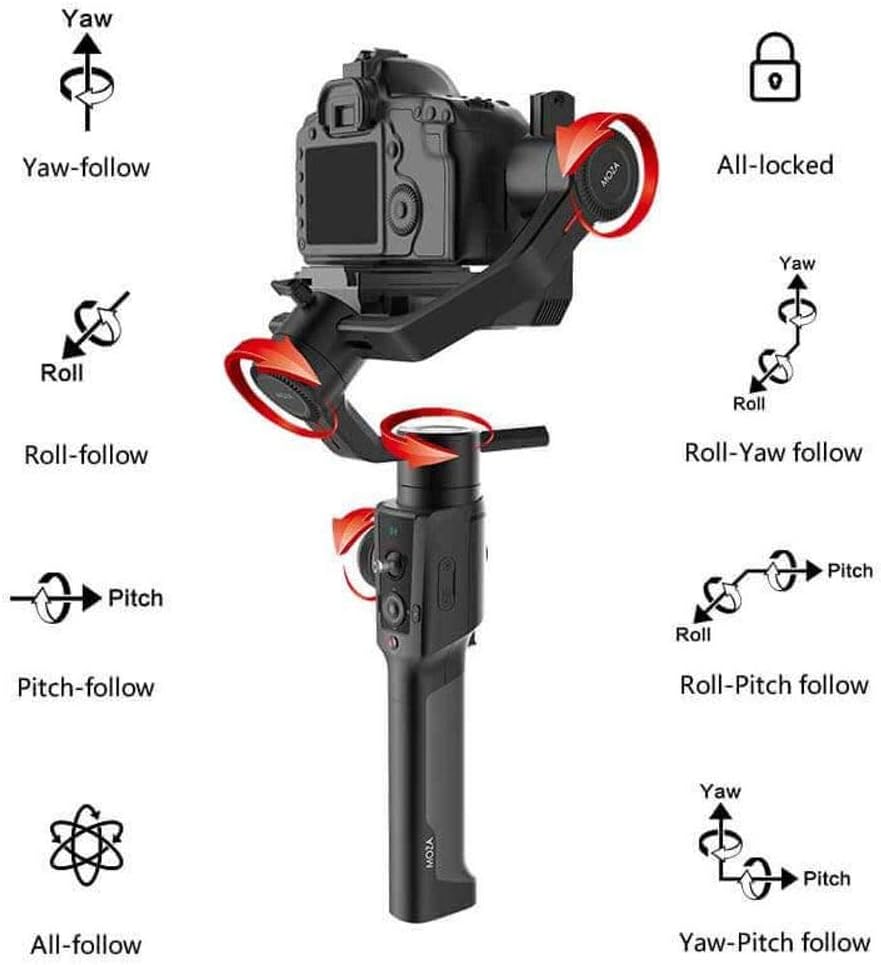
Figure 3: Visual representation of the MOZA Air 2's various operational modes, including Yaw, Roll, Pitch, and their respective follow modes, as well as All-locked and All-follow modes.
Opsætning
1. Batteriinstallation og opladning
The MOZA Air 2 is powered by four 18650 Li-on batteries. Ensure batteries are fully charged before first use.
Insert the four 18650 batteries into the battery compartment located in the handle. Ensure correct polarity.
Connect the intelligent charger to a power source and insert the batteries for charging. The charger's indicator lights will show charging status.
The MOZA Spark power supply system includes input and output ports for versatile power management. The input port allows for alternative power sources, while output ports can power the camera and other accessories.
2. Camera Mounting and Balancing
Proper balancing is crucial for optimal gimbal performance and battery efficiency. The MOZA Air 2 features quick-release plates and mechanical locks for easy setup.
Figure 4: The MOZA Air 2 gimbal highlighting the adjustable axes (tilt, roll, pan) for precise camera balancing.
Attach your camera to the MOZA quick release plate.
Mount the quick release plate with the camera onto the gimbal. Ensure it is securely locked.
Unlock each axis (tilt, roll, pan) one by one and adjust the camera position until it remains stable in any orientation without motor power. Use the lens support and screw if necessary for heavier lenses.
Once balanced, lock all axes.
Figure 5: MOZA Air 2 Gimbal with a camera connected, demonstrating the cable connection for camera control and power.
3. Kameratilslutning
Connect your camera to the gimbal using the appropriate camera control cable (Micro USB, Mini USB, Panasonic, or Sony) to enable camera control features via the gimbal.
Video 1: An official MOZA video demonstrating the features and capabilities of the MOZA Air 2 gimbal stabilizer, including its design and operational aspects.
Driftstilstande
The MOZA Air 2 offers various operating modes to suit different shooting requirements:
Yaw-follow: The camera follows the pan movement of the gimbal while tilt and roll axes are locked.
Roll-follow: The camera follows the roll movement of the gimbal while pan and tilt axes are locked.
Pitch-follow: The camera follows the pitch movement of the gimbal while pan and roll axes are locked.
All-follow: The camera follows all pan, tilt, and roll movements of the gimbal.
All-locked: All three axes (pan, tilt, roll) are locked, keeping the camera pointed in a fixed direction.
Roll-Yaw follow: The camera follows roll and yaw movements.
Yaw-Pitch follow: The camera follows yaw and pitch movements.
Sport Gear Mode: Provides rapid response for fast-moving scenes.
Switch between modes using the gimbal's control buttons or the MOZA Assistant App.
Avancerede funktioner
Smart Time-Lapse
The MOZA Air 2 features comprehensively upgraded time-lapse functions, offering up to 20 optimizations. This allows users to easily create various personalized and professional time-lapse videos, including motion-lapse, tracking time-lapse, and zoom time-lapse.
MOZA Spark Power Supply System
Equipped with four power ports, the MOZA Spark power supply system ensures extended working time. One input port allows for alternative power sources, while three output ports provide power to the camera and other accessories like follow focus systems, LED lights, and monitors. The integrated Battery Management System (BMS) enhances the gimbal's operational duration.
Understøttede kameraer
The MOZA Air 2 is compatible with a wide range of cameras, including but not limited to:
Canon: 1D, 1DX, 1DX2, 5D Mark IV, 5D Mark III, 5D Mark II, 6D, 60D, 7D, 70D, 750D
For specific compatibility questions, please contact MOZA support.
Specifikationer
Feature
Detalje
Produktdimensioner
13.39 x 5.51 x 18.11 tommer
Varens vægt
3.64 pund (1650 gram)
Modelnummer
MCG01
Batterier
4 A-batterier påkrævet (medfølger)
Maksimal vægtanbefaling
9 pund (4.2 kg)
Farve
Sort
Kompatible enheder
Monitor, Camera
Fabrikant
Gudsen
Dato først tilgængelig
19. september 2018
UPC
712424355122
Opretholdelse
To ensure the longevity and optimal performance of your MOZA Air 2 gimbal, follow these maintenance guidelines:
Hold gimbalen ren og fri for støv og snavs. Brug en blød, tør klud til rengøring.
Avoid exposing the gimbal to extreme temperatures or moisture.
Store the gimbal in its carrying case when not in use to protect it from impacts.
Kontrollér regelmæssigt alle skruer og forbindelser for at sikre, at de er fastgjort.
Ensure batteries are charged periodically even when not in use to maintain battery health.
Fejlfinding
This section addresses common issues you might encounter with your MOZA Air 2 gimbal.
Gimbal Not Powering On or Malfunctioning
Tjek batterier: Ensure all four 18650 batteries are fully charged and correctly inserted with proper polarity.
Batteriets sundhed: If batteries are old or frequently used, their capacity might degrade. Consider replacing them with new MOZA-approved 18650 batteries.
Firmwareopdatering: Ensure the gimbal's firmware is up to date. Outdated firmware can sometimes cause operational issues.
Genkalibrering: If the gimbal behaves erratically or drifts, perform a re-calibration through the MOZA Assistant App.
Difficulty Balancing Camera
Payload Limit: Verify that your camera and lens setup does not exceed the 9 lbs (4.2 kg) payload capacity.
Axis Locks: Ensure all axis locks are disengaged when attempting to balance.
Finjusteringer: Use the fine-tuning knobs and sliding plates for precise balance adjustments on each axis.
Lens Support: For longer or heavier lenses, utilize the included lens support to prevent front-heavy imbalance.
Camera Control Issues
Korrekt kabel: Ensure you are using the correct camera control cable for your specific camera model.
Sikker forbindelse: Check that the control cable is securely connected to both the gimbal and the camera.
Kameraindstillinger: Some cameras require specific settings (e.g., USB mode) to enable external control. Refer to your camera's manual.
For persistent issues not covered here, please refer to the official MOZA support resources or contact customer service.
Garanti og support
MOZA products are covered by a limited warranty. For detailed warranty information, product registration, and technical support, please visit the official MOZA webwebstedet eller kontakt deres kundeserviceafdeling. Gem din købskvittering som købsbevis i tilfælde af garantikrav.
For any questions regarding the use of your MOZA Air 2 Gimbal with your camera, please contact MOZA directly.
Relaterede dokumenter - MCG01
MOZA Air Professional håndholdt gimbal brugermanual | Gudsen Technology Udforsk MOZA Air brugermanualen til den professionelle håndholdte gimbal fra Gudsen Technology. Lær om dens avancerede funktioner, opsætning, kontroller og vedligeholdelse til filmisk kamerabevægelse med spejlløse kameraer og DSLR'er op til 5.5 kg.
MOZA AirCross Gimbal brugermanual og betjeningsvejledning Omfattende guide til MOZA AirCross kamerastabilisatoren, der dækker opsætning, betjening, app-kontrol, fejlfinding og specifikationer til professionel videografi og fotografering.
MOZA Mini-P Brugermanual: Bærbar 3-akset gimbalstabilisator Omfattende brugermanual til MOZA Mini-P, en bærbar 3-akset gimbal-stabilisator til spejlløse kameraer og smartphones, der dækker opsætning, betjening og avancerede funktioner som Inception Mode og Object Tracking.
MOZA NANO SE Smartphone Gimbal Stabilisator Brugermanual Denne brugermanual indeholder omfattende instruktioner til betjening af MOZA NANO SE smartphone gimbal-stabilisatoren. Den dækker opsætning, knapfunktioner, app-integration med MOZA Genie, firmwareopdateringer, fejlfinding og tekniske specifikationer for optimal mobil videografi.
MOZA Mini-MI Lynstartguide - Smartphone Gimbal Stabilisator Lær, hvordan du opsætter, betjener og fejlfinder din MOZA Mini-MI smartphone-gimbal med denne hurtigstartguide. Inkluderer batteriopladning, telefonmontering, kontrolfunktioner, app-brug og specifikationer.
MOZA AirCross 3 & AirCross 3 Pro brugervejledning Brugermanual til MOZA AirCross 3 og AirCross 3 Pro kameragimbal, der dækker forberedelse, opsætning, betjening, specifikationer og sikkerhedsretningslinjer.