Indledning
The Ottlite Executive Desk Lamp is designed to enhance your workspace with versatile lighting and convenient features. With an adjustable arm, 3 color temperatures, and 5 brightness settings, this lamp provides optimal illumination for any task. OttLite technology helps reduce glare and eyestrain, allowing for extended comfortable use. Additionally, a built-in 2.1A USB port offers a convenient charging solution for your devices, keeping them within easy reach.
Vigtige sikkerhedsoplysninger
- Read all instructions before operating the lamp.
- Betjen ikke lamp med en beskadiget ledning eller stik.
- Behold lamp væk fra vand eller andre væsker.
- Forsøg ikke at adskille eller reparere lamp yourself. Refer all servicing to qualified service personnel.
- Use only the power adapter supplied with the lamp.
- Tag stikket ud af lamp fra stikkontakten før rengøring.
Pakkens indhold
Markér venligst feltet for følgende elementer:
- Ottlite Executive Desk Lamp Enhed
- Strømadapter
- Brugervejledning (dette dokument)
Produkt overview
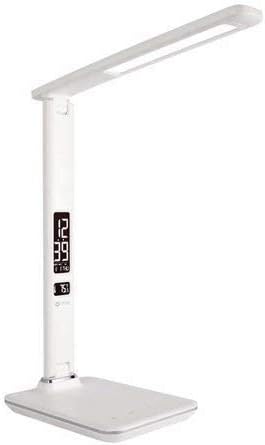
This image shows the Ottlite Executive Desk Lamp in white, featuring a sleek design with an adjustable arm and a rectangular LED light panel. The base includes a digital display showing time and temperature, along with touch controls.
The Ottlite Executive Desk Lamp features a sturdy base, an adjustable arm, and a rotatable lamp head. The base integrates a digital display for time, date, and temperature, along with touch-sensitive controls for light adjustments and other functions. A USB charging port is located on the side or back of the base.
Opsætning
- Fjern forsigtigt lamp og alle komponenter fra emballagen.
- Placer lamp på en stabil, flad overflade.
- Connect the power adapter cable to the power input port on the back of the lamp grundlag.
- Sæt strømadapteren i en almindelig stikkontakt.
- The digital display should illuminate, and the lamp er nu klar til brug.
Betjeningsvejledning
Tænd/sluk
- For at dreje lamp on or off, gently touch the Magt icon on the touch control panel located on the base.
Justering af lysstyrke
- Med lamp on, repeatedly touch the Lysstyrke icon (often represented by a sun or light bulb symbol) to cycle through the 5 available brightness levels.
Ændring af farvetemperatur
- To change the light's color temperature (e.g., warm white, natural daylight, cool white), touch the Mode or Farvetemperatur icon. The lamp offers 3 distinct color temperature settings.
Using the 2.1A USB Charging Port
- Locate the USB charging port on the side or back of the lamp grundlag.
- Plug your device's USB charging cable into this port.
- The 2.1A output provides fast charging for compatible smartphones, tablets, and other USB-powered devices.
Setting Time, Date, and Temperature Display
The digital display on the lamp base shows time, date, and ambient temperature. To set these:
- Tryk og hold på MODE button (often labeled 'M') on the control panel until the time display starts flashing.
- Brug UP og NED buttons (often labeled '+' and '-') to adjust the hour.
- Trykke MODE again to move to minutes, then adjust with OP/NED.
- Fortsæt med at trykke MODE for at gennemgå indstillingerne for år, måned og dag, og justere hver med OP/NED.
- After setting the date, you may be able to switch between 12-hour and 24-hour format, and Celsius/Fahrenheit for temperature, using the OP/NED buttons when the respective setting is flashing.
- Trykke MODE one last time or wait a few seconds for the settings to save.
Indstilling af alarm
Hvis din lamp model includes an alarm function:
- Tryk på MODE button repeatedly until the alarm icon (often a bell) appears on the display.
- Tryk og hold MODE indtil alarmtidspunktet begynder at blinke.
- Bruge OP/NED to set the desired alarm hour and then minutes.
- Trykke MODE for at bekræfte.
- To activate or deactivate the alarm, press the UP button when the alarm time is displayed (not flashing). An alarm icon will appear/disappear to indicate status.
Opretholdelse
- Sørg for at lamp er trukket ud før rengøring.
- Tør lamp surfaces with a soft, dry cloth.
- Brug ikke slibende rengøringsmidler, voks eller opløsningsmidler, da de kan beskadige finishen.
- LED-lyskilden er integreret og kan ikke udskiftes af brugeren.
Fejlfinding
| Problem | Mulig årsag | Løsning |
|---|---|---|
| Lamp tændes ikke. | Strømadapteren er ikke tilsluttet korrekt, eller der er ingen strøm fra stikkontakten. | Ensure power adapter is securely plugged into the lamp og en fungerende stikkontakt. Test stikkontakten med en anden enhed. |
| Digital display is blank or flickering. | Power issue or internal malfunction. | Check power connection. Unplug and re-plug the lamp. If issue persists, contact customer support. |
| USB-opladeporten virker ikke. | Device not compatible, cable faulty, or lamp ikke drevet. | Sørg for at lamp is powered on. Try a different USB cable and another device. Verify device requires 2.1A charging. |
| Kan ikke indstille tid/dato. | Forkert knapsekvens. | Refer to the 'Setting Time, Date, and Temperature Display' section and follow the steps carefully. Ensure you are pressing and holding the MODE button correctly. |
Specifikationer
| Feature | Detalje |
|---|---|
| Mærke | OttLite |
| Modelnummer | 799366629696 |
| Lamp Type | Skrivebord L.amp |
| Lyskildetype | LED |
| Indstillinger for lysstyrke | 5 niveauer |
| Indstillinger for farvetemperatur | 3 Tilstande |
| USB-opladningsport | 2.1A udgang |
| Kontrolmetode | Røre |
| Strømkilde | Elektrisk med ledning |
| Materiale | Plast, Metal |
| Varens vægt | 3.04 pund |
| Pakkedimensioner | 17.6 x 8.3 x 6.8 tommer |
Garanti og support
For warranty information and customer support, please refer to the warranty card included with your product or visit the official OttLite webwebsted. Gem din købskvittering som købsbevis i tilfælde af garantikrav.


