1. Introduktion
The Denver MRD-51 is a versatile multi-function music system designed to play various audio formats. It integrates a record player, DAB+ and FM/AM radio tuner, CD player, and cassette deck into a single unit. Additionally, it features a USB port for digitizing audio from CDs, records, or cassettes, and an AUX input for connecting external devices. The system includes two integrated stereo speakers for a complete audio experience.
2. Sikkerhedsinstruktioner
- Læs alle instruktioner omhyggeligt, før du betjener enheden.
- Gem denne vejledning til fremtidig reference.
- Udsæt ikke enheden for regn eller fugt for at forhindre brand eller elektrisk stød.
- Sørg for ordentlig ventilation; bloker ikke ventilationsåbninger.
- Placer enheden på en stabil, flad overflade.
- Disconnect the power plug from the wall outlet if the unit is not in use for a long period.
- Forsøg ikke selv at udføre service på enheden. Overlad al service til kvalificeret servicepersonale.
3. Pakkens indhold
Kontroller, at alle genstande er til stede ved udpakning:
- Denver MRD-51 Multi-Function Music System
- Strømkabel
- Fjernbetjening
- Brugermanual
4. Produktet er slutview

Figur 4.1: Denver MRD-51 Multi-Function Music System with turntable open. This image displays the Denver MRD-51 music system from a front-top perspective, with the turntable lid open and a vinyl record placed on the platter. The control panel, including the LCD display, knobs, and buttons, is visible below the turntable.

Figur 4.2: Denver MRD-51 Multi-Function Music System, front view. A front view of the Denver MRD-51 music system with the turntable lid closed. This image highlights the integrated stereo speakers on the sides and the central control panel, emphasizing its classic design.
4.1 Betjeningselementer på frontpanelet
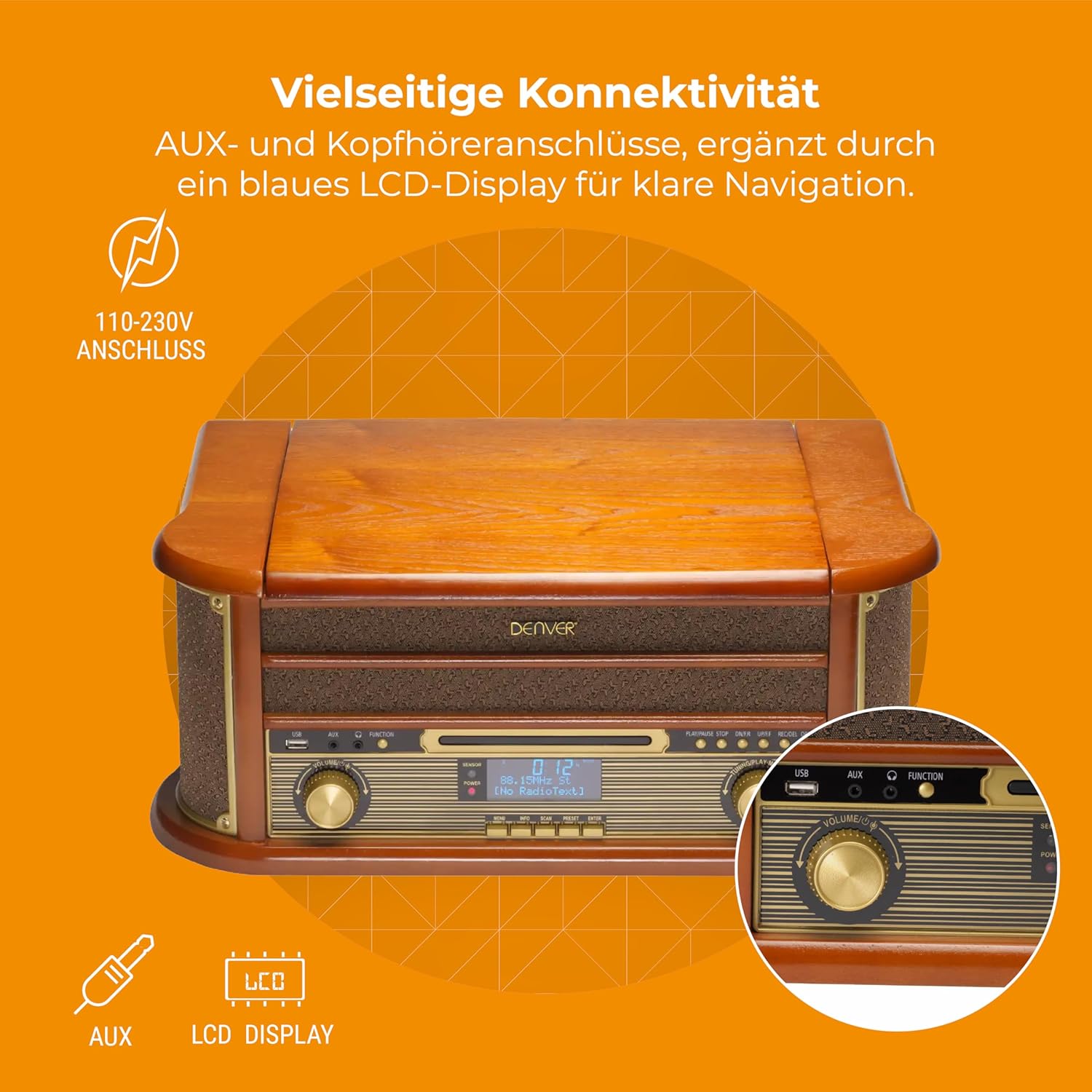
Figur 4.3: Denver MRD-51 front panel with USB, AUX, and LCD display. A close-up of the Denver MRD-51's front control panel, showcasing the USB port, AUX input, and the blue LCD display for clear navigation. This view details the various connectivity options available.
- POWER -knap: Tænder eller slukker for enheden.
- FUNKTIONSknap: Selects between Turntable, CD, Cassette, DAB+, FM, AM, AUX, and USB modes.
- USB-port: Til tilslutning af USB-lagerenheder til afspilning eller optagelse.
- AUX-indgang: 3.5 mm jackstik til tilslutning af eksterne lydkilder.
- LCD-skærm: Shows current mode, track information, radio frequency, and other system status.
- PLAY/PAUSE knap: Starts or pauses playback for CD, Cassette, or USB.
- STOP knap: Stopper afspilning.
- SKIP Buttons (◀◀ / ▶▶): Springer numre over eller spoler hurtigt frem/tilbage.
- RECORD knap: Initiates recording to USB.
- VOLUME knap: Justerer den samlede udgangslydstyrke.
- TUNING-knap: Adjusts radio frequency in FM/AM mode or navigates menus in DAB+ mode.
4.2 Turntable and Cassette Deck

Figur 4.4: Denver MRD-51 showing open turntable and cassette deck. This image illustrates the versatility of the Denver MRD-51, featuring the open turntable with a record and an arrow pointing to the cassette deck slot on the side, indicating its multi-format playback capabilities.
- Pladespillerfad: For playing vinyl records.
- Tone Arm with Stylus: Reads the grooves of vinyl records.
- Hastighedsvælger: Tillader valg af 33, 45 eller 78 omdr./min.
- Cassette Deck Slot: Til isætning af lydkassettebånd.
4.3 CD-afspiller

Figur 4.5: Denver MRD-51 with CD tray open and remote control. This image shows the Denver MRD-51 with its CD tray open, ready for disc insertion. A remote control is also pictured, indicating convenient operation of the system's functions.
- CD-bakke: Til isætning af cd'er.
- ÅBN/LUK-knap: Åbner og lukker cd-skuffen.
5. Opsætning
5.1 Udpakning og placering
- Tag forsigtigt enheden ud af emballagen.
- Placer enheden på en flad, stabil overflade væk fra direkte sollys, varmekilder og for meget støv eller fugt.
- Sørg for, at der er tilstrækkelig plads omkring enheden til ventilation.
5.2 Strømtilslutning
- Tilslut strømkablet til AC IN-stikket på bagsiden af enheden.
- Plug the other end of the power cable into a standard wall outlet (110-230V).
5.3 Antenneforbindelse
For optimal radio reception, extend the telescopic antenna fully for FM/DAB+ or adjust its position for AM.
6. Betjeningsvejledning
6.1 Generel drift
- Tryk på MAGT knappen for at tænde enheden.
- Tryk på FUNGERE button repeatedly to cycle through available modes: Turntable, CD, Cassette, DAB+, FM, AM, AUX, USB.
- Juster BIND dreje til det ønskede lytteniveau.
6.2 Betjening af pladespiller
- Select the 'Turntable' function.
- Åbn låget på drejeskiven.
- Placer en vinylplade på fadet.
- Set the speed selector to match the record's speed (33, 45, or 78 RPM). For 45 RPM records, use the included adapter if necessary.
- Løft forsigtigt tonearmen, og placer pennen over det ønskede spor på pladen.
- Sænk langsomt tonearmen ned på pladen. Afspilningen vil begynde.
- At the end of the record, the tone arm may automatically return to its rest, or you may need to manually lift and return it.
6.3 Betjening af cd-afspilleren
- Vælg funktionen 'CD'.
- Tryk på ÅBN/LUK knappen for at åbne CD-skuffen.
- Place a CD (CD/CD-R/CD-RW compatible) with the label side facing up into the tray.
- Tryk på ÅBN/LUK Tryk på knappen igen for at lukke skuffen. Enheden vil læse disken.
- Trykke AFSPIL/PAUSE for at starte afspilningen.
- Brug SPRINGE knapperne (◀◀ / ▶▶) til at navigere mellem numre.
- Trykke STOP for at afslutte afspilningen.
6.4 Betjening af kassettebåndoptageren
- Select the 'Cassette' function.
- Insert an audio cassette into the cassette deck slot until it clicks into place.
- Tryk på SPIL button (often integrated with the cassette mechanism) to start playback.
- Brug STOP button to end playback. Fast forward and rewind functions are typically available via dedicated buttons on the cassette deck.
6.5 Radiobetjening (DAB+/FM/AM)
- Select the desired radio function (DAB+, FM, or AM).
- For DAB+ Radio: The unit will typically perform an automatic scan for available stations upon first use. Use the TUNING drejeknap eller SPRINGE buttons to navigate through the list of stations.
- For FM/AM Radio: Brug TUNING knob to manually tune to a station. The frequency will be displayed on the LCD.
6.6 USB-optagelse
The MRD-51 allows you to digitize audio from your records, CDs, or cassettes directly to a USB storage device.
- Indsæt et USB-flashdrev i USB-port.
- Select the source function you wish to record from (Turntable, CD, or Cassette).
- Start playback of the audio source (e.g., play a record, CD, or cassette).
- Tryk på OPTAGE button. The recording indicator on the display will illuminate, and recording will begin.
- Tryk på OPTAGE knappen igen eller STOP knappen for at afslutte optagelsen. Den optagede file gemmes på USB-drevet.
6.7 AUX-indgang
- Tilslut en ekstern lydenhed (f.eks. smartphone, MP3-afspiller) til AUX-indgang ved hjælp af et 3.5 mm lydkabel.
- Select the 'AUX' function.
- Start playback on your external device. The audio will be played through the MRD-51's speakers.
7. Vedligeholdelse
7.1 Rengøring af enheden
- Tag altid stikket ud af stikkontakten før rengøring.
- Brug en blød, tør klud til at tørre de udvendige overflader af.
- Brug ikke slibende rengøringsmidler, voks eller opløsningsmidler.
7.2 Pleje af pladespillerpen
- Gently clean the stylus regularly with a soft brush, brushing from back to front.
- Undgå at berøre pennen med fingrene.
- Replace the stylus when sound quality deteriorates or if it is visibly damaged.
7.3 CD/Cassette Player Care
- Handle CDs and cassettes by their edges to avoid fingerprints and scratches.
- Keep the CD tray and cassette deck free of dust and debris.
8. Fejlfinding
| Problem | Mulig årsag | Løsning |
|---|---|---|
| Ingen strøm | Strømkabel ikke tilsluttet; stikkontakt ikke aktiv | Sørg for, at strømkablet er korrekt tilsluttet; prøv en anden stikkontakt |
| Ingen lyd | Volume too low; Incorrect function selected; External device not playing | Increase volume; Select correct function; Ensure external device is playing and connected properly |
| Turntable not spinning or poor sound | Speed setting incorrect; Stylus dirty or damaged; Record dirty | Adjust speed selector; Clean or replace stylus; Clean record |
| CD'en afspiller ikke | CD inserted incorrectly; CD scratched or dirty; CD format not supported | Reinsert CD correctly; Clean or replace CD; Ensure CD is CD/CD-R/CD-RW format |
| Dårlig radiomodtagelse | Antennen er ikke trukket ud/placeret korrekt; Svagt signal | Extend and adjust antenna; Try repositioning the unit |
| USB-optagelse virker ikke | USB drive full or incompatible; Source not playing | Use a different USB drive or clear space; Ensure audio source is playing during recording |
9. Specifikationer
| Feature | Specifikation |
|---|---|
| Produktdimensioner | 20.08 x 13.39 x 8.46 tommer |
| Varens vægt | 15.18 pund (6.9 kilo) |
| Modelnummer | MRD-51 (Internal: 111201210000) |
| Mærke | Denver |
| Maksimal rotationshastighed | 78 o/min (understøtter 33, 45, 78 o/min) |
| Inkluderede komponenter | MRD-51 unit |
| Særlige funktioner | Adjustable Speed, Digital Recorder, Integrated Speakers |
| Materiale | Aluminum (internal components), Wood (housing) |
| Farve | Træ |
| Kompatible enheder | Personal Computer (for USB transfer) |
| Radio Tuner | DAB+, FM, AM |
| CD-afspiller | Supports CD/CD-R/CD-RW |
| Lydudgang | 2 x 2.5W stereohøjttalere |
10. Garanti og support
For warranty information and technical support, please refer to the documentation provided with your purchase or contact Denver customer service through their official webwebsted. Gem din købsbevis i tilfælde af garantikrav.


